Отзывы о Комплект Thrustmaster T.Flight Hotas X
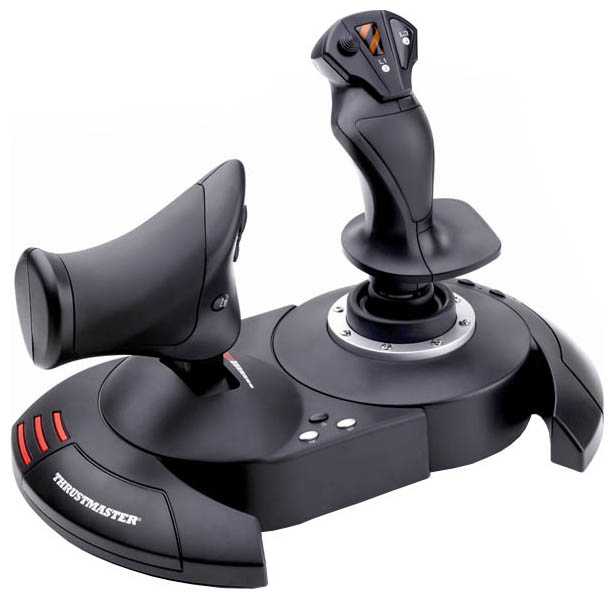
314 отзывов пользователей o Thrustmaster T.Flight Hotas X

Пользовались Thrustmaster T.Flight Hotas X?
Поделитесь своим опытом и помогите другим сделать правильный выбор

Profile no image

Интеллектор-7RNMN

31.07.2011

10/10

Оценка пользователя

Великолепно

отличная модель
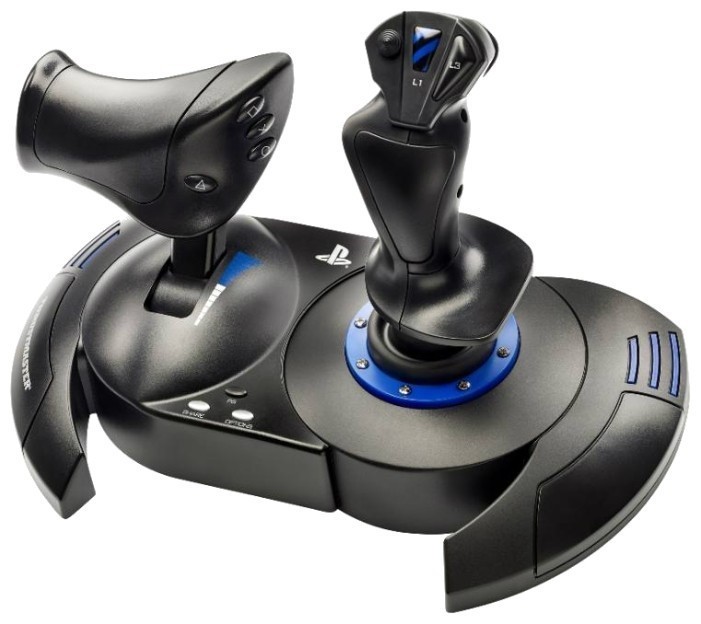
  • + Отличное управление самолетом.Играю в Ил-2 и не могу нарадоваться.Брал у товарища икс 45 и разницы в управлении не почувствовал.Регулировка жесткости порадовала,не ожидал такого эффекта.На *газульке* приятная середина выделена явным усилием,как и конец хода.На *палке* концы ходов тоже с усилием-как бы предостерегая от сваливания.Рысканьем можно управлять как на *палке* так и на тяге с помощью качалки,или можно управлять только на палке а на тяге использовать как еще одну ось.Джойстик очень массивный,на ощупь приятный и удобный.Рука лежит как надо,что на тяге,что на *палке*.Лично я соединил его в одно целое и летаю так-мне так удобно.Но можно использовать раздельно.Очень адекватная цена,что радует.Гарантия производителя-два года
  • - На данный момент не обнаружил
Со временем заменил резюки на датчики Холла.Ощущения не передать словами!!Кому интересно тот найдет в сети информацию.Советую как джой на котором можно определиться летать или не летать.Так же отличный аппарат для тюнинга ) Покупкой доволен
источник
Profile no image

Вояджер-8PXTC

15.08.2012

6/10

Оценка пользователя

Плохо

  • + Джойстик более-менее
  • - Нет нормального программного обеспечения, как было для Топ Ган Афтербуннер 2 (Thruastmapper)...
источник
Profile no image

Зета-Орион-7XAYG

15.08.2012

6/10

Оценка пользователя

Плохо

обычная модель
  • + Джойстик более-менее
  • - Нет нормального программного обеспечения, как было для Топ Ган Афтербуннер 2 (Thruastmapper). Запрограммировать кнопки и функции для конкретной игры невозможно. Это огромный минус!!!
источник
Profile no image

Сириус-3XIHL

25.04.2012

10/10

Оценка пользователя

Великолепно

  • + Полноценный HOTAS за 2000 руб!
    Очень удобное расположение и количество кнопок
    Есть твист.
  • - Недостатки мизерные:
    Всего...
источник
Profile no image

Аэронавт-0BJOT

25.04.2012

10/10

Оценка пользователя

Великолепно

отличная модель
  • + Полноценный HOTAS за 2000 руб!
    Очень удобное расположение и количество кнопок
    Есть твист.
  • - Недостатки мизерные:
    Всего одна хатка.
    Живет всего год.
    РУД с фиксацией в центре
Лучшее что можно взять для первого джойстика или среди недорогих.
источник
Profile no image

Астрон-1PZIZ

31.07.2011

10/10

Оценка пользователя

Великолепно

  • + Отличное управление самолетом.Играю в Ил-2 и не могу нарадоваться.Брал у товарища икс 45 и разницы в управлении не почувствовал.Регулировка жесткости порадовала,не ожидал такого эффекта.На *газульке* приятная середина выделена явным усилием,как и конец хода.На *палке* концы ходов тоже с усилием-как бы предостерегая от сваливания.Рысканьем можно управлять как на *палке* так и на тяге с помощью качалки,или можно управлять только на палке а на тяге использовать как еще одну ось.Джойстик очень массивный,на...
источник
Profile no image

Астрономад-9AKYR

02.04.2011

8/10

Оценка пользователя

Хорошо

хорошая модель
  • + отличное соотношение цены и качества
    для новичка самый оптимальный вариант
    в штурмовике ил-2 я настроил все кнопки за 10 мин. очень удобно играть
    в lock on я разобратся не сумел
    но видимо это камень в огород игре а не джойстику
  • - пока не обнаружил
рекомендую всем новичкам начать именно с него!!!
источник
Profile no image

Плазмонавт-6HIGU

02.04.2011

8/10

Оценка пользователя

Хорошо

  • + отличное соотношение цены и качества
    для новичка самый оптимальный вариант
    в штурмовике ил-2 я настроил все кнопки за 10 мин. очень удобно играть...
источник
Profile no image

Фотон-9DKVW

10.10.2009

10/10

Оценка пользователя

Великолепно

отличная модель
  • + Для меня очень удобный ( играл на Top Gun AfterBurner II ), падходит как к ПК так и для ПС3, легко программировать кнопки и сбрасывать по умолчанию, не требует дров, 12 кнопок.
  • - Нет дополнительной накладки при раздельном использования как у Top Gun AfterBurner II, но это просто не очень красиво смотрится.
Если кто ищет джой для IL-2 Sturmovik: Birds of Prey, то он падходит, и даже кнопки менять не надо.
источник
Profile no image

Нейрон-2JVYL

10.10.2009

10/10

Оценка пользователя

Великолепно

  • + Для меня очень удобный ( играл на Top Gun AfterBurner II ), падходит как к ПК так и для ПС3, легко программировать кнопки и сбрасывать по умолчанию, не требует дров, 12 кнопок.
  • - Нет дополнительной накладки...
источник
Profile no image

МехаРейнджер-0HDFF

09.12.2023

10/10

Оценка пользователя

Великолепно

Отличная модель
  • + Оперативно, спокойно, без головной боли
источник
Profile no image

Спектроник-5YIJK

09.12.2023

10/10

Оценка пользователя

Великолепно

Отличная модель
  • + Отличный джойстик для игр про самолеты. Все оси плавные и с обратной связью
источник
Profile no image

Спектроник-1OYFJ

08.03.2024

6/10

Оценка пользователя

Плохо

Посредсвенная модель
  • + Функционал, много кнопок
  • - Сломался джойстик для полета. Ищу где сделать ремонт.
источник
Profile no image

Фотон-5XQWC

28.01.2025

10/10

Оценка пользователя

Великолепно

Отличная модель
  • + Удобно пользоваться. В авиасимуляторах он сразу опознаётся. Ручка органомична и можно регулировать твёрдость джойстика
  • - не найдено
источник
Profile no image

Кронос-4YHTI

19.07.2025

10/10

Оценка пользователя

Великолепно

Отличная модель
  • + отличное качество
источник
Profile no image

ИнфраГость-7QDRX

27.04.2011

10/10

Оценка пользователя

Великолепно

WARNING: I stand by the previously entered review below, but having used the T-Flight for a week now I discovered a small problem. I lost my throttle control when using the Abacus Flight Deck 6 add-on to FSX, then found myself without throttle control on jets in FSX, and some problems with the hat switch. Two evenings of fussing around for an hour or so - looking for the source of the problem (calibration worked properly on most features - I did all sorts of sequences of resets to "factory"). OOOPS, there is a switch on the back of the T-Flight for PC/PS3. It is reasonably well protected from accidental contact by the main USB wire - but I put my T-F HOTAS on a shelf under my computer blindly when I'm finished. I'd banged the switch into PS3 mode, and then been trying to remap on my PC. No wonder the joystick and my FSX were confused. All is well now, and I didn't write an angry letter to Thrustmaster about their quality control . I append this to my review to remind you all that one should always ensure that the switch is set for the machine you are using before getting upset. A plus for the joystick - the onboard memory brought me back immediately once I set the switch (and reset FSX to "factory"). I only had to re-establish my personal mappings.Here starts the original review:I have been "playing" flight simulators since the original Apple II FS (which was skeletal). A frustrated pilot, Naval Air changed the basic obligation for flight training to five years from three and half in 1957, so I went "surface". (No, the training wasn't five years - that included two tours with the fleet instead of one). Five hours on my PPL logbook of years ago (J-3 Cub) as whenever I had time I didn't have money, and whenever I had money I didn't have time.I went through all the reviews of recent joysticks, price was a consideration. I settled on the TM T-Flight Hotas X and the Saitek (X65?) Pro. I noted that at least two real pilots (one active, one retired medically) loved the TM (and also that a youngster of 70 with considerable experience - I'm 75 - was an advocate). My interest in the Saitek, from its reviews, had to do with the auxiliary screen - I sometimes have difficulty jumping around for the radio or in reading the instruments.I settled on the TM T-Flight, I didn't want to spend the extra $100. My previous was a Logitech 3D Pro, and I've had an M$ Force Feedback (as well as early models from the archaic days). It arrived tonight. I have not fully tested it, so this might be premature - but all I can say is "WOW". I started with the preliminary training missions of M$ FS X, just to feel it out. I quickly moved on. The resistance spring on the joystick is a god-send - I can make a full loop by touch rather than having to watch the attitude indicator (my Logitech allowed me to drift my hand too easily, putting a bank into the straight loop). The full sized throttle allows me to adjust speed accurately (it has a sticky point, but I think that will smooth out with use). The centering point on the throttle allows a reference point for cruising speed (not an exact point, just a point to work from). The buttons on both the joystick and throttle are well placed for "blind" operation - and I particularly like the pre-mapped placement of the elevator trim, never used to use it as I'd forget where I put it. Makes cruising and approaches easier.I am using the throttle and joystick in their "attached" form, due to the "cramped nature of my cockpit". The stability is wonderful. As one who likes his beer and cigarettes I had a problem with pausing, looking down at the keyboard to find the "P" with my left hand had me going off course. I'd rather thought I'd like to map "pause" on the TM, but with the stability of the unit I'll save that button for something else.As to design, and as an old computer consultant and designer I'm a lover of design, I had some problems. First, I found that they had left out the Allen wrench promised for attaching the two units - until I turned it over an looked at the bottom and found it in its designed slot. Then I had a problem with the leading of the 18" wire connecting the two, it came out of a groove that prevented the joining of the units. But when I connected them I realized that the grooves matched up and the wire could run directly between them, and that there was a space to wind the excess under the throttle unit. That may sound trivial, but anyone who is that careful about the details of the design is likely to have been just as careful on the main features. (BTW, for the gentleman who said the units pull apart when in combat, you just didn't screw them in right. The Allen head screws are threaded only into the throttle unit, but it may feel as if they are threaded into the the joystick unit as there is residual plastic grabbing the threads. Give them a good knock with a light hammer, or screw them out while pulling on them. Once they are "free to slide" in the joystick unit they will
источник
Profile no image

Фотон-9XCPW

08.10.2012

2/10

Оценка пользователя

Ужасно

I am guessing I was one of the unlucky ones who got the Grade A, Number One, piece of crap flight sticks from Thrustmaster.Plugged the device into Windows 7, Windows 7 recognizes the device just fine. Hop into the W7 control panel, browse over to the device and try and do a calibration. When doing the calibration, the joystick pulled to its further most back (towards you) position, would return to center horizontal plane. Windows didn't see this as a calibration issue, but as a device issue because it would not correct it.No problem I thought, maybe W7 is being a bit moody today and doesn't want to work. I'll um, yeah there is no software that came with it, so I'll hit the internet to look to see if the Thrustmaster website has a calibration tool available through it.Nope, it does not. If you want the calibration tool you can either sift through forum threads of other people who have had issues similar to this where they link it or you can, and I am not joking here, contact Thrustmaster support through email so they can send you the link to download their calibration software.OTHERWISE, you can download the "official drivers" for Windows 7 and watch the ability to calibrate anything go right out the window, as it removed (at least for me) the advanced tab even off the Windows 7 calibration tool and their own little software doesn't let you calibrate! It just tells you how wrong it is, and how off dead center it is.Ok, so no big deal I thought I can survive for the price I just won't pull all the way back. I go into my first game, wow the dead zone is horrid. That is to say, the area you have to move the stick for it to register movement was very very large. Now this might have been on me as well, I could have tuned it in the game to decrease the dead zone, but I did not. Pulled the "trigger" on the stick and there was a good 1 second of lag between the press and the action.Mapped the same key on the throttle and it was instantaneous.For me, and I hope not for you, this was a horrible, horrible piece of crap. CRAP! You should never have to email support to download a tool for a device that isn't working correctly, it should either come on a cd in the box, or have it easily available on their website.TL;DR This was a piece of crap, I am not sure how it got this many good reviews.I hope this works well for you, I honestly do, I myself even believe I got a lemon, but I will not make lemonade out of it, I am sending it back and going to go for something a bit better.
источник
Profile no image

Аэронавт-6ZNUE

31.05.2012

8/10

Оценка пользователя

Хорошо

This was the second HOTAS that I bought and I'm mostly very happy with it. I have a chair setup for GT5 and I adapted that for use with this stick to get a real cockpit feel. Since all of my positive experiences are contained in other people's reviews I thought I would just point out the best things and the things that could be better. Unlike some other sticks, the stick itself supports the pitch, roll, and yaw. The yaw can also be done with switches on the throttle for the purists but having it on the stick helps me. The stiffness of the stick can also be adjusted. I haven't needed to adjust it yet but I did see a comment where the user complained that the stiffness of the stick wore out. I would think an adjustment at that point would have helped. It is designed for a right handed user but I assume many planes are too. The stick feels really nice although not as solid as it could be. There is a dead zone but it is relatively small compared to other sticks I've used. I have one main gripe about this stick and two smaller ones. The main gripe is that the cable between the throttle and stick is way too short. In fact, too short to really make sense. There is no way that you can sit in a chair with the throttle and stick on each side. HOTAS to me means that I can set it up like a real plane, not just having two separate places to put my hands. I resolved this myself by cutting the cable and splicing in the 13 or so wires contained in it through an old printer parallel port cable. I would not recommend doing that since it is easy to screw up and would void any chance of returning it but it worked for me and I now have about 6 feet of cable between the throttle and stick. I was concerned that the electronics would not work correctly across the increased cable length but so far no issues. My smaller gripes are that the throttle resistance is too easy and isn't adjustable, and that it needs a second up-down-left-right switch. Right now, games seem to support the lack of the second switch by having the user press and hold the triangle button while operating the switch to change the behavior. Of course, a thumb button for shooting on the side of the stick and vibration to simulate game action would be nice additions too. I've used the game with Blazing Angels 2, Birds of Prey, and Birds of Steel with no issues so far. They all have direct support for this HOTAS.
источник
Profile no image

НаноПилигрим-3RUVH

15.08.2012

10/10

Оценка пользователя

Великолепно

I really wanted to fly in BF3 effectively, but my typical gaming setup of keyboard and trackball made things difficult. After reading reviews I bought this to help me. Despite some reviewers mentioning it will break quickly due to its plastic construction, the product seems quite sturdy - and what isn't made out of plastic these days? After the incredibly complicated installation process of plugging it in was complete, I was finally able to play. I loaded my game and spent a few minutes binding keys and adjusting settings. There are 19 distinct buttons; I believe 3 are hardwired leaving 16 fully customizable buttons (you can even change the +/- x-y axis if you want). All in all, within 10 minutes of plugging in the joystick I went from Uruguayan rugby team pilot to the Red Baron. Obviously, learning the slight motor skills needed to effectively fly and target is an ongoing process, but this product made flying so much easier and more enjoyable, putting realism back into the act. When the joystick is connected together as pictured it it can comfortably fit on a lap or on a desk. It has screws to hold it together and a cord reel underneath to tuck the excess cabling into. In this configuration the joystick and throttle aren't so close that you're in danger of playing paper-rock-scissors with yourself and it feels quite natural. The buttons are laid out well also, and are arranged well enough you won't be accidentally pressing randomly. After several weeks of use I can't speak for the longevity of the product, but it's money well spent if lasts even a year. Battlefield 3 specific: You will definitely want to lookup the config file edit that removes the "dead zone" from the stick, as it makes things feel more responsive. I would also recommend switching the pitch and yaw from their default to make flying feel more natural.
источник
Profile no image

Супернова-2YMUR

24.03.2012

4/10

Оценка пользователя

Ужасно

I have many combat flight sims and 3 brands of flight sticks to controll them with.This one dose not last as long and is not made as solid as CH products or saitek X52 sticks are made.I ordered this to use with playstation 3 most of the time and pc sims not as much.I have used it less than any of the other flight sticks I have and 1 button has just stopped working.It did not feel as good when I took it out of the box.I new I would not use it as much and got it for playststion 3 sims and games more than anything else.I used it for flight sim x on pc and thats it on pc.I did not even like it for that and went to the X52 pro for flight sim x.I have had this for some time now but like I said it has had very little use.I only have 1 ps3 sim(apache)I use it with and on pc I only used it for flight sim x a few times because it dose not have the number of controll buttons needed for sims like wing over europe or wing over vietnam and other newer flight sims like A10 warthog or lock on plat that take controllers like ch products fighter flight stick and pro throttle or saitek X52 & X52 pro.It also dose not have the performance needed to controll the aircraft the way you need to with sims like I have listed.I may have used this controller 40 time as long as I have had it.The other brands I have listed have lasted for years with no issues and still work perfect like the day I opened them up out of the box and hooked them up.For the money you are better off to pay alittle more or alot more and get some other much better controller.This one will not last if they are all made like the one I got.You can get a bad item at anytime and thats just how it is but most thing work or you have issues in the first few weeks of use.That way you have a chance to send it back for a refund or new one.If you are like me and do not use some things as much as others you are just out of luck when things like this happens and you have had the item some time but used it very little.This is not worth the money and I would not order another one at half the price the way they last and perform.Think it over and order a better flight controller.This one will not last long if you use it much.I used mine very little and one button is dead as they get!!!!!
источник
Profile no image

Странник-6SSNE

14.12.2012

6/10

Оценка пользователя

Плохо

Caveat: I have large hands, but only slightly above-average for an adult male.Pros:+ Joystick feel is pretty good, adjustable tension is nice.+ Lots of buttons, the hat switch feels great.+ I love the styling.Cons:- Joystick is made for smaller hands than mine. This is subjective, YMMV.- Throttle and Joystick do not fit together easily. While it works, it's not quick to do by any means.- My throttle came with a "click" when I pressed the right rudder pedal (something broken? this was the reason I returned it). The rudder pedal on the back and buttons on the front are uncomfortable to use simultaneously (basically, you have to choose one). This may be another hand-size issue.- NOT made for dogfighting/space simulation/Descent-like games. Even when the throttle and joystick bodies are mated together, the whole unit still tips forward far too easily for me to get immersed in the experience. I turned tension both all the way down and up to attempt to resolve this with no luck.- If Joystick was detachable from throttle base (or the cord was longer/removable), it would be nice. When the units are apart, they tend to tip even more easily, though, too.I feel a bit sad; my attempt with this product was a waste of time, as I saw no reviews mentioning hand size as a potential concern.
источник
Profile no image

МехаРейнджер-5ITER

09.12.2012

4/10

Оценка пользователя

Ужасно

Six things keep this from being a great HOTAS setup.1) The throttle and stick are too close together - When they're joined as a single unit, pushing the joystick forward and twisting to the left (left rudder) puts the user's right thumb in the way of the throttle.2) No thumb button on the stick3) Not enough buttons on the stick - My Logitech Extreme 3D Pro has SIX buttons my right hand can hit while gripping the stick. This one has three.4) Throttle does not pivot - Has "rocker" control behind the throttle for direction changes - Extremely awkward to use5) When separated, the two parts look stupid - Why could they not both just be rectangular bases which fastened together instead of the stick being on a circular base and the throttle look like someone took a huge bite out of its base?6) Why can't the two parts be unfastened from one another and used separately as an option? - The throttle and stick are hardwired together, which means they can only be a certain distance apart. This makes it impossible to use this product for a cockpit simulator (simpit) in which the controls are mounted permanently on opposite arms of a gaming chair or opposite sides of a wrap-around control deck.If I had known it had all these issues, I would never have bought it. Look for mine on EBay in the near future. :)
источник
Profile no image

Лунатик-4YRJT

10.11.2012

8/10

Оценка пользователя

Хорошо

I've used Thrustmaster products for many, many, many years and have never been disappointed. The HOTAS is well thought out, easily customizable buttons and great features like adjustable resistance of the joystick and the ability to separate the controllers via the included (and self-storing) allen wrench (hex-key). NOTE: The controllers are connected by a VERY short cable!I have not played PC games for several years and had long since sold all my joysticks. I've used Thrustmaster primarily and have never been disappointed. I did use a Saitek for a while, it was OK, but kept drifting which required calibration pretty frequently.Recently I found Mech Warrior Online (Free to Play) which is based on the BattleTech Universe. You pilot "Mechs" which are basically tanks on legs. You can twist the torso, look around and have a lot of controls for targeting, Visual aids, weapon systems, etc.Pros:- Easy setup- Solid feel- Weighted base- Really adds to the feeling I'm in the cockpit of a 50 ton mech - looks and feels like something you would actually see in the cockpitCons:- A little tall for sitting on top of my desk- Connecting cable between controllers is VERY short and cannot be disconnected (Although I did not take it apart to see if it could be done)- Doesn't seem to be a way to adjust the joystick's position - ergonomically doesn't suit me when the controllers are connected.
источник
Profile no image

НеоВояжер-0WLJT

16.12.2012

6/10

Оценка пользователя

Плохо

First, I am not a practiced flight combat/sim person so that should be factored in. In the end, the deadzone issue (PS3 + Hotas X) took all the fun out of these games, causing me to overcompensate for lagging of the controls which is not what you want when flying, even at your desk. I spent several hours trying custom configs, researching forums, making untold adjustments, trying again. In the end the deadzone thing was just too much but what more can you expect from analog controllers? I ended up using the standard ps3 controller which was slightly better then the Hotas X. I am not sure whether the problem is with the games or the controller or the pS3 (or all of them). I do notice my PS3 controller does not tilt the wings when you tilt the controller which I sort of expected it to do and does do with other games. Perhaps this is because it is not the newest ps3 controller and I bought the system about 3 years ago. I am going to check whether a newer ps3 controller would be better. Be prepared to spend many hours trying to get this stick to work properly with these games + PS3 and if you do, the experience will probubly be worth the time, patience and application of considerable effort. I just wanted to play a bit without going to pilot school :-)
источник
Показаны отзывы 49-72 из 314.

Похожие товары с лучшей оценкой
9.5/10 баллов

Sony DualSense

3896 отзывов

от 16500.00 руб.

9.3/10 баллов

Thrustmaster T300 Ferrari Integral Racing Whee

92 отзывов

от 103883.00 руб.

9.1/10 баллов

Logitech F710

135 отзывов

от 10623.00 руб.

8.9/10 баллов

Thrustmaster T.Flight Hotas X

314 отзывов

от 11284.00 руб.

8.8/10 баллов

Microsoft Wireless Controller

492 отзывов

от 8250.00 руб.

8.7/10 баллов

Logitech G X56 H.O.T.A.S

55 отзывов

от 58490.00 руб.

8.7/10 баллов

Razer Wolverine V2 Chroma

71 отзывов

от 18999.00 руб.

8.6/10 баллов

Logitech G Extreme 3D Pro

1016 отзывов

от 12608.00 руб.

8.4/10 баллов

Thrustmaster TCA Yoke Boeing Edition

29 отзывов

от 87989.00 руб.

8.3/10 баллов

Thrustmaster T.16000M FCS

685 отзывов

от 15572.00 руб.

8.1/10 баллов

Sony DualSense (CFI-ZCT1W)

101 отзывов

от 12432.00 руб.

8.1/10 баллов

Thrustmaster TCA Officer Pack Airbus Edition

15 отзывов

от 43990.00 руб.

8/10 баллов

FLYDIGI Direwolf 2

106 отзывов

от 6181.00 руб.

8/10 баллов

Dobe Геймпад (для PS4)

36 отзывов

от 1190.00 руб.

8/10 баллов

Sony Джойстик

138 отзывов

от 15000.00 руб.

7.5/10 баллов

Microsoft Геймпад (Series S/X/Xbox One

6 отзывов

от 8250.00 руб.

7.5/10 баллов

8Bitdo Pro 3

10 отзывов

от 5715.00 руб.

7.4/10 баллов

Thrustmaster T.Flight Hotas 4

32 отзывов

от 17092.00 руб.

7.3/10 баллов

Dexgame Геймпад для PS3

15 отзывов

от 3490.00 руб.

7.2/10 баллов

TWS Геймпад WinStreak

20 отзывов

от 2499.00 руб.