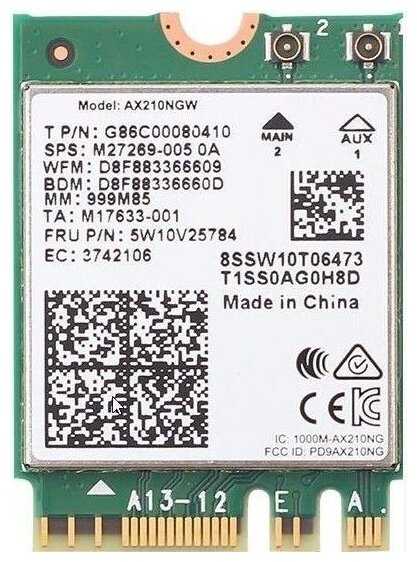
Отзывы о Bluetooth+Wi-Fi адаптер Intel 3168NGW.AC
117 отзывов пользователей o Intel 3168NGW.AC
Пользовались
Intel 3168NGW.AC?
Поделитесь своим опытом и помогите другим сделать правильный выбор

J. White
28.12.2020
8/10
Оценка пользователя
Хорошо
I had to order two of these because I messed up the first one trying to get the very small antenna snaps snapped. I messed up the antenna wire connectors too. I reordered the wireless card and also ordered new antenna wires. I was more careful the second time and used forceps lightly until the snaps connected. My fingers are too big for this type of task. Other than that, installation was easy - the drivers installed and the wifi and bluetooth worked. My purpose for upgrading to bluetooth 5.1 was to improve the sound of music on my hi-def headphones. After all this, I cannot perceive any sound improvement over bluetooth 4.2. Another disappointment was bluetooth range - the range is exactly the same as before, good but not great. My phone company supplied router does not include wifi 6, so no improvement there either - the speed is the same as before. My headphones support aptX, but there aren't any aptX drivers available for this wireless setup from Intel or my computer maker - so no aptX here either. But, I've upgraded to wifi 6 and bluetooth 5.1, and it all works.
Mark M.
28.12.2020
10/10
Оценка пользователя
Великолепно
I used this to replace the dying Intel 7260 card in my ASUS ROG G751JY. Prior to replacement, my wifi card would drop connections randomly. This past week that old card constantly died several times an hour. I discovered others with my laptop model were able to swap the 7260 (which is prone to failure, apparently) with this model, the 9260.
And what a success! My wireless connection is now solid for the first time in months. Windows 10 was able to immediately detect the card and update to the latest drivers, no problem. Depending on your laptop's internal configuration, I recommend plugging in the two wires to the board before you slot the new board back into the motherboard. They're a little tricky to pop back in, but take your time and you'll be fine.
Regarding the ASUS G751JY: You'll need to disassemble a lot to get to the old wifi card. There are some good tutorial videos on YouTube on how to access it underneath the keyboard. After unplugging the old card, I swung the two wires under the screen so I could plug them into the new card more easily. Then I swung them back underneath where I plugged the new wifi card into the motherboard. It's easier that way, trust me.
And what a success! My wireless connection is now solid for the first time in months. Windows 10 was able to immediately detect the card and update to the latest drivers, no problem. Depending on your laptop's internal configuration, I recommend plugging in the two wires to the board before you slot the new board back into the motherboard. They're a little tricky to pop back in, but take your time and you'll be fine.
Regarding the ASUS G751JY: You'll need to disassemble a lot to get to the old wifi card. There are some good tutorial videos on YouTube on how to access it underneath the keyboard. After unplugging the old card, I swung the two wires under the screen so I could plug them into the new card more easily. Then I swung them back underneath where I plugged the new wifi card into the motherboard. It's easier that way, trust me.
Christine
28.12.2020
10/10
Оценка пользователя
Великолепно
Hi,
I have an Asus Vivobook Laptop that is very easy to open up and work on. Getting the OEM Realtek 8822BE Wifi/BT card to work with Linux was always frustrating (There are several threads on the internet, Reddit, etc.). Windows 10 no issues. So I decided to try Linux again (Ubuntu 20.4) and everything but WiFi worked upon initial install. I followed some troubleshooting and solution threads but couldn't get wifi working (worked fine in Windows)
So I had read that Intel cards had better support on Linux and bought this one on a whim. Boom plug and play (almost)! On each OS (Windows and Ubuntu) after installing the Intel card I just had to run updates and the Intel drivers were automatically found.
Then because I never had a working WiFi connection in Ubuntu I just has to search for nearby networks, find mine and log in.
Everything works with this Intel card, Wifi and Bluetooth I am happy.
I have an Asus Vivobook Laptop that is very easy to open up and work on. Getting the OEM Realtek 8822BE Wifi/BT card to work with Linux was always frustrating (There are several threads on the internet, Reddit, etc.). Windows 10 no issues. So I decided to try Linux again (Ubuntu 20.4) and everything but WiFi worked upon initial install. I followed some troubleshooting and solution threads but couldn't get wifi working (worked fine in Windows)
So I had read that Intel cards had better support on Linux and bought this one on a whim. Boom plug and play (almost)! On each OS (Windows and Ubuntu) after installing the Intel card I just had to run updates and the Intel drivers were automatically found.
Then because I never had a working WiFi connection in Ubuntu I just has to search for nearby networks, find mine and log in.
Everything works with this Intel card, Wifi and Bluetooth I am happy.
Saul Arias
28.12.2020
10/10
Оценка пользователя
Великолепно
My brother and I both recently purchased gaming laptops. I bought the Zephryus and he got the Legion. These laptops have absolutely horrible 1X1 WiFi cards. This means only one radio for download and one for upload. If you have such a card in your laptop these intel 2x2 (2 receiving and 2 transmitting radios) cards will solve every WiFi issue. These are fast and maintain a strong and steady connection. I cannot emphasize enough how much of an improvement upgrading to this card was, especially for these two notebooks. Both of our laptops were able to achieve better reception and quicker stable connections.
Stanio
28.12.2020
10/10
Оценка пользователя
Великолепно
This product eliminated all the stress and anxiety that Dell pc has caused me after I decided to upgrade my memory and HD to SSD. My wireless adapter, that enables my wireless connection through WIFI immediately became unavailable after I upgraded my Studio XPS 15 pc. Dell would not help me in no way shape or form to figure out what the problem was and how to fix it....until I did some research online and found out that Dell pulled a major stunt by using an excess of poor quality components that they knew would create problems to users in time to come and they continue to manufacture their Laptops with the same inferior components which are currently causing these issues that I am faced with today. However, lucky for me, some good samaritan refers and or recommended this magic component from Amazon that would completely change how wireless connectivity works on the XPS laptops. I was skeptical at first but it turned out that this small item resolved all my pc issues once and for all. Thank you
Oone day at a time
28.12.2020
10/10
Оценка пользователя
Великолепно
I wanted to add wifi to my ATX computer but didn't want to use USB or other brand wifi card. This work perfect with the Fenvi Desktop Wireless Network M.2(NGFF) Wireless Card. I love the idea I now have BT and can change the card if something better come out. Don't add one of those over price wifi card with heatsink... It not needed.
DB
28.12.2020
10/10
Оценка пользователя
Великолепно
I wasn't sure if this would work on my version of the HP Spectre X360 (i7-8550U). I have never had good Bluetooth connectivity and was tired of going through Bluetooth dongle's that would conflict with the onboard chip (AC8265). Turns out the antenna was never attached, but I swapped out the chips anyway. I am NOT a tech guy but was able to get everything reattached and sealed correctly. I have had solid Bluetooth connectivity with the 9260 chip, I can FINALLY connect my Bose QC headphones after years of frustration!
Dan
28.12.2020
10/10
Оценка пользователя
Великолепно
If you expect to upgrade your home wifi to the wifi 6 standard soon, you may want to look at another sku such as Intel AX200 for a few dollars more.
I got this card for a brand new Dell Inspiron 5585 Ryzen 5 laptop to replace the terrible Qualcomm 1x1 wifi it came with. Replacing the wifi card on most laptops is easy, even if the whole back shell has to come off. I get full speed from my internet connection now. There's a different version of this card for newer Intel processors but this 9260 should work for most laptops and it's the same one included in many high end computers over the past couple years. I did not go for a wifi 6 card because compatible access points were cost prohibitive six months ago when I got the best wifi that fit my budget.
I got this card for a brand new Dell Inspiron 5585 Ryzen 5 laptop to replace the terrible Qualcomm 1x1 wifi it came with. Replacing the wifi card on most laptops is easy, even if the whole back shell has to come off. I get full speed from my internet connection now. There's a different version of this card for newer Intel processors but this 9260 should work for most laptops and it's the same one included in many high end computers over the past couple years. I did not go for a wifi 6 card because compatible access points were cost prohibitive six months ago when I got the best wifi that fit my budget.
V. Lee
28.12.2020
10/10
Оценка пользователя
Великолепно
Summary:
* Inexpensive wifi upgrade
* Pretty easy to instalI (but depends on your laptop model)
I have a 2016 Dell XPS 15 which came with an Intel 7260 wifi card. After 4 years, I'm still trying to get by with that laptop, but one frustration has been that that laptop doesn't pick up a wifi as well as the other wireless devices in our household. After a couple hours of research (to figure what card I could upgrade to, to confirm it would be plug-and-play, and to find YouTube videos which showed how to swap the card on my particular Dell laptop model), I decided to go for it.
*** To take the back off this particular laptop, you a size T5 torx screwdriver.*** The only tricky part was disconnecting the cables. They are tiny and I was afraid of breaking them. I don't have any advice here other than I needed to pull straight up and it was tighter than expected. I might have pried them off; I don't remember.
* Inexpensive wifi upgrade
* Pretty easy to instalI (but depends on your laptop model)
I have a 2016 Dell XPS 15 which came with an Intel 7260 wifi card. After 4 years, I'm still trying to get by with that laptop, but one frustration has been that that laptop doesn't pick up a wifi as well as the other wireless devices in our household. After a couple hours of research (to figure what card I could upgrade to, to confirm it would be plug-and-play, and to find YouTube videos which showed how to swap the card on my particular Dell laptop model), I decided to go for it.
*** To take the back off this particular laptop, you a size T5 torx screwdriver.*** The only tricky part was disconnecting the cables. They are tiny and I was afraid of breaking them. I don't have any advice here other than I needed to pull straight up and it was tighter than expected. I might have pried them off; I don't remember.
Amazon Customer
28.12.2020
10/10
Оценка пользователя
Великолепно
Card works great and does as advertised.
FYI your router must support 160mhz mode, and must have more than 433mhz per antenna to get any gain out of this card. Most routers have 1300 mbps or less for speed on the 5ghz band. divide this by the 3 antennas it has for that specific band and that is only 433mhz per antenna, and thus since this card only has 2 antennas it will max out at 866 mbps speed (thus being no faster than 8xxx and 7xxx intel wifi cards).
If router states it is ac2400 or greater AND only has 3 antennas then this card should get increased wifi speeds (vs other dual band wireless AC cards).
If it is ac3xxx and has more than 3 antennas then you will have to dig deeper into the tech specs.
It will take 2500-2600 mbps on 5ghz band router utilizing 3 antennas to max this card out. (On high-end models like netgear nighthawk it may have 6+ antennas but not all antennas are for a single band.
FYI your router must support 160mhz mode, and must have more than 433mhz per antenna to get any gain out of this card. Most routers have 1300 mbps or less for speed on the 5ghz band. divide this by the 3 antennas it has for that specific band and that is only 433mhz per antenna, and thus since this card only has 2 antennas it will max out at 866 mbps speed (thus being no faster than 8xxx and 7xxx intel wifi cards).
If router states it is ac2400 or greater AND only has 3 antennas then this card should get increased wifi speeds (vs other dual band wireless AC cards).
If it is ac3xxx and has more than 3 antennas then you will have to dig deeper into the tech specs.
It will take 2500-2600 mbps on 5ghz band router utilizing 3 antennas to max this card out. (On high-end models like netgear nighthawk it may have 6+ antennas but not all antennas are for a single band.
N. Obody
28.12.2020
10/10
Оценка пользователя
Великолепно
I upgraded a laptop with the 8260, it's mostly a lateral move except for the Bluetooth. Bluetooth 5 earbuds are getting cheap, and they sound pretty good IF YOU HAVE BT5. If you're on BT4, you get the classic audio codec which sounds like a lousy cell phone connection.
After I got this, I realized that Intel has the AX cards out for a little bit more. AX doesn't give better performance until you have a household of AX gear, so on the one hand getting just the one is kinda silly. On the other hand, if you're opening your laptop now, for a few bucks more you can get a more futureproofed radio. Your choice.
Upgrading your laptop's wifi card is not for the timid. The antenna connectors are a bit delicate, it can take a scary amount of force to snap the tiny buggers in.
After I got this, I realized that Intel has the AX cards out for a little bit more. AX doesn't give better performance until you have a household of AX gear, so on the one hand getting just the one is kinda silly. On the other hand, if you're opening your laptop now, for a few bucks more you can get a more futureproofed radio. Your choice.
Upgrading your laptop's wifi card is not for the timid. The antenna connectors are a bit delicate, it can take a scary amount of force to snap the tiny buggers in.
Sammy
28.12.2020
10/10
Оценка пользователя
Великолепно
Replaced the Dell Wireless 1830 (Broadcom card) in my Dell XPS 15 that would never work quite right with Bluetooth mice and didn't play nice with iTunes. I essentially "downgraded" from a 3x3 card to a 2x2 because apparently 3x3 cards aren't a thing anymore, but have not noticed a negative impact to connection speeds. Bluetooth finally works as intended with my laptop and I'm super glad to get rid of the useless OEM card. Can't really complain here. A+!
BF
28.12.2020
10/10
Оценка пользователя
Великолепно
Just installed in a Dell Latitude 7470 (6th gen i7) I juat got that came with an 8260 card. It was acting very strange, wifi wouldn't toggle back on, wouldn't stay connected, and would show no available networks, and none of the software fixes helped more than momentarily.
Popped this in, fired it up, and connected right up... works like a champ. Getting about 200Mb/s down & 150 up (edit: don't know what was up the other day, but now getting a little over 200 down, and a little under 300 up. I pay for 200, my desktop wired usually gets a bit over 300 both ways) on 5Ghz, which is basically the speed I pay for. Wired usually gets more like 300, but I'll take it to fix my wifi for <$20.
Popped this in, fired it up, and connected right up... works like a champ. Getting about 200Mb/s down & 150 up (edit: don't know what was up the other day, but now getting a little over 200 down, and a little under 300 up. I pay for 200, my desktop wired usually gets a bit over 300 both ways) on 5Ghz, which is basically the speed I pay for. Wired usually gets more like 300, but I'll take it to fix my wifi for <$20.
Gandhi Perez
28.12.2020
10/10
Оценка пользователя
Великолепно
Short story: It worked and fixed my dell xps 9550 wifi issues. It would disconnect all the time with the old chip fro dell.
Long Story: My dell xps 15 from 2015 was always full of issues. One of the buggiest "high end laptop" I ever bought and regret going to dell and leaving my old Mac. One MASSIVE issue of recently was my laptop constantly disconnecting from the wifi at home. It would work fine at my University and other wifi spots, but at home the laptop just disconnected non stop. It would connect for 1-5 minutes then disconnect. This was incredibly frustrating to play games online. MORE importantly, in the world of covid-19, my classes were changed to online and we had ZOOM meetings along with exams. I would have to use my phones 4g to ensure I didn't disconnect from an online exam. This made it clear I had to fix the issue by either buying a new 700$ plus laptop or find cheap solution. Well I youtubed and googled many remedies, all which failed. I was left with either attempting to mess with my routers frequencies to adjust to my laptop or try this intel Chip. I chose the cheap simple option which was the chip. So far, no disconnects in online games and the laptop connects automatically unlike the old chip where I had to retype the password everytime I turned on the device.
You will need to download some updates from intel prior to the installation in order to make sure that the laptop connects to the internet after the installation.
The customer service from the seller is really good! my first order of this chip was lost due to most likely the riots that happened. The chip was ordered in may 19 but didn't come in at all so I messaged the seller on June 3. I emailed them and got a quick friendly response assuring me that they would refund me right away. And they did. Since I really badly needed the chip, I ordered the product again and it came in this time without issue. Would reccomend this chip and seller. Im just so happy to finally be able to use this laptop without constantly disconnecting or having to buy another laptop.
Long Story: My dell xps 15 from 2015 was always full of issues. One of the buggiest "high end laptop" I ever bought and regret going to dell and leaving my old Mac. One MASSIVE issue of recently was my laptop constantly disconnecting from the wifi at home. It would work fine at my University and other wifi spots, but at home the laptop just disconnected non stop. It would connect for 1-5 minutes then disconnect. This was incredibly frustrating to play games online. MORE importantly, in the world of covid-19, my classes were changed to online and we had ZOOM meetings along with exams. I would have to use my phones 4g to ensure I didn't disconnect from an online exam. This made it clear I had to fix the issue by either buying a new 700$ plus laptop or find cheap solution. Well I youtubed and googled many remedies, all which failed. I was left with either attempting to mess with my routers frequencies to adjust to my laptop or try this intel Chip. I chose the cheap simple option which was the chip. So far, no disconnects in online games and the laptop connects automatically unlike the old chip where I had to retype the password everytime I turned on the device.
You will need to download some updates from intel prior to the installation in order to make sure that the laptop connects to the internet after the installation.
The customer service from the seller is really good! my first order of this chip was lost due to most likely the riots that happened. The chip was ordered in may 19 but didn't come in at all so I messaged the seller on June 3. I emailed them and got a quick friendly response assuring me that they would refund me right away. And they did. Since I really badly needed the chip, I ordered the product again and it came in this time without issue. Would reccomend this chip and seller. Im just so happy to finally be able to use this laptop without constantly disconnecting or having to buy another laptop.
Kevin J. Darrah
28.12.2020
10/10
Оценка пользователя
Великолепно
I was a bit skeptical, the Laptop had a slower 466 Mb card in it, I was seeing about 350 Mb up/Down. I put the new card in it and it doubled the speed of the Laptop. For wireless I couldn't ask for much more, and I am only using a standard Access Point, as stated, the card will reach 1.7 GB if used with a router with the latest technology. I am only utilizing about 1/2 of what the card could really do using an extender for an AP. Pictures are before and after installation. The last picture is after I wirelessly connected to our Nighthawk XR500 which is our main router on the other side of the house. This card is impressive!
Duhkgeorge
28.12.2020
10/10
Оценка пользователя
Великолепно
I don’t have much to write. I received it in a padded envelope and it was in a bag. I’d have concerns about it arriving in one piece, but mine did!
Easy to slip in and it works.
I don’t like buying the things like this from amazon due to a lack of integrity and counterfeits, but I was in a bind and this works! I don’t have exceptionally fast internet but I swear my laptop is instantaneous when web browsing now. I can’t compare because the old WiFi died and I can’t compare. I had an older version but I didn’t think I’d be able to take advantage of the faster speeds on this WiFi card. I may have been wrong.
Easy to slip in and it works.
I don’t like buying the things like this from amazon due to a lack of integrity and counterfeits, but I was in a bind and this works! I don’t have exceptionally fast internet but I swear my laptop is instantaneous when web browsing now. I can’t compare because the old WiFi died and I can’t compare. I had an older version but I didn’t think I’d be able to take advantage of the faster speeds on this WiFi card. I may have been wrong.
JART
28.12.2020
10/10
Оценка пользователя
Великолепно
This is a massive step up from every Intel WiFi chip I've ever used. Why? It is utterly rock-solid stable. That's really it. Every Intel chip I've ever used had had awful connection issues and 5GHz range. 7260 sucked, 8260 sucked, 6235 sucked, 3160 is a joke. This one just works, no matter what, across Linux distros and Windows 10. As of the time of this review, it works flawlessly on my C6H X370 board's dedicated M.2 WiFi slot and Ryzen 7 1700 CPU. Had it for months now with zero issues. I'd recommend this over competing brands' solutions right now. Good job for once, Intel.
R. Eye
28.12.2020
10/10
Оценка пользователя
Великолепно
I bought this card as an upgrade it my beloved Dell XPS 15 9550, replacing the original DELL 1830 (Broadcom) card. The Dell card is a 3x3 and this is a 2x2 but I simply left the grey antenna wire off. The installation was straight forward (see the many internet tutorials). As mentioned by other users, the attachment of the antenna wires (MHF4 connectors) was painfully challenging, but this is not a deficiency of the card. I had originally considered the Intel 8260, but this came with Bluetooth 5.0 (future proofing attempt). I was gratified with the Upload/Download results as well as the coverage. I was finally able to connect to my FIOS ap at 5Ghz. Importantly, I downloaded the Intel wfi drivers and the bluetooth driver prior to swapping cards and had no issues on install. I love this upgrade so far.
Mariano R.
28.12.2020
10/10
Оценка пользователя
Великолепно
Excelente adaptador
Este adaptador Wi-Fi es uno delos mejores, mejoró especialmente la velocidad de conexión y la confiabilidad con Linux y Windows, realmente recomendado.
Genaro HR
28.12.2020
6/10
Оценка пользователя
Плохо
Bluetooth no tan bueno
Compré esta tarjeta para actualizar la vieja Qualcom QCA9377 en mi laptop, sin embargo el sonido bluetooth y recepcion bajaron de calidad considerablemente, no pude activar el soporte de APT-X. Creo que es buena tarjeta pero no para lo que esperaba
Marco Antonio Morales Canul
28.12.2020
10/10
Оценка пользователя
Великолепно
Excelente funcioinamiento
Muy buena tarjeta, trabaja bien (Compre 2) y funcionan correctamente, Bluetooth y 5G, el precio también muy bueno, Solo tengan cuidado con la generación del procesador para que sea compatible. Acabo de comprar otra para una Asus con procesador i7 de sexta ¡Y sirvió también!
Rob
28.12.2020
10/10
Оценка пользователя
Великолепно
My laptop came with a killer branded Wi-Fi card that was unreliable. I couldn't get Hyper-V to function correctly and so I purchased a replacement.
As ever, the Intel Wi-Fi cards are great, good throughput, signal and stable. (although I prefer to do a driver only install).
Also fixed my issue with Hyper-V.
As ever, the Intel Wi-Fi cards are great, good throughput, signal and stable. (although I prefer to do a driver only install).
Also fixed my issue with Hyper-V.
Dave Massey
28.12.2020
10/10
Оценка пользователя
Великолепно
Got this to replace the wireless card in my laptop as it was a little flaky - it was quick to install and worked with windows 10 straight away; after using this for a couple of weeks it is much more stable than the card it replaced and consistently get 800+MBs from my router on AC.
Amazon Customer
28.12.2020
10/10
Оценка пользователя
Великолепно
Does what it says on the tin
Показаны отзывы 73-96 из 117.