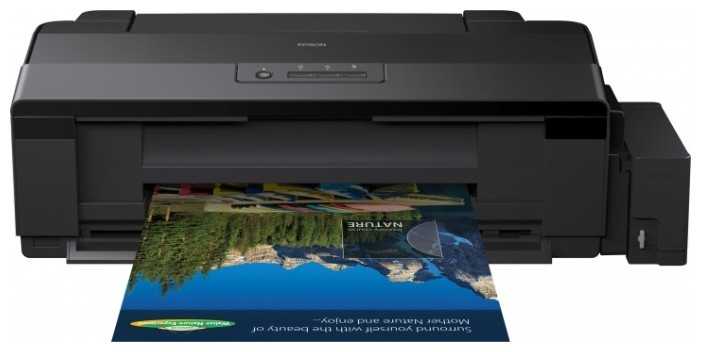
461 отзывов пользователей o Epson L1800

Пользовались Epson L1800?
Поделитесь своим опытом и помогите другим сделать правильный выбор

Profile no image

Астрон-7WBGB

11.02.2011

8/10

Оценка пользователя

Хорошо

Покупаю уже второй принтер, причем первый печатает отлично, НО после года службы КАТЕГОРИЧЕСКИ НЕ ХОЧЕТ ЗАХВАТЫВАТЬ БУМАГУ. А по остальным показателям принтер отличный и практичный. Советую
Profile no image

Фотон-2VZYG

26.01.2011

6/10

Оценка пользователя

Плохо

Плохо захватывает бумагу, приходится вставлять по 1 листу. Если будите брать такой, на нём нужно постоянно печатать, иначе принтер начинает глучить и не видеть картридж. Качество печати хорошее.
Profile no image

Сатурниан-2IYJW

22.04.2010

10/10

Оценка пользователя

Великолепно

Взяли для фотостудии. Печать качественная. Цена очень даже хорошая. Из всех производителей, Эпсон советую больше остального, так как компания выпускает действительно качественные принтеры.
Profile no image

Астрон-8LPKP

10.03.2024

10/10

Оценка пользователя

Великолепно

Отличная модель
  • + Хороший и качественный принтер
источник
Profile no image

ХроноГость-2WNKL

10.07.2020

6/10

Оценка пользователя

Плохо

Посредсвенная модель
  • + Родная СНПЧ и А3+
  • - Бумагу берет отвратительно. Нужно подавать по одному листу. Иногда чем-то неприятно пищит. Через день безосновательно делает супер прочистки, сливая много чернил. При этом в памяти принтера эти прочистки не фиксирует. Их в отчёте просто нет. Погружается в задумчивость. Бывает отправляешь на печать и не поймешь отправил или нет - принтер не подает никаких признаков от 15 до 120 секунд, пока начинается процесс печати...
источник
Profile no image

Синтрон-9UBIN

12.08.2020

8/10

Оценка пользователя

Хорошо

Хорошая модель
  • + Прекрасный принтер с хорошей цветопередачей без лишних функций
  • - комплекте поставки не было сетевого...
источник
Profile no image

Астероид-6EWEO

13.09.2023

8/10

Оценка пользователя

Хорошо

Хорошая модель
  • + Качественная печать
  • - Проблема с захватом бумаги , через 2 перестал ее захватывать совсем (
источник
Profile no image

Вектрон-0QZYP

17.05.2021

10/10

Оценка пользователя

Великолепно

Отличная модель
  • + Принтер Epson L1800 отличный аппарат)! Очень доволен качеством печатания . Все доступно и понятно с...
источник
Profile no image

Спектр-1MJSS

13.09.2023

4/10

Оценка пользователя

Ужасно

Плохая модель
  • - Очень капризный к бумаге, не подхватывает листы, трудно подобрать бумагу, чтобы стабильно работал.
источник
Profile no image

Сатурниан-7KXZB

13.09.2023

8/10

Оценка пользователя

Хорошо

Хорошая модель
  • + Сочный, плотный цвет.
  • - Только из коробки и уже заминает матовую фотобумагу 90 гр., одновременно мажет фото черной краской при высоком качестве печати.
    За немалую цену такой себе огрех - 1000 руб. за упаковку бумаги потрачено зря.
    На бумаге 160 гр. Печатает хорошо.
источник
Profile no image

Туманник-5CJSE

27.09.2013

8/10

Оценка пользователя

Хорошо

Ну в общем так, Купил я его на днях, принес домой, радостный до одного места. Провел все необходимые операции вывожу на печать фото. А вылезает чуть испачканный белый лист, пол ночи разбирался что с ним такое, проверка дюз и чистка что простая что усиленная ни к чему не привела. Ну естественно я огорчился и хотел было уже отдать его обратно, но на одном интернет ресурсе прочитал что у них в СНПЧ проблема с воздушными каналами, образуется вакуум и краска просто не доходит до головки. В общем открыл пробки. почистил головку и о Боги!!!! Печатает!!! Качество печать меня удивило, очень достойно за эти деньги (печать фото в формате А4). Посмотрим дальше как он себя покажет. Ставлю 4 только из за того что пришлось повозится и поломать голову.
Profile no image

Гиперион-3YEUM

06.04.2013

10/10

Оценка пользователя

Великолепно

Супер, супер принтер, печать такого качества за такие деньги, я даже не мог представить. Приходится печатать много фотографий, увлекаюсь съемкой. До этого приходилось сдавать в фотолаб, друг посоветовал L800. Бюджет ощутимо стал пополняться)Качество печати даже лучше чем в фотолабе.Всем рекомендую!
Profile no image

Синтрон-2DWKT

01.02.2013

10/10

Оценка пользователя

Великолепно

подарил брату фотографу-любителю данное устройство,до сих пор слышу восхищение,все очень круто подумываю и себе приобрести.
Profile no image

Аэронавт-9KCRM

18.12.2012

10/10

Оценка пользователя

Великолепно

Классный фотопринтер!Теперь печатать можно в огромных колличествах.Жаль не МФУ...
Profile no image

Сириус-8YPAD

13.12.2012

10/10

Оценка пользователя

Великолепно

Приобрёл принтер недавно. Пока очень доволен! Замечательные фотографии! Единственный недостаток - это отсутствие в комплекте шнура для подключения к компьютеру, придётся приобрести отдельно.
Profile no image

НоваГость-5ZMEY

14.11.2012

10/10

Оценка пользователя

Великолепно

Предупреждаю, т.к. нигде об этом не пишут - шнура USB в комплекте нет, в связи с чем необходимо его приобрести одновременно с принтером, а то подключать будет нечем....
Profile no image

ОмниКод-3VLVC

23.09.2012

10/10

Оценка пользователя

Великолепно

Купил не давно данное устройство, Вообще шикарное, жена фотограф, печатаем много. По этому взяли l800. Реально классные фотки и реально дешевая печать. Тем кто задумывается о покупке советую.
Profile no image

Альфа-Юнит-1ZXVA

29.06.2012

10/10

Оценка пользователя

Великолепно

Принтер покупался для печати большого количества фотографий в фотолабораторию. Достоинства:1. Низкая себестоимость отпечатков (действительно ок. 1,5 рубля за фото 10х15 без учета бумаги, как и заявляет производитель).2. Удобство эксплуатации (быстрота заправки и презаправки, отсутствие грязи на рабочем месте, встроенные профили в драйвере устройства).3. Цветовой охват чернил практически идентичен чернилам Claria. 4. Гарантия производителя.5. Краски в комплекте.6. Скорость печати (нас очень устраивает, хотя фото в обычном качестве печатается ок. 20 сек).7. Печать на дисках.Недостатки:1. Неудовлетворительное качество ч/б фото (black уходит в cyan), что действительно заметно.Итог:Можно сказать, что недостаток один единственный - это качество ч/б. Но у нас устройство используется для печати исключительно цветных фото, так что это не совсем проблема. Собственно говоря практически от любого 6-цветного принтера трудно ожидать очень нейтрального серого. За свою цену - самый оптимальный в отношении цены, качества и выгоды от использования.
Profile no image

Гиперион-3GSUZ

16.11.2011

10/10

Оценка пользователя

Великолепно

Очень доволен приобретением: все заявленное правда - цена отпечатков, качество EPSON. Всем рекомендую!!!С нетерпением жду появления в вашем магазине расходников на него (картриджи 70мл).
Profile no image

НеоВояжер-8WDKK

27.09.2013

8/10

Оценка пользователя

Хорошо

Ну в общем так, Купил я его на днях, принес домой, радостный до одного места. Провел все необходимые операции вывожу на печать фото. А вылезает чуть испачканный белый лист, пол ночи разбирался что с ним такое, проверка дюз и чистка что простая что усиленная ни к чему не привела. Ну естественно я огорчился и хотел было уже отдать его обратно, но на одном интернет ресурсе прочитал что у них в СНПЧ проблема с воздушными каналами, образуется вакуум и краска просто не доходит до головки. В общем открыл пробки. почистил головку и о Боги!!!! Печатает!!! Качество печать меня удивило, очень достойно за эти деньги (печать фото в формате А4). Посмотрим дальше как он себя покажет. Ставлю 4 только из за того что пришлось повозится и поломать голову.
Profile no image

Вояджер-9KHJF

10.04.2012

4/10

Оценка пользователя

Ужасно

Let me tell you about a little love story gone, terribly wrong.I've loved my Epson Artisan Inkjet 1280 for over 10 years. It was a workhorse and always gave me crisp, fast, color, and it was wonderfully efficiency on inkjet replacement costs--I mean really, really great. After 10 years of mega use though, sadly, the old boy was on his last legs, and it was finally time to let him rest in peace. So, having had great luck and satisfaction with that old man, and the Epson printers before him, I, of course, went straight back to Epson family of products to choose my new partner inn printing. After shopping, researching, and reviewing all my options, I settled on the R2000 Artisan Inkjet. I paid a little over $500 with a $100 mail-in rebate.Set up was simple enough. I bought the printer directly from Epson, and it came with the drivers, manual, and wireless set-up software on a CD-Rom. I popped in a USB, connected it to my Mac, and initialized the wireless set up. I was courteously redirected to download everything I needed to set up the wireless network from the internet, so there was not even a need for the CD, other than to have it as a back-up. Set up was simple and went smoothly--no problems at all there. However, there were other problems almost immediately. The ink supply levels for the printer appeared to be inaccurate, so after only printing about 100 pages, the printer stopped working and asked for more juice...ALREADY?! Fine. I had ordered extra ink cartridges, and I replaced the low ink, although oddly, it was the cartridge for the "clear" optimizer slot. After I replaced the cartridge and change the printer setting to "low optimization" so it wouldn't drink so much color optimizer. The printer was ready to go again, but not for long. After one day, the indicator light to replace another cartridge (black) came on. I replaced the black ink. Finally, on the road, I thought. Not so much.Though I changed the cartridges, the supply levels never went all the way back up to full. So, either the cartridges aren't full to begin with, or the supply level sensors are wacked. I reinitialized all printer settings to (hopefully) restore proper levels. They went up, but not where they should be for new cartridges. I started printing on "Economy" mode to say ink on draft prints, but "Economy" gives only a faint gray image (looks worse than even a dot-matrix printer). BUT, sadly, after that, even on "regular" mode, the print quality just went downhill. Dull, muted colors, listless looking graphics, muddy type faces (not crisp and clean), and the edges of each sheet of paper started getting "skid marks" from where the paper was being pulled into the printer. Cleaning the rollers has not had much impact on NOW this new issue, either.With very, very pricey inkjet carts averaging around $70 dollars to replace,--and there are EIGHT carts--I could potentially end up spending $100-150 a month on ink. At that rate, within a year, I could have bought a $1000 printer and probably gotten much more mileage. I am not sure what to do with the damn thing now since I waited over a month to set it up after I got it (didn't want to say good-bye to my 1280), and now the 60-day return period is over. I would send the pile of plastic straight back to Epson if I could because I simply should NOT have this much trouble after only the most minimal of work that this printer has done.This printer now sits on the floor by the edge of the wall as a piece of office flotsam taking up space in the corner of the room. I'm somewhat resigned to just having it be a lame, emergency back-up printer--but right now, it can't even be that since the printer jams every time a sheet of paper tries to load into the printer.Well, let me tell you something, Mr. R2000. You've been unfaithful to my marriage with the Epson family, and you broke my heart. I feel like I've been cheated on! Dearest, Epson, how could you let him do it? How could you let me down like this? You had me believing that my romance with the R2000 would be just as good as the Epson's I've loved before! I put my faith in your R2000, and he took my love--and my MONEY--and ran. Well, our romance is now over--once bitten, twice shy. After all these years! Oh, breaking up is hard to do!Other people seem infatuated with the R2000. Maybe the R2000 just has them fooled, or maybe I simply got a lemon this time. I'll be OK. I've gotta new guy now. I bought another printer from a different manufacturer at a sweet price, and he satisfies my every need. But I'm still sad I've had to break off my relationship with Epson. They were wonderful years, and it was good while it lasted. Maybe we'll meet again some day. For now, I somberly raise a cup of coffee, gaze at at the R2000 piled in the corner, and say with a sigh, "Here's lookin' at you, kid."
источник
Profile no image

Дроид-7WZMG

06.04.2013

2/10

Оценка пользователя

Ужасно

I purchased the Epson Stylus R2000 with high hopes. When I first took it out, everything went fine. The instructions were helpful on how to put the ink in, how to set the paper trays up, etc. The trouble was when it came to setting it up with my Mac. I put the CD in and followed the directions exactly, until it hit a stop. It gave me an error saying it could not find my internet connection. The troubleshooting instructions say to uninstall the software and try again to fix this problem. I must have uninstalled and reinstalled the software five times before I gave up and dialed Epson customer service. I explained my problem, and the man on the other end of the phone told me to uninstall and reinstall the software. I told him I'd already done this, but went ahead. Well, same error. Then he says to go press the button on my router for ten seconds. After that, press the WIFI button on my printer for 5 seconds. I was dubious, but hung up the telephone and tried it. The wifi button did blink, so okay- I once again installed the software. Same error again.At this point, I was getting frustrated. I decided to set up the printing specifics without the wireless connection and to print via the USB cord (which /should/ be included). With the R2000 plugged in to my Mac, I pulled up the test page that Epson created and tried to print. It made a noise like it was about to print, then I got another warning, this time that the paper roll was jammed. I checked the sheets of paper; perfectly fine. I checked where the roll of paper would go (I had none inserted), nothing. I tried several times and each time it said the roll was jammed.I called Epson again. This time, the customer service was even more unhelpful and rude than the last. He sounded bored out of his mind and didn't even listen to my problem. He asked if I'd restarted my Mac to solve the problem. I told him no, because it's not my Mac's issue, it's the printer and the software. I know this because the Mac will accept other wireless connections and printers just fine. I even tested it by deleting a saved wireless printer and then reconnecting; went fine, printed fine. So I told him the printer software continually showed me warnings. He asked what my Mac version was; 10.6. During the conversation, I must have repeated it several times, because he kept telling me about the 10.7. I kept telling him it was 10.6, and he then switched to telling me what could go wrong with 10.8. What?! Growing more frustrated, he told me he had no idea what was wrong. Yes, those were his words. Then, he told me this wasn't his problem and I should call Amazon. That's when I got upset. I told him it's not Amazon's fault. Amazon doesn't cover issues with printers-- they clearly state to call the manufacturer. He again said he didn't know what was wrong and couldn't help. He'd only given me one option to try; to turn my laptop off. At that point, I told him I'd return this and search elsewhere.The only positive thing I have to say is how gracious Amazon was. The lady I spoke to on the phone was exceedingly helpful and Amazon took the faulty printer back with no problem whatsoever.I know this will get bad votes simply because I'm not raving about Epson and their product. But my experience was terrible, and I'd rather find another printer and company that will actually listen to the customer and their problems with the product instead of telling them they didn't have any idea. Actually, scratch that. I'd rather find a product that works from the get-go. For this price point, that shouldn't be too much to ask.
источник
Profile no image

Альфа-Юнит-9ROXC

02.09.2012

10/10

Оценка пользователя

Великолепно

After years of using Canon printers, I decided to purchase an Epson R2000 to replace my old Canon Pro 9000. It had finally given up the ghost after years of faithful service. Why the switch? I had never used pigment inks before, for fear of the nozzle clogging reported so frequently with their use. Also, color is my thing and the vividness of colors from the dye type inks was outstanding. But, I just wanted to try the pigment ink since I had never previously done so. I really didn't care that they have, on average, twice the fading or color change resistence that dye inks do. The newest dye inks last upward of 100 years when kept in an album, and I'll be long gone befoe any of them fade. People don't realize that modern giclee(spray) prints, even the dye type, when done on matched paper, last much longer than the old wet lab prints we used to get from the photo lab. I have some old lab prints from 35 years ago that have faded to an overall magenta hue. These prints had not been exposed to daily sunlight. My preferred paper is the semigloss or luster type. I don't use matte papers very frequently. I often do 12 x 18 prints on 13 x19 paper so a printer handling that format was necessary. Epson had introduced a new pigment printer in the 13 x19 format that seemed to be optimized for printing on glossy or semigloss type papers, the R2000. It used pigment inks, but from what I could determine, they gave beautiful vivid colors almost indistinguishable from dye based inks. The R2000 had all the bells and whistles I would ever need. I decided to give it a try.I am happy that I did try it out. The colors are as vivid as my old Canon Pro 9000. The Epson prints about as fast for comparable sizes as the Pro 9000 did. This had been a complaint with earlier Epson printers, slow printing. The new ones keep right up with the equivalent Canons that were among the fastest dedicated home photo printers. Clogging has not been a problem using Epson factory inks. I might try a non-manufacturer ink in a dye type printer, but I firmly believe it is best to stay with the factory inks in a pigment type printer. I have gone as long as one month between prints with the Epson, but have had no problems with clogged nozzles. Since pigment inks can have the pigment settle in the cartridge if it sits unused for a while, Epson includes a neat ink cartridge shaker in this printer. The larger format Epsons keep the ink mixed by bubbling air through the cartridge. This one shakes the cartridge up for 30 seconds. The shaker can be started any time by just going to the maintenence part of the driver and clicking on it.Now to the important stuff: the print quality. In a word, outstanding! The vividness of the colors is a match for the Pro 9000. I have tried a number of papers, including the Epson factory papers, but the one I like best is the Ilford Galerie Smooth Pearl. This is Ilford's equivalent to the Epson Premium Luster. I have compared both and in my opinion the Ilford just edges out the Epson paper in vividness and color quality. That is something I didn't expect since the Epson Premium Luster has such a great reputation. Ilford has a printer profile for using this paper in the R2000 printer and it works fantastically. I print out of Photoshop Elements and have a calibrated display. Using the Ilford profile, the results are truly WYSIWYG. I have tried a number of other papers including high gloss and matte, but the only one I really liked was the Red River Paper's Polar Metallic. This stuff gives a print that looks for all the world like the metallic prints on Kodak's special paper that you can get from a photo lab service. If you have a very colorful photo, and you want the colors to really pop, give the Polar Metallic a try.In summary, I am very happy with my new printer. It does everything I want it to do and I do not see myself outgrowing it for a long while.
источник
Profile no image

Спектр-8HVSE

19.04.2012

10/10

Оценка пользователя

Великолепно

I got this giant of a printer--the largest personal printer I've ever seen!--and had quite a time getting it ready for use. There were enough tapes used to batten down the hatches, you could have sent it on a sea voyage without damage. I loved this!After what felt like an Amazon adventure, it was finally ready. Luckily Epson had made a sort of "Start Here" sheet that I followed and it got me through 98% of what I needed to do then promptly led me astray. So after clearing two football field size square-footage on my table and inserting the eight(!) printer cartridges, I plugged it in and turned it on. According to the sheet, the printer was then supposed to go through an ink initialization process which would take "about four minutes."Well, I waited and waited, but there was no indication of whether this process was either taking place or whether it was done. After 15 minutes, I decided to check in further and found there was a light over the ink button. I pressed that and then the printer did go through the initialization process, a waste of 10 minutes! I could've cured cancer in that lost time.The next stumbling block I ran over (and stumbled on, of course) was the software. It was stressed that the software had to be installed on the PC first before connecting up the R2000 and so it came to pass that that was exactly what I did. Since the R2000 can be used either via 100Mbps Ethernet, Wireless (they suggest 802.11n, which I don't have, but it works smashingly well with 802.11g) or USB, the software process wanted to know which I was going to use.But here's the thing: the documentation suggests you should first connect the printer for configuration via USB after which you can switch to wireless so I made the choice to use USB. Apparently, that was the wrong thing to do because I did want to use wireless and should have set it up for wireless regardless and it still would have used the USB cable for configuration. As it happened, I had to perform a reinstallation of the printer software to change it from USB to wireless. After that, pie!After quickly printing a test page (glorious color!), I then tried to print a picture on a glossy photo paper. After opening the graphic in Picasa, I chose the R2000 as the destination printer, chose a 5"x7" graphic and sent it on its way.It was done printing in under 30 seconds. It was also glorious! Brilliant reds, dark velvety blacks, and every shade and hue in between. This thing is incredible and versatile. I don't have matte or fine art paper or canvas and I haven't tried printing on the CD/DVD, but I have no reason to think I won't be getting the same kinds of results.The software options are incredible and vast. I can choose and set color profiles, I can choose which outputs to use, I can choose an ungodly number of paper types, I can print on just about any kind of printable surface, except for maybe T-shirt.Seriously, I was blown away. The last inkjet printer I owned could barely keep up (it was an HP) and quickly became clogged and useless. I threw it away after 6 months use so you can imagine how pleasant a surprise it was to use the R2000! Then again, considering the price differences, it should follow.The one thing I was trepidant about was the price of the cartridges. I was expecting to pay some unearthly price for each one and, when I saw a price of $30, I thought my fears were realized. Imagine my joy when on further inspection, that was the price for ALL 8 cartridges.I am immensely pleased with the R2000 and I foresee that it has set the standard for inkjet printers for me, now and in the future. Five well-deserved stars.
источник
Показаны отзывы 265-288 из 461.

Похожие товары с лучшей оценкой

9.9/10 баллов

Fujifilm Instax Mini Link 2

110 отзывов

от 14139.00 руб.

9.4/10 баллов

HP LaserJet Pro M15w, ч/б, A4

271 отзывов

от 42280.00 руб.

9.4/10 баллов

Pantum M6507, ч/б, A4

2397 отзывов

от 30191.00 руб.

9.4/10 баллов

Pantum P2500W

46 отзывов

от 13852.00 руб.

9.3/10 баллов

Canon I-SENSYS LBP6030, ч/б, A4

105 отзывов

от 17874.00 руб.

9.2/10 баллов

HP Color Laser MFP 179fnw

190 отзывов

от 68839.00 руб.

9.2/10 баллов

deli P2000

44 отзывов

от 13499.00 руб.

9.1/10 баллов

Canon i-SENSYS LBP631CW

72 отзывов

от 37185.00 руб.

9.1/10 баллов

Digma DHP-2401W

121 отзывов

от 14661.00 руб.

9.1/10 баллов

Xiaomi Mijia Photo Printer 1S, цветн., м

372 отзывов

от 13186.00 руб.

9.1/10 баллов

Canon Pixma G1420

83 отзывов

от 59572.00 руб.

9/10 баллов

Canon i-Sensys LBP-6030

253 отзывов

от 22761.00 руб.

9/10 баллов

Brother HL-1223WR, ч/б, A4

460 отзывов

от 31990.00 руб.

9/10 баллов

Epson L18050 (C11CK38403)

30 отзывов

от 69535.00 руб.

9/10 баллов

Epson EcoTank L3210

292 отзывов

от 34276.00 руб.

9/10 баллов

Fujifilm Instax Link Wide

29 отзывов

от 23725.00 руб.

8.9/10 баллов

Canon ImageCLASS LBP6030 (8468B006)

8 отзывов

от 16805.00 руб.

8.9/10 баллов

Pantum P2506W

42 отзывов

от 17900.00 руб.

8.9/10 баллов

Canon Laser Shot LBP2900, ч/б, A4

103 отзывов

от 26012.00 руб.

8.9/10 баллов

HUAWEI PixLab B5 [CV81Z-WDM2]

33 отзывов

от 49990.00 руб.