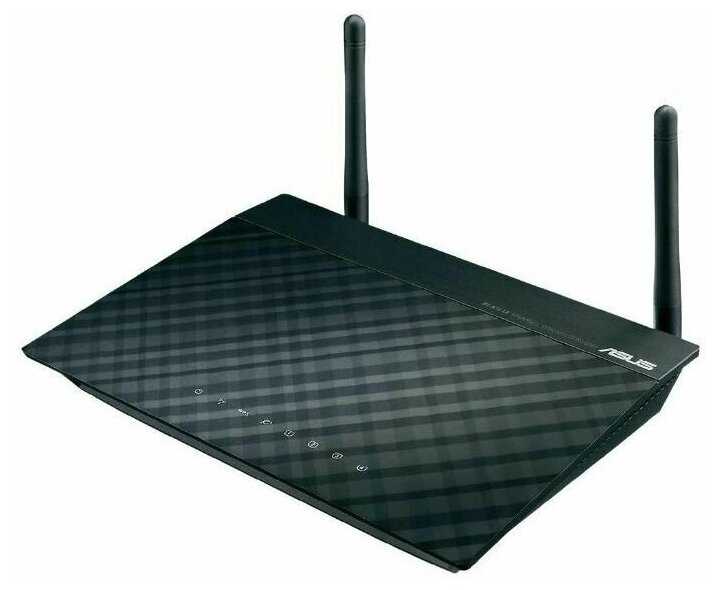
Отзывы о Роутер ASUS RT-N12E
Где купить
Роутер ASUS RT-N12E
|
Роутер ASUS RT-N12E | Яндекс Маркет | 2 935 ₽ | Посмотреть |
|
Роутер ASUS RT-N12E | Яндекс Маркет | 2 935 ₽ | Посмотреть |
3641 отзывов пользователей o ASUS RT-N12E
Пользовались
ASUS RT-N12E?
Поделитесь своим опытом и помогите другим сделать правильный выбор

Квантум-3BEVA
02.10.2011
10/10
Оценка пользователя
Великолепно
The unit both looks great(with the white color) and works great. In fact it works too great: I was trying to input all the usual information for my DSL/PPoE account info, but it can actually find the information by itself. It's also amazing that as soon as you open up your web browser, the setup windows pops up automatically. I have never configured a router with such ease (I had used about 5 routers prior to this one). Oh, almost forgot: the price is hard to beat too!
Зета-Орион-1UTSO
08.12.2011
8/10
Оценка пользователя
Хорошо
Not bad for its price. I actually use it as a repeater/extender and has been working fine since. Helps me extend my wi-fi signals to "where no one has gone before", especially to my front pool, which is awesome.I would recommend it highly.
Гиперион-8EMXC
09.11.2011
10/10
Оценка пользователя
Великолепно
I required a repeater for my household as the source of our internet connection is in the basement. The IP of the router was surprisingly not included in the paperwork but a quick google search pointed me to the right direction. After that the process was very easy and the network was up and running within a matter of minutes.
Кварковец-4GZJS
30.07.2011
2/10
Оценка пользователя
Ужасно
I have a motorola surfboard modem/router and wanted to extend its signal to the top floor(in repeater mode). I have tried setting it up many times in all sorts of mode (AP/Repeater/router).Worst customer service in the world. I called them up (call goes to mexico) and they are reading out the direction from the manual.It didnt work for me. After connecting it to the computer I never saw the QIS. I am sure there is more to the setup than those 4 step. It works well in the router mode but doesn't work as a repeater.I would rather prefer a device that is just a repeater and works as one than have everything and doesn't work at all.I ended up ordering Amped repeater.
ОмниКод-1ZMBC
16.11.2011
6/10
Оценка пользователя
Плохо
Bought this router 6 months ago, and it worked great with incredible range and download speeds. Now, I can barely get 250Kbs per sec from it while being in the next room! just has become very buggy.It has an incredible amount of options and features which is why this is even more disappointing.
Лунатик-2NELV
16.10.2011
10/10
Оценка пользователя
Великолепно
I have a wireless router in the basement. It needed to be there for wiring reasons, so moving it up one floor was not an option. Hence, the signal is weak on the 2nd floor. I had a wire from the 2nd floor down to the basement and added this as a 2nd access point. This solved the problem and was reasonably easy to set up. I didn't try the repeater or router functions, so I can't vouch for those.
Пандорец-4QRVF
11.10.2011
10/10
Оценка пользователя
Великолепно
My last router was an ASUS one also. Used it for more than 5 years. Had to retire it because my new computer's not compatible with it. Otherwise, it still works just fine.For RT-N12, anyone with a little experience dealing with routers should be able to set it up. So far it's working fine for me. I did not use tomato or DD-WRT. Thought that since it's working fine, I don't need to go through the trouble.
Кронос-5DMRY
06.11.2011
10/10
Оценка пользователя
Великолепно
My techie friend advised that I get this router to replace one that I had that didn't have the newest security. Being a non-techie, this was ridiculously easy to set up and get it going. It seems to be working great, and my occasional lags in internet speed that my old router was giving me are gone now. Great deal.
Синтрон-6QGNO
22.03.2011
10/10
Оценка пользователя
Великолепно
I wasn't looking for a router, and I bought this because it was one of the cheapest available wireless adapters (to connect a TV which has no wifi, but has wired ethernet into a wireless network). The advantage of this as an adapter is that you can connect up to 4 wired-only devices into wireless using just this device. If that wasn't impressive by itself, it extends the range of your existing wireless network. There are very few routers available with this capability, and none at this price range. Setting this up in repeater mode was a 5minute affair. After using it for more than a couple of weeks now, I must say this works very well. Never dropped the connection, and I haven't rebooted it since I powered it on after configuration. Have been streaming movies after movies from Netflix to my wired-TV. It is a bit bulkier than I anticipated, but still looks good (wouldn't call it "great-looking", like some others said though ;-)).As for the router mode, I tested it and it works. But my primary use has been as a adapter, and I can vouch for its performance on that mode: Totally recommended.
Сатурниан-3HSCY
19.06.2011
10/10
Оценка пользователя
Великолепно
I purchased this despite some of the negative reviews. I bought this specifically to use as a repeater for my wireless system. I've used others and they were ok but very expensive. This looked like a pretty good deal. When it arrived, the first thing I did was update it to the current Asus firmware. That being done, I set it up as a router. If you know basics (like the fact that you have to set up a static IP address on the computer you use to set up the repeater) then setup is a snap. Placed the switch in the right position, opened the web page that controls the unit, and started. It found my network and two neigboring networks. Entered the security code for my network, and it was up and running. Great signal and throughput. I'm ordering another one to use on our church network!
ИнфраГость-8UHJK
19.11.2011
8/10
Оценка пользователя
Хорошо
Set up is straightfoward and the instructions on set up are adequate. What they do not really emphasize is that the web configuration portion of the set up is the critical part of the process. I am happy with this device and I would purchase one again
Гелиос-7DCQR
23.12.2011
2/10
Оценка пользователя
Ужасно
This is a worst networking equipment I have ever used. There is nothing good to say about the it. Thanks to Amazon, I can return it.
ТерраБот-2ZDHM
14.10.2011
10/10
Оценка пользователя
Великолепно
If you plan to flash DD-WRT, download build 14896. Earlier builds were too buggy for this router.Another pitfall is that the default radio power setting of 71mW is too high. This setting actually cause WiFi to become unstable. The correct value should be 17mW.Once the right firmware and settings are applied, this is one of the most powerful routers in ths price range.
ТерраБот-0GDQZ
28.10.2011
10/10
Оценка пользователя
Великолепно
This router can be installed by anyone that knows how to check email. Fastest and easiest setup I have ever done on a router. For the tech geeks, this router is still fully open for you to play with settings, but beginners can skip the fancy stuff and get right to surfing. Easy to install, easy to modify- great purchase.
Странник-2EPAY
13.12.2010
10/10
Оценка пользователя
Великолепно
Yes. I felt like Homer Simpson with a glazed doughnut.First, if you are thinking of buying this unit and are not comfortable loading Tomato USB on it, then forget it. The Asus software for it is worthless.If you are slightly technical and are willing to search for information on the internet how to install and use Tomato USB or DD-WRT then this is THE router for you.I researched buying a new router for a month. Then spent another month watching prices and confirming my selection. It really came down to the Asus RT-N16. I didn't find another router with this performance and features anywhere near the $100 price point.Got router 3 weeks ago. Installed DD-WRT on it. Configured settings. Played with it for a few days and then installed Tomato USB. I like to test drive a lot of cars before I buy. So I test drove Tomato. I liked it. Even went so far as to install Asus's latest software version 1.0.1.9. Qos was a joke. Reinstalled Tomato. I like the bandwidth meter. The Qos graphs. I have my HP LaserJet 1200 set up as a network printer on one usb port and a network drive on the other usb port.No. I don't know linux. I'm not a supergeek. But I do build my own computers and am willing to read and learn. I still can't understand what I should be doing with linux but I was able to install tomato and configure the router through the gui interface.If you know anything about linux then this is a no brainer.
Странник-6EGZY
09.06.2011
2/10
Оценка пользователя
Ужасно
I will NEVER purchase a product by this company again. The instructions that came with the router were some of the worst I've ever seen. The downloadable instructions on the Website were almost as bad. The simple task of connecting cables was confusing because they neglect to indicate when to use the WAN port vs the LAN ports. A call to customer service (812-282-2787) was as frustrating as I've had in a long time. Roberto, the basic level tech, knew nothing about my issue and took nearly 10 minutes to refer me to a higher level tech (who will supposedly call me back within 2 hours- we'll see). BTW, trying to set this up as a repeater (doesn't work with a Verizon Adtec router) and now as an AP using a Mac laptop. Buyer beware- IMHO ASUS customer service is very, very poor.
Дроид-2FCDY
15.09.2011
10/10
Оценка пользователя
Великолепно
Setup was trouble-free except had to install their software for device discovery. After you find the IP address you can just use your own browser for the rest.It has mac address filtering, nonbroadcasting SID, and WPA TKIP, which are all I wanted.Four LAN jacks lets you plug the previous access point into this access point without running another cable.You can change its IP address to a fixed one, but you have to find it the first time.
Небулоид-8VMLU
03.04.2011
10/10
Оценка пользователя
Великолепно
I purchased two of these routers. First, I needed some extra gigabit ports for wired connections (and this router has four). Second my house is kind of spread out (need wireless coverage for basement, backyard, garage, first level, and upstairs MBR. Thus I needed routers with good wireless range, that could be easily configured as wireless extensions of the wired network in the house. I was not able to configure the stock firmware to accomplish this, but the open source DD-WRT firmware does it with ease. Follow the tutorials at the DD-WRT wiki and you won't have any problems. I also like the presence of two USB ports per router, which have enabled me to plug in some external drives. Thus the routers also serve as network attached storage. I'm still discovering things that the DD-WRT firmware can do. The ASUS routers handle the open source firmware with all the bells and whistles without a problem. These routers are rock solid (the stock firmware leaves something to be desired, sorry ASUS).
Плазмоид-7DSLO
01.10.2011
10/10
Оценка пользователя
Великолепно
I've only been using the Asus RT-N12 router for 2 weeks and it works great. I only use it as a router and not a repeater so I can't comment on the repeater capabilities. It was easy to set up. I have used it with Windows 7 and Linux 11. My apartment is small so I can't test the range but I get 5 bars through the walls into the next room. I highly recommend this router.
Вояджер-0NOVG
28.11.2011
10/10
Оценка пользователя
Великолепно
Plug in and follow simple setup.Hooked up my network in no time.Old netgear died.But this is a great replacement.Amazon requirements are making mthink no more reviews.
НеоВояжер-2SRWX
25.06.2011
10/10
Оценка пользователя
Великолепно
Ok Fellow Amazon Shoppers...There are some things that you need to know if you plan on setting this device as a repeater.1. If you purchase multiple units.. CHANGE THE IP of the Device. Or you will have an ip conflict, and they will just restart over and over.2. FLASH to 1.04 ASAP, The units I had come with 1.02, which were not as easy to setup as a repeater in 1.04 it will access you Access point, acquire an IP from your Access Point, and no longer a threat of a conflict. Also the devices will now be assigned an IP by your DHCP so you can easily manage your network.So if you wish to repeat.. Flash first.It will save you time, and in the end you will love this device, the range is amazing...
Лунатик-6NFWH
23.05.2011
2/10
Оценка пользователя
Ужасно
After 4 and a half hours on the phone with 5 different tech specialist at CenturyLink I finally gave up and returned this Router. At first I tried to set this up myself using the included CD. The instructions call for pushing a button and observing a light on the side of the router. Hard to do when the button and light do not exist. When I called the technical people at CenturyLinks Rescueit service to help, the process gets hung up part way through when you are entering the ip address information. It shows a message box that says "Completed" but the timer never stops and the box never closes. Tried several times to get past this point, (one time waiting 45 minutes)but never could. If you are more techy than the tech people that do this type of thing everyday for a living, perhaps this router is for you.
Гелиос-3HQVP
03.02.2011
8/10
Оценка пользователя
Хорошо
The router arrived DOA. I used the ASUS FW Restoration Utility to flash the latest FW and it was still DOA. Then used that utility to flash TomatoUSB and I was able to at least communicate with the router, one NVRAM clear later and I was in business. That was weird, good thing I planned to use TomatoUSB anyway... My only guess is that the NVRAM was corrupted from the factory, and only a completely different firmware would change enough of it to be able to get in at all and do a full wipe...With TomatoUSB, the router works wonderfully!IMPORTANT:1. Use the version of the FW Restoration Utility included on the bundled CD, not the latest download from the website. I tried the latest version from the website at first and it didn't work, regardless of what FW I was trying to flash.2. The FW Restoration Utility can only be used if the router is in rescue mode. To force the router into this mode, unplug the power from the router and hold in the restore button as you plug the power back in and hold it until the power light begins to blink. Make sure you have set a static IP on your system before doing this. ASUS documentation recommends 192.168.1.10 (subnet mask 255.255.255.0).
ХроноГость-7TTGZ
16.07.2011
10/10
Оценка пользователя
Великолепно
I couldn't figure out how to get it to work with the existing software, so I ended up flashing the router with the software suggested in other reviews (I was not able to flash the 1.04 ASUS software since I was using a Windows 7 computer, so I flashed it with the DD-WRT software) and was able to get it to connect (as an access point) to my Cisco router without too much trouble after that. I am definitely a novice, yet I was able to figure it out. This substantially improved the wireless coverage in the house and eliminated the areas of the house that used to have limited wireless connectivity. Great product!
Показаны отзывы 3481-3504 из 3641.