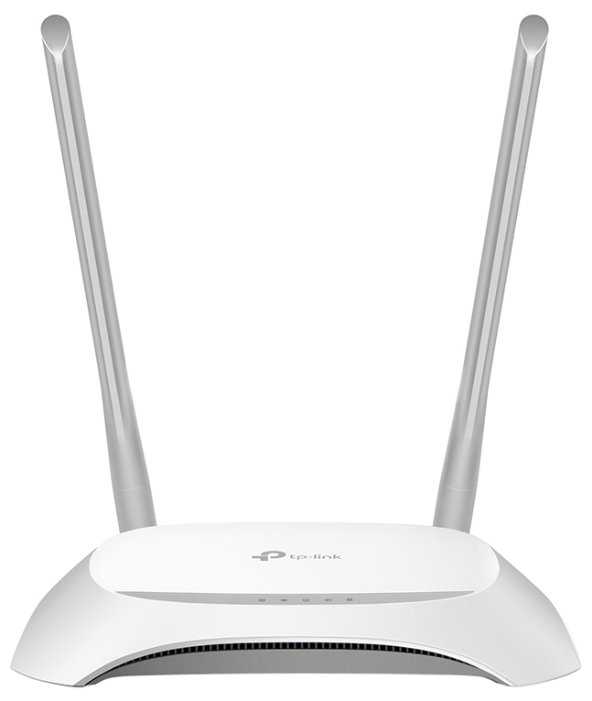
Отзывы о Wi-Fi роутер TP-LINK TL-WR850N
Где купить
Wi-Fi роутер TP-LINK TL-WR850N
|
Tp-link TL-WR850N TP-Link (ISP) N300 Wi-Fi роутер PROJ (ISP) | Яндекс Маркет | 4 090 ₽ | Посмотреть |
539 отзывов пользователей o TP-LINK TL-WR850N
Пользовались
TP-LINK TL-WR850N?
Поделитесь своим опытом и помогите другим сделать правильный выбор

Квантум-5WPSD
29.05.2024
10/10
Оценка пользователя
Великолепно
Отличная модель
- + Пользуемся несколько месяцев, стоит за микроволновкой + скачки электричества - живёт, пробивает тоже добротно
НаноПилигрим-9AQSA
29.05.2024
10/10
Оценка пользователя
Великолепно
Отличная модель
- + да вроде норм
- - чуть позже дам знать вроде 🔥
Аэронавт-6MKGA
26.12.2024
10/10
Оценка пользователя
Великолепно
Отличная модель
- + Отличный повторитель, быстро подключил, все работает.
Пандорец-9VUZY
27.01.2025
10/10
Оценка пользователя
Великолепно
Отличная модель
- + Работает
Вояджер-1CHDN
14.01.2021
8/10
Оценка пользователя
Хорошо
Хорошая модель
- + Дизайн
- - Пока не выявлено
Гравитон-4DEMD
26.07.2022
4/10
Оценка пользователя
Ужасно
Плохая модель
- - На 4 год службы начал тупить
НеоВояжер-6CVKV
12.12.2023
10/10
Оценка пользователя
Великолепно
Отличная модель
- + 3 антенны, отлично ловит через 2 бетонных стены
Большая скорость передачи данных - - Не нашёл
Странник-3NALT
12.07.2024
6/10
Оценка пользователя
Плохо
Посредсвенная модель
- + Есть аггрегация каналов
- - Маркий корпус, иногда теряет связь, помогает рестарт
Зета-Орион-8CLAD
07.12.2023
10/10
Оценка пользователя
Великолепно
Отличная модель
- + отличный роутер, проблем не обнаружено
Спектр-9ARAQ
01.03.2025
10/10
Оценка пользователя
Великолепно
Отличная модель
- + Отличный роутер, теперь вай фай подцепляется еще пока машинк во дворе паркуешь
- - Очень высокая цена к сожалению
Астрон-4PPDH
07.12.2023
10/10
Оценка пользователя
Великолепно
Отличная модель
- + Сразу настроился и начал работать
- - Шнур для соединения интернета короткий
Спектр-2YGSQ
07.12.2023
10/10
Оценка пользователя
Великолепно
Отличная модель
- + Работает прекрасно, интернет ловит на ура
Нейрон-8RTDR
13.08.2021
2/10
Оценка пользователя
Ужасно
Очень плохая модель
- - Очень слабый.
Фотон-3DDPH
27.07.2019
10/10
Оценка пользователя
Великолепно
Отличная модель
- + Отличный роутер, просто супер- и связь моя техника не теряет, и перезагружать не просит- просто спокойно...
Эксопилот-6XLNA
25.08.2020
8/10
Оценка пользователя
Хорошо
Хорошая модель
- + Работает нормально по своим параметрам. Зона покрытия в квартире отличная. Перезагружать не приходилось за несколько дней пользования. Две антенны смотрятся лучше, чем одна.
- - Отсутствие USB порта не есть хорошо. Кому то очень...
Вояджер-1AVUA
23.03.2021
10/10
Оценка пользователя
Великолепно
Отличная модель
- + Отличный роутер, связь держит отлично, сбоев нет уже год, настраивать легко, что еще надо?
- - нет
Аэронавт-9JVYU
17.01.2011
10/10
Оценка пользователя
Великолепно
TP-LINK TD-W8960n Wireless N ADSL2+ Modem Router, A Review[...]TP-LINK TD-W8960n Wireless N ADSL2+ Modem Router, A ReviewIntroductionIn last week's column I talked about the issues I've had with the True supplied Billion Sky Modem and the Humack modems they carried previously.Basically, despite many visits by True technicians, I could never get these two to work without dropping every few hours, often needing to be power-cycled to reset, and how after as little as a month old they'd progressively get worse. I have a box of over 10 of these, all in various stages of remaining function. The point with this was, even a brand new Billion Sky from the box resulted in the more than occasional drop and often needed to be power-cycled.Finally I went to Pantip Plaza and asked for the best modem they carried. The True technicians had already told me the Dlink was the one to get, and the shops at Pantip confirmed this. At first I was excited with the Dlink DSL-2542b. More speed, no drops, and a reasonable price of baht 1800. Even though it took two True technicians two days to get it to work in a bridged mode with my Linksys WRT-350n Wireless N router, I was still happy because it was the first modem that worked without dropping. Then after less than 24 hours it dropped and required power cycling. It seems that every 24 hours, give or take, the Dlink would drop until it was power cycled.A reader wrote in explaining that when running torrents the modem required an unusual number of connections and they probably weren't clearing from the buffer without a power-cycle reset. This makes sense, though I had no way to verify. Thank you!I'd already ordered another unit, just in case, and it was on its way from the US. In the few short weeks it took for the new unit to arrive, the Dlink DSL-2542b's performance degraded noticeably. Speed decreased, power-cycle resets were required every 4-5 hours vs every 24 hours, and it started dropping like the Billion Sky from True. I exchanged it at the Dlink service center for a new one, and in less than 7-8 days of use it was acting the same.And then the new unit arrived.TP-Link TD-W8960n Wireless ADSL2+ Modem RouterTP-Link is a little known Chinese company in Shenzhen China. As most of the big name routers, including the Dlink and Billion Sky are manufactured in China, the TP-Links origin didn't bother me at all.Unpacking the TD-W8960n I noticed it had very clean lines, was small and light, and included the power supply, two antennas, two RJ11 phone cables, one RJ45 connection cable, and a single ADSL splitter/filter in the event you use a phone on the same line.The TD-W8960n is a single band (2.4ghz) wireless N/B/G wireless router with four physical Ethernet RJ45 ports, a standard phone line connection, and is rated to handle up to 24mbps download and 3.5mbps upload. As my connection is only 16mbps download and 1mbps upload this worked out fine.It includes built in VPN tunnel capability, QoS protocols directly supporting most popular applications, a 300mbps Wireless N transmission rate, and just about any security protocol you can imagine. I won't go into all of the features, but except for the 802.11a band (5ghz) I can't think of anything it doesn't have. I've had the 802.11a band on my wireless routers for the last 6-7 years and they never get used so no big loss there.The more I read over the specifications the more impressed I became. This unit doesn't lack for anything!The front panel LED's are standard, power, internet, ADSL connection, QoS enabled, and 4 WLAN Ethernet port activity/connection LED's.InstallationThe first thing I noticed when I carried this small device (8x5x1 inches) to my office where my networking equipment is located, is that it would replace an equally large Dlink modem/router AND a much larger Linksys WRT-350n wireless N router. The extra space and cleaner look is much appreciated.Back panel connections are standard. One standard phone line port to connect to your phone wall outlet, four Ethernet RJ45 ports, a reset button, a power connector, and an on/off button. The two antennas screw on in seconds.For me connections were easy. I connected it to my phone line, and then a single RJ45 Ethernet patch cord into my Cisco 8 port gigaswitch already connected to my NAS devices and the 6 cables routed to different locations in my home. I connected the phone line, the one Ethernet patch cord, plugged the power transformer into my UPS device, and screwed on the antennas to their threaded mounts. I powered it on and left the office.SetupSo far the TP-Link TD-W8960n shined, but where it really shined was in the setup. Type into your browser URL bar "192.168.1.1" and you're immediately rewarded with the login window. The default `admin/admin' user/pass combo gets you into the main menu.I'm not going to go into the 50 pages of setup choices the user manual lists. I'll just tell you I found their user interface totally intuitive and in less than five minutes
Плазмоид-2WRIR
21.03.2012
10/10
Оценка пользователя
Великолепно
We have an observatory located around 600 feet from our main house across two hills and through some trees. The observatory has power but no internet. Our house is two story, and on the second level has a clear line of sight to the remote building.I purchased two of these TP-Link TL-WA5210G High Power Wireless Outdoor CPE in order to create a point to point wireless network to be accessed from this remote location. After setting up the first one just outside of a window on the first floor pointing toward the building(but no line of sight), I was surprised to be able to see the Wifi network(100% strength) both infront of and inside the building. Then to just test it I went further away to around 1200 feet and the signal went down to about 60% strength.When I tried to access to the network however, both iPhone and laptop could see the network yet unable to connect to it. I went back to the TP Link settings page(via Chrome browser 192.168.1.254) and downloaded the most recent firmware update. That also did not fix the issue. I added WPA2 security and set those settings to automatic and that allowed me to connect to it. I have read various reviews claiming issues with the quick setup, and adding security was the solution for me.I changed locations and moved it upstairs away from my router and actually used a Netgear 85Mbps Powerline Network Adapter Kit - XETB1001 to connect it to the internet. I was worried about the power injector because I have 2 powerline systems running in the house but I saw no interference with or from either system. I positioned the TP-Link directly towards the building through a couple of branch-less trees but otherwise unobstructed view. It is behind a window(inside the house) at the corner of the house that is closest to the building.After moving it upstairs the signal strength is 100% at 2000 feet and I haven't checked any further. Inside of the building that is steel, tin, and wood I get perfect reception and fast speeds. I had planned to set up a second one to act as a relay but I ended up not even needing it. I am very surprised at the quality, ease of setup, and features available for a product in this price range. It was a complete solution for my situation and I see the range of possibilities for commercial and retail use. My biggest surprised was how robust the browser control panel was, with included explanations of every menu item on EVERY screen. Very happy about that.I have a little networking knowledge but this was completely new thing to me, and within half an hour I was good to go.My hope is to mount it to a PVC pipe outside of the house facing the same direction, as it is designed to be outside I feel it will increase the range even more when properly setup. Everyplace I read said this is optimized for rural use, so I feel if you have open fields and hills without much obstructions, you can probally get the ranges they advertise(when properly installed) and if you need more range you can always setup an external antenna like this Hawking HiGain Directional Antenna, indoor/outdoor, 14dBi HAO14SDP I was looking at.
Синтрон-5WWZG
11.01.2013
10/10
Оценка пользователя
Великолепно
First off, the product works well once you get it set up. However, if you have Centurylink as your DSL provider, be aware that the setup instructions given by TP-Link will get you to a point where you are showing that you have the modem/router set up correctly but you will not receive a signal wirelessly.When I called TP-Link Customer service to walk through setting up (because it's not working they way they said to set up) they said I would have to contact Centurylink for the info needed to set up. Then, Centurylink (because they apparently only want you to rent/buy modem/routers from then instead of buying them elsewhere cheaper and with faster delivery) will NOT give you the info needed to set up unless you buy some monthly "help with non-Centurylink modems" plan, or buy one of their modem/routers!!!After 4 phone calls between TP-Link and CenturyLink which were mostly a waste of time (except the last one to CenturyLink, I did have the satisfaction of telling them what I think of their ways considering the amount of $$$ I pay them for both my home and my office telephone and DSL accounts), I finally figured out the settings needed to set up with Centurylink, and because I am a nice person I will give them to you so you won't have to spend 4 hours and much frustration getting this set up (I set up 2 of them, one for office and one at home, the home one took 4 hours, the office one maybe took 4 minutes because I had the settings straight).1. Connect everything per TP-Link Instructions2. Open IE (will show unable to connect to internet)3. In address bar type 192.168.1.14. For Username type in: admin and for Password type in: admin5. Choose Quick Setup6. These are the important things you need which Centurylink will refuse to provide: VPI: 8, VCI 35, WAN Link Type: IPoE, and it's a Dynamic IP Protocol (you will have places on the setup where you choose this information)Hopefully, Centurylink won't change any of their setting in order to further irritate future non-Centurylink modem/router purchasers.
Дроид-6CHLT
10.02.2012
10/10
Оценка пользователя
Великолепно
Hello and thank you for reading my review. First I think it would be beneficial to give a very brief explanation of my setup and why I was buying this access point.I'm a typical home user. I have an intermediate knowledge of computers, but certainly not an "IT" level of knowledge. In my house I have an 802.11n router in my basement next to my cable modem. From here I have a gigabit switch and patch panel that routes cat5e cable to various rooms in the house. For my wireless devices however, the signal strength was rather poor in the opposite corner of the house so I needed something to extend the range which leads me here.For my purposes I could use two different modes of operation. I could use this either as a repeater to extend the range, or as a standard access point.A repeater will take any traffic it receives and simply retransmit it along, which is after all why they call it a repeater. The problem with this is, 802.11 wireless drops off in datarate as range increases. At the extreme edge you will be down to 1 Mbps even if connected with an 802.11n device. So as an example if your router has a range of 300 feet, you could put this device in at the 300 foot line, and still communicate with your router 600 feet away (from the router). However, even if you were 310 feet away from the router (so only 10 feet away from the access point) your speed will still be only 1 Mbps, your speed will be limited by the weakest link (300 feet between router and access point). So why use it? It gives you the range without needing any cords aside from power. I tried this mode and it worked well.For me though, since I have the cat5e routed through the house, I decided ultimately to set this up as a traditional access point. This lets me be out of range of the router, yet if I'm close to the AP I can still get the full 802.11n speed. I also used the included Power over Ethernet (PoE) module for two reasons. One, it lets me put the access point anywhere without regard for an outlet needing to be nearby, and two I can plug the PoE module into my UPS (Uninterpretable Power Supply) along with the rest of my networking equipment to keep it running in a power outage. The PoE module is very small and easily placed anywhere along the line.So far it has run perfectly and I have not needed to power cycle it once in the two months of ownership. I have the AP set up with the same SSID as my router so my devices will automatically connect to the stronger. I now have 4-5 bars of signal strength no mater where I am, and throughput more than high enough to stream everything I've tried so far.This access point does feature other modes of operation, but I have not tried them so I won't talk to them.If I encounter any problems, I will be sure to update this review. In closing, I would say this access point is a good idea for any home user. You can use it as a repeater if you don't have any cat5e wiring, or use it as an access point if you run a network cable to your base router. It's also useful if your router does not not have built in wireless, in which case you could configure this as an access point and just connect it to your router with them both in the same room.
Квазар-3LERY
03.12.2012
6/10
Оценка пользователя
Плохо
I bought this to extend my home WiFi range. I currently use a Linksys WRT54G running DD-WRT firmware. It is placed in an upstairs bedroom and I felt that getting the Ap outdoors and up on my TV tower should give much greater range. I hung the TP Link on the tower, connected it, and started checking the signal compared to the Linksys using a Nexus tablet running WiFi Analyzer. In most places, the Linksys had a better signal by at least 10 dB. Since I was using the built in directional antenna, I tried to get in line with the antenna's main lobe. This helped the signal strength some. I got maybe 400 feet away before both signals faded away. Even at extreme distances, the Linksys was as good or better than the TP link and this was going through walls and at a lower height. Next, I connected a 12 dBi omni antenna I had previously mounted on the tower. Obviously, the antenna's gain was greatly exaggerated. Signal strength was lower than before. It was uniform in all directions, just lower. That is not the fault of the TP link AP however and is just included as a point of reference. I did find the TP Link easy to set up as an access point and my Nexus was able to connect and access the internet easily. All in all I have to say the advertising for this unit is misleading. If you read the fine print, you will see that the power is rated as ERP using a 12 dBi antenna. This means that the actual output is only +15 dBm. I have a co worker who has internet but no wifi. I think I will give this and a small switch to them since they only need coverage in their home.
Синтрон-0QUHW
08.08.2012
10/10
Оценка пользователя
Великолепно
Setup was fairly easy. The CD ROM for setup was useless for me- kept getting error 006. Luckily all I had to do was to do was go to the web address: 192.168.1.1 and use the online setup while connected with my Aircard and the TP-Link's ethernet cable. I had to call Century Link to get my username and password; also, ppp= ppoe; vpi=0; and vci=35. I obtained all that from Century Link Tech Support; along with the obligatory warning that I would have to get an IT person out to my house to setup my router/modem because I didn't get it from them. Fortunately, the TP-Link "Quick Setup" tab worked great and I was up and running in minutes. There is also a downloadable 13.0 MB "EasySetupAssistant" on TP-Link's regular web site.An "Advanced Setup" tab exposes numerous other settings for highly customizing your connections. In addition, there is a "Diagnostic" tab that quickly assesses multiple aspects of your TP-Link's connection. TP-Link's online tools appear comparable to those of Netgear, etc. However, as with the others, there is limited helpful info for understanding and adjusting advanced parameters. Consequently, if one needs to make advanced adjustments such as QoS one has to consult internet resources for a "primer" on all the advanced parameters and capabilties.The "Device Info" tab on the TP-Link web site lists a firmware version for my unit that, as far as I can tell, does not compare meaningfully to the version numbers of the most recent Firmware avilable for download . Consequently, I chose not to install it as the unit is working fine- would not want to brick it.All in all I'm quite happy with the TP-Link TD-W8960N v3 0x00000002 wireless modem/router.Thanks to all those that wrote reviews saying it worked with Century Link; that helped in my decision. It saved me $41.00 over getting the Century Link sold $100.00 unit that is rated much worse (Actiontec).
Синтрон-2UKGY
22.03.2011
4/10
Оценка пользователя
Ужасно
I found this router delightfully quick and easy to setup, unlike the significantlymore expensive Netgear, D-Link, and other major brand name wireless routers I've owned.It is also the cheapest priced router I've owned. It runs cool.CONS. I find the signal power is good. People who complain about signal power may want to considerthe quality of their PC's built wireless card or its driver. You can easily and cheaply compensate for a lackluster laptop wireless card by add adding a USB Wireless adapter like the high gain Alfa adapter I bought @ Amazon for under $17. Add the TP-Link router and a powerful USB adaptor and you will still be less out of pocket than with a major brand wireless router.Setup was exactly what TP-Link leads you to expect. I followed the user guide. In a fewminutes I was up and running. It took more time getting Windows 7 to recognize Tp-Link and connectthe first time. Ubuntu Linux (10.10) was fast and easy I needed no software. Just entered the routername (name I gave it during setup) and the password (key).Buyers need to be much more specific when posting about computing products. The specificity needs to begin intheir own minds. Then, they can correctly identify problems and solve them and accurately report to other buyersthe quality and failings of products.Here is what I found. Ease of setup, ease of connecting but connection was varied. Often, connection and speed was excellent in the beginning but it didn't last. For a week I tried different router channels, I tightened security measures. I now have a consistently excellent, fast network. How? I connected an Alfa High Gain adapter to my Thinkpad T-60 and was surprisedthat I got excellent results, no dropped connections, consistent fast speed. The T-60 uses Ubuntu Linux 10.10 32-bit Gnome.I setup the network with a Thinkpad Edge using Ubuntu Gnome, 64-bit. After running through various logical possibilities,I decided to run Windows 7 Home. I got the exact same excellent wireless result as I get with the T-60. Conclusion?There is nothing wrong or faulty with the TP-Link, nor is there an inherent problem with Ubuntu and the Network. The problemis some combination of Ubuntu 10.10 64-bit & its driver for the Edge wireless card, for in the same laptop, with the samehardware, Windows 7 Home duplicates the same superb result as I get with the T-60. The TP-Link WR340G is an excellent Wireless and Wired router. Unless you have a defective unit, if you have the problems described by several people here, most likely it is not the router. Don't rush to post here and tell people the router is no good. Keep trouble shooting.Now, I'll see how long it lasts. Some users report their router died after a few weeks, I wonder how many were using their unit without a surge protector. (Those cheap power sticks you get in stores are not real surge protectors. Real surge protectors begin at about $36. A lot of people lose their expensive routers because they fail to use a real surge protector.By the way, the same is true for a lot of electronics these days, microwaves, convection-toaster ovens, radios, desktop computers, etc. Educate yourself about surge protection and surge protectors and act accordingly. You will save a lot of money. I've been using them for years and my electronics last years longer than anyone I know. Its mind boggling to me how many people think nothing of dropping $2000 for a TV but will not spend #50 for a surge protector.
Квантум-4DVCG
27.01.2012
6/10
Оценка пользователя
Плохо
Updated 2012/02/08First of all, no, I would not recommend this device unless you already intend to replace the firmware no matter what device you are getting.The hardware for this does seems to be fairly good: I get great signal from it and haven't had it crash from overheating, etc.However, TP-Link's firmware for this device has some bugs in the wireless functionality causing it to stop working in some conditions (no longer can connect to it, but it still transmits an unusable wireless signal), requiring a reboot of the access point. I have two of these - same issue. In my case, it did still respond over the wired connection when this happens, others I've heard haven't been as "lucky." No new firmware updates to fix any issues for almost a year.The problem is only software, though. There are firmware images from the current development version of OpenWrt that do work well on this device and do not have this problem. Note that TP-Link states that any issues you have as a result of using third-party firmwares will not be covered under warranty, probably fairly standard policy.The non-release OpenWrt images provided for this device on the OpenWrt site do not include the web configuration tool (named luci) by default, last I checked. You must build your own or find one someone else has built for including luci by default (unless you're fine with configuring it from the console with telnet and ssh). If you have a computer with Linux and enough free hard drive space it isn't too hard to do, though. Release versions of OpenWrt do include luci, if I remember right, so there will eventually be ready-to-use images provided for it.I have two of these access points. Currently one is connected to my network and providing wireless access while the other connects to it to provide wired access to multiple devices in another room by having the WDS function on both access points enabled and plugging it into a network switch. I bought the second one knowing that the stock firmware was unusable for me, but it was one of the cheaper options at the time and I suppose I just didn't want to get something else I didn't know I could get working reliably.
Показаны отзывы 409-432 из 539.