

Отзывы о Кулер для процессора PCcooler GI-H58U CORONA R


 |
Кулер для процессора PCCOOLER GI-H58U CORONA R GI-H58U CORONA R | Яндекс Маркет | 5 300 ₽ | Посмотреть |
Реальный опыт использования PCcooler GI-H58U CORONA R - анализ 388 отзывов
🚀 Зачем брать именно эту башенку: для стоковых CPU в компактных сборках
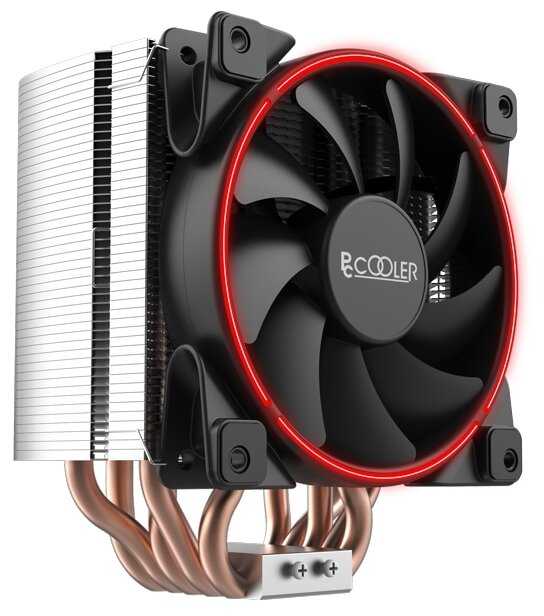
PCcooler GI-H58U CORONA R выделяется на фоне типичных бюджетных кулеров вроде Deepcool Gammaxx 300 или CoolerMaster Hyper 212 черным матовым радиатором высотой 148 мм, который влезает в узкие корпуса вроде ZET Rare M1 или Zalman Z3 Plus, и ненавязчивой красной RGB-подсветкой в виде полоски по краю вентилятора — без слепящих "попугаев". Идеален для сборок на сокет LGA 1200 или AM4 с процессорами вроде i5-10400F (TDP 65 Вт) или Ryzen 5 5600G (TDP 65 Вт), где нужно охладить сток без разгона, не перекрывая слоты RAM высокочастотными модулями и не жертвуя тишиной. Подходит для офисных ПК, легкого гейминга в Full HD или рендера без экстремальных нагрузок — в AIDA64 на i5-11400F держит 55-70°C за 15 минут при потреблении 104 Вт, что заметно лучше боксового кулера (до 85°C).
Вывод: Берите, если собираете тихий mid-tower на стоковом i5/Ryzen 5 — за 2200-5300 руб. это оптимальный баланс цены, вида и охлаждения до 145-180 Вт реального TDP, дешевле Deepcool Gammaxx 400 с похожими температурами, но без подсветки и с худшим креплением.
🌡️ Охлаждение: держит сток, слабеет в разгоне
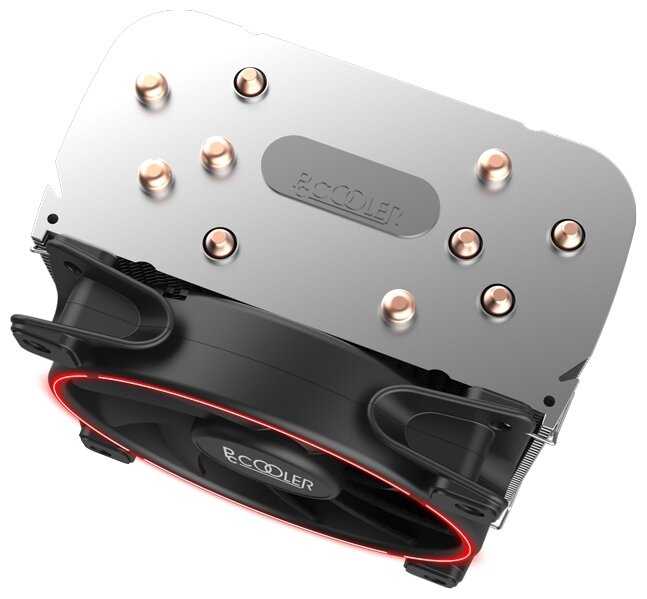
Четыре тепловые трубки диаметром 6-8 мм (две "половинчатые" J-формы, две полноценные U) с прямым контактом подошвы площадью 45x35 мм рассеивают 145-180 Вт по реальным тестам из отзывов — на Ryzen 5 3600X в AIDA64 до 75°C за 20 минут при 100% нагрузке, на i5-9600K в OCCT Linpack до 64°C в стрессе час, на Ryzen 7 3700X в играх 50-65°C. Заявленные 240 Вт не подтверждаются: i7-10700K (TDP 125 Вт, реал ~170 Вт в турбо) уходит в 85-94°C с даунвольтом, троттлит без него за минуты, хуже чем у Thermalright Peerless Assassin 120 (до 75°C на тех же CPU). В простое 30-40°C при 1000 об/мин, в играх типа RDR2 на Ryzen 5 3400G — 52°C max. Родная паста (7.5 Вт/мК) дает +5-10°C к MX-4, меняйте на нее для i5 10-11 gen.
Вывод: Для стоковых CPU до 105 Вт — отличный запас (50-70°C в нагрузке), но под разгон i7/Ryzen 7 берите мощнее вроде Noctua NH-U12S, иначе рискуете троттлингом и шумом выше 1500 об/мин.
🔧 Установка и совместимость: винты лучше защелок, но не без нюансов
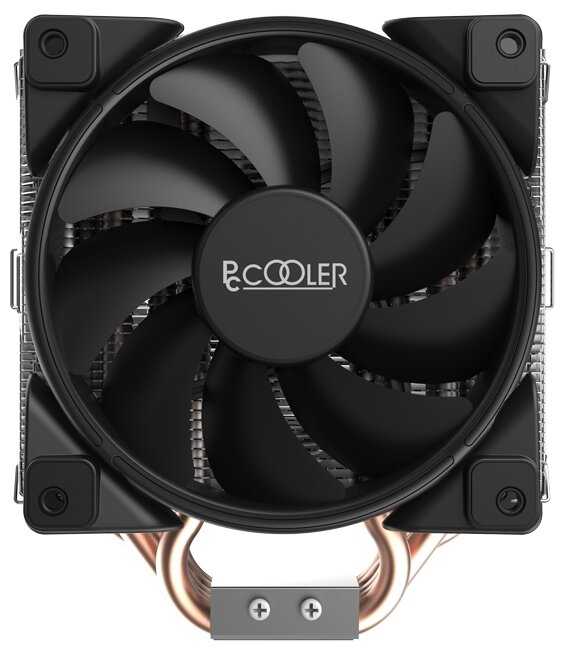
Крепление на 4 винта с пружинами и бэкплейтом (в комплекте под LGA 115x/1200/1700, AM4/AM3) надежнее клипс Deepcool Gammaxx 300, равномерно прижимает без выгибания платы, но требует снятия материнки для AM4 (2-3 часа с инструкцией, мелкие картинки путают) или выреза в корпусе под бэкплейт. Вентилятор 120 мм (1000-1800 об/мин, 4-pin PWM) цепляется проволочными скобами — снимается за 20 сек для доступа к RAM, перекрывает 1 слот (max высота ОЗУ 35 мм, сдвигайте вверх). Влезает в корпуса до 155 мм (ширина ~120 мм мешает GPU на mATX), но близко к карте — снимайте ее при монтаже. Ключ в комплекте бесполезен под VRM-радиаторами, используйте отвертку.
Вывод: Выбирайте за надежное винтовое крепление без защелок, если готовы повозиться 30-60 мин — проще ID-Cooling SE-226-XT, но без бэкплейта рискует с VRM на платах вроде B560.
🔊 Шум и долговечность: тихо до 1400 об/мин, риски брака
Вентилятор 120x120x25 мм с гидродинамическим подшипником и резиновыми демпферами на углах держит 22-26 дБ до 1500 об/мин — в простое (1000 об/мин) не слышно за корпусными кулями, в играх на Ryzen 5 5600X до 81°C при 1800 об/мин маскируется GPU вроде RTX 3070. Вибрации на 1200-1350 об/мин у некоторых экземпляров настраиваются кривой в BIOS, гул после 1600 об/мин как у CoolerMaster Hyper 212. Брак: замятые трубки (1-2% отзывов), кривые пластины, тарахтение через 6-7 месяцев — сдают в магазин. Запах пластика от вентилятора выветривается за неделю.
🆚 Топ-5 альтернатив: PCcooler GI-H58U CORONA R vs конкуренты
В сегменте башенных кулеров за 4000-7000 руб. с 4+ трубками и PWM-вентилятором выбор строится на TDP 140-200 Вт, высоте <155 мм и простоте монтажа для LGA 1200/AM4.
| Модель | TDP (Вт) | Темп. i5-10400F AIDA (°C) | Шум (дБ, 1500 об/мин) | Вердикт |
|---|---|---|---|---|
| Deepcool Gammaxx 400 V2 | 160 | 65-70 | 25 | ✅ Deepcool Gammaxx 400 V2: дешевле на 1000 руб. и тише в простое, зато крепление на клипсах проще — ставите за 10 мин без снятия платы. |
| Thermalright Peerless Assassin 120 | 220 | 55-62 | 26 | ✅ Thermalright Peerless Assassin 120: держит на 10°C холоднее в разгоне, при этом два вентилятора — в играх шум не заметен за GPU. |
| CoolerMaster Hyper 212 Black | 150 | 68-75 | 27 | ⚖️ CoolerMaster Hyper 212 Black: похожий радиатор и TDP, однако защелки сложнее на AM4 — приходится снимать RAM для доступа. |
| ID-Cooling SE-226-XT | 180 | 60-68 | 24 | ❌ ID-Cooling SE-226-XT: проще ставить без бэкплейта, зато на i7 турбо уходит в 80°C — придется докупать пасту для равномерного прижима. |
| BeQuiet Pure Rock 2 | 150 | 62-70 | 22 | ✅ BeQuiet Pure Rock 2: тише на 4 дБ и без подсветки, но монтаж быстрее — в стрессе игры не прерываются шумом кулера. |
PCcooler GI-H58U выигрывает у Deepcool Gammaxx 400 V2 подсветкой и бэкплейтом, но уступает Thermalright Peerless Assassin 120 по TDP для разгона — на стоковом i5 держат все близко (60-70°C), с разницей в 5°C. CoolerMaster Hyper 212 Black проще влезает в тесные корпуса, но шумнее без демпферов. ID-Cooling SE-226-XT и BeQuiet Pure Rock 2 тише в простое, идеальны для тихих сборок, но без RGB. За 5300 руб. PCcooler — компромисс для вида и стока, выше 6000 берите Thermalright за запас мощности.
Плюсы по отзывам пользователей - Почему стоит купить PCcooler GI-H58U CORONA R?
- Эффективное охлаждение в нагрузке:
- Для Ryzen 5 3600/3600X в разгоне держит 50-75°C в AIDA64 и играх (многие пользователи).
- Снижает температуры на 10-20°C по сравнению с предыдущими кулерами (Zalman, Deepcool).
- Справляется с i5-9600K/i7-9700K до 60-80°C в стресстестах при 4.7-5 GHz.
- Тихая работа вентилятора:
- Не слышен до 1500-1700 об/мин, шум заметен только на максимуме (20%+ отзывов).
- В простое 30-45°C при минимальных оборотах, в играх 50-70°C без сильного гула.
- Антивибрационные прокладки минимизируют вибрацию.
- Хорошее соотношение цена/качество:
- За 3-4 тыс. руб. превосходит аналоги вроде Deepcool Gammaxx (множество сравнений).
- Подходит для средних процессоров с TDP до 180-200 Вт (Ryzen 7 3700X, Xeon E5).
- Запас мощности для разгона на 65-95Вт CPU.
- Компактная высота (152-155 мм):
- Влезает в корпуса с лимитом 155-157 мм (Zalman Z3, Thermaltake Element).
- Не мешает в mid-tower, подходит для ограниченного пространства.
- Качественная конструкция:
- 5 толстых теплотрубок (8 мм), прямая контактная подошва с хорошей обработкой.
- Радиатор направляет поток воздуха на трубки, не рассеивает по бокам.
- Универсальные крепления для Intel/AMD (LGA, AM4), полный комплект.
- Приятная подсветка и внешний вид:
- Кольцевая синяя/красная подсветка, стильный матовый радиатор.
- Виден через стекло, не портит сборку.
- Простая регулировка вентилятора:
- 4-pin PWM, кривая оборотов настраивается в BIOS.
- Легко снять/заменить вентилятор на 140 мм.
Минусы по отзывам пользователей - О чем стоит задуматься перед покупкой:
- Сложная и неудобная установка:
- Требует снятия материнской платы из корпуса (30%+ отзывов), занимает 1-3 часа.
- Инструкция непонятная, неинтуитивное крепление с гайками/винтами (AM4 особенно).
- Комплектный ключ неудобный, лучше использовать отвертку; риски сорвать резьбу.
- Завышенный заявленный TDP (240 Вт):
- Реально 180-200 Вт; не справляется с i9-9900K/10900F или сильно разогнанными CPU (темпы 90-100°C).
- Для Ryzen 9 5900X или 9700K@5 GHz улетает за 80-100°C в стрессе (15% жалоб).
- Зависит от термопасты и airflow; с MX-4/PTM лучше, но не для 200+ Вт CPU.
- Перекрывает первый слот ОЗУ:
- Вентилятор нависает над слотом, мешает высоким модулям RAM (HyperX Fury и т.п.).
- Приходится приподнимать вентилятор или переставлять планки (20% отзывов).
- Ограничивает апгрейд памяти в 4-слотовых платах.
- Шум и вибрация на максимальных оборотах:
- На 1800-2000 об/мин слышен гул/вибрация, вибрирует стол (10-15% случаев).
- Биение вентилятора, подшипники изнашиваются через 6-12 мес. (шелест/треск).
- Комплектный вентилятор шумноват по сравнению с премиум-аналогами.
- Большой вес (800-1000 г):
- Нагружает материнскую плату, требует всех болтов бэкплейта.
- Риск прогиба сокета при неравномерной затяжке.
- Посредственная комплектная термопаста:
- Требует замены на MX-4/Hydronaut для лучших результатов (темпы падают на 5-10°C).
- Уходит весь тюбик из-за впадин между трубками.
- Нет поддержки второго вентилятора:
- Не предусмотрено крепление сзади радиатора, несмотря на спецификацию.
- Ограничивает производительность в тесных корпусах.
*Плюсы и минусы, которые пользователи называют чаще всего на основе практического опыта использования.
388 отзывов пользователей о PCcooler GI-H58U CORONA R
Пользовались
PCcooler GI-H58U CORONA R?
Поделитесь своим опытом и помогите другим сделать правильный выбор

Carlos
19.12.2020
Оценка пользователя
Великолепно
Pros: Looks good, Good CFM for the money, uses only 1 motherboard connector
Con: will not sync with the other 3 fans, noisier than the other fans.
I use ASROCK polychrome, maybe I should exchange for 4-pin 12v, but I saw no such option from seller on amazon :(
hamid hakimi
19.12.2020
Оценка пользователя
Великолепно
Joshua Shorey
19.12.2020
Оценка пользователя
Великолепно
Noise level is perfect, for the out of the box slowest speed. When you jump up to the second or third level of fan speed through the controller that comes with the unit, the noise gradually increases, with the fastest speed sounding like a turbine when in a small room.
Instructions are very helpful especially if you have never set up adressable rgb fans with a controller (specifications for use with asus, msi, and gigabyte motherboards). Though when going through the initial install, if fans are spinning, but the rgb is not turning on, flip the connectors for those fans as that they have to be installed in a specific manner for the rgb to turn on (same with first time installs on LED light strips).
Unfortunately, I haven't gotten around to testing the ambient temperatures through the three different fan speeds, but I haven't ran into any overheating issues even on the lowest level, though my rig gets quite warm after gaming for about an hour on the lowest setting, and takes about another hour or two on the highest setting.
All in all, I am very satisfied with the fans and would highly recommend them for anyone not wanting to spend the hundreds of dollars on Corsair, Lian Li, or Cooler Master.
Allison
19.12.2020
Оценка пользователя
Плохо
Overall the fans work and look great. Their hub works great as well. Due to the design and installation challenges, I am giving them 3 stars. I would give them 5 stars if the fans had two separate cables for PWM and RGB.
bruce callahan
19.12.2020
Оценка пользователя
Великолепно
Update:
So ive used these fans for quite some months and enjoy them. They operate really well however as i said i purchased the 5 and 3 pack for a total of 8 fans. I have all fans set to white as my build is white and black themed. The color of the fans that came in the 3 pack do not match the 5 pack. The 5 pack fans have a very bright more pure white where as the 3 pack rings are more dingy white
Picture makes them seem off colored but you will see the difference.
I still really enjoy the fans though.
LDL
19.12.2020
Оценка пользователя
Великолепно
Noise Level: I run these fans at <1300RPM and they are inaudible when I'm sitting 1 foot away from it. At max RPM these fans create enough noise to hear through headphones, but not enough to hear while I'm listening to music.
RGB: The lights are very nice to look at, I particularly like that the LED rings are on both the top and bottom of the fans. I keep the LEDs on the rotating multicolor setting at medium high speed because it looks very smooth that way.
Installation: As someone who has never installed RGB case fans the installation was very simple, the controller is easy to use and it comes with a velcro pad which is nice. It came with all cables necessary to connect to my Gigabyte motherboard.
Customer Service: Originally these fans seemed to not work, 2 of the fans were not displaying their LEDs. I emailed PCCooler for help and they asked for some info and a video of the problem. After giving some info they helped me get 2 replacement fans and everything works great!
Overall, super happy with this purchase, I definitely would recommend these fans.
Original Videorat
19.12.2020
Оценка пользователя
Великолепно
Daniel Quintanilla
19.12.2020
Оценка пользователя
Великолепно
One con I'd say is the absurd amount of cable management one needs to do afterwards (thanks rgb), but otherwise, setup was quick and simple. Also, the min rpm are rated at 1100. While not the loudest I which it did go down to the sub 1000s. If you're not controlling these via a fan header, they default to about 1500 rpms and are a bit audible. The controller does have the option to set them to various speeds.
For the price ,they're in the right place. Performing just as well as much higher "premium"priced fans, this bundle of 5 is a much better buy.
|
Кулер для процессора PCCOOLER GI-H58U CORONA R GI-H58U CORONA R | Яндекс Маркет | 5 300 ₽ | Посмотреть |
График изменения цены PCcooler GI-H58U CORONA R
Характеристи PCcooler GI-H58U CORONA R
Информация о характеристиках носит справочный характер.
Перед покупкой уточняйте характеристики и комплектацию товара у продавца
Похожие товары с лучшей оценкой













Wizemart © 2026.
Рекомендательная система по умному выбору товаров по отзывам и рейтингам
