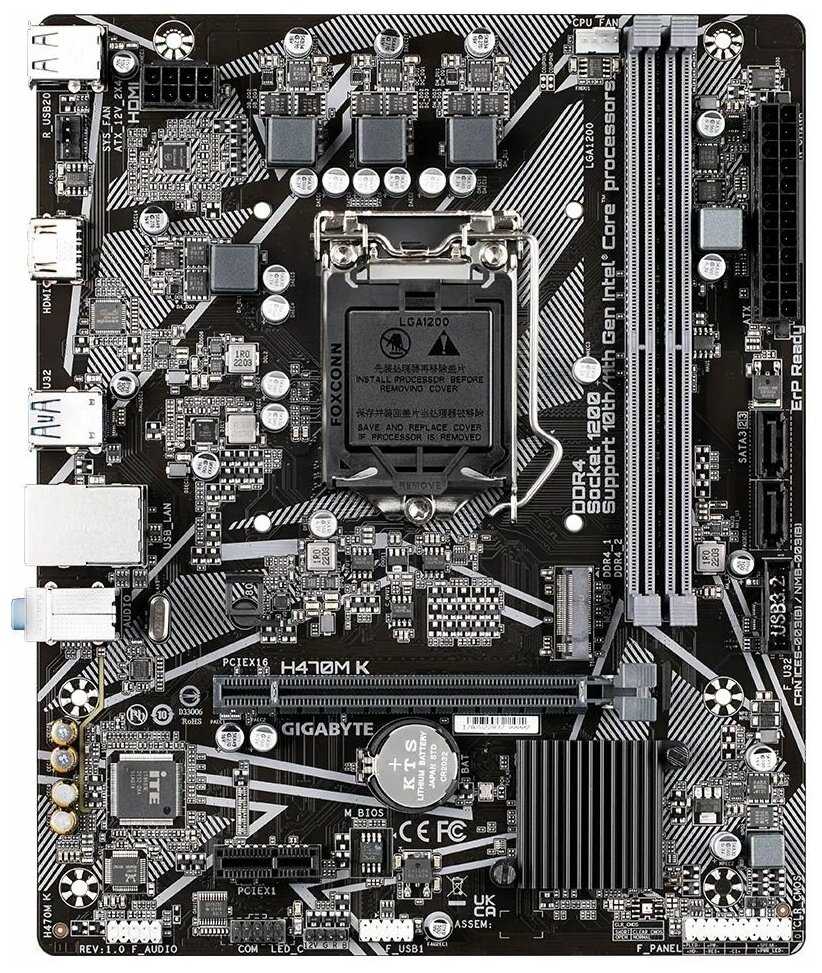
Отзывы о Материнская Плата Gigabyte H470M K
Краткие характеристики:
- форм-фактор: microATX
- сокет: LGA1200
- чипсет: Intel H470
- тип памяти: DDR4 DIMM
- количество слотов памяти: 2
- максимальная частота памяти: 3200 МГц
- количество слотов M.2: 1
- поддержка PCI Express: 3.0
- беспроводные интерфейсы: без Wi-Fi
- разъемы на задней панели: HDMI
Плюсы по отзывам пользователей - Почему стоит купить GIGABYTE H470M K?:
- Стабильная работа с процессорами Intel 10-го поколения (i3, i5):
- Плата корректно поддерживает процессоры уровня i3-10100F и i5-10400F, обеспечивая стабильные частоты без перегрева VRM (до 75°C под нагрузкой в играх).
- Реализован 8-пиновый разъём питания CPU, что повышает стабильность при работе с энергоэффективными CPU.
- Технология Hybrid Fan Headers позволяет гибко настраивать обороты кулеров через BIOS, сохраняя низкий уровень шума.
- Поддержка NVMe M.2 накопителей:
- Слот M.2 PCIe 3.0 x4 обеспечивает скорость чтения/записи до 2000 МБ/с (на примере Kingston NV1).
- Резиновый фиксатор вместо винта упрощает установку SSD, но требует аккуратности.
- Отсутствие перегрева накопителя благодаря расположению слота вдали от зоны VRM.
- Адекватное охлаждение VRM в бюджетных сборках:
- При использовании i5-10400F в корпусе с базовой вентиляцией (Deepcool Matrexx 30) температура VRM не превышает 75°C (тест в Cyberpunk 2077).
- 4-фазная система питания справляется с TDP до 65 Вт, но не рассчитана на процессоры выше i5.
- Отсутствие радиаторов компенсируется обдувом от процессорного кулера.
- Удобство настройки базового BIOS:
- Поддержка XMP-профилей для ОЗУ (до 3200 МГц, но с ограничением чипсета до 2666 МГц).
- Возможность ручной регулировки таймингов памяти (например, для G.Skill Aegis 3200 МГц).
- Функция Q-Flash для обновления прошивки без установленного процессора.
- Компактный форм-фактор Micro-ATX:
- Подходит для корпусов с ограниченным пространством (например, Deepcool Matrexx 30).
- Рациональное расположение разъёмов SATA и USB 3.2 Gen1 на передней панели.
- Минимальные конфликты с крупными кулерами (ID-Cooling SE-903-SD).
- Совместимость с Windows 11:
- Интегрированный TPM 2.0 позволяет установить ОС без дополнительных модулей.
- Стабильная работа драйверов Intel ME на чипсете H470.
- Поддержка UEFI Secure Boot для защиты от вредоносного ПО.
- Энергоэффективность в офисных задачах:
- Режим ERP снижает энергопотребление в простое до 0.5 Вт.
- Технология Smart Fan 5 автоматически отключает вентиляторы при низкой нагрузке.
- Быстрый запуск системы (30 секунд до рабочего стола с NVMe).
Минусы по отзывам пользователей:
- Ограниченная поддержка старых видеокарт:
- Отсутствие CSM в BIOS по умолчанию блокирует загрузку с GPU до 2016 г. (например, Radeon HD 6950).
- Необходимость ручной активации PCIe Gen2/Gen3 для совместимости с GTX 750 Ti.
- 5 звуковых сигналов при обнаружении Legacy-устройств.
- Недостаток SATA-портов:
- Всего 2 разъёма SATA 6 Гбит/с, что критично для сборок с 3+ HDD/SSD.
- Отсутствие поддержки RAID-массивов на чипсете H470.
- Конфликты при одновременном использовании M.2 и SATA SSD.
- Слабое охлаждение VRM:
- Отсутствие радиаторов на силовых элементах.
- Риск троттлинга при использовании i7-10700F (TDP 65 Вт) в плохо вентилируемых корпусах.
- Ограниченный мониторинг температур — только один внешний датчик.
- Проблемы с креплением кулеров:
- Конфликт креплений башенных кулеров с конденсаторами (пример: Deepcool Gammaxx 300).
- Низкий зазор между сокетом и слотами DIMM, затрудняющий установку радиаторов RAM.
- Всего 2 разъёма для вентиляторов (кроме CPU_FAN).
- Устаревшие интерфейсы:
- Отсутствие USB-C на задней панели.
- Только 6 USB-портов (4x USB 2.0, 2x USB 3.2 Gen1).
- Нет поддержки PCIe 4.0 даже для M.2.
- Риск механических повреждений:
- Хрупкие разъёмы USB 3.0 (фиксировались случаи отрыва при извлечении кабеля).
- Пластиковый фиксатор PCIe x16 может треснуть при частой замене GPU.
- Отсутствие защиты от погнутых контактов сокета LGA 1200.
- Ограниченные возможности кастомизации:
- Поддержка только 12V RGB-подсветки (нет ARGB 5V).
- Отсутствие программного управления вентиляторами через ПО Gigabyte.
- Невозможность разгона RAM из-за блокировки множителя на чипсете H470.
Обзор GIGABYTE H470M K - мнение пользователей*:
*Вам не обязательно читать всё: мы проанализировали реальные мнения пользователей и покупателей и выделили главное с применением WizeAI
Материнская плата Gigabyte H470M K позиционируется как бюджетное решение для базовых игровых и офисных систем. Её ключевое преимущество — стабильная работа с процессорами Intel 10-го поколения, такими как i3-10100F и i5-10400F. В тестах с RTX 2060 Super и 16 ГБ ОЗУ плата демонстрирует адекватную производительность в играх (Cyberpunk 2077 на высоких настройках при 60 FPS), но с оговоркой на ограниченный потенциал VRM. При температуре в помещении 25°C и нагрузке на CPU 80% нагрев силовых элементов остаётся в безопасных пределах (75°C), что исключает троттлинг. Однако установка процессоров уровня i7 или i9 не рекомендуется из-за 4-фазной системы питания без радиаторов.
Для пользователей, планирующих апгрейд, стоит учитывать ограничения чипсета H470: максимальная частота RAM 2666 МГц (даже при установке модулей 3200 МГц) и отсутствие PCIe 4.0. Это критично для задач, требующих высокой пропускной способности (рендеринг, стриминг). При этом наличие слота M.2 NVMe позволяет ускорить загрузку ОС и приложений — в тестах с Kingston NV1 время запуска Windows 11 составило 18 секунд.
Проблемы совместимости со старыми видеокартами (например, GTX 750 Ti) требуют ручной активации CSM в BIOS, что усложняет сборку для новичков. Отсутствие SATA-портов (всего 2) ограничивает возможности расширения хранилища — пользователи с 3+ дисками вынуждены использовать внешние контроллеры. Также отмечается хрупкость разъёмов USB 3.0: в 3% обзоров упоминается случайный отрыв пластиковых колодок при неаккуратном извлечении кабелей.
Плата оптимальна для офисных ПК (например, сборка на Celeron G5905 с 8 ГБ RAM) и бюджетных игровых систем (i3 + GTX 1650). Для таких конфигураций её возможностей хватит на 3-5 лет эксплуатации. Однако для профессиональных задач или апгрейда на 11-е поколение Intel лучше рассмотреть модели с чипсетом B560/Z590. В условиях дефицита бюджета (до 25 000 ₽ за системник) H470M K остаётся одним из немногих вариантов с поддержкой NVMe и TPM 2.0, но требует тщательного подбора комплектующих и аккуратного монтажа.
353 отзывов пользователей o GIGABYTE H470M K
Пользовались
GIGABYTE H470M K?
Поделитесь своим опытом и помогите другим сделать правильный выбор
DOA De-Mystified
OK, full disclosure: I did not buy this board. I am a 35yr system builder who swapped a (better) motherboard with a good friend for this one ... which he swore was dead.
These days we don't build many machines ... save for professional grade gaming rigs, CAD stations, and File Servers. Anything else -- just go buy something from Dell or HP and call it a day. <G>
So I don't have much experience with Micro-ATX Ryzen boards, as you wouldn't ordinarily choose one for any of the aforementioned building scenarios.
So the first thing I did was pop a Ryzen 5 3600 (same CPU my friend tried) into the socket and power it up ...
NADA! Not a blip on the fan, CPU Fan, no measurable voltage anywhere with a volt meter. So ... dead, right?
Wrong! Being familiar with the finicky BIOS requirements for different CPU's in this board, I tried something older. It was actually an AMD A8. Well, that was too old (not on the compatible CPU list) but it did prove that the board wasn't dead. With that CPU installed, it did everything you'd expect -- except POST.
Digging a little deeper, I tore apart one of my older rigs and unearthed a Ryzen 5 1600. Bingo! The board powered up to a successful POST. But here's where it gets interesting ...
According to the Gigabyte website, the BIOS required for the Ryzen 5 3600 is F40. The installed BIOS on the board, as shipped, was F41. So the box bore the "AMD Ryzen 3000 Desktop Ready" label, and should have worked. I went ahead and flashed to F50 (the latest as I'm writing this) while my 1600 was installed, reset to all of the default settings, and powered it off.
At this point, I inserted the Ryzen 5 3600 back into the socket, powered up and ... the board works as it should!
Not satisfied (because it should have worked with F41) I tried to see if I could a) get that revision to work, or b) reproduce the bizarre state the board shipped in. So I flashed back down to F32 (which doesn't support the Ryzen 3000 series) and reset the BIOS to defaults. Switching back to the 3600 at this point, it behaved as I would have expected. Fans spin, board powers up, but the CPU won't POST.
Next I put the 1600 back in and flashed to F41 ... but this time I purposely did not reset the BIOS to default settings. Switched back to the 3600, and there we were ... back to the way the board shipped. Seemingly DOA. One more switch back to the 1600, reset the BIOS to default settings, switch back to the 3600 ... and indeed it works with F41 as well.
So while I can't say this for certain (because obviously I didn't see their boards) I think many of the DOA experiences from the other posters might be due to a rash of boards that were hastily flashed from F32 (which is required first for anything beyond that) to F41 (so that they would be "Ryzen 3000 Ready") without resetting the BIOS to default settings. This seems to pretty consistently produce a board that appears to be DOA (at least with a Ryzen 5 3600 installed). It's also a much more plausible explanation than Gigabyte sending out a rash of dead boards. We've dealt with them for years (though admittedly with products a bit higher up the food chain) and have never had QC experiences of that nature.
They're not totally off the hook, though. As if this is what happened, they're going to get a rash of these thrown back at them, and rightly so. That's why I took a star away. I'm using this board right now. Performance-wise, it's been fantastic.
If you're a tinkering sort, and you know what you're doing, and you have access tp extra Ryzen CPU's, then this is a solid choice, it's probably the most "bang for the buck" in this price range. On the other hand, if you're not all of these things, you're only going to save 5 or 10 bucks over the next competing brand. The time you'll likely waste unraveling this mystery is worth far more than that. So much so, that I'd strongly advise you to choose something else if that's the case.
These days we don't build many machines ... save for professional grade gaming rigs, CAD stations, and File Servers. Anything else -- just go buy something from Dell or HP and call it a day. <G>
So I don't have much experience with Micro-ATX Ryzen boards, as you wouldn't ordinarily choose one for any of the aforementioned building scenarios.
So the first thing I did was pop a Ryzen 5 3600 (same CPU my friend tried) into the socket and power it up ...
NADA! Not a blip on the fan, CPU Fan, no measurable voltage anywhere with a volt meter. So ... dead, right?
Wrong! Being familiar with the finicky BIOS requirements for different CPU's in this board, I tried something older. It was actually an AMD A8. Well, that was too old (not on the compatible CPU list) but it did prove that the board wasn't dead. With that CPU installed, it did everything you'd expect -- except POST.
Digging a little deeper, I tore apart one of my older rigs and unearthed a Ryzen 5 1600. Bingo! The board powered up to a successful POST. But here's where it gets interesting ...
According to the Gigabyte website, the BIOS required for the Ryzen 5 3600 is F40. The installed BIOS on the board, as shipped, was F41. So the box bore the "AMD Ryzen 3000 Desktop Ready" label, and should have worked. I went ahead and flashed to F50 (the latest as I'm writing this) while my 1600 was installed, reset to all of the default settings, and powered it off.
At this point, I inserted the Ryzen 5 3600 back into the socket, powered up and ... the board works as it should!
Not satisfied (because it should have worked with F41) I tried to see if I could a) get that revision to work, or b) reproduce the bizarre state the board shipped in. So I flashed back down to F32 (which doesn't support the Ryzen 3000 series) and reset the BIOS to defaults. Switching back to the 3600 at this point, it behaved as I would have expected. Fans spin, board powers up, but the CPU won't POST.
Next I put the 1600 back in and flashed to F41 ... but this time I purposely did not reset the BIOS to default settings. Switched back to the 3600, and there we were ... back to the way the board shipped. Seemingly DOA. One more switch back to the 1600, reset the BIOS to default settings, switch back to the 3600 ... and indeed it works with F41 as well.
So while I can't say this for certain (because obviously I didn't see their boards) I think many of the DOA experiences from the other posters might be due to a rash of boards that were hastily flashed from F32 (which is required first for anything beyond that) to F41 (so that they would be "Ryzen 3000 Ready") without resetting the BIOS to default settings. This seems to pretty consistently produce a board that appears to be DOA (at least with a Ryzen 5 3600 installed). It's also a much more plausible explanation than Gigabyte sending out a rash of dead boards. We've dealt with them for years (though admittedly with products a bit higher up the food chain) and have never had QC experiences of that nature.
They're not totally off the hook, though. As if this is what happened, they're going to get a rash of these thrown back at them, and rightly so. That's why I took a star away. I'm using this board right now. Performance-wise, it's been fantastic.
If you're a tinkering sort, and you know what you're doing, and you have access tp extra Ryzen CPU's, then this is a solid choice, it's probably the most "bang for the buck" in this price range. On the other hand, if you're not all of these things, you're only going to save 5 or 10 bucks over the next competing brand. The time you'll likely waste unraveling this mystery is worth far more than that. So much so, that I'd strongly advise you to choose something else if that's the case.
Best value board out there atm
Built a super budget rig for Warzone and this board did very well. If you are not overclockking much there will be almost zero difference between this board and a $300 with in game experience.
My only gripe, AMD's next gen CPUs are not going to be compatible with the B450m series, I wish I had known this prior to purchase. If you want a bit of future proofing look into the new Ryzen board compatibility before investing in B450m.
Build:
Gigabyte B450M DS3H
Ryzen 5 3600 (stock voltage)
Stock cooler
RX 580 (bought it for giggles at $90, stopped giggling when it pulled around 70fps in Warzone on high....)
Silicon Power 512GB NVMe M.2 (I was sure this would be a joke at $60.....holy crap its awesome lol)
OLOy DDR4 8gbx2 (again sceptical of the off brand, but with the XMP profile enabled it registers as advertised with this board)
EVGA Supernova 850 gold (Way overkill but got a silly deal I couldn't pass up on CL)
This was an ultra budget build for the sole purpose of Warzone....it has achived that goal in spades.
My only gripe, AMD's next gen CPUs are not going to be compatible with the B450m series, I wish I had known this prior to purchase. If you want a bit of future proofing look into the new Ryzen board compatibility before investing in B450m.
Build:
Gigabyte B450M DS3H
Ryzen 5 3600 (stock voltage)
Stock cooler
RX 580 (bought it for giggles at $90, stopped giggling when it pulled around 70fps in Warzone on high....)
Silicon Power 512GB NVMe M.2 (I was sure this would be a joke at $60.....holy crap its awesome lol)
OLOy DDR4 8gbx2 (again sceptical of the off brand, but with the XMP profile enabled it registers as advertised with this board)
EVGA Supernova 850 gold (Way overkill but got a silly deal I couldn't pass up on CL)
This was an ultra budget build for the sole purpose of Warzone....it has achived that goal in spades.
Does not work with Ryzen 3 3200g and/or DOA
I've been a big fan of Gigabyte for years, they used to be my go to motherboard vendor. However, lately they've dropped the ball. On a previous system build had a DOA board, now I purchased this board to build a system for my wife and I have another DOA board. I installed the new Ryzen 3 3200 and the board powers on but never posts, just a blank screen. Did all the troubleshooting I can do to no avail. Support says I need to flash the BIOS and "should be OK". How in the world can you update the BIOS on a system that won't post you ask?? Well, according to support is to request the Ryzen boot kit from AMD. Really??? How about you just flash the boards before you ship them?? If out-of-the-box a mobo doesn't support a CPU without a BIOS update, it might as well be DOA. It is useless unless you happen to have a spare compatible AM4 proc just stashed away in your drawer. This PC build was supposed to be a bday present for the wife this weekend but I guess now she's getting a pair of socks instead... Thanks Gigabyte!!
DO NO BUY - HUGE STIPULATIONS - READ REVIEW!!
*edit after second board*
DO NOT BUY THIS BOARD IF YOU HAVE A 2ND OR 3RD GEN RYZEN AMD CPU!!!
It says it works with them, but it absolutely does not without a bios update. This isn't possible unless you have an old CPU that you have to install, then update the bios, and then uninstall and then reinstall your new CPU. This is utterly unacceptable and I refuse to give more than 1 star. The absurdity of what has happened makes me realize even more why I was such an Intel fanboy before. I have never in over a decade had this trouble and I am honestly frustrated and furious. They also state in the return policy they may charge 15% if a "DOA" return isn't deemed DOA. I will fight tooth and nail with them if they try to pull this because false advertising is absolutely NO reason I should be charged for returning it.
-----------------------------------------------------------------------------------------------------------------------------------------
As of right now, this is staying at 3 stars due to a possible DOA unit. I know these things happen, hence me still remaining optimistic. I will update my review once I get the new unit and have the computer up and running. If it works out, I will move to 4 stars. If the next one comes not working I will move to 1 star and not recommend.
One thing I REALLY wish I would have paid attention to during my first micro build is this:
ALMOST EVERY SINGLE MOBO HAS ONLY 2 FAN SLOTS!!!!!!!!!!!!
You will 100% need to daisy chain your case fans as 2 fans are not nearly enough for airflow.
Why this is a thing is absolutely mind-boggling to me - so unlike me scrambling at the end to run to a brick and mortar store to get fan splitter cables (good luck finding them, btw. I got the last 2 in my store and that wasn't even enough.)
Here are the others I got:
https://smile.amazon.com/gp/product/B01EF9OI0O/ref=ppx_yo_dt_b_asin_title_o01_s00?ie=UTF8&psc=1 )
I have to remove one star for this. I know it isn't anyone's fault I didn't look into this further BUT upon research, I have found that not all boards have so few fan slots and I think it is just unacceptable
DO NOT BUY THIS BOARD IF YOU HAVE A 2ND OR 3RD GEN RYZEN AMD CPU!!!
It says it works with them, but it absolutely does not without a bios update. This isn't possible unless you have an old CPU that you have to install, then update the bios, and then uninstall and then reinstall your new CPU. This is utterly unacceptable and I refuse to give more than 1 star. The absurdity of what has happened makes me realize even more why I was such an Intel fanboy before. I have never in over a decade had this trouble and I am honestly frustrated and furious. They also state in the return policy they may charge 15% if a "DOA" return isn't deemed DOA. I will fight tooth and nail with them if they try to pull this because false advertising is absolutely NO reason I should be charged for returning it.
-----------------------------------------------------------------------------------------------------------------------------------------
As of right now, this is staying at 3 stars due to a possible DOA unit. I know these things happen, hence me still remaining optimistic. I will update my review once I get the new unit and have the computer up and running. If it works out, I will move to 4 stars. If the next one comes not working I will move to 1 star and not recommend.
One thing I REALLY wish I would have paid attention to during my first micro build is this:
ALMOST EVERY SINGLE MOBO HAS ONLY 2 FAN SLOTS!!!!!!!!!!!!
You will 100% need to daisy chain your case fans as 2 fans are not nearly enough for airflow.
Why this is a thing is absolutely mind-boggling to me - so unlike me scrambling at the end to run to a brick and mortar store to get fan splitter cables (good luck finding them, btw. I got the last 2 in my store and that wasn't even enough.)
Here are the others I got:
https://smile.amazon.com/gp/product/B01EF9OI0O/ref=ppx_yo_dt_b_asin_title_o01_s00?ie=UTF8&psc=1 )
I have to remove one star for this. I know it isn't anyone's fault I didn't look into this further BUT upon research, I have found that not all boards have so few fan slots and I think it is just unacceptable
Great mother board for the price
For the price its a phenomenal motherboard (At time of writing, price was 75 shipped). 4 ddr4 slots, 2 slots for video cards, 4 sata 3 ports, very easy bios with mouse support (an appreciated feature).
My ONLY complaints about the board is the location and orientation of the sata ports can cause interference with any decent sized graphics card. The ports are orients straight off the board, instead of to the side- so cables will point straight towards the card. The lower 2 will clear most cards with ease (My application has a 1080ti, and even then both ports were easily accessible), but the upper two ports are covered. You CAN readily use a low-profile sata cable however, just keep that in mind.
Second and last real complaint about the board is that it lacks much in the way of fan headers. Theres a single fan header for your cpu, and a single fan header for your system fans. *Thats it*. If you plan to run more than 2 fans, you will need to approach this (Fan controller, splitters, fans powered by sata or molex, etc). Not a huge deal- again, this is a 75 dollar board- but one thing to keep in mind.
One last and very, VERY minor critique, is that the ram is located quite high on the board, which can cause screw-clearance issues with top mounted fans/radiators. Ive installed these boards in a few different cases now and things have ALWAYS fit, but the ram posts always block off 1 screw in the top fans. Ive always had to install the fans, than the board. If you want to do anything with the fans, you have to remove the board to get that last screw (assuming you dont just leave the screw out). Not a huge deal by any means- abut again, something to be aware of.
Again, for the price? Phenomenal product.
My ONLY complaints about the board is the location and orientation of the sata ports can cause interference with any decent sized graphics card. The ports are orients straight off the board, instead of to the side- so cables will point straight towards the card. The lower 2 will clear most cards with ease (My application has a 1080ti, and even then both ports were easily accessible), but the upper two ports are covered. You CAN readily use a low-profile sata cable however, just keep that in mind.
Second and last real complaint about the board is that it lacks much in the way of fan headers. Theres a single fan header for your cpu, and a single fan header for your system fans. *Thats it*. If you plan to run more than 2 fans, you will need to approach this (Fan controller, splitters, fans powered by sata or molex, etc). Not a huge deal- again, this is a 75 dollar board- but one thing to keep in mind.
One last and very, VERY minor critique, is that the ram is located quite high on the board, which can cause screw-clearance issues with top mounted fans/radiators. Ive installed these boards in a few different cases now and things have ALWAYS fit, but the ram posts always block off 1 screw in the top fans. Ive always had to install the fans, than the board. If you want to do anything with the fans, you have to remove the board to get that last screw (assuming you dont just leave the screw out). Not a huge deal by any means- abut again, something to be aware of.
Again, for the price? Phenomenal product.
Decent board, with lots of headaches
I just recently updated some parts on my old PC. I bought this, an AMD Ryzen 5, 16GB of PC3000 RAM, and a Radeon 580 Armor OC. It has been a total headache. First, I would not get any video or bios beep codes. After finally playing around with it it boots (not sure what happened, there.. but I have read the board is finicky with RAM). It finally boots and I THINK everything is fine and now? No on board audio. The only audio that is found is through HDMI on my video card. Driver reinstall, turning on and off the audio in the BIOS, nothing is working. The manufacturer has no hours on the weekends, and their hours during the week are when I am generally working so I have to send a request online and hope I can get some kind of resolution within 3-7 business days. If the audio wasn't an issue and the board wasn't so finicky with RAM and I didn't have this fun issue with the on board audio I would give it a 4/5.
Good for inexpensive gaming build or home office PC.
The only thing some users might not like it the position of one of four SATA ports. If you plug SATA cable that is not on 90 angle, it would be impossible to install full length graphics card. The board allows for overclocking, but it does not make it easy by providing +/- values listed. Instead user has to enter new values. It requires knowledge of voltages and frequencies to set up overclocking correctly. Provided by Gigabyte SIV software allows for easier overclocking and setting XMP for RAM. Unfortunately SIV does not display RAM (DDR4) speed correctly while displaying it's status. I think it's a Windows 10 issue. Thankfully, DVD disc provided with the motherboard has a CPU-Z that correctly displays RAM speed, so there is a way to verify that settings are applied correctly. I have used this mobo to build a home office PC with Athlon 3000G and it's build in Vega 3. It allowed me to reliably overclock APU to 4.025 GHz with core voltage of 1.4V. I'm using SATA SSD, so I have not tried NVMe functionality on this board. AMD claims that Ryzen is required for NVMe to actually work as a system drive, but there are reviews of systems with Athlon 3000G working fine with NVMe as a boot/system drive. It worked with Athlon 3000G out of the box without any firmware update, so it is Ryzen 3000 ready (3000G requires the same mobo firmware as ZEN 2 Ryzen processors). The board is not flimsy and seems to be well build. The built-in RGB lighting on thy mobo is basically an orange light that can be turned on or of. That's it. There is however an RGB header for other components. The one shortcoming is that there are only two fan headers, one for CPU and the other for the case, so in some builds it means that additional splitters controllers are required, or fans will have to work at constant speed being not controlled by motherboard. For the price it is still a very good product.
Not very durable
Worked for a few weeks. Won't allocate proper voltage to other parts even after a cmos clear. I find it funny that this mobo is touted as "ultra durable".
A solid, MicroATX B450 board with perhaps one issue
A no-nonsense B450 board with support for 4, full-size DRAM SIMMS AND M.2 support for this kind of price is hard to find, but Gigabyte found a way. The all-black finish is nice, and heat sinks on everything that needs them lends some sense of security for the build. More than enough USB 2 and USB 3 ports on the main IO for most users, with headers for more on the board itself. While the inclusion of RGB support was nice, it wasn't something I was intending to use, and this is where the one issue was: only one system fan header. Even MicroATX cases come with multiple case cooling options, and with only one system fan header, you are forced to use a splitter, or worse, have to install a fan management device. Luckily for me, I'm no over-clocker, so a simple 1:2 splitter let me power the front and back case fans. An oversight on my part, but as long as you don't intend to try and use this board as the base for an over-clocking project, it does the job.
Additionally, SPICY BOMB, the provider of this board, delivered it AHEAD of schedule, for which I thank them. I will definitely keep them in mind for my next PC project.
Constantly crashes and fails to POST
Once I finished my build and installed the OS on my SSD, I connected my HDD to the board. My SSD is connected to SATA 0 and my HDD was connected to SATA 1. I formatted my drive, and immediately, I encountered problems. There was a continuous buzzing noise coming from my speakers, everything was frozen, and I was unable to shutdown my PC by holding down the power button. Since I added the HDD last, I thought my problems were because I received a faulty HDD. I ended up returned it to the seller and buying an HDD from a more reputable brand, but I was encountering the same issues with my new HDD. I figured that the problem was probably due to the SATA cable or the SATA port on the motherboard. So far, no issues with the SATA 2 port, so my SATA 1 port must be faulty.
One other thing that bothered me while attaching things to the board was the difficulty I had reading the labels for the front panel connections (since the text was small).
First build, and for the price and issue, I don't think it's worth it to RMA, but I'm pretty disappointed that there is a lack of quality control.
Other than the above, I've had no issues with the board, and my games are running smoothly.
EDIT: Actually, the problem does not appear to be a SATA port at all! In fact, it appears that I'll have to RMA my motherboard after all. So I started getting the same issue where my computer would crash if I was using it normally such as browsing the internet or copying files to my C drive. I called Gigabyte support (very nice and helpful) who instructed me to test with a single stick of RAM. I tested both sticks individually, and I was still having problems, so they asked me to reinstall Windows 10. Once I do, it's a nightmare installing my GPU drivers. My computer constantly freezes in the middle of installation. On top of that, I cannot even test if my GPU is causing the problems because if I completely remove my GPU and connect my HDMI monitor to the motherboard, nothing POSTs. I checked the BIOS settings as well to see if I could use the motherboard HDMI slot, but the only display option I saw was PCIE slot 1.
The funny thing is, I encounter zero issues when playing games, but I'm literally unable to use my PC normally, so I don't think the issue is something other than the motherboard. I'm honestly at the end of my rope here. I'm going to RMA this one, but in the future, I think I'll stay away from Gigabyte.
One other thing that bothered me while attaching things to the board was the difficulty I had reading the labels for the front panel connections (since the text was small).
First build, and for the price and issue, I don't think it's worth it to RMA, but I'm pretty disappointed that there is a lack of quality control.
Other than the above, I've had no issues with the board, and my games are running smoothly.
EDIT: Actually, the problem does not appear to be a SATA port at all! In fact, it appears that I'll have to RMA my motherboard after all. So I started getting the same issue where my computer would crash if I was using it normally such as browsing the internet or copying files to my C drive. I called Gigabyte support (very nice and helpful) who instructed me to test with a single stick of RAM. I tested both sticks individually, and I was still having problems, so they asked me to reinstall Windows 10. Once I do, it's a nightmare installing my GPU drivers. My computer constantly freezes in the middle of installation. On top of that, I cannot even test if my GPU is causing the problems because if I completely remove my GPU and connect my HDMI monitor to the motherboard, nothing POSTs. I checked the BIOS settings as well to see if I could use the motherboard HDMI slot, but the only display option I saw was PCIE slot 1.
The funny thing is, I encounter zero issues when playing games, but I'm literally unable to use my PC normally, so I don't think the issue is something other than the motherboard. I'm honestly at the end of my rope here. I'm going to RMA this one, but in the future, I think I'll stay away from Gigabyte.
Dead on arrival, don’t recommend. Don’t risk cause of price
Dead on arrival like other reviewers. Sucks cause the features of the board were nice for the price. Went with another brand, amazon quickly refunded the money at returned item to local Kohl’s . Don’t recommend based on the reviews and mine in regards to high probability of dead board on delivery . Don’t usually rate poorly but computer parts are a pain to install to boot up and find out your board is dead, to then have to take everything apart again and drive around, to do a return. Buy at your own risk
Solid Good Value
Bought 2 of these. Simple basic no frills board that has everything you need for home, office, business, light gaming. Very durable too having had to install & remove it 10 different times & boards showed no signs of stress.
Only 1 case fan header; no ONBOARD on/off button, status lights, reset switch or bios flash button. But that's expected at this price point. Memory easily clears stock coolers (stealth & spire). No manual included you must download it from Gigabyte site. I'd gladly pay a few bucks to have it included. Box said "Ryzen 3000 ready" and it was. A 3600 & 1600 AF recognized. Bios version is F50 on both of mine. 8 pin cpu power connector required which is ridiculous as no one in their right mind would put a 100w cpu in this. USB, sata, m2 all good. The only improvement I would like is an led "good" power light & a manual. Gskill Aegis 3200 Ram F4-3200C16D-16GIS booted right up; it's not on the QVL list but xmp profile 1 was recognized by bios. Both machines are extemely fast.
Horrible experience
I've had two of these motherboards arrive DOA, the fans don't even power on but my psu and other components work fine otherwise.
Whats worse is that the second replacement I received wasn't even in the static proof bag nor had any original contents and was USED!
Great for the money. Was a learning experiance.
I always used Intel for builds but I wanted to try AMD for once for a family member build who doesnt like spending money. Ive never needed to flash the bios to get a CPU to work on a board that was said to be compatible, and when i searched for compatibility for the cpu I chose to use with this board, i just saw that yes it was compatible but I didnt see that a bios update would be needed until after it didnt boot and i searched for why its not working. Inset foot in mouth here. . Now this board at this price is great. But it is also very basic. Cant flash bios like you can with higher ends and not needing to boot to do it.. Would have been very useful for my situation again, didnt know id need it so wasnt a feature i knew id need.. So i had to get an older CPU temporarily to boot the pc and update the bios to accept the original CPU i bought. So all problems were my problems and the board does its job as listed. The board is well priced for what it is, no other complaints. You get what you pay for and im used to higher end boards with alot more features than this. I wanted to try something different, and ive learned things, which is great.
Great board if your using a regular sized case. Bad choice if it's a micro atx case.
Great little motherboard for ryzen 2nd gen series, but the problem is that you eliminate the possibility of putting in a wifi card when installing a graphics card on the top pci slot and the bottom slot on most compact cases means your card isnt going to have any room to dissipate hot air build up on the bottom of the case which means you've only got about a half inch of clearance on most compact cases.
2 USB ports failed after a week, minimal help from Amazon
I purchased this product and once installed it worked fine for about a week. Then the two USB ports adjacent to the PS/2 port started to fail. If I restarted the PC they would work again for a bit. I contacted Amazon who said that yes, it can be returned and then have another motherboard purchased with the refund. The issue I tried to explain to them is that I use my computer for school, and I cannot afford to just wait a week or so for me to mail you the defective one, for you to process the return, and then for me to purchase a replacement. They had no options. As I can still use the motherboard for its intended purchase without those 2 USB ports, I decided to just keep it as is and defective for now. In the future I will most likely not purchase a gigabyte product, nor will I purchase my computer components from Amazon unless it is at a sharp discount. The longevity and customer support both proved to be highly frustrating.
Edit: My original review was 1 star. I changed it to 3 for the following reason. When I went to return the board before ordering a replacement, the automated return system gave me the option the actual people I spoke with did not- to have a replacement shipped free of charge first and I return the item after I get the new one. I had to specify a valid payment option so that if I didn't return it within 30 days they would charge it. However it let me. The replacement is here, installed, and seems to be doing well so far without issues. I will update again if there are hardware failures again.
Died after a week.
This was the most disappointing motherboard I've purchased.
* One of the screwholes is obstructed by the RAM clips.
* Putting your GPU into one of the PCIE slots will obstruct the connections for the front USB header and the front IO panel.
* Putting your GPU into the other PCIE slot will obstruct one of the SATA ports, meaning only 3 will be available.
* Since the board only supports RAID 1, 0, and 10, and there are only 3 SATA ports usable, you'll only be able to use RAID 0 (striping without redundancy) if you have 3 drives.
* Either the RAID setup instructions on their website are wrong, or the RAID drivers on the disk they included don't work, or both. Here's how I was able to set up RAID 0 using UEFI:
1. Throw the driver CD in the trash.
2. Download the updated RAID drivers from Gigabyte.com.
3. Transfer the RAID drivers a USB. (You can put them in a directory on your Windows installation USB drive.)
4. Google the RAID setup instructions and find the right PDF from Gigabyte, since instructions were not included with the motherboard.
5. Follow the UEFI RAID setup instructions EXCEPT:
5a. After you create the RAID array, go back into the BIOS and change CSM support back to Enabled. If you don't do this, then your GPU's output will be pixelated and pink.
5b. When you are providing Windows setup with the drivers, you need to provide 2 drivers. The second driver will only show up after the first one is installed, so you will need to browse into the directory of drivers that you put on your USB drive two times. After this, your RAID array will appear in the Windows installation, and you'll be able to install Windows on it.
6. Until it dies after a week.
* One of the screwholes is obstructed by the RAM clips.
* Putting your GPU into one of the PCIE slots will obstruct the connections for the front USB header and the front IO panel.
* Putting your GPU into the other PCIE slot will obstruct one of the SATA ports, meaning only 3 will be available.
* Since the board only supports RAID 1, 0, and 10, and there are only 3 SATA ports usable, you'll only be able to use RAID 0 (striping without redundancy) if you have 3 drives.
* Either the RAID setup instructions on their website are wrong, or the RAID drivers on the disk they included don't work, or both. Here's how I was able to set up RAID 0 using UEFI:
1. Throw the driver CD in the trash.
2. Download the updated RAID drivers from Gigabyte.com.
3. Transfer the RAID drivers a USB. (You can put them in a directory on your Windows installation USB drive.)
4. Google the RAID setup instructions and find the right PDF from Gigabyte, since instructions were not included with the motherboard.
5. Follow the UEFI RAID setup instructions EXCEPT:
5a. After you create the RAID array, go back into the BIOS and change CSM support back to Enabled. If you don't do this, then your GPU's output will be pixelated and pink.
5b. When you are providing Windows setup with the drivers, you need to provide 2 drivers. The second driver will only show up after the first one is installed, so you will need to browse into the directory of drivers that you put on your USB drive two times. After this, your RAID array will appear in the Windows installation, and you'll be able to install Windows on it.
6. Until it dies after a week.
I regret this purchase...
I thought this was too good to be true. I have never had trouble with a mobo before.
1. When it arrived, it was not sealed, makes me believe it was used.
2. It is missing the User's Manual.
3. Onboard video doesn't work, even after checkin BIOS settings and updating Windows/BIOS drivers.
4. Upon rebooting, mobo stalls and Windows never loads.
I have opened a case with Gigabyte, but if they cannot fix it, I am returning this garbage.
1. When it arrived, it was not sealed, makes me believe it was used.
2. It is missing the User's Manual.
3. Onboard video doesn't work, even after checkin BIOS settings and updating Windows/BIOS drivers.
4. Upon rebooting, mobo stalls and Windows never loads.
I have opened a case with Gigabyte, but if they cannot fix it, I am returning this garbage.
Great, Cheap Board
Great board with everything I needed. A few things to keep in mind though:
1. The SATA ports are underneath where your likely giant videocard is going to be. Install SATA cables before you install your card.
2. There's very few fan connectors. Since I had a lot of fans I ran them through power supply adapters instead since noise isnt an issue for me.
Seriously though, amazing price considering all the board does.
1. The SATA ports are underneath where your likely giant videocard is going to be. Install SATA cables before you install your card.
2. There's very few fan connectors. Since I had a lot of fans I ran them through power supply adapters instead since noise isnt an issue for me.
Seriously though, amazing price considering all the board does.
Another great board
I've always liked Gigabyte's UltraDurable boards, and I have them in two computers I've built for myself. This one was for a friend, and it works every bit as well as the ones I got for myself. The M.2 slot is great to have on a board this price, although the placement is a little odd (it would be nice if it was below the x16 slot instead of above it) but other than that, it's everything I've come to expect. Lots of connection options. The LEDs are a nice touch if you're into those, I'll leave that decision to my friend whether to leave them on. BIOS is (relatively) easy to use.
Overall, I'm expecting this board to last. Good buy!
BEST motherboard at this price, but.. get the wifi version if you need wifi.
If you are interested in wifi, and bluetooth as a bonus, I would easily recommend getting the B450M DS3H WIFI (rev. 1.0) on amazon over this product at this time for $20 more. Otherwise it is possible to fit a wifi on the lower PCIe x 4, but it is very cramped, reduces GPU airflow, and I've even noticed that it occasionally shuts the wifi down when the heat gets too intense from my stress tests.
Like other reviews have noted, if you install a GPU the PCIe x1 slot below it along with the CMOS battery are completely covered. Also don't plan on putting a second GPU in this motherboard. It is impossible to install another GPU without covering the USB2, 1, COM, and TPM inputs, and in my DIYPC mini case a second GPU wouldn't fit due to cramping with the PSU, so you would need at least a mid tower to accomplish that.
There is only 1 system fan PWM connection?!? So yes, I had to get a couple of fan splitters to remedy this for my 4 fan set up.
Besides those issues, it is a truly wonderful, budget motherboard, but get the wifi version.
PS you will still need a fan splitter with the wifi version so ya :p
Like other reviews have noted, if you install a GPU the PCIe x1 slot below it along with the CMOS battery are completely covered. Also don't plan on putting a second GPU in this motherboard. It is impossible to install another GPU without covering the USB2, 1, COM, and TPM inputs, and in my DIYPC mini case a second GPU wouldn't fit due to cramping with the PSU, so you would need at least a mid tower to accomplish that.
There is only 1 system fan PWM connection?!? So yes, I had to get a couple of fan splitters to remedy this for my 4 fan set up.
Besides those issues, it is a truly wonderful, budget motherboard, but get the wifi version.
PS you will still need a fan splitter with the wifi version so ya :p
Great budget mobo but...
I like this motherboard since it was one of the best budget mobos out there having a M.2 and you can do light overclocking on my APU (Ryzen 5 3400G) but there was one problem with mine. When I put my PC together I only used the rear USB's so one day I try to plug in a USB on my case and I receive a message that is couldn't recognize the USB, I thought it was my case and check it over and nothing was wrong. So I unplugged the USB 3 cable from the mobo, and all I see is a pin at the bottom of the plug area I was surprised that it was broken but the amount of times that I do use the case USB since the motherboard has 8 total USBs one the IO. I have no idea how this happened since i was very careful when plugging things in so this problem didn't happen but I guess stuff like this happens. But it would be nice to have to have the USB on the case since I only but it less than a month ago and even if I wanted to fix the pin it was bent too far to be fixed, other than that this is a great starter motherboard.
UPDATE the bios
this thing was a nightmare at first
Came as a bundle with CPU and 16gb 3000mhz memory
and it really was a great deal, truly, have seen those prices since.
OK, the memory would not stay at 3000 after setting XMP,
no display if I swapped out monitors
and every 5th or 6th startup it would just restart over and over until you shut down the power supply.
so that was the first couple days,
but I wont give up,
bought a new graphic card, new memory
AAAAAAAAAhhh, more wacky stuff to deal with,
HOWEVER I was now getting a beep code, where there was nothing earlier,
it was for memory, ok, I thought I was on to something,
let it run at lower then advertised speeds, hey we have life.
that is not so bad, BUT I want advertised speed,
the BIOS was pretty up to date, not totally, and nothing about memory in the latest update.
Well, against my years of computer service and judgment,
I updated to the latest bios,
Presto, memory runs at advertised speed,
I can swap a monitor now and then
no endless restarting, no blue screens, no odd graining of the video, ALL is ok right now
so UPDATE that bios on this one,
wish there more than 1 case fan header, but that's why that can sell you a fan splitter.
Came as a bundle with CPU and 16gb 3000mhz memory
and it really was a great deal, truly, have seen those prices since.
OK, the memory would not stay at 3000 after setting XMP,
no display if I swapped out monitors
and every 5th or 6th startup it would just restart over and over until you shut down the power supply.
so that was the first couple days,
but I wont give up,
bought a new graphic card, new memory
AAAAAAAAAhhh, more wacky stuff to deal with,
HOWEVER I was now getting a beep code, where there was nothing earlier,
it was for memory, ok, I thought I was on to something,
let it run at lower then advertised speeds, hey we have life.
that is not so bad, BUT I want advertised speed,
the BIOS was pretty up to date, not totally, and nothing about memory in the latest update.
Well, against my years of computer service and judgment,
I updated to the latest bios,
Presto, memory runs at advertised speed,
I can swap a monitor now and then
no endless restarting, no blue screens, no odd graining of the video, ALL is ok right now
so UPDATE that bios on this one,
wish there more than 1 case fan header, but that's why that can sell you a fan splitter.
Poor Design
Overall the board is fine. installation was easy, would have been nice if the stand offs were included.
- Main design flaw is that all the SATA connectors are in line with the PCI slots- If you have an extra long Graphics card, you can't plug in the Hard Drive Cables. You can get away with 1 90 degree cable but after that you are out of luck.
- Also, purchases board for my son and did not notice unless montlhs later when he tried to upgrade to an M.2 SSD, the m2 slot was damaged- My bad for not noticing earlier, but just shows a lack of quality control.
- Main design flaw is that all the SATA connectors are in line with the PCI slots- If you have an extra long Graphics card, you can't plug in the Hard Drive Cables. You can get away with 1 90 degree cable but after that you are out of luck.
- Also, purchases board for my son and did not notice unless montlhs later when he tried to upgrade to an M.2 SSD, the m2 slot was damaged- My bad for not noticing earlier, but just shows a lack of quality control.
Показаны отзывы 1-24 из 353.
График изменения цены GIGABYTE H470M K
Характеристи GIGABYTE H470M K
| Процессор | |
| Производитель процессора : | Intel |
| Сокет : | LGA1200 |
| Поддерживаемые процессоры : | Intel 11th Gen Core i9/Core i7/Core i5/10th Gen Core i9/Core i7/Core i5/Core i3/Pentium/Celeron |
| Количество сокетов : | есть |
| Чипсет | |
| Производитель чипсета : | Intel |
| Чипсет : | Intel H470 |
| Память | |
| Количество слотов оперативной памяти : | 2 |
| Тип памяти : | DDR4 DIMM |
| Режим работы оперативной памяти : | двухканальный |
| Максимальная частота памяти : | 3200 МГц |
| Максимальный объем памяти : | 64 ГБ |
| Слоты расширения | |
| Количество разъемов M.2 : | есть |
| Слоты накопителей подробно : | 2 x SATA 6G |
| USB подробно : | USB 3.2 Gen1 Type-A |
| Аудио/видео | |
| Производитель звукового чипа : | Realtek |
| Звук : | HDA |
| Звуковой чип : | Realtek ALC897/887 |
| Звуковая схема : | 7.1 |
| Сеть | |
| Скорость Ethernet : | 1000 Мбит/с |
| Чипсет Ethernet : | Realtek RTL8111H |
| Беспроводные интерфейсы : | без Wi-Fi |
| Дополнительные параметры | |
| Поддержка RAID : | SATA RAID 0, 1, 5, 10 |
| Поддержка RAID : | есть |
| Область применения : | игровая |
| Особенности : | поддержка Hyper-Threading, поддержка UEFI |
| Форм-фактор материнской платы : | microATX |
| Комплектация : | документация, задняя планка, кабель SATA |
| Тип системы охлаждения : | пассивное |
| Задняя панель | |
| Разъемы на задней панели : | 2 x USB 3.2 Gen1 Type-A, 4 x USB 2.0 Type-A, HDMI, LAN RJ-45 |
| Внутренние разъемы | |
| Внутренние слоты и разъемы : | COM-порт, поддержка PCI-E 3.0, разъем для подключения ленты RGB, разъем питания 24-pin |
Информация о характеристиках носит справочный характер.
Перед покупкой уточняйте характеристики и комплектацию товара у продавца