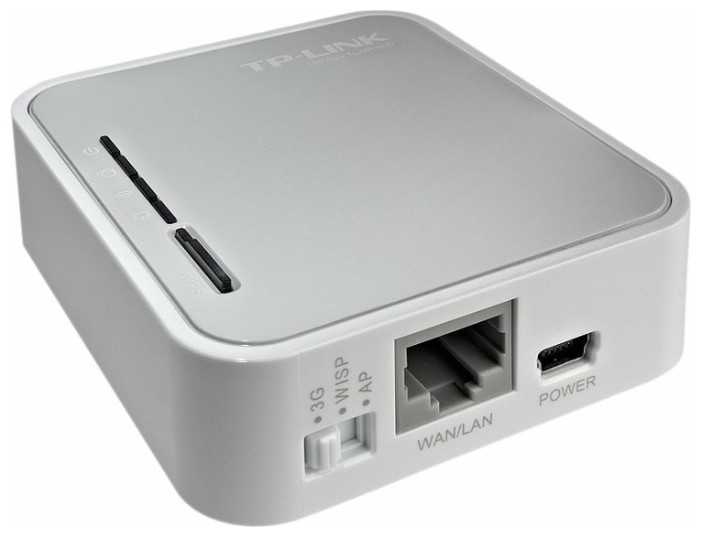
Отзывы о Wi-Fi роутер TP-LINK TL-MR3020
Где купить
Wi-Fi роутер TP-LINK TL-MR3020
|
Wi-Fi роутер TP-LINK TL-MR3020, N300, белый | Яндекс Маркет | 2 715 ₽ | Посмотреть |
699 отзывов пользователей o TP-LINK TL-MR3020
Пользовались
TP-LINK TL-MR3020?
Поделитесь своим опытом и помогите другим сделать правильный выбор

Спектроник-6SRDC
19.02.2013
10/10
Оценка пользователя
Великолепно
I LOVE this product!!! I have to say I have been SO disappointed in my new laptop - the darned thing is supposed to be top notch, but doesn't even get a signal in my bedroom, whereas I never had a problem with my older computer. But enter the TP-LINK TL MR3020 3G/4G Wireless N150 Portable Router, Pocket Design 2.4Ghz ... It has been amazing at picking up the signal from our den and providing me with an uninterrupted signal 24/7! I couldn't be happier with this little gadget, and it is really much smaller than I expected! About the width of a cell phone, and double the depth, but 1/2 the height, and much lighter... it's very, very compact and portable! There are 3 parts - the cord, the plug, and the actual router - easy to break down; it's plug and play in mere seconds! Which is great because I'm getting ready to go away on business, and the TP-Link is definitely going with me! I kept the packaging for traveling! The type of gadget that works well for me - I don't have to do a thing, and I don't have to understand how it works or read any instructions! I just don't have time right now for anything complicated! And the TP=Link couldn't be easier! I just can't express how thrilled I am with this product and it couldn't have come at a better time!This is a must have for anyone with a signal problem!A 5 Star Product in every regard!
Небулоид-3UIEW
10.02.2013
4/10
Оценка пользователя
Ужасно
Purchased this modem to work with an embedded device that requires Ethernet. Had had success with a Cradlepoint modem in the past and thought I would give this a go since the USB760 modem from Truconnect appeared on the "other" list on the TP-link site and the price was good.Truconnect is not an option in the TP-link settings for the USA region but the carrier they use (Sprint) is so I tried that. Unfortunately although the modem was recognized it did not connect so I contacted TP-link support.They got back to me pretty fast but with bad news. Basically - see the answer below. "Sorry it does not work but that is not our problem and we make no commitment to help or investigate compatibility."Here is the email response from support:Dear ****,Thank you very much for your email requesting information about our product.This is ****** from TP-LINK technical support department.If 3G modem is not in the compatible list, we just try to help customer to configure the router but we do not make sure they must work properly.Since you have already tried configuring it manually, it still no result.I have to say sorry about that.If you need any further help, please feel free to let me know.To get technical support more quickly, please go to[...]Best Regards---------------------------------------------*******Technical Support EngineerTP-LINK TECHNOLOGIES CO., LTD.
Плазмоид-7IJTD
15.02.2013
8/10
Оценка пользователя
Хорошо
TP-LINK makes two portable routers. The TL-MR3020 must be powered by an AC adapter or via a mini USB port, while the TL-MR3040 can be powered by the two aforementioned methods plus by a self-contained battery. The battery inside the TL-MR3040 is rated at 2000 mAh and can last between 4 to 5 hours. The price difference between the two models is less than $20 on Amazon.com.Selecting the right one depends on your application.If you need to share a mobile broadband signal (by connecting a 3G/4G modem to the router's USB port) among a notebook computer that has at least one free USB port and several wireless devices (tablets, smartphones, ipods, etc.), you can buy the cheaper TL-MR3020 and use a mini USB to USB cable to power it from the notebook computer. Beware that the notebook PC's battery power will drain faster than normal because of this connection.On the other hand, if you just need to share mobile bandwidth among wireless devices (no notebook PC), you'll need to buy the TL-MR3040.If your application is desk-bound, where there is always AC available, there is no need to buy the TL-MR3040.Likewise, if you plan to share a wired broadband signal among several wireless devices, getting the TL-MR3020 fulfills the requirement and costs less.
Сириус-4VLCC
21.03.2013
10/10
Оценка пользователя
Великолепно
A very easy to use compact portable router for travel. A hot spot can be easily established when a 3G/4G USB modem is connected to the router. I haven't documented this in trial, but the advertised wireless N speed operates up to 150Mbps with administrator control over how much bandwidth can be allotted to each device.The security setup was a piece of cake. By pressing the WPS button a WPA2 secure connection is established which is both faster and more secure than WEP encryptions plus you won't need to use a password.When I travel, I like to take my Kindle Fire for email, Web browsing and reading because the small size fits with my minimalist travel style. The TP-Link 3G/4G Portable Wireless N Router configures so easily the setup was a dream. I just attached the hotel's Ethernet cable to the router and the mini USB cable from the router to my Kindle Fire. If for any reason you need a non-standard configuration or need to upgrade firmware (for example, your existing device doesn't support 4G sharing), their excellent support team is ready to walk you through the setup.For the money, this little gem does a lot.
Эксопилот-7PEGV
06.04.2013
8/10
Оценка пользователя
Хорошо
i travel a lot. Finding myself in places and hotels that do not provide wireless internet connections. This router makes it very easy to share the wired internet access with my many devices ( a kindle fire HD,laptop and two smart phones). I always take advantage of the internet i am paying for in hotels to update all my software and apps, which at times cam be a lot. Lack of wireless connectivity was a major problem before i got this. With the TP link i can connect all my devices and update all my apps and software. I can stay in touch by e-mail facebook and twitter. Very handy.I must also point out the great USB power mode it has. I used to have a router that needed to be plugged into a power source. At times the power source was a bit far from the internet cable. having the USB power mode solves this challenge. great device highly recommended.This can be used with a usb modem, which becomes very important for people who travel overseas a lot, especially to the Middle East and Africa where at times the only internet available is via USB modem devices.
Плазмонавт-5QZWI
31.01.2013
8/10
Оценка пользователя
Хорошо
This TP-Link Portable 3g?3.75G IEEE 802.11n, IEEE 802.11g, IEEE 802.11b Wireless N Router ( TL-MR3020) ( Sorry, the product link did not work ) is a great travel router. I had a chance to try this out in Arizona, our home is in Idaho and normally when we go down there, I have a hard time getting connected at my father's place. This time, the TP-Link Router worked like a charm, with just a plug in, which enabled me to get the WiFi. It does take a little time to set up password etc etc, because the instructions with this set up were minimal, which is why I gave it a four star instead of a five. It sets up as a router for 3G but also can be configured to just be a standard router for several devices in your home.This router is small and lightweight, especially great when you are traveling. I had considered taking my old Linkseys router with me on long trips, but that is only good if you stay in one place. This router is easy to take along and one of the good features is that it has the ability to plug into a hotel ethernet connection, which then converts into WiFi, so you can use it with your tablet.This worked quite well for me and I do recommend it. If you have a problem with the passwords, tech support is only too happy to help you out!
Плазмонавт-2ECCL
23.01.2013
6/10
Оценка пользователя
Плохо
I travel a lot and hate it when I come across a hotel that doesn't have WIFI, but only offers a wired connection in the room. While this is fine for connecting a business laptop, it does me NO good for my iPad. This is where having the MR3020 comes in handy. When I get to the room, I but the unit in AP mode and plug it into the hard-wire connection. A couple minutes later, the unit pulls an IP address and my iPad is able to connect to it. The hotel login then comes up on the screen and I'm now able to utilize the hotel connection wirelessly.To me, that makes this unit worth it's weight in gold. I not only connect my iPad to it, but it also supports up to 10 devices so my iPhone and my laptop connect to it at the same time as well.The unit has the ability to share a cellular hotspot signal as well, however it requires a USB aircard connection. While this may work for some corporate travelers who are issued a USB aircard, many providers are now offering self-contained aircard hotspots that make the functionality of this device less necessary.All in all, it's great for me and my uses in hotel travels, but I haven't found a need to utilize the USB aircard sharing feature and I think as technology progresses it will be a feature that will be obsolete shortly.
Гиперион-6JMFB
04.03.2013
8/10
Оценка пользователя
Хорошо
I purchased this unit about 2 weeks ago and has not been able to get the unit to stay up for longer than 1-2 hrs average and occasions just for a few mins. The unit completely locks up and the only way to reset it is to unplug and plug in the power. The unit came with the latest firmware according to the TP-LINK website. I used the ethernet port for WAN and wanted the WISP feature in case I needed it. I did not use the 3G/4G port at all. I have quite a bit of experience working with routers. This is one of the most unreliable routers I have come across. The reviews on Amazon were pretty positive. So maybe I just have a bad apple. I do not like to give negative reviews. But this is a just a warning to anyone that this may not work as advertised. I really had high expectations and hope that a firmware update will fix the problem. I have also reported this to TP LINK tech support.3/6/2013I have since spoken with tech support and the issue was WMM under Wireless advanced which needs to be disabled. The unit have stayed up for over a day now. I am upgrading my ratings which also accounted for excellent customer service.
Эксопилот-9BXJJ
24.01.2013
4/10
Оценка пользователя
Ужасно
This product is a miracle of miniaturization. I was amazed how small it is, and how many functions it offers.Unfortunately, it seems impossible even to get through the configuration process without it crashing or stopping response for a minute at a time. I was unable to get it working after half an hour, and I am a computer expert. I spent most of this time simply waiting for the device to respond or rebooting it after it stop responding entirely. I tried using both the quick setup, which did not work, and the detailed set up, which exhibited these bugs.I have gone to their website, and at least some of the problems are really basic things -- the router does not work as described in the accompanying instructions. This product was simply not ready to ship when they shipped it.By the way, the documentation and on-screen menus clearly assume that you are technically knowledgeable about computer networking. If you're not, you will never be happy with this product unless an expert sets it up for you.I was really impressed by the range of features listed in the documentation. I only wish that they had finished the built-in software (firmware) so that it worked as described.
ХроноГость-5KQCB
04.02.2013
6/10
Оценка пользователя
Плохо
I want to say up front that I am a novice when it comes to knowing how to setup a WI-FI router. I had to have a computer technician set my current router. So why did I get this router? I want it for when I travel.The first thing I noticed was how small it is. This is helpful since it won't take up much space in my luggage. The next thing I did was read the provided instructions and then the ones on the TP-Link web site. Have you ever tried to put together a child's toy or an intricate book case and get flustered with all of the put tab A in slot B-1 instructions? Or get overwhelmed when you saw 50 - 100 pieces laying on the floor? Well that's how I felt. There was so much information that I got overwhelmed. So if you are a novice, I suggest you go to your local user's group or to a computer store tech to get some advise on how to set it up.All in all, it is a nice little router that should suit your online needs. It will be especially helpful when on vacation if you stay at a hotel with only an Ethernet plug - no WI-FI. Simply plug it into the wall and start using WI-FI on your laptop or tablet.
НоваГость-9TGDX
21.03.2013
8/10
Оценка пользователя
Хорошо
I selected this router because of its size. I wanted a small portable router to use on trips and that could also serve as an emergency backup in case of a failure of my home network router. I have not been to a motel or hotel that did not have Wi-fi provided in the rooms, so I have not had a use for that purpose.I did however set this unit up at home to test it as a router for my home network, using a direct ethernet hookup. It was very easy and quick to set up. It does not, however, have the range that my old Linksys router or its replacement, a new NETGEAR - Wireless-N Router. To be fair, when I am in the same room ( as I would be at a motel ) with the TP-LINK TL-MR3020 router I could not tell any difference between the more expensive NETGEAR Router and this unit. I will keep it in the glove box when I travel, just in case, and I know it can keep me connected to the internet until I can obtain a replacement, if my home router fails.
Капеллан-3HJKA
25.01.2013
10/10
Оценка пользователя
Великолепно
Everyone is raving about how great this little portable router is, but nobody really mentions what you need to make it work.You need:An Ethernet port with active internet.A power source.A computer with the software installed.--------------------------------------You can use a wall adapter as a power source as well, but you really need to plug this into a laptop and into an Ethernet port for it to work. It can then broadcast a wifi or 3G/4G signal. If you need to power a tablet, this is great.Here is when it wouldn't be useful: if you have no Ethernet port or if you do not have a computer with the software. I have T-Mobile, so my Samsung Galaxy S can bee rooted to use as a wifi hotpoint. For free. So if I don't want to lug around a laptop plus my tablet, I can go that route. But if you have Verizon or ATT (which don't play nice with rooting your phones) then this is a great device if you don't have wifi or 3G/4G for your tablets.I recommend it, but just make sure you need it. If you travel frequently, then it's a good thing to have. Especially if your hotel charges ridiculous wifi usage rates. Pirate internet ahoy!
Вояджер-1SDMY
11.04.2013
8/10
Оценка пользователя
Хорошо
Works great with both AT&T USBConnect Momentum 4G and 900 3G, has more features than my aging D-Link DGL 4500. Setup is a breeze and runs like a champ.Small and compact, I was impressed by how much it can do with such a small package size.Speed is good, I'm using it to provide internet to the WLAN side of my home router and have no problems with 4+ computers using the internet at once.Had trouble getting it to work properly in bridge mode with my existing AP/SSID, so I'm leaving that feature off till it is fixed in a future FW update.Recognizing and connecting to the USB modem takes about 5 minutes, somewhat longer than I would like, but I don't power mine off very often.All-in-all, this is a great little router for it's features and the price point. If you use a 3G/4G USB modem frequently, I would recommend picking one up as it gives you a lot more freedom.
Астрономад-8ROPD
24.01.2013
10/10
Оценка пользователя
Великолепно
As a long-time IT person, it usually takes quite a bit to surprise me, but this handy lil box left me speechless at first. Not only does it set up as a router for 3G (say that wireless aircard I still have lurking for trips to locals without hotspots), but also can be configured to be a standard router to handle up to 10 devices in a home or small office, and can be used to convert a single cat 5 connection in a hotel into a multi-room or suite router (handy if you have co-workers or family members in the adjacent rooms too!) Very nifty, I am impressed. Currently this router is attached to a cat 5 cable in a room that was otherwise a wifi deadspot in my multi-level home. It now allows me to use wifi in that room and cut the phsyical tether to the network for my devices.Further investigation about this device indicates it can also be used to set up a NAS, network attached storage, with some extra configuration. I have not tried this aspect yet but from the accounts I have read this should suit my needs there, as well.Highly recommend - 5 stars in each and every category.
Альфа-Юнит-9CFSD
25.02.2013
6/10
Оценка пользователя
Плохо
This product is a perfect match with TP-LINK TL-WDN4800 Dual Band Wireless N900 PCI Express Adapter,2.4GHz 450Mbps/5Ghz 450Mbps, IEEE 802.1a/b/g/n,WEP, WPA/WPA2 (see my review of TP-LINK TL-WDN4800). I set it up as "AP Mode - Access Point Mode" (note in AP mode, the router can support 4 types of sub-mode: access point mode, repeater mode, bridge with AP mode, and client mode). I do not use it as 3G/4G router.When I connect this product with TP-link, 12 feet away with no barrier (wall, ceiling, etc.), I can achieve wireless speed as high as 150MB. That is VERY HIGH for wireless. This is the good point.The main drawback is it is hard to change the configuration, e.g.: change the default SSID, change wireless password, and disable the DHCP server. The manual says you have to connect to 192.168.0.254. It is not possible for me because my network is 192.168.1.1-based. But once you solve the puzzle, everything is working. That's the reason I give only 3 stars.
Пульсар-6ERTJ
08.02.2013
10/10
Оценка пользователя
Великолепно
I'll leave the geeky specs to the tech blogs but here is my use and experience with the TL-MR3020 router.* Simple setup - connected to laptop and protected in about 15 minutes, probably could have done it in 5 but that's my fault.* Connected wireless stick modem to the router and had instant hotspot that connected 2 laptops, my i-touch and my wife's phone.I do a lot of work out in the field and a wireless stick is usually fine for myself but when you have a small crew, or are having an impromptu meeting not near a reliable hotspot this device gets you going. It is small enough to be in your laptop bag or carry-on since it is only about the size of a pack of cigarettes, which makes it easy enough for having it handy when you need it.Great if you work in the field, travel to odd areas, or the most issue...horrible hotel internet access.I work in IT but this is some mystery device that you'll need to be calling the other side of the world for in order to get working. This is a simple out of the box and go item.
НаноРейдер-8KXRP
24.01.2013
8/10
Оценка пользователя
Хорошо
This Router works great. I haven't had any real problems with it and so far, I am very satisfied with this item.So far, I've only used the router in one location. The Internet at my work is wired, unfortunately, and so bringing my laptop in to work with is a pain. There's no "easy" switch with our computer systems, unfortunately. This router works perfectly to plug in to the one available Ethernet cable in the office and get wireless wherever necessary. It worked almost instantly and hasn't given me any issues.The one slight hiccup that I ran into was the fact that the instructions were a little vague. I kept running into a roadblock around step 3, but it seems like that was primarily due to the fact that it only included step 3 instructions for PCs (but I'm using a MacBook Pro). It was only after several minutes of frustrated attempts that I realized that it didn't require that step and the solution lay elsewhere. Once I came to this conclusion, it was up and running in moments.This is a great and useful tool. It will come in handy for a long time to come.
Странник-6PENH
24.01.2013
8/10
Оценка пользователя
Хорошо
I travel a lot and usually take my iPad or iPad mini with me and my husband takes his laptop and network card. This is not a problem when wireless is available free, but it is a pain when wireless is not available or I am getting smacked for wireless or wired access for one device. Used with my husband's card, I get wireless on my pad and it doesn't cost a dime. In fact, I could attach a max of ten device through the TP-Link if i wanted to. Easy to use, this is a wonderful compact little device that takes up little space and be used in a variety of configurations to get a wireless connection.You can also use this to eliminate the wire completely, replace another router, or as in my case override my Apple Airport.My husband has used this to override the wire he uses in his home office and claims that the connection he gets via the TP-Link is stronger.This didn't occur to me,but another reviewer said they are using this for their Roomba. I'm going to try this and will report on my results.Very clever device given the reasonable price.
Эксопилот-5EYER
26.02.2013
10/10
Оценка пользователя
Великолепно
This little beauty is a well-made router. By connecting a 3G/4G USB modem to the router, a 3G/4G Wi-Fi hotspot is instantly established. Unfortunately, I was looking to be able to use my netbook in my home wirelessly. Although I purchased a "Wi-Fi Networking for Dummies" book and read a lot of material on the internet. my Verizon DSL is not wi-fi capable. IF it is, I surely am doing something wrong. This is a learning experience for me. What I can do with this and my Westel Router (Verizon supplied) is use it as a 'repeater' for distant locations in my home. I can use it in place of the D-Link wireless usb connection to the internet on my laptop. And... I can continue to experiment and learn about 3G, 4G, and Wi-Fi. This is a very attractive device! I suppose if I traveled, I could use it to establish a wireless connection in a hotel room. I plan to update this review from time-to-time to provide more information.
Спектроник-7BBAN
21.02.2013
10/10
Оценка пользователя
Великолепно
Right out of the box, you can tell that this thing is made for travel. It is super light and very small, and while that is great in your suitcase, it does mean that you need to be cautious with it (but isn't that the case with any electronic device?).I am fairly competent with set-up but this was not as easy as plug-and-play. It took a little figuring it and messing around, but all in all, it really wasn't too difficult to get working. I tried it with a 3G stick and a wall port and found that both worked very well. I was able to get a solid, speedy signal that was just as good as my day to day router. The TP-LINK is not as powerful as my daily router, though. If I went around a corner with my laptop or tablet I lost most of the signal, but that's no big deal, since this isn't designed to service a house.I tried this out with 2 laptops, an iPad and several iPhones and never had a problem connecting or using.
МехаРейнджер-3USIC
02.03.2013
10/10
Оценка пользователя
Великолепно
I'm a frequent traveler and this router comes in handy in a lot of different scenarios. It's also super small and light but holds up to travelling abuse well.RV-ing and Camping: * If you have a MiFi or other 3G/4G USB stick you can use this device to share your internet around the campsite. * If the campground provides Ethernet you can set it up as a router. * If the campground has WiFi you can set this up as a WiFi repeater.Hotel: * Plug it into the hotel Ethernet to create a wireless hot-spot.Travelling Salesperson/ Retailer * Stuck at a convention and need to share your MiFi between your notebook, phone and Square device? This router is perfect.Other items in the box include a USB wall plug, Ethernet cable and a double-ended USB cable. One minor annoyance, this uses a "mini USB" plug and EVERYTHING else I own uses a micro-USB (Android Phones, Kindle, etc).
Небулоид-0ZIPM
05.04.2013
6/10
Оценка пользователя
Плохо
I was excited to get this product when I read the reviews - I thought it would help me create a wireless hot spot when I travel by using the 3G/4G capability of my phone - I was wrong or I was just not tech savvy enough to get it to work that way. Other than that, the router is simple to use and very small, easy to travel with. it is easy to use/set up (plug and play is the best way to describe it).going back to look at other reviews, it seems I may not have been using the product properly and will take it for another spin on my next trip and will come back t update my review. as a portable router or something to use in small spaces this is a great alternative to the larger bulkier ones we have had in the past.
НаноРейдер-4JMUT
14.02.2013
8/10
Оценка пользователя
Хорошо
After I received this compact router, I had a chance to use it in one of my trips. Believe it or not, there are still hotels in the US that provide on wired connection. Wireless connection comes with an extra fee, so this router really comes in handy. This is the way you can have a wireless connection and can sit in bed to work on your laptop. Since I don't have a 3g/4g USB modem, I need to borrow one to test. Set up is simple and I got it online and running in less than 10 minutes.If you share a connection in one small to medium size room then it works just fine. Move to another room, like the hotel bathroom where there is a wall, then the signal drops. Not disconnecting you, but slow down significantly until you come back to line of sight. I watched a Netflix movie on my iPad without any issues. It is a handy device and will be in my luggage when I travel.
Нейрон-4KYBE
19.02.2013
8/10
Оценка пользователя
Хорошо
If you've been spoiled by Apple's wireless router products, as I have, then you'll find the web-based configuration of the TP-LINK TL-MR clunky and not particularly intuitive.However, once it's been set up, it's pretty slick. I tried it as it own router, plugged into an Ethernet modem, and it fed out IPs with no troubles. I then set it up as a repeater, boosting the range of another wireless modem, and it handled that task well, too.The downfall of this little is range. You get more than 20 feet away and the signal strength starts to drop. Through walls, it's even worse. BUT, if you're using this little guy while traveling, those minuses quickly turn to pluses: no worries about other folks in your hotel trying to connect! ;-)Limited range aside, this is a solid little router and it'll stay in my laptop's bag; ready for travel.
Показаны отзывы 601-624 из 699.