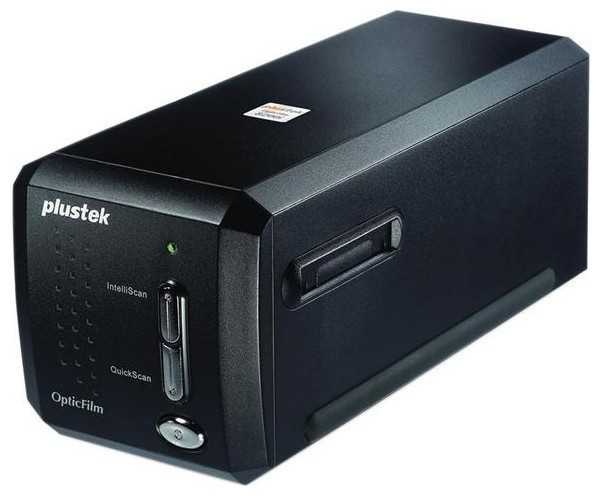
Отзывы о Сканер Plustek OpticFilm 8200i SE
Где купить Сканер Plustek OpticFilm 8200i SE
146 отзывов пользователей o Plustek OpticFilm 8200i SE
Пользовались
Plustek OpticFilm 8200i SE?
Поделитесь своим опытом и помогите другим сделать правильный выбор

Пульсар-4AZWE
17.05.2011
8/10
Оценка пользователя
Хорошо
Did a lot of research on scanning slides and film. Yes the Nikon 5000 and 9000 are the best out there with ICE but there are no vista or windows 7 drivers for them and I want to be able to see all that RAM I bought. So Plustek was the only real "newer" technology option out there. I also have an Epson V750 so I am pretty serious about my scanning. Comparing the two is interesting because it is kind of like apples and oranges. The clarity and brightness of the Plustek beats the V750 hands down. BUT the V750 has ICE and can scan 12 slides and 24 negatives at one time. I was a bit skeptical of the Plustek dust and scratch removal, it is not as "hands free" as ICE is. The funny thing is that the 7600i has infrared, which is what ICE needs to do it's thing but they did not pay the premium for the licensing I guess. All that said, I believe the Plustek method to be superior to ICE for one reason, it leaves more detail in the resulting picture than ICE does. If you get real nit picky, which I am, the ICE technology leaves edges fuzzier than the Plustek solution and both REALLY remove the junk. SO if you aren't real picky about the results and want a very simple, volume, workflow, use the V750. If you want to save a few dollars and get better results with a few more steps, then buy the Plustek. The unit is a lot smaller than you imagine it is but feels very solidly built. I have only run experiments on quality of scans so I have not run a lot of film through it. We will see how it holds up. To be fair, I must admit that I upgraded my Silverfast to the HDR Studio, they had a Christmas sale and I couldn't turn it down. This does give me more of a "production line" capability. This is not a trivial tool, there is a learning curve. But if you take the time and perseverance to learn Silverfast software You should be pleased.
НаноПилигрим-4IVOL
06.07.2012
8/10
Оценка пользователя
Хорошо
I've just finished scanning my first thousand slides and have found this scanner to be exactly what I hoped it would be. Easy to use and produces excellent scans. The editing software was a bit clumsy at first for a long time MAC user, but not too difficult to learn. I'd recommend this for anyone that wants to convert a large quantity of 35mm slides to digital files.
Небулоид-6YYBW
21.03.2011
8/10
Оценка пользователя
Хорошо
I broke my Nikon Coolscan V scanner. If you don't already know, Nikon has discontinued their film scanners. When I inquired with them about getting it repaired, I was told that they could only do it if they had the parts. This hardly seems sustainable, so I looked around for other options. I stopped scanning film about 6 years ago, so I wasn't sure what was out there. I thought by now flatbeds with film adapters like those from Epson and Canon would give stellar results, but they don't. I've tried the Epson 4490 and V500, and the scans were pretty soft. I hear the Epson V700 is better, but not by much. Used dedicated film scanners are way over priced. For instance, a used Coolscan V is twice the price I paid new. Then I ran into Plustek 7400. This scanner, as far as I can tell, is the same as the 7600i but without ICE infrared dust remover. Since I wasn't going to scan color film, I didn't think I needed it.I've only had it a couple days, so I can only give a few observations:Pros.-Scans are pretty sharp. At least as sharp as my Coolscan was. I can see grain!-Pretty fast.-dmax is good. I have some dense negatives and at least from looking at the histogram of the scans, nothing was clipped.-The scanner is solid feeling. The body is plastic compared to the metal body of the coolscan, but I don't think that is a big deal.-The film holder is not flimsy compared to the epson's and even the nikon's.Cons.-It doesn't scan at advertised 7200 dpi. I'm not really sure what the real resolution is, but I can see step interpolation artifacts on scans that are 7200 dpi. It's still really good compared to it's competition in its price range.-I wanted to do sloppy border style scans, but this doesn't look to be a possibility based on the actual scan area.Overall, I'm happy with my purchase and am especially happy that Plustek is continuing to make this technology for this dying (though I'm seeing a recent resurgence) analog medium.
Кронос-4UYKP
20.08.2012
10/10
Оценка пользователя
Великолепно
The ONLY drawback has been the time required to scan; however, the quality more than makes up for the wait.
Аэронавт-8IIIL
03.01.2012
6/10
Оценка пользователя
Плохо
Mixed feelings here: As others have noted, the SilverFast software that comes with the scanner is not very friendly; I think it is designed to test your patience, sanity and commitment to using the scanner. I finally got the thing up and running after 2 days of wrestling with SilverFast, which included several installs and uninstalls, downloading of new drivers, etc. Quite a pain.Now that I can actually use the scanner, I'm very pleased with the results. I'm scanning old 35mm black and white negatives, most of which were poorly processed and have not been stored archivally. I'm able to get usable scans and, with some help from Photoshop, producing decent-enough prints.When evaluating this scanner, I have trouble separating the scanner from the software that comes with it. If I had to do it again, I do not think I would purchase this scanner simply because of the software.
Кронос-8RYOX
08.06.2012
10/10
Оценка пользователя
Великолепно
This slide scanner is great. The software is another issue. Once you master scanning it does the job very well. I wish the tray would move automatically. I am scanning in 1200 slide of my family and I am averaging 3 min a scan with adjusting to what looks good. I hope this helps.
Нейрон-8QOUB
08.04.2012
10/10
Оценка пользователя
Великолепно
I scanned about 3000 old 35mm color slides with this scanner, which took a very long time, but was faster than anything else in the price range. To get faster you will have to put out the big bucks for a professional machine which you will never justify unless you begin advertising and doing this for others - which is not a bad idea if you have the time. I didn't and was satisfied with this product. Don't expect any product support from the manufacturer though. YAK
Вояджер-5SUUD
08.02.2012
10/10
Оценка пользователя
Великолепно
I used to be a professional wildlife photographer living within three miles of Yellowstone National Park. Life took a turn and I don't shoot much anymore. I do however have a huge collection of slides that are almost useless to me. I decided to get them into a digital format so that I could enjoy them easily on my computer. I did some research, and for the money this unit is the bomb! I scanned a couple hundred of my favorites as soon as it arrived. I was quite happy with the unit's ease of use and blown away with it's performance. If it is in your price range, do not hesitate to pick one of these up!
ТерраБот-6BNCH
13.09.2011
8/10
Оценка пользователя
Хорошо
I ended up with a thousand family slides that no one reallly wanted or had the equipment to view. Some being over 50 years old they were physically not good and the content was hit or miss. The Epson v500 scanner I had would work and do an excellent quality job but takes a long time and the effort wasn't worth the return. I have a Mac and waned to just do it. The Plustek 7400 is simple to use and the quality is well within my acceptable range. I basically ignored all the features of the silverfast solfware because it was beyond my desire to do anything but get the job done. I also didn't find the software too clear. I did call them with some startup questions and talked to a live person who was too happy to help. If you have really artsy type stuff or if you're anal you might not have the same opinion but it you just need to archive slides in your lifetime I would recommend this item.
МехаРейнджер-5QKUM
21.08.2011
8/10
Оценка пользователя
Хорошо
Despite using this scanner on an old (not recommended by Plustek) slow computer (Xp Home, 866MHz, 256Mb ram and USB 1.1) the performance was surprisingly good. The Silver Fast software will occasionally indicate that the scanner is not ready or indicates an error that requires another attempt; but does not lock up and continues on. Because of the slow computer I perform a prescan and make manual color and exposure adjustments limiting the resolution to 500 dpi on a 4"x6" output. This setting produces a raw 17 Mb file that when compressed by the software yields a final 1.5 Mb file. The dust and scratch removal tool works well if your settings are not too aggressive. The ease of use is good and produces much more throughput than the flatbed scanner I used to use. The quality of the unit and accessories is good and should last if reasonable care is exercised. I can recommend this product to anyone wanting to digitize a large archive of 35mm slides or negatives.
Астрон-7VSFP
06.06.2011
8/10
Оценка пользователя
Хорошо
I have had this scanner for 10 days. I am using it on a new Macbook Pro with a quad chip. The scanner itself does excellent scans. The software, Silverfast, is old and very much not user friendly. The first clue is that upon installation it requires Rosetta. The documentation for the software is over 500 pages and you actually have to read it to understand the software. The software works intermittently between crashes. In the 10 days I have been using Silverfast it has crashed at least 15 times. Silverfast has more adjustments than you could possibly ever use, and, for most people, more than you will understand. The Photoshop extension does not work at all. It requires old versions of the software before the CS series.Overall, the scanner makes wonderful slides, but the software is cumbersome, ancient, difficult to use and understand but necessary to use with this scanner. For the price the scanner is very good. But, the software is greatly overpriced.Update: Silverfast has rewritten the software and it works much better.
Эксопилот-3KWLN
01.05.2009
10/10
Оценка пользователя
Великолепно
I'm going to review this scanner in relation to another film scanner I have used, the Nikon Coolscan 5000 ED. Why don't I still have the 5000? With the scanner and all the attachments I had, I had about $2K invested in the 5000. I finished a project I had with it almost 2 years ago so I sold it because I didn't want $2K just sitting around unused. Then a few weeks ago another huge project involving negative scanning came up. Unfortunately, I no longer had the $2K to re-invest in the 5000 setup so I went looking for other options. This scanner seemed to have the best performance in a budget film scanner based on reviews so I gave it a shot.Image Quality: I can't tell the difference between the two. Now, I need to mention that I don't scan at the full DPI that the scanner can do. With every film scanner I have tried (I have tried 3 different ones at this point; the other two I mentioned already and the third was a high end Canon flatbed scanner with filmstrip holders) I have found that full DPI results in an extreme loss of my time (takes way too long) as well as adding a lot of grain but adding no additional detail when pixel-peeped with Photoshop. So, I never scan at the highest DPI. On the 7300, the 7200DPI setting is indistinguishable from the 3600DPI setting in terms of detail so I use 3600. Again, I find no difference between the quality of the two scanners.Software: This, as it turns out, is the most important part of the scanning process. I have now used 3 different scanning software programs. I have used a Canon one, I have used the one that came with this scanner, and I have used a program available online called VueScan Professional. I have found that the worst thing you can do is use the software that came with this scanner. Do not use it! Really poor processing with this bundled software. Trust me on this, buy the Vuescan professional software online. It's not prohibitively expensive by any means and if you ask me it is essential to getting the most out of this (or any other) film scanner!Speed: Well, yes, the Coolscan 5000 does blow this scanner out of the water when it comes to speed. You do get something for your $1200 (with no attachments; up to $2K with the full compliment) If you are going to be doing this permanently, yes you will probably want the 5000. If this is a one time deal and you are on a budget, then the 7300 is probably the way to go at 1/5 the price, which brings me to the next bullet point...Price: The 7300 is 1/5 the cost of the Coolscan 5000 ED. Hey, you really can't beat that ratio.Build quality: 7300 is actually better than I thought in this respect. I was expecting a tiny and flimsy machine. It iss actually larger and more solidly built than I expected. That said, it is no 5000. The 5000 is a piece of military hardware compared to this--it's built like a tank.In summation, you will have to weigh your own personal preferences as far as speed and cost goes. To me, these are the only two variables. As I said I have found the quality to be indistinguishable. You are going to have to make your decision based on how much money you have and how much free time you have. It is a slow inexpensive scanner vs a fast expensive one. Please take my advice and read online reviews of the Vuescan software. Don't take my word for it on that; see what professionals say about that product. Just please don't waste your time with the bundled software that comes with this machine.
Дроид-2KJMH
22.03.2011
8/10
Оценка пользователя
Хорошо
I was involved in a project utilizing old negatives and slides and the flatbed attachment was not making it. High end scanners were too expensive and the lower priced stuff had too many negative points in reviews. This scanner had decent reviews and so I gave it a shot. The reviews do not lie, but do it justice, this is a sweet piece of equipment with excellent packaging, and I was surprised with the handy carrying case. Yes, the negatives and slides are fed manually and the included software's interface is kind of kludgy on a Mac, but the results are excellent. In fact, I actually appreciated the simplicity of the manual feed. I had a slight problem with the included software and sent a message to tech support. I not only received a prompt response but it was by telephone, incredibly thorough and informative. What more can you ask for. High points: solid equipment, exceptional ease of use, effective software(- a star for the interface), amazing tech support and excellent results!!!
Зета-Орион-2PBQB
09.12.2010
4/10
Оценка пользователя
Ужасно
I bought the Plustek 7400 scanner as a potential replacement for an old Polaroid scanner to try to solve the problem that comtemporary PCs and Macs now barely support SCSI interfaces, if at all. I use an Epson 700 for all formats except 35mm, but have found that dedicated film scanners work better than the Epson for small film. This is barely true for the Plustek, even with some sharpening. I found the resolution disappointing and the software to be overly complex and horrible-looking compared with what I'm used to. Plustek should develop better software that is simpler and easier on the eyes--something understated like Epson's or even Photoshop. They should also improve the film holders--negatives move around in them and they mask too much of the image. The world still needs good scanners that are less expensive than the current Nikon model and Imacons, especially now that Polaroid is gone. Plustek, step up to the challenge so I won't have to return your product again!
Кронос-3XJLL
05.12.2010
6/10
Оценка пользователя
Плохо
Last month I bought a Nikon F5, then I need to Scan the film.When I check for the available options realized that the only major Photography companywhich stills sells film scanners was Nikon, and their scanners were not onlyexpensive, they were also hard to find..This Plustek Scanner is a real alternative, forget the bed scanners which claimsthat can scan film, the results are always awful with those..You can shoot with your 35mm camera and get full frame digital images using this scanner,You need to be very careful in the process, and using the highest resolution (7200 dpi) theprocess is very, very long (8 min. each slide). Sadly the results are not as good as what youcan get using a Full Frame Digital SLR, but the cheapest Full Frame camera is sell for about $2000,and you can get a very good film camera and this scanner for least than $1000 with pretty decent results.
Пандорец-7QLAS
22.03.2011
8/10
Оценка пользователя
Хорошо
Just started using the Plustek 7600ai, am very impressed with its speed and ease of use - the program takes a little time to get use to, but once you use it enough its not an issue - for the price and results from its capabilities product is well worth what it cost! I would also say that their tech support was extremely helpful!
ТерраБот-2NQRM
05.04.2011
10/10
Оценка пользователя
Великолепно
Scanning decades of B&W fim...I was able to retrieve grossly underexposed negatives which I had given up on. This alone is of great value. Quite an advantage to have this tool when wet chemistry (and my light meter) fail to produce a satisfactory image. And, it's safe!
Туманник-3NBSB
19.04.2010
8/10
Оценка пользователя
Хорошо
I purchased this scanner to convert my parents' aged and deteriorating slides to electronic format. I did a lot of research before buying, and many reviewers commented that Plustek scanners were great. They're absolutely right... this scanner converts negatives and slides to a digital format in great detail. The software included (I use the PC version) allows you to straighten the image, edit color levels and brightness, and do almost anything you want. With all of the options, though, it comes with a lot of learning. The publishers have included videos to show you how certain features work; they're recorded by a gentleman with a European accent which may cause some problems understanding the first time through. I haven't yet had to read the manual (included only on the CD, not in print copy), but you should expect to spend at least an hour playing around with the various options and seeing what they do. The manufacturer quotes a scan time of approximately 35 seconds per slide - be aware that this is for single pass scanning, and does not include multiple passes (for better dust/dirt removal) or processing time for despeckling or sharpening.All in all, a great device (even packed with its own padded carry bag - use it and toss the original box into storage if you like) that offers a myriad of options for making your scanned pictures as good as you want them. Just be prepared to trade some of your time for increased quality.
ТерраБот-5FGCG
27.01.2011
10/10
Оценка пользователя
Великолепно
I've scanned about 300 slides and negs so far and am still learning the ins and outs of the software but really like it so far. Easy to set up, easy to use hardware. Software is great so far with one-click video instructions of how to use different aspects of it. I've been scanning mostly on 3600 DPI, which creates 50MB Tiff files.
Гелиос-5JHTL
12.10.2008
10/10
Оценка пользователя
Великолепно
after 2 weeks and over 700 negatives and slides scanned i find very little to complain about with this scanner. i am using this under osx leopard and have not tried the windows software.pros - depending on the quality of the negatives or slides the results can be absolutely amazing. some well preserved slides i scanned, kodak of unknown film type, at 1200 dpi produce 1.3 megabyte files of approximately 7.1 megapixles - 3320x2240 pixels. color saturation and replication was excellent using the default settings. color negatives from kodak gold 200 also scanned excellent using the default settings. slight changes to the saturation and brightness were necessary on a few of the negatives but those were a result of the lighting when the pictures were taken. for black and white negatives the default settings for kodak tmax 400 and trix 400 work very well. the only items i have needed to change are the brightness for midtones and overall brightness depending on how the picture was exposed orginally. several negatives i scanned at 2000 dpi, both color and bw, and the size of the files grows to about 11 megabytes each, 5577x3763 pixels. still excellent quality scan, just about 3 times longer to actually scan the file. i have not used the more advanced featurse for automatic scratch removal so i cannot comment on that part of the software. if your negatives or slides have been stored in protective sleeves, the 3 hole punch style with 6 sleeves for 6 pictures each seem to have worked best for me, the results can be fantastic. a few color negatives i have tried that were loose in the packets ritz camera would return your pictures in have a had a lot of scratches on the negatives.cons - 1. the software will not work without stamping a big DEMO text across the scans unless you register it thru the internet. this is lousy! especially as the software provided is an SE version. read Special Edition with less features than a full version. 2. user name has to be capital first letter of first name and capital first letter of last name. you cannot type your user name in all caps or all lowercase. registration fails otherwise but does not tell you why. 3. how do you this on a machine that does not have access to the internet? i.e. a dedicated workstation in an office would not be able to use it. 4. sometimes when scanning bw negatives the saturation will wig out and the displayed color will change to a purplish hue. turning the saturation setting to the lowest setting corrects this but i am not sure why it happens in the first place.neutral - as stated by others scanning is a little slow. you will not scan your entire collection in a weekend. considering the amount of tweaking i have done on underexposed or overexposed pictures i can see automatic scanning might not be best for everyone.final comments - on osx after the scan is complete the file is opened with preview so you can rotate it then if you need to. i would recommend this scanner to someone else who has the time, the collection, and the desire to scan a lot of negatives or slides. the only negative, pun intended, i have is the software registration - especially for an SE version of software.
Туманник-7DVMH
12.11.2010
2/10
Оценка пользователя
Ужасно
Between the poor customer service, the vague instructions and the lackluster performance of this product, I would not recommend anybody purchase it. I am now in the process of trying to return it for a refund. The manufacturer should be ashamed of themselves for offering a product like this.
Аэронавт-9DPHR
04.05.2010
10/10
Оценка пользователя
Великолепно
I Received the Plustek OpticFilm 7300 35mm film scanner a few days after it was ordered for me as a birthday gift; it arrived at my home in the foothills of the Beartooth Mountains in mint condition. It took me longer to find the instructions than it took to hook it up. I followed the six steps, loaded a 35mm color transparency (slide) pushed the IntelliScan button and saved it to a folder I'd built for copies. The first trial scan was a bit dark, so I used the on-screen adjustments and played for a couple of hours. One thing I should have purchased at the same time was a bulb/brush to clean the film. Some of my slides are 45 years old and are a tad dusty. Things tend to get that way in a den.
Лунатик-6ZOGH
21.02.2010
2/10
Оценка пользователя
Ужасно
Shame on Amazon. I ended up with the Plustek Opticfilm 7200 as that was the only one available when I purchased it in November, 2009. I turns out the unit was 3 Models old and was probably 3 years out of date. I continue to be plagued with problems, incompatibility with Windows7 and the constant failure of the unit to sync to my PC without the need to uninstall and reinstall software each time I try it. When I finally contacted Amazon only 90 days after purchasing the unit, I was advised they would not accept it for return and that I would have to deal with the manufacturer. I don't know if the 7300 is anymore compatible with Windows7 or not. Just be advised that the product is at least 2-3 Models years outdated.
Кварковец-4SHCM
14.12.2009
10/10
Оценка пользователя
Великолепно
I just received my scanner today. Wonderful. This puts flat bed scanners to scan slides to shame! I've tried several gadgets and flat bed scanners over the years to scan slides and it was a royal pain in the butt.The setup was quite easy. After installing the drivers (the support website had the new drivers for Windows 7) I was able to use Gimp to acquire images from the scanner. I was able to scan 4 slides in about 4-5 minutes. Very easy and very quick.I would recommend if you buy this to use Gimp or make sure to get the newer version of SilverFast if you're using Windows. The SilverFast software provided with the scanner I received didn't recognize the new drivers properly so I can't use the software. I don't care, however, as I can use Gimp to acqure the images from the device.I am rating it 5 out of 5 beause these have dropped significantly in price and is the first scanning device that does the job on slides very well.
Показаны отзывы 97-120 из 146.