

Отзывы о Материнская плата GIGABYTE B550M AORUS ELITE (rev. 1.0)
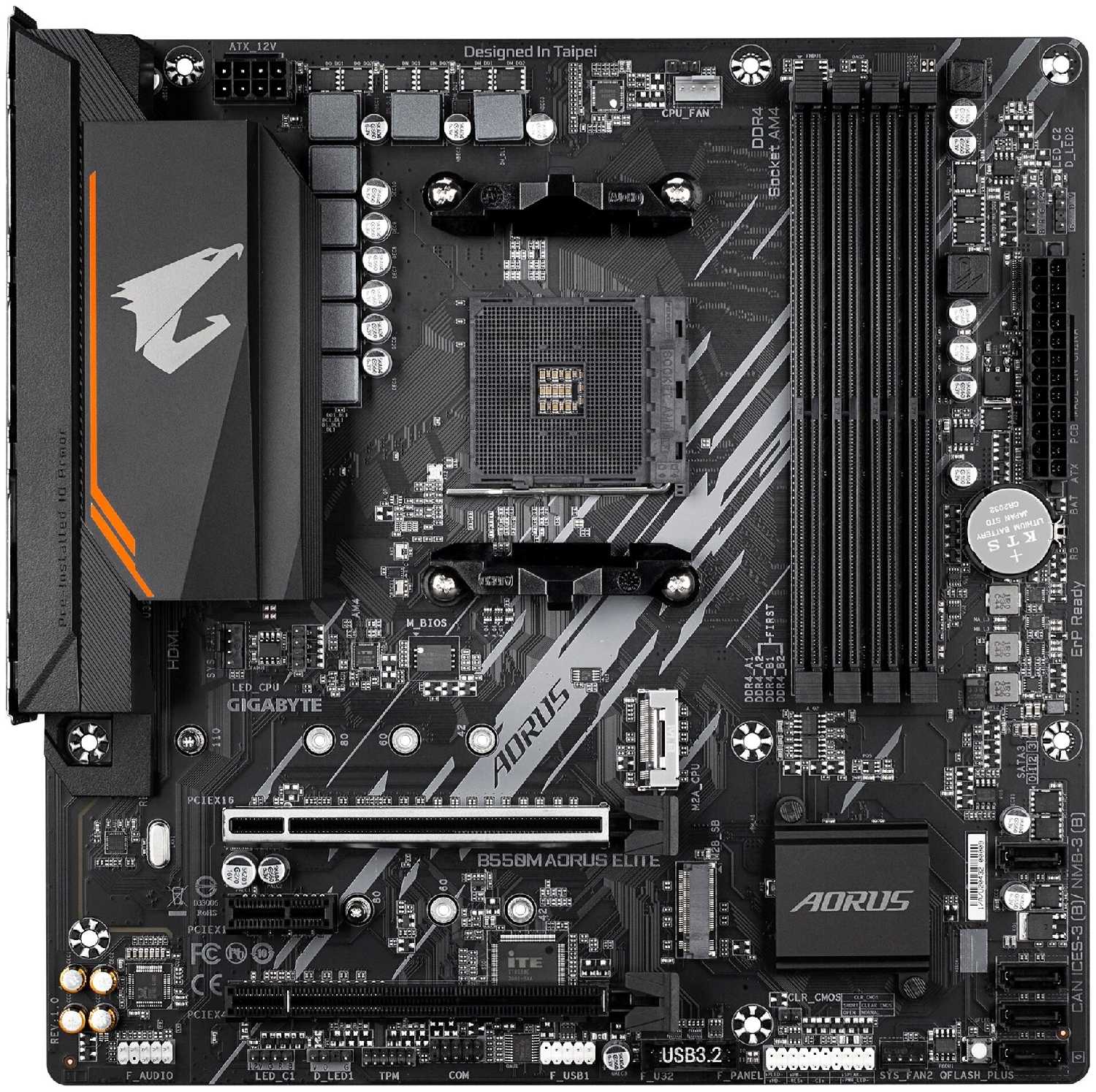
2644 отзывов пользователей o GIGABYTE B550M AORUS ELITE (rev. 1.0)
Пользовались
GIGABYTE B550M AORUS ELITE (rev. 1.0)?
Поделитесь своим опытом и помогите другим сделать правильный выбор

swaraj
13.05.2021
Оценка пользователя
Великолепно
pranay mondal
13.05.2021
Оценка пользователя
Великолепно
Sushant M.
13.05.2021
Оценка пользователя
Великолепно
Magic
10.10.2024
Оценка пользователя
Великолепно
This MB was perfect for my build(3700x). Easy to install and an excellent price. The WiFi works flawless and it has plenty of headers for rgb, sata, and more.
Would definitely buy again and hopes the picture helps those that are unsure about the compatibility
Stu
13.05.2021
Оценка пользователя
Великолепно
I don't get any value out of overclocking Ryzen CPUs. Some solid 3600mhz RAM and a decent cooling system and you're looking good at stock with these CPUs in terms of real world performance gain, so with that in my mind I opted to choose a B550. With no need for wifi or anything else, this is a fantastic board at its price compared to the competition and I think at its price point is the most compelling as youre effectively just buying nice to have features like WiFi or additional headers for things like USB C if you spend any more. These to me are nice to haves but I don't have any need for them.
It did come with BIOS version F2, and I ran into stability issues with xmp enabled and running at my corsair vengeance pro's rated 3600CL18. The next bios version states memory compatibility as an improvement and the AppCenter tool from Gigabyte easily updated my bios while in windows to the newest release. Fixed all stability issues. The board does have QFlash, so if you buy a 5000 series CPU you'll still be able to flash the bios if you don't post. (updating bios without a cpu, ram or anything if you're not sure what QFlash is)
I wouldn't recommend this board for overclocking CPUs, but I don't recommend it on Ryzen 3000 series anyway.
In terms of memory, run through the BIOS updates and you'll get XMP running fine in my experience. There seems to be a good enough power delivery to get into it with ram overclocking but I haven't tried to yet.
So far the board has been great, I can't hear any of the VRMs while gaming and support for 3900XT out of the box was great. There are less USB ports than I'm used to but enough for me. If you plug a lot of peripherals in and are considering this board, a decent USB hub is you friend.
The one design flaw are two the holes to screw the motherboard into place. Since they're in/near the heatspreader in the top left they're not as say to get to. Have some fine tweezers reday to help out there.
TLDR: Update the BIOS, it's super easy. This board is fantastic and if you're not overclocking anything other than enabling XMP, you won't go wrong here.
Me Tell U
10.10.2024
Оценка пользователя
Плохо
So far everything is working good, but the install wasn't without a few issues.
First, the WiFi antenna included with my board, had different connectors than the board itself, so it wouldn't plug in... I checked the box for an adapter, but nothing. Luckily I had another antenna laying around that did fit, so I was able to use it.
Also, I tried reaching out to Gigabyte support about the WiFi antenna, and the only support option available was via their support website, I opened a case but didn't get a response (24+ hours later).
***Update from Support.... I finally got a response telling me to contact customer service (they provided an email) and provide them a photo of the incompatible antenna/MOBO, which I did. They responded asking for a copy of my invoice, which I provided, then I received a generic response stating "If you'd like to make a purchase of Gigabyte Products or Accessories etc... Please complete the attached credit card authorization form."
Bottom line... they were no help!****
I also had a little trouble updating the bios. After the bios update (which indicated it was successful), the computer got stuck rebooting. The RGB lighting on the board turned off, the fans went to full speed, the display was frozen, and the mouse and keyboard became unresponsive. After about 20 min, I just powered it off, and back on, and luckily it came up with the new BIOS installed.
Another disappointment is that only one M2 slot (M2A), supports PCIe "X 4" SSD, which also happens to be the only M2 slot that supports M2 SATA SSD, so I can't install an M2 PCIe X 4 SSD and a M2 SATA SSD, because the second M2 slot (M2B), only supports up to M2 PCIe "X 2" SSD and does NOT support M2 SATA SSD's.
I would have liked to install one, 500GB M2 PCIe SSD for OS and applications and one 2TB M2 SATA SSD for storage, only to avoid the added cabling and keep a clean install. Unfortunately that's not possible with this MOBO, so I'll have to use a traditional SATA SSD for storage. Maybe this is to be expected in this price range?
Also, when you use the M2 slots some SATA and/or ASATA ports are disabled (this is normal), but I wish they would include some covers that could be placed over the disabled SATA/ASATA ports, so that you can easily tell which ports are unavailable for future changes/additions, without having to refer back to the MOBO manual.
All-in-all, I think this board offers a lot for the price, but Gigabyte Support and Customer Service are severely lacking.
Amazon Customer
13.05.2021
Оценка пользователя
Великолепно
- Great VRM design
- Good overclocking
- Plenty of USB ports
- Great memory support
- Wifi and Bluetooth support
Cons
- Lack of front header for USB-C
- RGB is pretty basic.
jeffrey
10.10.2024
Оценка пользователя
Хорошо
Im running a ryzen 7 2700, with 16 gigs of corsair vengence 3200 ddr4 ram, corsair 750 psu, amd msi rx580 8 gig oc video card, and a 500 gig ssd, all in a phantex p400 case
Zenito R.
13.05.2021
Оценка пользователя
Ужасно
WernerJB
10.10.2024
Оценка пользователя
Ужасно
Anonymous
13.05.2021
Оценка пользователя
Хорошо
That said, this mobo doesnt support the 2600 cpu. Bummer considering how popular and still good that is. Anyone hoping to use the 2600 as a stop gap until the 5000 series becomes more affordable had better pony up for a 3000 series instead. I've had to pony up for a 3600 instead. That said, its a good board.
Alexander T.
10.10.2024
Оценка пользователя
Ужасно
Lewis Holmes
13.05.2021
Оценка пользователя
Великолепно
Aaron
10.10.2024
Оценка пользователя
Ужасно
TROB
13.05.2021
Оценка пользователя
Плохо
If you update to F13e all these issues are 98% fixed.
My computer is now much more stable and I can actually game properly with out it blue screening.
3700x
3080FE
Crucial 3600
Corsair SF750
Rob
10.10.2024
Оценка пользователя
Великолепно
It boots very quickly, no unnecessary splash screen (something I used to hate on old Gigabyte mobos).
The WiFi is phenomenal. It connected immediately and is very fast.
So far, this has been a flawless piece of tech.
9swampy
13.05.2021
Оценка пользователя
Ужасно
Wanat
10.10.2024
Оценка пользователя
Хорошо
Kyle
13.05.2021
Оценка пользователя
Великолепно
Supports 3000 and the newest 4000 series
Pcie 4.0 x16 for gpu and gen 4 m.2 ssd
Very future proof
MT - Colorado
10.10.2024
Оценка пользователя
Ужасно
1- send the MB to them and they will update it.
2- take it to a local shop and have them do it.
3- contact AMD have them send a boot kit to enable you to boot, update the BIOS.
4- install a 2000 series processor which should boot and let you update the BIOS
If I had a spare Proc, i would do option 4, Option 3 seems the next least painful
Waiting on AMD to respond to my request for a boot kit.
Original - Very disappointed. built out my new PC and this MB fails to POST, no video (yes I have an AMD 3400G CPU with built in graphics.) powers up, fans spin, nothing else, no video. RED LED for CPU.
Brian McGhee
13.05.2021
Оценка пользователя
Хорошо
There is a nut/spacer that has to be removed to allow the fitting of the NVME drive. I have various socket sets and an iFixit tool set...nothing was the required size. I was on the brink of using pliers, never a good idea, when I remembered seeing a little socket in the packaging of an old Gigabyte X470 motherboard I own. Turns out it's exactly what's required...it's a socket with a Phillips head which allows you to unscrew the nut/spacer. Why on earth is the same 1 cent tool not included with this motherboard.
Just the 1 star off for what is actually a great motherboard.
Brandon P.
10.10.2024
Оценка пользователя
Великолепно
I Built this computer for school, This board featured everything I wanted plus more. The motherboard bios is pretty simple, although some people might need to run a bios update prior to using for certain things. The motherboard is very nice, everything is very simple, But if you run into issues refer to your manual.
Specifications:
Processor: Ryzen 7 2700X
RAM: 32GB of G.Skill Ripjaws V 3200MHz
SSD: Samsung 970 EVO 500GB M.2
PSU: Seasonic FOCUS PLUS 650 Watt Full modular Platinum certified
_____________________________________________________________________________________________
Above are just some of my specifications, the board seems to hold up very well for it's price point.
Overall: I would totally recommend this board even though I have had terrible issue with Gigabyte in the past, but this board seems to hold up just fine. It has a lot of good features that will be very helpful, also some RGB fusion features. This board will surely hold up to it's standards. If you are looking for a motherboard I would recommend going with this for any Ryzen computer build, and you will not be disappointed
Literal Reviews
13.05.2021
Оценка пользователя
Хорошо
It works well but there are only 2 fan headers and lots of pointless RGB headers. The board has built in RGB but the colour can't be changed.
The BIOS is lacking a few options and automatically sets RAM voltage to 1.38v when XMP is 1.35v but the board is working well other than these software issues
James Miller
10.10.2024
Оценка пользователя
Плохо
Похожие товары с лучшей оценкой

























Wizemart © 2026.
Рекомендательная система по умному выбору товаров по отзывам и рейтингам
