

Сканер Canon CanoScan LiDE 400 — 573 отзывов, плюсы и минусы
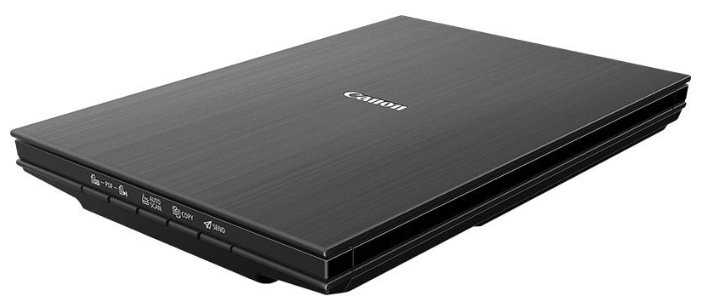


Реальный опыт использования Canon CanoScan LiDE 400 - анализ 573 отзывов
Canon LiDE 400 — это компактный планшетный сканер, ориентированный на домашних пользователей и малый офис. Его ключевые преимущества — мобильность, простота подключения через USB Type-C и высокая скорость обработки документов в стандартных режимах. Модель демонстрирует отличное качество сканирования фотографий благодаря 48-битной глубине цвета и поддержке разрешения до 4800 dpi через сторонние программы. Автоматические функции, такие как Multi-Scan и отправка файлов в облако, значительно экономят время при работе с большими объемами документов.
Однако устройство имеет ряд существенных недостатков. Хрупкий корпус и ненадежная крышка требуют аккуратного обращения, а шум при работе может мешать в тихих помещениях. Ограничения родного ПО, особенно в части максимального разрешения, вынуждают пользователей устанавливать дополнительные программы. Проблемы с питанием через USB 2.0 и короткий кабель осложняют мобильное использование.
Сканер оптимален для задач, не требующих профессиональной обработки: оцифровки архивных фото, повседневного документооборота, создания PDF-копий. Он подойдет фрилансерам, студентам и тем, кто ценит компактность. Однако для регулярного сканирования книг, работы с пленками или профессиональной ретуши стоит рассмотреть модели с CCD-сенсором и усиленной конструкцией.
Важно учитывать особенности эксплуатации: подключение напрямую к USB 3.0, использование качественных кабелей и своевременную калибровку. При аккуратном обращении LiDE 400 прослужит 3–5 лет, но ресурсоемкие задачи могут сократить этот срок. В целом, это удачный выбор для домашнего использования, но с оговорками для профессиональной среды.
👍Почему стоит купить Canon CanoScan LiDE 400 - Преимущества по отзывам пользователей
- Высокая скорость сканирования и поддержка разрешения до 4800 dpi:
- В режиме 300 dpi сканирование занимает 7–8 секунд для формата А4, что удобно для повседневных задач.
- Максимальное разрешение 4800×4800 dpi доступно через сторонние программы (например, VueScan), обеспечивая детализацию структуры бумаги.
- Режим 600 dpi подходит для оцифровки фотографий с сохранением текстур и цветовых нюансов.
- Питание и передача данных через USB Type-C:
- Не требует отдельного блока питания, что упрощает мобильность и подключение к ноутбукам.
- Армированный кабель в комплекте обеспечивает стабильное соединение даже при активном использовании.
- Поддержка USB 3.0 улучшает скорость передачи данных, особенно при высоких разрешениях.
- Удобное ПО и настраиваемые кнопки:
- Кнопки PDF, Copy, Send позволяют мгновенно сохранять документы, печатать или отправлять файлы без запуска ПО.
- Программа IJ Scan Utility поддерживает автоматическую обрезку нескольких фотографий за один проход.
- Гибкие настройки цветокоррекции, баланса белого и удаления дефектов в фирменном софте.
- Компактность и вертикальное хранение:
- Толщина корпуса — 39 мм, вес — 1,8 кг, что удобно для небольших рабочих пространств.
- В комплекте предусмотрена подставка для вертикальной установки, экономящая место на столе.
- Z-образная крышка позволяет сканировать книги толщиной до 3–4 см.
- Качественная цветопередача и CIS-технология:
- 48-битная глубина цвета обеспечивает точное воспроизведение оттенков даже на выцветших фото.
- Трехцветные светодиоды минимизируют искажения при сканировании глянцевых поверхностей.
- Режим «Фото» автоматически корректирует контрастность и яркость для архивных снимков.
- Автоматизация процессов:
- Функция Multi-Scan объединяет сканы крупных форматов (например, А3) в один файл без швов.
- Автоопределение границ документа сокращает время постобработки.
- Интеграция с облачными сервисами через IJ Scan Utility упрощает удаленную работу.
- Совместимость и простота установки:
- Драйверы для Windows 10/11 и macOS устанавливаются за 3–5 минут с сайта Canon.
- Поддержка TWAIN и WIA-драйверов обеспечивает работу со сторонними программами (FineReader, Photoshop).
- Автоматическое распознавание ОС при первом подключении.
👎О чем стоит задуматься перед покупкой - Недостатки по отзывам пользователей
- Хрупкая конструкция и ненадежная крышка:
- Пластик корпуса подвержен царапинам, а крышка прогибается при давлении, что может привести к засветам.
- Фиксатор Z-образного положения часто срабатывает некорректно, требуя ручной регулировки.
- Уплотнительный поролон на крышке со временем отслаивается, нарушая прижим.
- Ограничения ПО и автоматизация:
- Родное ПО Scangear ограничивает разрешение 1200 dpi, а 4800 dpi доступно только через VueScan.
- Авторежим сохраняет файлы в PDF/JPG без ручного выбора, что неудобно для профессиональных задач.
- Отсутствие поддержки Linux, кроме базовых драйверов, ограничивает пользователей OpenSource.
- Шум и вибрация при работе:
- Уровень шума достигает 45 дБ в режиме 600 dpi, что раздражает в тихих помещениях.
- Вибрации вызывают смещение текста на сканах при неплотном прилегании документа.
- Отсутствие «тихого» режима в настройках.
- Проблемы с питанием через USB:
- При подключении через USB-хаб возникают ошибки из-за недостаточной мощности.
- USB 2.0 не всегда обеспечивает стабильную работу, требуя переход на USB 3.0.
- Короткий кабель (1,2 м) ограничивает мобильность.
- Ручная настройка для точного сканирования:
- Глубина резкости CIS-сенсора всего 2–3 мм, что требует идеального прилегания документов.
- Ручная калибровка через Scangear необходима для каждого скана в режиме высокого разрешения.
- Автокоррекция теней и бликов часто ошибается, требуя ручного вмешательства.
- Ошибки драйверов и совместимость:
- На Windows 11 возникают конфликты с обновлениями, требующие чистой установки ОС.
- Кнопки на корпусе не работают без полной версии IJ Scan Utility.
- Сбои при сканировании в сетевом режиме.
- Ограниченная долговечность:
- Ресурс механизма — около 20 тыс. сканов, после чего возможны поломки каретки.
- Светодиоды теряют яркость через 3–4 года активного использования.
- Отсутствие сервисных центров для ремонта в СНГ.
*Плюсы и минусы, которые пользователи называют чаще всего на основе практического опыта использования.
573 отзывов пользователей о Canon CanoScan LiDE 400
Пользовались
Canon CanoScan LiDE 400?
Поделитесь своим опытом и помогите другим сделать правильный выбор

Скромный эксперт
15.10.2020
2/10
Оценка пользователя
Ужасно
New scanner from canon
I got it in good condition well packed by Amazon. But scanner had some issue with driver or hardware. It did not work properly. Error msg pop up and says cannot connect with scanner. I tried to reinstalling the driver and updating to latest. I connected in USB 3.0 and 2.0, also removed other usb device, still not working. I thing it had some driver issue. Not stable to use.it started the scanning process for 2seconds and then error msg pop up Can not even scanned single image. So disappointed with Canon scanner.
Скромный эксперт
15.10.2020
10/10
Оценка пользователя
Великолепно
Before you install this printer...
I have seen many buyers complaining about this product, that, it is not recocnised by windows or mac, it happens because of a mistake. First you must install the CD driver provided, and when the interface ask you to connect the printer cable, that is USB, then only you should connect the cable. The rest work like magic! I have provided a sample image scanned in 300 DPI, a bird manual with creamy paper, observe the detail! I strongly recommend this product.
Скромный эксперт
15.10.2020
10/10
Оценка пользователя
Великолепно
The first product didn't work, replaced one working great
As most users reviewed this has some problem and will not connect post setting up. As per the instruction I set it up and connected the scanner to laptop when requested and it was all fine successful set up. Post setup once I started the IJ Utility tool within few seconds it started throwing connection error and every time you connect you will receive the same error. I tried on 3 laptops and it all the same.
However, Amazon replaced this product promptly and the second one is working like charm since first installation without any issue. I'm using this scanner for almost more than a year and it produces great scanning result every time. So I definitely recommend this product.
However, Amazon replaced this product promptly and the second one is working like charm since first installation without any issue. I'm using this scanner for almost more than a year and it produces great scanning result every time. So I definitely recommend this product.
Скромный эксперт
15.10.2020
2/10
Оценка пользователя
Ужасно
Worst product. Not working on windows as well as Mac book
Worst product. After trying so many times of uninstalling and installing software, still scanner not working on windows 10 and MacBook as well. Getting scanner communication errors.
Скромный эксперт
15.10.2020
10/10
Оценка пользователя
Великолепно
Brilliant Scanner
Just make sure you FIRST install the Driver from the CD and connect the scanner only when the driver installation wizard prompts you to do so. The wizard tries to connect to the internet for downloading the latest stuff, so just make sure your machine is online before running the driver CD. Scanner is working great.
All the negative reviews are from people who connected the scanner without first installing the driver from the CD. If you messed it, just disconnect the scanner, go to device manager and uninstall all the scanners from the list; restart the machine and try running the CD first.
All the negative reviews are from people who connected the scanner without first installing the driver from the CD. If you messed it, just disconnect the scanner, go to device manager and uninstall all the scanners from the list; restart the machine and try running the CD first.
Скромный эксперт
15.10.2020
10/10
Оценка пользователя
Великолепно
A great scanner
I had previously purchased an Epson Scanner (Epson perfection V39). The first one never worked. The replacement stopped working in around 2 months, and had a bad build quality. I purchased this next. And this one is much better.
First of all, when you get this, there's a lock-unlock slider at the back. You NEED to unlock it. Otherwise the scanner will turn on but won't work.
I am using this on a Mac. When I was using the Epson scanner, it installed a software that kept on bugging me to register the product every few days. But this one does not need any installation of any software/driver at all on a Mac. Just plug in the USB and open Image Capture. Image Capture is an application that is preinstalled in all macs. You will find the scanner on the left in the Shared category. Just use it from there. No need to install any software or drivers, it all works out of the box. The scan quality is also great out of the box.
I really like how sturdy this scanner is. The build quality is great. You can also lift the upper lid to make space for books, etc. The cable that comes with it is the most solid, heavy duty USB cable that I have ever seen. And it is a standard USB-C to USB-A cable, so if you have a laptop like the new macbooks with USB-C port, you can also use a standard USB-C to USB-C cable without any dongles.
I think if you are looking for a budget portable flatbed scanner in India, you only have 3 options - Canon LIDE 300, LIDE 400 (this one), and Epson perfection V39. Out of the three, I think this one is by far the best. I can safely recommend this one.
First of all, when you get this, there's a lock-unlock slider at the back. You NEED to unlock it. Otherwise the scanner will turn on but won't work.
I am using this on a Mac. When I was using the Epson scanner, it installed a software that kept on bugging me to register the product every few days. But this one does not need any installation of any software/driver at all on a Mac. Just plug in the USB and open Image Capture. Image Capture is an application that is preinstalled in all macs. You will find the scanner on the left in the Shared category. Just use it from there. No need to install any software or drivers, it all works out of the box. The scan quality is also great out of the box.
I really like how sturdy this scanner is. The build quality is great. You can also lift the upper lid to make space for books, etc. The cable that comes with it is the most solid, heavy duty USB cable that I have ever seen. And it is a standard USB-C to USB-A cable, so if you have a laptop like the new macbooks with USB-C port, you can also use a standard USB-C to USB-C cable without any dongles.
I think if you are looking for a budget portable flatbed scanner in India, you only have 3 options - Canon LIDE 300, LIDE 400 (this one), and Epson perfection V39. Out of the three, I think this one is by far the best. I can safely recommend this one.
Скромный эксперт
15.10.2020
2/10
Оценка пользователя
Ужасно
Wostest product I ever seen.
Worst product I ever seen. It can not be connect to PC for a single time. I called customer care, they suggested me to visit service center along with it and PC! Even Canon has no technical support over telephone!
Don't buy this at any cost.
Total loss of money and time.
It will make you big harrasment for life time.
Don't buy this at any cost.
Total loss of money and time.
It will make you big harrasment for life time.
Скромный эксперт
15.10.2020
4/10
Оценка пользователя
Ужасно
Not upto the brand name..!
DO NOT CONNECT THE SCANNER UNLESS ASKED DURING SOFTWARE/DRIVER INSTALLATION.
Pros: Resolution (crisp & detailed pictures), speed and software front.
Cons: Blue shade is quite dominant in the scans. Colour reproduction is not so good as far as photo scanning is concerned.
Some misalignment is visible at higher resolutions 3600+ dpi (Came to know from a review video). The body is not so strong, though lightweight.
I replaced the product because of noticeable blue dominance in the scans, considering it as a fault in that particular item. Unfortunately, the replacement was completely faulty and couldn't scan anything at all. So I had to return the product.
I would recommend you to compare Epson v39 with this and then decide which product to buy. If budget is not an issue then go for Epson v600.
Pros: Resolution (crisp & detailed pictures), speed and software front.
Cons: Blue shade is quite dominant in the scans. Colour reproduction is not so good as far as photo scanning is concerned.
Some misalignment is visible at higher resolutions 3600+ dpi (Came to know from a review video). The body is not so strong, though lightweight.
I replaced the product because of noticeable blue dominance in the scans, considering it as a fault in that particular item. Unfortunately, the replacement was completely faulty and couldn't scan anything at all. So I had to return the product.
I would recommend you to compare Epson v39 with this and then decide which product to buy. If budget is not an issue then go for Epson v600.
Показаны отзывы 1-8 из 573.
Как менялась цена на Canon CanoScan LiDE 400
Характеристики Canon CanoScan LiDE 400
Информация о характеристиках носит справочный характер.
Перед покупкой уточняйте характеристики и комплектацию товара у продавца
Обзоры и руководства на Canon CanoScan LiDE 400

Альтернативы с более высокой оценкой























Wizemart © 2026.
Рекомендательная система по умному выбору товаров по отзывам и рейтингам
