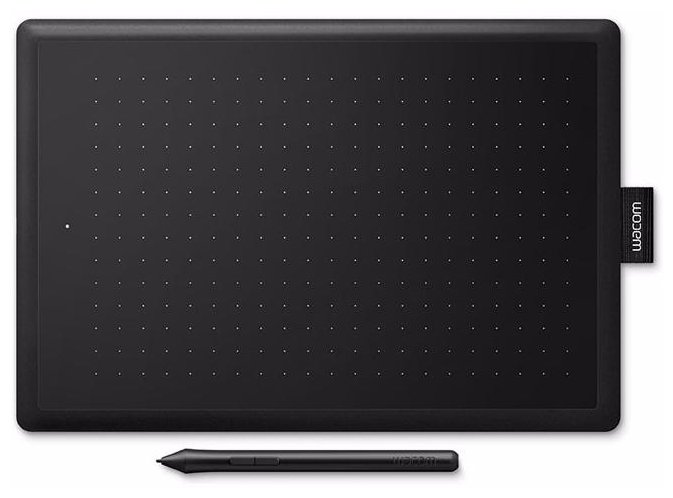
Отзывы о Дигитайзер Wacom CTL-472-N
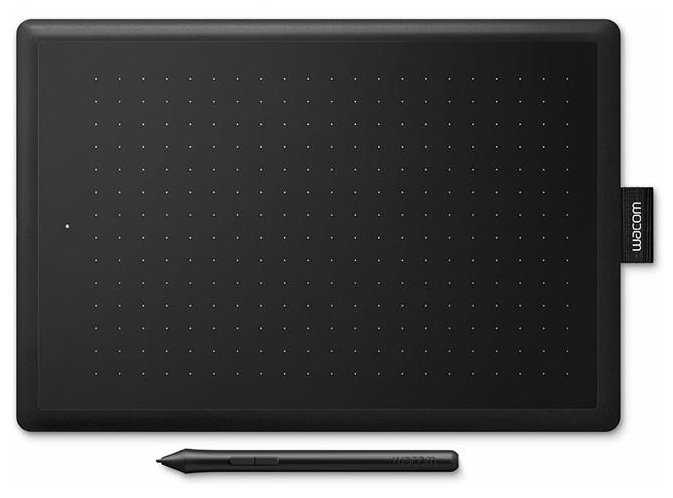
|
Графический планшет WACOM One Small (CTL-472-N) EU черный/красный | Яндекс Маркет | 5 699 ₽ | Посмотреть |
|
Графический планшет WACOM One Small (CTL-472-N) EU черный/красный | Яндекс Маркет | 5 699 ₽ | Посмотреть |
|
Графический интерактивный перьевой монитор/планшет Wacom One 13 DTC133 | Яндекс Маркет | 31 418 ₽ | Посмотреть |
|
Графический планшет WACOM CTL-672-N | Яндекс Маркет | 31 997 ₽ | Посмотреть |
441 отзывов пользователей o WACOM CTL-472-N
Пользовались
WACOM CTL-472-N?
Поделитесь своим опытом и помогите другим сделать правильный выбор

Плазмонавт-1GXEJ
14.11.2019
Оценка пользователя
Хорошо
- +
Ваком, он и есть Ваком.
- -
пока не обнаружены
Покупал дочке для рисования почти 3 месяца назад. Встал с полпинка, вопросов никаких. Дочка довольна
Квазар-2BEBU
02.11.2019
Оценка пользователя
Великолепно
- +
Хороший девайс но дорогой. От себя могу посоветовать купить xp-pen
- -
Когда видишь по воздуху и сразу прикосаешся к самому планшета происходит микролаг и не работает с вин 7
МехаРейнджер-3DJAH
04.11.2019
Оценка пользователя
Хорошо
- +
Цена.
Совместим с Windows 7.
Перо без батареек.
Подходит для игры в osu.
- -
Короткий кабель.
Покрытие при постоянном использование быстро стирается.
Плазмоид-6TSHO
13.12.2019
Оценка пользователя
Великолепно
- +
Качественный за свои деньги
- -
Не usb-c.
Для осу очень хороший планшет
Плазмоид-4TMGL
22.08.2019
Оценка пользователя
Великолепно
- + Удобство и простота использования
- - Царапается немного, кладу сверху лист бумаги или самодельную пленку из файла.
КиберНаблюдатель-1ACYX
05.05.2019
Оценка пользователя
Хорошо
- +
Лёгкий, компактный, крепкий да и красивый. Хороший друг для творчества! Лампочка радует глаз и когда не понятно с чем проблема, с планшетом или компьютером то можно сразу увидеть.
- -
Драйвера кривые, сейчас они более лучше. Но в начале 2018 вообще был ужас. Ну и кнопочек нет (ну это уже субъективно)
Пользуюсь 1 год и несколько месяцев и доволен. Мне он нравится и пока на другие планшеты не буду переходить. P.S кабель на фотках не от планшета, я его погнул. Так-то кабель обычный.
Аэронавт-2TNSU
30.11.2019
Оценка пользователя
Великолепно
- +
Хороший, Совместим с Windows 10
Скажу 1 словом : Хороший
ОмниКод-6IEXD
21.08.2019
Оценка пользователя
Великолепно
- + Функционал
- - Все отлично
Пандорец-9PEKQ
08.07.2019
Оценка пользователя
Великолепно
- +
Компактный, есть куда засовывать перо, хорошо работает с windows 7.
- -
Нет.
Куплен был не в днс, а в другом магазине. Отлично работает, что тут не скажешь с фотошопом. Не пользовался месяцев примерно 2-5 исправно работает. Всем советую.
НаноРейдер-0LMOE
29.06.2019
Оценка пользователя
Великолепно
- +
-Компактный
-Перо без батареи
-Стильный дизайн
-Низкая цена
- -
Короткий провод и всё
В целом, я доволен своей покупкой. Покупал я исключительно для игры в osu! Также этот ГП подойдёт для начинающих художников. Рекомендую.
Кронос-5UHEP
31.07.2018
Оценка пользователя
Хорошо
- +
-Красивый дизайн
-Перо без батареек, а значит легкое
-Совместимость с Windows 7
-Прост в настройке
- -
-Ну во первых ,хоть он и прост в настройке, но я очень был недоволен тем ,что в драйвере нельзя развернуть область планшета (а я левша ).
-Слишком мало наконечников (3шт), пришлось заказывать на Алике, потому что в России за них ломят слишком высокую цену
-Короткий кабель, всего 1 метр? Серьёзно?
-Перо показалось слишком тонким и хлипким. Если вспотеют руки ,то оно будет просто летать по вашей квартире
Покупал сей чюдо в основном для игры osu! на замену своему китайскому планшету. Разница в основном только в размерах, а так ,по ощущениям стало легче играть и инпут лага вроде нету.
Но все же за наконечники минус, один наконечник стерся за 2 дня. К тому же XP-Pen клали пачку из 10шт, а здесь всего 3шт.
Супернова-9UHNS
28.08.2018
Оценка пользователя
Великолепно
- + Планшет с маленькой областью работы пера ,но этого достаточно.
Нет встроенных клавиш на графическом планшете ,но это не беда для тех кто привык рисовать без них.
Планшет не плохо подходит для ретуши и обработки фотографий.
Как плюс можно считать 3 запасных концов для пера и пинцет для их извлечения.
Как минус плохое ПО ,но его можно перезагрузить и может оно станет лучше.
Есть модель M точно такая же ,но побольше на ней удобнее работать (дороже).
Дизайн планшета мне показался не совсем соответствующим, меня смутила красная задняя панель планшета.
Есть место где можно написать свое имя.
Один из минусов планшета, что он слишком легкий( для некоторых это будет плюсом).
Так же к плюсу этого планшета, можно отнести резиновые ножки.
Спектроник-9IZYQ
16.04.2019
Оценка пользователя
Великолепно
- + Минимализм
- - Размер
Кронос-4EQTK
13.12.2018
Оценка пользователя
Хорошо
- +
-Удобное перо с двумя кнопками
-Небольшая площадь для работы
-Быстрая настройка драйверов
-На планшете есть держатель для пера
-Стильный дизайн
-Для пера не нужны батарейки
-Низкая цена
- -
-При вождении пером производится достаточно громкий звук
-Короткий провод, но его можно заменить
-Провод подключается только с левой стороны планшета
На нём очень удобно рисовать и использовать в фотошопе. За счёт небольшой площади рука не устаёт. В комплекте есть 3 сменные насадки для пера и одно в самом пере.
ТехноНаблюдатель-0GCOV
17.03.2019
Оценка пользователя
Великолепно
- + Цена, стилус, дизайн.
- - Если нужно для более масштабных дел, то конечно нужен подороже.
НаноРейдер-1CGVX
14.07.2019
Оценка пользователя
Великолепно
- + Цена Удобный размер Приятная тактильно поверхность Высокая точность
- - Пока не выявлено
Квазар-4JHDU
21.07.2018
Оценка пользователя
Хорошо
- +
-Перо без батареек(об это уже каждый написал, и я напишу)
-Легкий
-за такие деньги хорошая рабочая область
-петличка для пера(хотя бы не потеряете перо)
-3 запасных наконечника
- -
-невоможность развернуть раб.область на 180 без неофициальных программ
-быстро стираются наконечники
-перо из дешевого пластика. Если долго работать, то скользит в руке
-резиновые ножки, которые оторвались спустя месяц
Брал я этот гп в основном для игры osu!, а рисование было уже на втором плане. Брал его как замену cth-480, и скажу сразу, это небо и земля, по сравнению с cth этот 472 не то что бы очень плох, вся разница в основном в пере. Ну на счет инпут лага вроде иногда что-то подобное бывает, но это не точно, потому что чаще всего мои кривые руки всему виной.
НоваГость-3KPSA
14.07.2019
Оценка пользователя
Великолепно
- + Простота, цена и качествево сборки
- - Не выявлено
КиберНаблюдатель-3DMJD
21.10.2018
Оценка пользователя
Хорошо
- +
-Лёгкое перо
-Прост в настройке
-Красивый дизайн
-Совместим с Windows 7
- -
-Малое количество наконечников (3шт)
-Короткий кабель (1м)
-Капризное покрытие планшета,на которое надо клеить винил
-Быстро стирающиеся наконечники
-Хрупкий кабель
Таблет за свою цену хорош,но есть проблемы с установкой драйверов на Windows 7,так как последние дрова с сайта на Wacom CTL-472 не идут,надо качать драйвера старой версии 6.3.30-6 ,играю на нём в osu! инпут лага вроде как нет,нормальная по размерам рабочая зона,в общем хороший планшет,подходит как для рисования,так и для игр
НаноПилигрим-3NRQD
13.04.2019
Оценка пользователя
Великолепно
- +
Покупал для игры так что я играл очень хорошо перо удобное есть запасные 3 наконечника и стераются они очень мучительно и медленно это огромный +
- -
Растерается поверхность и можно увидеть себя
Отлично заходит под мои ощущения
Астрономад-9VZQT
16.07.2018
Оценка пользователя
Великолепно
- +
Красивый дизайн, задняя часть красная, и есть возможность написания собственного имени.
Нормальный размер для работы, новечку данный ГП идеален.
Удобное перо, не нуждается в зарядке, рисовать им одно удовольствие. Есть вожможность фиксации пера на петличку, не порвется.
Драйвера идеально работают, заработал сразу после перезагрузки и установки дровов.
- -
Быстро стираются стержни, но все зависит от использования.
Сами стержни дорогие.
Хлипкий и короткий провод, но есть возможность подключение любым иным проводом микро usb.
Неадекватно работает с win7
Идеальный ГП пользуюсь где то 7-8 месяцев, очень доволен, был выбор между интуосом и оне бай ваком, но остановился на втором)
Рекомендую к покупке!
Вектрон-6OWSQ
02.02.2019
Оценка пользователя
Великолепно
- +
Отличный планшет для начинающих. В комплекте идет пару сменных стержней, ставится удобная бесплатная программа со всеми настройками. Работает из коробки как на Windows, так и на macOS.
- -
Нет дополнительных кнопок, и поверхность мала, но за свою цену и для начинающего это не минусы
Кронос-5XOZW
21.03.2019
Оценка пользователя
Великолепно
ТехноНаблюдатель-5VDCH
29.12.2018
Оценка пользователя
Великолепно
- + Большая область работы
Отличная цена
Хорошее качество материалов - - Перо довольно тонкое и нет ластика