

Материнская плата MSI Z490-A PRO — 382 отзывов, плюсы и минусы
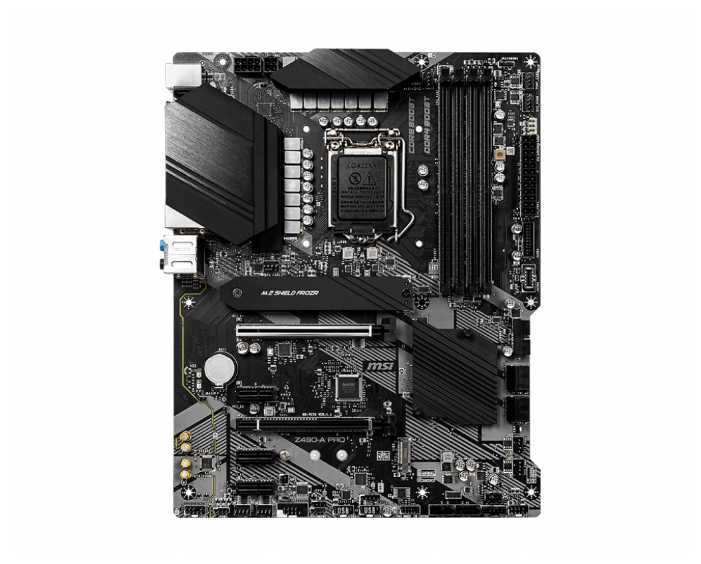

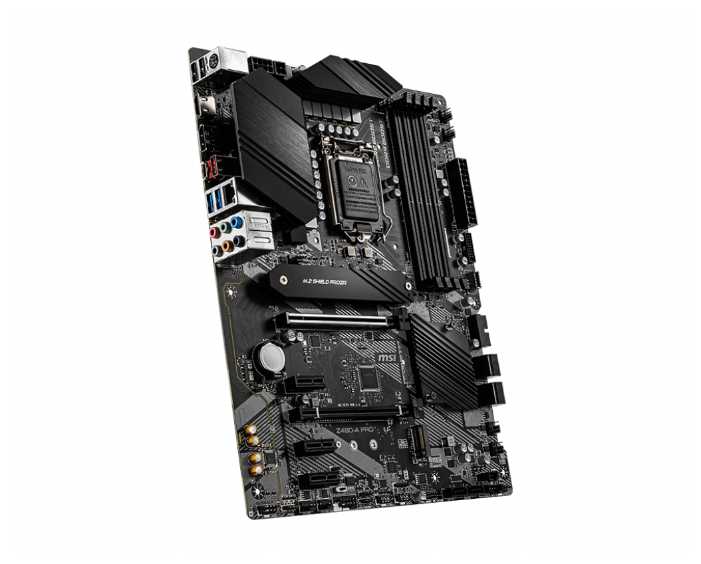


Что пользователи пишут в отзывах: ключевые плюсы и минусы MSI Z490-A PRO
*Проценты и ключевые выводы основаны на повторяющихся темах и сценариях, которые чаще всего упоминаются пользователями в отзывах.
👍Почему стоит купить MSI Z490-A PRO - Преимущества по отзывам пользователей
- Отличное соотношение цены и качества:
- Подходит для бюджетных сборок на i5-10400F и i7-10700 без переплаты за ненужные функции.
- Массивные радиаторы на VRM и M.2 обеспечивают стабильность при нагрузках.
- Поддерживает разгон памяти до 4266 МГц на XMP без проблем.
- Включает 2.5G Ethernet и все необходимые интерфейсы для повседневного использования.
- Хороший разгон памяти и CPU:
- XMP-профили активируются сразу, память Crucial 3600 МГц разгоняется до 4000 МГц.
- i5-10600K разгоняется до 5 ГГц, VRM держит температуры до 65-69°C в стрессе.
- BIOS позволяет быстро сбросить неудачные настройки разгона.
- Поддержка PCIe 4.0 после обновления BIOS для RTX 3060 и выше.
- Удобный BIOS после обновления:
- Интуитивный интерфейс с русским языком и возможностью мониторинга.
- Обновление BIOS с сайта решает проблемы совместимости с 11-м поколением Intel.
- Dragon Center управляет RGB и вентиляторами стабильно.
- Эффективное охлаждение:
- Радиатор на M.2 предотвращает троттлинг SSD Samsung 970 EVO.
- VRM остается холодным до 45-69°C в играх и стрессе с i5-10600K.
- 8 разъемов для вентиляторов, включая для помпы.
- EZ Debug LED для диагностики:
- Индикаторы CPU/VGA/DRAM помогают выявить проблемы при сборке.
- Сигнализирует о неисправностях, как в случае с бракованным CPU-контактом.
- Полный набор интерфейсов:
- 2x M.2 NVMe, 6x SATA, USB 3.2 и DisplayPort.
- Экранированные слоты DDR4 защищают от помех при разгоне.
👎О чем стоит задуматься перед покупкой - Недостатки по отзывам пользователей
- Проблемы с BIOS при первом запуске:
- Отсутствует вкладка Boot Priority до активации CSM и отключения Secure Boot.
- Автоматически включает RAID, сливающий диски в массив, требует ручного отключения.
- Первая версия BIOS не видит Windows на M.2 или требует 2 часов настройки.
- Обновление обязательно для 11-го поколения Intel.
- Случаи брака и дефектов:
- Несколько пользователей получили платы с черным экраном, CPU LED и деформированным сокетом.
- Проблемы с слотами RAM A1/A2, не запускается в двухканале.
- Партия брака в некоторых магазинах, сервисный центр подтверждает неисправность.
- Слабый встроенный звук ALC892:
- Звук тихий в наушниках даже на фронтальной панели.
- Распространенная проблема с драйверами и Windows, режется громкость.
- Хуже, чем на старых платах других брендов.
- Отсутствие инструкции в комплекте:
- Нет полноценного мануала, приходится искать на сайте MSI.
- Диск в коробке не читается на современных приводах.
- Неясно подключение спикера и RGB-разъемов.
- Не для тяжелого разгона топовых CPU:
- VRM не рекомендуется для i9-10900K в OC, температуры до 75°C.
- Требует 8+4-pin питания, 4-pin недостаточно для буста.
- i5-10500 не держит 4.5 ГГц all-core.
- Другие мелкие проблемы:
- Тонкий текстолит, механические дефекты на конденсаторах у некоторых.
- Авто-захват дисков в RAID после установки.
*Плюсы и минусы, которые пользователи называют чаще всего на основе практического опыта использования.
382 отзывов пользователей о MSI Z490-A PRO
Пользовались
MSI Z490-A PRO?
Поделитесь своим опытом и помогите другим сделать правильный выбор

MVeilleux
07.01.2021
Оценка пользователя
Великолепно
Andrew Devlin
07.01.2021
Оценка пользователя
Великолепно
BK
07.01.2021
Оценка пользователя
Великолепно
Sorry you can't see much in the picture due to my obnoxious cooler.
PC Build:
CPU: i7-10700k
CPUC: Noctua NH-D15 Chromax
MOBO: MSI Z490-A PRO
RAM: 32GB (4x8GB) HyperX Fury DDR4 3200
GFX: MSI GTX 1080 Gaming X
PSU: Seasonic Focus Plus Gold 750w
DRIVES: 250GB Samsung 970 EVO Plus M.2, 1TB Seagate SSHD, 2TB Samsung 860 Evo SSD, 4TB WD Black HDD
Adrian in Phoenix
07.01.2021
Оценка пользователя
Хорошо
I did find that the CPU power cables are difficult to plug in if the CPU cooler is in place.
I would have liked one more USB 2.0 header, but I was able to set it up with 4 front-panel USB ports. I'm not using the more modern (3.2) USB connector yet, so that gives me some room to expand in the future.
I could have used a bit more space for the Power LED connector - the one for my old case takes the room for 3 pins, but this motherboard only provides space for 2 pins. A trip to my junk box and a few minutes with the soldering iron resulted in a cable that is working well. A newer case probably wouldn't have this issue.
My biggest issue isn't MSI's fault - I wanted to use a motherboard video port for one monitor - I found in MSI's FAQ that the current Intel chipset doesn't permit the use of both a video card (or cards) and the use of the on-board video. I wish this was something I had seen in the Amazon description ...
My current setup uses 2 MSI video cards, plus a USB adapter for my 3rd monitor. I can probably drive that monitor from another port on one of the video cards - I just need a few minutes to reconfigure things (again!).
Overall, I'm glad I got this motherboard - it keeps things so cool that my fans are barely running, so the system is very quiet. Installation of Win-10 Pro was easy, as was the installation of MSI's drivers and utilities. I still need to copy over a bunch of software & data from my old system to the M.2 SSD, but it is up and running through my employer's VPN and I have an Internet radio station playing in the background. A very good motherboard for me.
F. Ganter
07.01.2021
Оценка пользователя
Хорошо
I was looking to upgrade my 8 year old MSI motherboard to a 10th gen board. That board was solid for me, so I decided to stick with MSI, rather than Gigabyte. (Plus, the Gigabyte 10th gen boards were more expensive.)
While I'm not a hard-core gamer, I do plan on playing games with this PC. As I don't really care about RGB on the board, I opt'd out of the Gaming Plus board for this cheaper Pro model. From what I can tell RGB is the only notable difference in the two.
Edit - 8/8/20: The ALC1220 audio codec on the Gaming Plus board is supposedly better than the ALC892 on this Pro board. The Gaming Plus board also has an S/PDIF audio connector.
As the MSI web site says, this is a well-constructed board. I could tell just by taking it out of the box.
Installing a board is installing a board - pretty straightforward, if you've done it before. The user guide is pretty decent for being a foreign-based company - i.e. English instructions are pretty good. Plus, there is a lot of good detail in the manual.
One thing they could improve on in the install instructions is providing clarity on CPU power. Instructions imply you need the 8 pin and 4 pin power connectors, but you only need the 8 pin, unless you are going to do some very serious CPU overclocking. (multiple articles on the internet on this)
I'm using an NVME card as my primary storage. Installing that under the FROZR shield was a piece of cake, especially since multiple m.2 screws are included. When the board booted, it had no problems with the NVME card or any other component for that matter; the board just booted up fine.
Something I find slightly odd... when booting up, the logo displays, but the options to boot into BIOS or Boot Manager only blip on the screen for .5 seconds. I'm not sure if this is because I have a fast NVME drive and CPU, or if its a flaw in the design of the board.
I installed Windows 10 (2004) on this PC. I seem to be having some issues with the onboard Realtek audio drivers. When I try to install the latest from the MSI site, they don't seem to stick - the Microsoft drivers stay there. I called MSI tech support and they couldn't really figure it out. So, I'm hoping either Microsoft or MSI comes out with a patch for this.
I personally think Dragon Center is a bloated piece of software. It installs multiple components that do not apply to me - e.g. mystic lighting. Also, the "scenarios" feature I found to be harmful, in that as soon as you click on a scenario, it changes your BIOS settings (e.g. memory speed). On the surface, that sounds like a good idea. However, the scenarios customization does not allow you to customize key aspects (like memory speed). You have to go back into BIOS. It turns out Live Update is all I really needed, so I uninstalled Dragon Center and downloaded Live Update from the MSI web site. (It is not on the install disk included with the motherboard.)
Everything considered, this appears to be another solid board from MSI at a decent price-point.
Update (8/7/20): While the initial install of the Realtek drivers did not work well (install package kept reinstalling), I did eventually get it to work by cancelling out of the reinstall. Part of the issue was that I originally got a bad tech support person at MSI. His immediate and only advice was to reinstall Windows, which I had just installed. He didn't bother to understand the issue. When I later got someone who knew better, he clarified that only the "Sound, video and game controllers" device shows an updated driver. The devices under "Audio inputs and outputs" still show an older Microsoft driver. This is how it is supposed to work according to MSI. Audio is working fine, which leads me to a point... I'm not clear what the "Audio Boost" feature does. The sound from this board is no different than what I got from my 8 year old MSI board.
BTW - Both times I called MSI tech support I waited less than 5 minutes and both techs were clearly English-speaking - likely in the US like me.
Avid Motorsports Participant
07.01.2021
Оценка пользователя
Великолепно
Core System:
MSI z490 A-Pro
i5-10600k
Noctua NH-U12S cooler
MSI 5700xt
FEP Coder
07.01.2021
Оценка пользователя
Ужасно
It may seem like a strange configuration for a gamer class motherboard, but I like to use Z series chipsets in my PCs whenever possible for maximum configurability and bandwidth. For example, I use a Z series chipset in my backup server for hardware RAID expansion via PCIe cards. In a backup server, integrated video is just fine. Furthermore, in my software development PCs where maximum CPU, RAM and I/O is useful, I also only need integrated video for running dual monitors.
This limitation doesn't seem to be well thought out.
Joey
07.01.2021
Оценка пользователя
Хорошо
Pros:
1) She gets the job done, no lollygaggin or whatever you want go call it.
2) Hasn't blown up on me, so that's good i guess.
3) Comes with some pretty cool components and features, such as a testing light on the MB itself. Just incase you can't get it to post, it will tell you signify in a simple way what could be jacked up.
4) Has A PECi Metal Shield, (don't know if I'm saying that correctly don't judge), so your graphics card won't be so droopy later on.
5) Sturdy ports and many of them.
6) Also has a (1) M.2 NVME Heat Guard as well.
Cons:
1)Most likely I may not have a component plugged in, put for some reason the HMDI ports don't work for jack. So you have to use your graphic card ports to see POST (Will update you on that).
2) Doesn't have a built in Wi-Fi capability.
3) Utilizes a disk to download drivers, would've been better had it been a cheap USB drive or both. Since barely anyone cares about a Disk Drive anymore.
4) Only (1) PCEi Armor Shielding, could've been better with multiple.
5) Only has (1) M.2 NVME Heat Guard as well, literally why have a second port, but hook a brother up and add another one.
Overall Conclusion:
It's alright, it gets the job done and does handle the new 10th Gen Intel CPUs, but honestly they could've personally added a bit more to it to make it last longer, even if they did have to throw in a couple of bucks extra, but w.e.
Как менялась цена на MSI Z490-A PRO
Характеристики MSI Z490-A PRO
| Процессор | |
| Производитель процессора : | Intel |
| Сокет : | LGA1200 |
| Поддерживаемые процессоры : | Intel 10th Gen Core/Pentium Gold/Celeron |
| Количество сокетов : | есть |
| Чипсет | |
| Производитель чипсета : | Intel |
| Поддержка SLI/NVLink/CrossFire : | 2-Way CrossFire |
| Чипсет : | Intel Z490 Express |
| Память | |
| Количество слотов оперативной памяти : | 4 |
| Режим работы оперативной памяти : | двухканальный |
| Тип памяти : | DDR4 DIMM |
| Максимальная частота памяти : | 5000 МГц |
| Максимальный объем памяти : | 128 ГБ |
| Слоты расширения | |
| Количество разъемов M.2 : | 2 |
| Слоты PCI-E подробно : | 2 x PCI-E 3.0 x16, 3 x PCI-E 3.0 x1 |
| Слоты накопителей подробно : | 6 x SATA 6G, M.2 (Key M) 2242/2260/2280 (PCIe 3.0/SATA) |
| USB подробно : | 2 x USB 2.0 Type-A, 2 x USB 3.2 Gen1 Type-A, USB 3.2 Gen1 Type-C |
| Аудио/видео | |
| Производитель звукового чипа : | Realtek |
| Звук : | HDA |
| Звуковой чип : | Realtek ALC892/ALC897 |
| Звуковая схема : | 7.1 |
| Сеть | |
| Скорость Ethernet : | 2.5 Гбит/с |
| Чипсет Ethernet : | Realtek RTL8125B-CG |
| Беспроводные интерфейсы : | без Wi-Fi |
| Дополнительные параметры | |
| Поддержка RAID : | SATA RAID 0, 1, 5, 10, нет |
| Поддержка RAID : | есть |
| Особенности : | поддержка UEFI |
| Форм-фактор материнской платы : | ATX |
| Комплектация : | материнская плата - 1 шт, диск с ПО - 1 шт, задняя планка - 1 шт, кабель SATA - 2 шт, документация |
| Область применения : | игровая |
| Тип системы охлаждения : | пассивное |
| Задняя панель | |
| Разъемы на задней панели : | 2 x USB 2.0 Type-A, 2 x USB 3.2 Gen1 Type-A, DisplayPort, HDMI, LAN RJ-45, PS/2 (клавиатура), PS/2 (клавиатура/мышь), PS/2 (мышь), USB 3.2 Gen1 Type-A, USB 3.2 Gen1 Type-C, USB 3.2 Gen2 Type-A, USB 3.2 Gen2 Type-C |
| Внутренние разъемы | |
| Внутренние слоты и разъемы : | COM-порт, питания процессора 8-pin, поддержка PCI-E 3.0, поддержка PCI-E 4.0, разъем для подключения TPM-модуля, разъем для подключения ленты RGB, разъем питания 24-pin |
| Общие характеристики | |
| Производитель совместимого устройства : | MSI |
| Дополнительная информация : | MSI EZ Debug LED, Steel Armor, VGA Armor |
Информация о характеристиках носит справочный характер.
Перед покупкой уточняйте характеристики и комплектацию товара у продавца
Обзоры и руководства на MSI Z490-A PRO







Альтернативы с более высокой оценкой




















Wizemart © 2026.
Рекомендательная система по умному выбору товаров по отзывам и рейтингам
