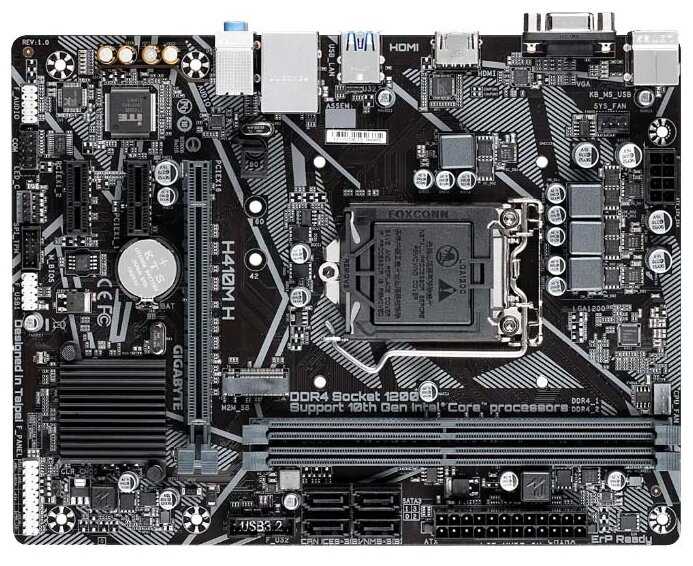
Отзывы о Материнская плата GIGABYTE H410M H (rev. 1.0)

5.5/10

Плохо


  • бюджетная
  • стабильная работа
  • быстрая загрузка SSD
  • удобный BIOS
  • подходит для офиса
  • проблемы с GPU
  • не поддерживает 11 поколение
  • неудобные разъемы
  • слабое охлаждение VRM
  • ограниченная совместимость

Рейтинг: Плохо 77 отзывов

414 место из 508 в категории Материнские платы
34
16
8
3
16


Краткие характеристики:

  • форм-фактор: microATX
  • сокет LGA1200
  • 2 слота DDR4 DIMM
  • 2133-2666 МГц
  • 1 слот M.2 PCI-E/SATA 3.0
  • 1 слот PCI-E x16
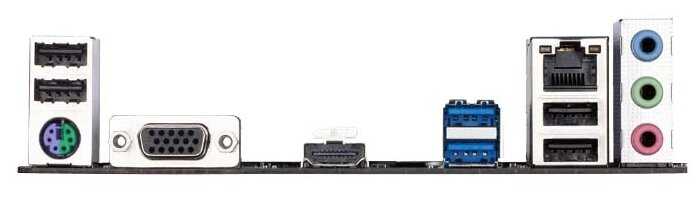
  • разъемы на задней панели: HDMI
  • D-Sub
  • звуковая схема 7.1


Плюсы по отзывам пользователей - Почему стоит купить GIGABYTE H410M H (rev. 1.0)?:

  1. Низкая цена и хорошее соотношение цена/качество:
    • Бюджетная плата, часто продается по акциям за 1200 рублей, подходит для недорогих сборок ПК.
    • Идеальна для офисной работы и легких игр вроде "Танков", где не требуется высокая производительность.
    • Подходит для процессоров Intel 10 поколения, таких как i3-10100f и i5-10400f, без лишних затрат.
  2. Стабильная работа из коробки в простых конфигурациях:
    • Запускается сразу с i3-10100f, M.2 SSD на 120 ГБ и видеокартой GT710, без настройки BIOS.
      • Установка Windows 10 проходит гладко, все драйверы ставятся без проблем, работает месяцами стабильно.
      • С i5-10400f тянет без перегрева, обеспечивает стабильную работу для повседневных задач.
    • Высокая скорость работы с M.2 NVMe SSD:
      • С дешевыми SSD (например, 128 ГБ за 1000 рублей) достигает скорости чтения 1500 МБ/с, что ускоряет загрузку Windows и приложений.
      • Поддержка PCIe x4 для M.2 2280, совместима с Kingston A2000 (чтение 1500 МБ/с, запись 1000 МБ/с).
      • Обеспечивает быструю загрузку системы, что важно для офисных и домашних ПК.
    • Удобный UEFI BIOS:
      • Интерфейс приятный и понятный, позволяет легко настраивать загрузку и параметры.
      • Поддержка разгона процессора до 4.9 ГГц (аналог i5-10600K) и памяти до 3300 МГц в некоторых случаях.
      • Работает с Windows 10 без дополнительных прошивок для базовых задач.
    • Компактный форм-фактор и достаточное количество разъемов для базовых нужд:
      • Micro-ATX размер удобен для маленьких корпусов, есть разъем для нескольких вентиляторов.
      • Достаточно портов на задней панели для офисного использования, включая USB и видео-выходы.
      • Хорошая совместимость с 2 планками ОЗУ по 8 ГБ (например, Patriot), работает стабильно.
    • Надежность в долгосрочной перспективе для простых задач:
      • Пользуются 2 года без нареканий, подходит для домашнего и офисного ПК.
      • Качество сборки устраивает для бюджетного сегмента, не ломается в базовом использовании.

Минусы по отзывам пользователей:

  1. Проблемы с запуском без встроенной графики в процессоре:
    • Не стартует с i3-10100f (без iGPU) и дискретными видеокартами без UEFI BIOS, требуется дополнительный GPU с EFI или процессор с графикой для входа в BIOS.
    • Нужна настройка: включить CSM Support в Boot, установить Storage Boot Option Control на UEFI, CPU PCIe Link Speed на Gen2, иначе лаги и артефакты.
    • Несколько пользователей сдали по гарантии из-за этого, особенно с RX580 или старыми картами вроде GT610.
  2. Не поддерживает процессоры Intel 11 поколения:
    • Несмотря на чипсет H510, не совместима с 11-м поколением, что вводит в заблуждение (возможно, это H410).
    • Ограничивает апгрейд, подходит только для 10 поколения, что важно для планирующих модернизацию.
    • Подтверждено отзывами и поддержкой Gigabyte.
  3. Неудобное расположение разъемов:
    • SATA-разъемы повернуты коннекторами к CPU, мешают угловые кабели для HDD/SSD, усложняет сборку в корпусе.
    • M.2 разъем расположен неудачно, трудно доступен, не поддерживает SATA SSD в версии v3 (только PCIe).
    • Мало USB-портов (нужно докупать хаб), только один разъем для CPU-кулера, требует splitter для вентиляторов.
  4. Слабая система охлаждения и качество сборки:
    • Плохое охлаждение VRM (только 4 фазы питания), может перегреваться при нагрузке.
    • Плата гибкая, кажется хрупкой при установке, риск повреждения при работе с компонентами.
    • Ненадежное крепление M.2 пластиковой защелкой — SSD может выпасть, лучше использовать болты.
  5. Ограничения BIOS и совместимости:
    • Не открывается BIOS (черный экран 5 секунд, сразу в Windows), нет поддержки Legacy mode — только UEFI.
    • Полная несовместимость с Linux, поддержка рекомендует только Windows 10/11.
    • Не разгоняет ОЗУ до заявленной частоты (ограничение на память), BIOS неудобный с разбросанной информацией.
  6. Возможный брак и мелкие дефекты:
    • Погнутые ножки сокета, проблемы с разъемами ОЗУ, 5 коротких сигналов при старте (диагностика CPU).
    • Требует прошивки BIOS для некоторых GPU (например, для 4K поддержки), иначе не видит дискретную карту.
    • Скудная инструкция, маленький список совместимых NVMe на сайте Gigabyte.


77 отзывов пользователей o GIGABYTE H410M H (rev. 1.0)

Пользовались GIGABYTE H410M H (rev. 1.0)?
Поделитесь своим опытом и помогите другим сделать правильный выбор

Profile no image

Litzner

07.01.2021

10/10

Оценка пользователя

Великолепно

Best Value X570 Board for the 3900X
This board is one of the best value X570 boards that can easily handle the 3900X. It is a simple board, no wifi, 1GB Intel NIC, and a fantastically built 12+2 phase VRM that should even be able to handle the 3950X when it comes out. In my humble opinion, if you don't need extras on your motherboard, there is no better X570 value then the Gigabyte X570 Elite.
источник
Profile no image

Brian

07.01.2021

2/10

Оценка пользователя

Ужасно

Solid MOBO/Terrible BIOS
Update at bottom:
They weren't kidding about the extra copper - This board has some serious weight to it. Flex is non existent.
The RGBs on the back and over the IO are nice.
I do wish the second M.2 PCI SSD slot came with a heat spreader as well.
The board itself-Great. No issues whatsoever.
It's a 5 star board, except for one big thing.
The BIOS sucks. It's terrible.
It has less features then the M5A99FX Pro R2.0 (My old board from about 6 years ago)
The AMD RAID Expert Utility is a pain to even navigate. When selecting options with the mouse, they usually don't actually change. You must use arrow keys and enter.
This BIOS fails to recognize PCI RAID Controllers. If you use a RAID card, you won't be able to configure it in the BIOS or boot from it. But yet if it's pre-configured, Windows will recognize it in the file explorer/disk management.
The menus that you'll actually be using are buried inside irrelevant options.
Windows 7 and this board are not a possibility as well.
It took me about two days of errors and reboots to get Windows 10 to install and actually boot. Pray it goes smooth your first time, as the rest will not. The board still thinks I've got two Windows 10 installations despite wiping all my drives.
Fun times.

Also, POST times vary from 5-60 seconds making this the SLOWEST POST I've ever seen. Windows 10 loads in literally 1 second for me, but I have to wait sometimes a full minute to get there.
If you don't have RAID setup in the BIOS it's quicker-5-25 seconds instead.

***Update***
Unfortunately I have to update this to 1 star. The BIOS is that bad. Not only is it just painful to use, it lacks basic functionality.
For instance, I got a NVMe m.2 ssd. Installed it, found it in the BIOS, tested it. It works. I boot up windows, it doesn't show in disk management. Further digging reveals in device manager, it is there but you must toggle "show hidden devices." The properties on it revealed that windows recognized it as currently disconnected.
After jerking around the BIOS, I tried turning NVMe RAID on. The device now shows in Windows, but as legacy support and not capable of the PCI gen 4 speeds I was after.
There is no and I mean no reason turning RAID on should make it populate.
If you are like me and have a lot of storage (10 drives total: 2 M.2, 1 M.2 nvme, 1 SATA SSD, 6 SATA HDDs) this motherboard is not for you.
I spent countless hours finagling settings to get it running. This is a process for my last motherboard that actually didn't even need the BIOS for anything other than the boot order and to access my PCI RAID controller.
I really wanted to like this motherboard, but Gigabyte paid almost no attention to one of the most important aspects of it.
источник
Profile no image

Amazon Customer

07.01.2021

8/10

Оценка пользователя

Хорошо

**READ THIS BEFORE RETURNING "DOA"**
A lot of one star reviews will say this board is DOA. I thought mine was too, but it's not!

Be patient! Here's what happened.

When you power the board, the LED lights should flash initially. This is a good sign. Press the power button or trip the pins with a screwdriver, if it doesn't respond, that doesn't mean it's dead. WAIT ~15 MINUTES AFTER PRESSING THE POWER BUTTON.

***Turns out my mobo was busy resetting BIOS, and after it was finished it powered up normally. Make sure this isn't the case with your board before thinking it's DOA.***

I had tripped the pins after troubleshooting the problem to the board and was feeling pretty defeated, I started to look at returning this and buying a replacement board. As soon as I added a replacement to the cart, fans started spinning and led strips came on.

Now, I'm not saying that this is the best board. The fact that there was no led indicator or ANY indication really that the bios was updating/resetting straight from the box made me monumentally frustrated. If I hadn't left it powered up in defeat for that long I absolutely would have returned it, because there was nothing (not even a forum post after googling) suggesting that this might happen. Now that I got it to work, though, it's fine! Boot time is a little slow, but it handles my Ryzen 3700 just fine, and is ultimately a great board for the price.
источник
Profile no image

IT Admin

07.01.2021

10/10

Оценка пользователя

Великолепно

Simple, Solid, Board
This is the first machine I've built that when I plugged in the Microsoft Windows 10 Pro USB into the front panel it booted and installed with not a single issue anywhere and haven't had to open the ancient, but serviceable, Lian Li ATX case even once.

The manual is decent, but the prize is that everything that is labelled in the manual is also written on the board. It was very easy to identify all of the various connections, big and small, on the board. Gigabyte claims they used "Twice the copper as others" and from the heft of the board, it feels like they did - I installed the CPU onto the board out of the case feeling no flex getting it installed. Back panel fit fine with no goofy thin metal case-piece as with others.

I paired with a Aorus PCIE4 M.2 (so much copper on the heat sink, don't stub your toe dropping it) and a cheaper Intel (where I used the single M.2 heat-sink that the MB comes with). Both worked fine as did an old LG DVD and a newish RX480.

Windows 10 Pro installed easily, the MB came with the latest BIOS, the drivers on the CD were fine and installed easily - even uninstalling the inevitable "extra stuff" went quickly and easily. The GIgabyte website is simple to navigate and confirm I had the latest drivers. Switching on XMP by clicking Profile 1 in the BIOS was straightforward and boom, my memory is running at the rated 3600 spec. I have no interest in over-clocking, but all the features needed to pursue this are there.

I didn't need wifi and chose to go "inexpensive," but as I came to realize, I did not go "cheap" - very pleasant experience building a 3800x using GIgabyte's X570 Aorus Elite.
источник
Profile no image

Cliff

07.01.2021

2/10

Оценка пользователя

Ужасно

DOA-BUT!!
GIGABYTE X570 AORUS Failed me and I only had that weekend to build this for my son...
Used the GIGABYTE X470 AORUS for his twin brother and that board is Great. I have no doubt the X570 is good there is always going to be the DOA from every Manufacture at some point since they can't spot check every M.B. going into box's. GIGABYTE is a good company and I did not contact them directly Because of my time frame and the seller gave me back my money Instantly. thanks to all involved. I am A builder so I Fully test the DOA to be Sure and it's worth saying as soon as I dropped another M.B. in everything worked 100% and still going perfect 2 Months later(The Build Was All New Parts). have a nice Day
источник
Profile no image

F/1.0

07.01.2021

10/10

Оценка пользователя

Великолепно

Solid Ryzen 3000 choice
This is not an comprehensive review, there are plenty of sources for that. This is an anecdotal report of my experience with this product.

It works flawlessly with the r5 3600 and corsair lxp vengeance 3200/16 xmp kit. Very stable, very fast (on par with reviewer benchmarks). Bios is good, no issues. Fan is quiet on f4j BIOS.

Things that make this board standout:
- Price is good for what it has
- Excellent VRMs
- Intel NIC
- Front USB3 headers
- Gigabyte is currently the fastest at BIOS updates

Its main competitor is the Asus TUF x570, but I think this board is better on because of the points mentioned. If I were to do it again, I would do it with this board.
источник
Profile no image

Tiberious

07.01.2021

6/10

Оценка пользователя

Плохо

Meh.. it worked, mostly
Motherboards are funny these days, the manufacturers have figured out just exactly how to parcel out features and quality at what they have turned into twenty different price points, and it's really an annoyance to the con(pro)sumer at this stage in the game. You hear all the time about motherboards not mattering, don't spend money on high ends motherboards, etc, etc, etc. And that is sometimes true when everything works out well. Except for me. I've never bought a non-high end board that didn't annoy me. In the case of this one, it was short of external ports for a new board in 2019, and it outright refused to run my ddr4 3200 two sticks at the rated cas14. As did the similarly priced board from MSI I had before this one. Also the manual sucked, the online manuals and info from Gigabyte sucked, the bios was "meh" at best, it was just not a good experience. It ran ok if I forgot about having quick ram, it overclocked bout like anything else for my 2700x, it's a pretty decent VRM setup and runs cool enough, it just felt overly budget, like it was dressed up a bit more than it warranted. There aren't many really "bad" boards these days, with the exception of some goofups in power regulation here and there, but even they will generally work for normal folks.

For reference, prior to this I had an MSI B450 Gaming Pro Carbon AC, which felt in overall experience like a more polished product, though it wouldn't run my ram at rated speeds either.

I replaced the Aorus elite with an X470 Asus Crosshair VII Hero, which is technically a downgrade in chipset functionality, but in every other way is a premium product and it looks, feels and behaves like it.
And, my very expensive 32gb x 2 of cas14 3200mhz ram at it's rated speed and voltage with no muss, no fuss, no
grief, and there hasn't been the slightest hiccup. I paid twenty or thirty bucks more for the Asus, which was old enough to be a hundred bucks less than it's launch price, and it was a bargain at the price.
Every time I try to use something other than Asus, I end up compromising somewhere.
I keep trying though.

It's a shame none of these guys can seem to slim down their product stack and put the features that
make a good board on them all, and leave off (from at least some of them) the flashy gamery stuff that
drives cost up.
источник
Profile no image

D. Fox

07.01.2021

10/10

Оценка пользователя

Великолепно

Slow Buggy Bios Version F10
I think the board is great but the Bios is slow. When turning on the power it can take up to a minute for the Bios to load. Sometimes it will load in 10-15 seconds when it should always come up in less than 5 seconds. Windows 10 loads faster than the Bios. Another thing it does is it resets the Bios if any little thing has changed. It will probably be fixed with a new bios version but it's on the fourth release now.
Other than that, it's a very fast board. I'm using 4000 memory and it works fine. The manual says to use 3200 but the ads say it can use 4000 and beyond so I decided to try 4000. Mine runs at 3990 all the time with Patriot Blackout Profile 1.
Edit. After running it a few days, it seems to have settled in with it's settings and boots up fast... Bios comes up in about 6 seconds, maybe just a little slower than what I am used to. Also want to say and this is important: *** When you first start your PC after putting the board in, wait, wait, wait, and it will start up. You might think you have a bad board but for some reason, on the very first start up, it can take a couple minutes for it to get up and running to the point where you can press DEL and get into the Bios. ***
источник
Profile no image

G Craig

07.01.2021

2/10

Оценка пользователя

Ужасно

Upgrade Hell Horrid product
Board is well made , it is just a good meat and potatoes board with out all the bling and WIFI crap I do not want or need .

Then their is the horrid bios , I have been building computers since socket 7 was out , I built many AMD systems when Athlon and DDR1 came out , even a couple of Ryzen 2 x470 boards , BUT never in all my life Have I seen such a board I could get al least get up and running .
Bios is clunky , crude , not well layed out , , You have the Gigabyte bios , then the AMD bios , and they do not communicate well between each other
USB issues galore , IRQ issues , getting " No IRQ 55 Handling " errors at boot up once I upgrades the bios from F-10 to F-22 AMD releasing AGESA updates that totally screw this board do not update to anything above F-10
Memory handling issues galore , running anything above ddr2100 and look out , tried 3 different kits , even some fancy Samsung B-Die that cost me a bundle , UH, NO GO!
Spent 4 days with this board , 4 days of hell , Run , run far away from the POS
Check the Gigabyte forums and You will see for yourself
источник
Profile no image

Mark F

07.01.2021

10/10

Оценка пользователя

Великолепно

Not sure why all the negative reviews...my upgrade journey in a nutshell...
I read through all the reviews before purchasing this board. I had decided a few months ago that my old FM2+ build with the AMD Kaveri A10-7850K was getting long in the tooth and it was time to upgrade. Yay!

So this is my 3rd and final revision.

Revision 1.0: I went to the Ryzen 5 3400G APU on an MSI B450M Pro VDH Max, Corsair CX500 PSU, with TEAMGROUP Dark-Z 3200mhx 32GB RAM. HUGE upgrade from the old tech, lol!

Then I was like, you know, I would love to do some gaming, and since I just upgraded the monitor to a 32" Acer 2k 75hz display, wouldn't it make sense to get some hardware that can take advantage? Don't get me wrong, the 3400G is a great APU and can be perfect for some entry level gaming or non-gaming PC use, but I needed more!

Revision 2.0: Got the Ryzen 3600x and MSI 5500XT Mech OC GPU. NICE! Gaming was fun again! I could even play Gears 4 at 2k High settings for the most part. Gotta say, that little GPU surprised me with it's performance for the specs it had...but it wasn't enough! So I decided to use that build for a family member, and went to my current version:

Revision 3.0: Went from mATX to ATX, got the Fractal Meshify-C ATX case, Thermaltake Toughpower 750W Gold PSU, Ryzen 3700X CPU, WD BlACK 500gb nvme M.2 drive, and Sapphire Pulse 5700XT GPU (same RAM), and put it all on the Gigabyte X570 AORUS Elite.

OK now that we're all tracking, back to the actual review!

Like I said, I was worried about all the negative reviews...DOA boards, no POST, 20 hour initial boot, turtle-like BIOS load speed, used being sold as new, etc...I was like My God...

But two things sold me on this board...the nearly unanimous reviews that said the VRM was excellent, and the price point. Also, I had a Gigabyte F88A D3H for years that never let me down.

Package arrived in excellent condition, ALL NEW, SEALED. Board looks great, I love the design, and it has a quality feel to it, some real weight, which I appreciate. The LED strips are nice, low profile, not too gaudy at all and compliment my RGB fans perfectly.

I like the connections too. 2 CPU fan headers, 2 SYS fan headers, 2 3-pin 5V RGB headers, and 2 12V 4-pin RGB headers, 6 SATA ports, etc...nice and versatile. I don't even need the RGB headers, as I have 6 Thermaltake Riing 12 plus premium case fans wired to two controllers via one of the USB headers. Only RBG header I'm using is LED C2 for the Wraith Prism CPU fan.

Setup went without a hitch. Initial boot took maybe 30-40 seconds. Booted into BIOS to set XMP profile and rebooted to Windows 10 Pro.

And my one and only issue had arrived. My Seagate Firecuda 2TB SSHD storage drive was gone! Like...gone! BIOS saw it just fine, but windows couldn't see it at all. WTH? Tried DISKPART cmds, Disk Management, Partition software, nothing worked. I went to Device Manager and saw that "AMD SATA Drives" drivers had hardware conflicts. I tried installing latest chipset drivers from Gigabyte and AMD, still nothing.

Finally I just uninstalled via Device Manager, removed drivers, and rescanned, and that worked! All good now.

This is the nicest build I've ever done. Looks amazing, love the LEDs (so do the kids), and runs fast and smooth as butter.

Now I can play games on 2K resolution and all Ultra settings with no issues, and I love knowing I have quality power (Gold rated PSU) going to quality power management (MB VRMs), for my system.

My goal was performance and longevity, as I don't want to spend over $1,500 on building a family PC for at least another 5 years. And I cannot understate the importance of the right power delivery system for a system to run at it's optimum levels, which will ensure that longevity.

As for boot times, it's fast. I don't even notice what people were complaining about, my system loads to Windows login in like 10 seconds. I also was able to OC the CPU and tighten the timings on my RAM, using the Ryzen DRAM calc software, which is a nice bonus.

This board runs cool, also, the board fan hasn't even spun up once, even during stress tests.

I highly recommend this board for those looking for a nice, solid, reliable, but not exorbitantly priced X570 ATX board.

Happy hunting!
источник
Profile no image

Moto Guy

07.01.2021

10/10

Оценка пользователя

Великолепно

Aorus X570 Game on!
Now that I've had this board 6 months+, Gigabyte's early bios F3 was not that great, with each bios update the board functions much better and has one of the better VRM's on the market, I think the Best Bang for your $$ and is future prof for AM4 latest Ryzen cpu's, for now my 6 Core R5 2600X is plenty and handles all my games BF4,BF5, RDR2, Crisis 3, GTA5 on High settings @ 1440p/144 Hz. Once the 3rd gen R5 3600XT comes down in price, that's my next buy, good luck and game on!
источник
Profile no image

Gonzo

07.01.2021

2/10

Оценка пользователя

Ужасно

DOA
After installing on my latest PC build, I was not able to get a boot-up screen, even after hours of troubleshooting.
I have used Gigabyte MOBO's on my last 14 PC builds and this is the 1st DOA. After reading reading reviews I noticed I'm not the only one that has had this issue... Do NOT buy this one!
источник
Profile no image

Chance P.

07.01.2021

2/10

Оценка пользователя

Ужасно

This motherboard requires Windows 10. Update 2. do not purchase this motherboard, ever.
Update 2: Do not buy this motherboard, ever. I've had more problems with it than every other motherboard combined in my entire life. I shouldn't have to pop the RAM out and back in to get this thing to POST every time I reboot. Absolutely infuriating. I'll try tech support again, but I'm not holding my breath. Now I know why my friends say to never buy Gigabyte mobos. I'm going to email them one more time as a courtesy, but I'm done with Gigabyte. I thought I was buying a high end board, but this thing is trash. Gigabyte X570 AORUS Elite. Also I love how it sits there mid-post with RED LED's for absolutely no reason making you think it isn't booting then after 2 minutes inexplicably it boots. At least it boots after that though. Which is what threw me last time. Every hardware install though I kid you not, it will randomly not POST without me popping the ram. Sometimes just powering it off it won't POST again. Totally random. DO NOT PURCHASE.

Update 1: Someone should write in huge letters this mobo requires windows 10. wasted an entire weekend. Never heard back from tech support. Finally got it set up after building an entirely new system around it. Finally heard back from tech support a week later and they were clueless.

So, PSA. This motherboard requires windows 10.
Windows 7 = no.
Windows 10 = yes.
7, no.
10, yes.
10, not 7. 7 won't work.

Historical:
Short version. Got it all installed. Windows 7 boots, USB promptly quits. Can't get any further. Wasted 9 hours trying every combination. None of the bios tweaks for USB helped. Using windows 7 Pro. Does this motherboard require windows 10? Wish there was more readily available tech support available. Says wait is 4 days from manufacturer.
источник
Profile no image

Tark Mwain

07.01.2021

10/10

Оценка пользователя

Великолепно

So Far So Good
Before I bought this board, I saw that a few people were having issues with the board failing to wake from sleep (forcing a hard reboot). Other people complained that booting took forever and the board seemed to be in some sort of boot loop cycle. I have not seen either issue at all (knock on wood) either on the default BIOS or the latest BIOS (F30). Both were bug free. So, yeah, that makes me happy.

The Aorus Elite, according to a lot of tech reviewers, has the best VRM you're going to find sub $200. It can handle a 3950X with ease while still remaining pretty cool while doing it. So that was a big selling point for me.

So, instead of rambling, I'll just list pros and cons now.

Pros:
1) Top notch VRM (at least for the $200 price range).
2) Good Audio codec
3) Intel LAN (considered higher quality than RealTek)
4) USB Type C support (if you have a type C port on front of your case, you're good to go).
5) Two M.2 slots
6) Comes with "G Connector". I believe Gigabyte invented this and others have copied. It is a massive time saver when building the system.
7) Has addressable RGB headers.

Cons:

1) Only 4 total fan headers (including CPU). So this means 1 CPU fan, and 3 case fans. If you're running more than 3 case fans, you're going to have to daisy chain them yourself or buy a case with its own fan controller. You have been warned.

2) Only one of the M.2 slots has a heatsink. For the other one, you'll have to bring your own or just run it naked.

3) The board doesn't have much RGB bling going on. (It has RGB headers, but very little RGB on the board itself).

4) While it has Intel LAN, it is only 1 GiB. These days 2.5 should be the minimum, although to be fair, it's rare you'll find it on any board in this price range.

5) No debugging LED's whatsoever. IF you have a problem booting, you're flying blind.

6) No Clear CMOS button. If your OC fails to POST, you're going to have to short the jumpers 1990's style.

In the past, you could get a lot more features than this for $200. I don't know what happened in the past several years, but all motherboard manufacturers have begun gating basic features (like POST code LED's) to $300+ boards. It is BS, but it's what we have to deal with now.

But as for this board, I have no complaints. Between this and the MSI Tomahawk or the ASRock Steel Legend, it's a toss up. They are all 3 good and have different feature sets (this board has features those don't, while those have features this doesn't). Just compare them all and see which features suit your use case scenario best. But at least for VRM's you won't find a better board for $200.
источник
Profile no image

amazo user 9000

07.01.2021

8/10

Оценка пользователя

Хорошо

looks nice , runs nice
1st off - I am not sure this is the manuf problem or Amazons' , but the board came with NO foam packing around it inside the box nor the shipping box. Not even some cardboard protection or anything. So I was fairly sure it was damaged , bouncing all around the country getting to me. It booted up and is currently running right now.... so we'll see...

On to the product itself, it looks nice, runs nice - has an easy BIOS Flash method. and is running the AMD 3900X at full capacity right now. Features are great for a low-end priced X570 board. Audio sounds great through this. Everything went pretty smooth.

A few issues are that either the Bios setting in memory or the APP program itself is not holding the proper memory speed settings or is being reported incorrectly. I am hoping another new Bios will fix this...
...and one of the mounts where the M.2 drive goes snapped right off the board when I was unscrewing it. Obvious factory defect. So I had to move my M.2 drive to the secondary location further down...

Looking forward to this hopefully running for many years to come....
источник
Profile no image

jake wolff

07.01.2021

2/10

Оценка пользователя

Ужасно

Look up this motherboard “cold boot issue” and do NOT buy this product
I bought this product to replace an older motherboard for my ryzen 7 3800. Everything worked fine prior to this motherboard. I installed the board and it works beautifully, outside of it only starting from a cold boot 1 of every 5 times. Look up this motherboard and “cold boot issue” and you’ll see the road you don’t want to go down.

I contacted amazon and got a new board for free, which was generous...but wouldn’t you believe... THE SAME ISSUE.
источник
Profile no image

Elizabeth Ouzts

07.01.2021

2/10

Оценка пользователя

Ужасно

Stay away from this board
Really wanted this board to work. Looks awesome - black, sleek, and sits in the case nicely! I've had trouble with this board from the very beginning. I thought that the issues were caused by the bios being in an infancy form (new chipset and all), but after 5 bios' I finally got an RMA and sent it back to Gigabyte for repair. They kept it for a little bit and sent it back to me. No communication at all from Gigabyte; not a 'hey this thing works as designed', or 'we fixed this little bit here and you should be good to go'. NOTHING from them. So when it got back, it worked for a little bit but then started having the same problems as before: The bios keeps resetting and I can't do a restart without doing a power cycle (turn it off - wait, then power it back up). Any changes in the bios are for naught because the bios simply resets the next go around. Maybe they'll release a bios that fixes it and I'll be happy. In the meantime; I'm very disappointed, and my recommendation is to seek another brand of motherboard (and stay away from the Gigabyte brand all together).
источник
Profile no image

Amazon Customer

07.01.2021

8/10

Оценка пользователя

Хорошо

Decent Motherboard for mid level AMD build
This is a great motherboard for an AMD socket AM4 mid level processor such as 3700X or 3800X. It has plenty of USB ports, though risers and cables are needed to access all of them (as many as 19 total). Though these USB ports are of about 3 levels of performance: The original USB 2.0, the original USB 3.0, and USB3.1. The board does not have a ton of bells and whistles, but works well. The only real downside is it does not seem to support SLI or Crossfire. It appears there are two 16 lane graphics card slots, but one is only X4. I was able to update the BIOS to version 10. Bios has many features and is fairly easy to use. There is no eSATA connectors for outboard hard drives, but I don't think much if any of the competition has them either. Just the six internal SATA sockets. This board does not have WiFi, but they do sell a version with it for a little more if it is important. I did not encounter any issues installing it, and it has been running strong for a week. One of the strong points of the Aorus Elite MB is the VRM circuit for generating the CPU power, It is 12+2 phase . I recommend this board for those building a mid level system looking at the ~$200 range for a motherboard.
источник
Profile no image

Kriton

07.01.2021

2/10

Оценка пользователя

Ужасно

This X570 motherboard was definately overated
This motherboard had high hopes however that were quickly dashed. After installation of motherboard and first bootup, it took 5 tries just to get into the bios to finish configuring the system. Upon reboot it took over 10 minutes to get back into the bios and received message that bios settings have been reset. Went through and set all the them all back up just to rinse and repeat the procedure 4 more times until I had enough of the shenanagins. I have owned many Gigabyte motherboards and this one has got to be the worse. If you can live with a very finicky bios that does not like to stick, go for it. The motherboard does provide ample PCIe slots to accomodate GPU and other various devices. I do wish I was able to get this one working as it had on paper all the right stuff.
источник
Profile no image

Jessica Culhane

07.01.2021

8/10

Оценка пользователя

Хорошо

Works great, Looks great, 1 minor compatibility issue
My setup: NZXT h510 case, Ryzen 5 3600 CPU, ASRock Radeon RX 5700 XT GPU, Gskill Ripjaw 3200 2x8 Ram, WD blue 1TB SATA 2.5" SSD, EVGA 650w gold power supply.

Pros:
This was my first time full-build. The motherboard comes with a great set of instructions, and i was able to build my PC following the manual. No issues with plugs, or arrangement, everything fit just fine.
Its a very good looking board, there's plenty of options to go ham with RGB, but i chose to do an all black no RGB build, and it still looks very sharp with this board.
The uEFI interface is easy to use, comes with a easy mode for newbies like me, as well as an advanced mode that lets you customize pretty much everything.

Cons
I had a compatibility issue with my SSD. Its a brand new SSD, but I installed windows on this SSD using my old computer (a circa 2014 Dell). Apparently there is an issue that if you set up a drive using an older BIOS computer it is not compatible with uEFI systems, such as this motherboard (MBR format vs GPT format). My research told me that it should be as simple as just telling my motherboard to boot in legacy mode, however i tried every possible setting on this board and nothing let me boot up the MBR formatted drive. I had to wipe the drive clean, delete the partition, and format it as GPT and reinstall windows. Wasn't a big deal since all i ended up wiping was a fresh install of windows 10. But if you plan on running windows from an old drive, or a new drive setup using an older computer, do your homework.
источник
Profile no image

Amazon Customer

07.01.2021

2/10

Оценка пользователя

Ужасно

DOA, bad BIOS updates, seems ok if you can get it working
Board arrived DOA, would not recognize any SATA or M.2 NVMe drives. Updated and downgraded BIOS as recommended by gigabyte and forums (current BIOS build you download apparently has issues too) with no luck.
Drives all work in my other computer, or in a USB enclosure with my laptop so its clearly the motherboard causing the issues.
Thankfully Amazon is great about returns but I'm not trusting Gigabyte again, I've read too many similar issues online about DOA boards and BIOS issues with these .
источник
Profile no image

Short_shots

07.01.2021

10/10

Оценка пользователя

Великолепно

Mother of God
I've always been hesitant of AMD, but I finally bit the bullet after prime day got the headshot. Unbelievably happy I got hit though.

This motherboard is simply laid out, well labeled, stable, and has everything you could need. RGB's are PLENTY on this board. You could light up the entire block with RGB's on this thing.

The BIOS is beyond simple and the setup was painless. GET IT.
источник
Profile no image

Jason F

07.01.2021

8/10

Оценка пользователя

Хорошо

Nice Motherboard but it may have died in less than 1 year. Update: MB is good.
I chose this Motherboard because it had the features I wanted and looked like it had no RGB lighting, turns out it has some but I just used it as an indicator it was on.

I had not built a PC in years and it took some time to find and identify what some things were for. The instructions are very informative and helped out. I thought at first I was missing the second support and screw for the second m.2 but I found it, The MB has a nice clip for your front panel audio and switched to clip into before connecting to the MB to make things easier.

I placed the order on 12-1-2019 and on 9-9-2020 the computer died. A quick Google search has led me to think its either the Power Supply or the MB. My screen went black and I lost sound while watching a video on Youtube. The MB LED lights stayed on and the fans kept spinning. I reset using the reset switch and the power switch but got no result so I pulled the plug for a few minutes. Now when I turn it on I get a white flash behind the I/O area, Had that when I first turned it on and thought that it was a LED flashing, and the fans spin but no image and the mouse and keyboard have no power. I'm waitin to hear back from Gigabyte Tech Support but fear I may have to buy a new MB and Power Supply.

Update 11-17-2020
Gigabyte says it tests ok and will be sending it back. I'll see if I did something wrong when it gets to me. I had to call customer service because I was afraid I had missed a E-Mail, the Customer Support web site has a "Ask a question feature" Even with covid my total phone call time was only 9 minutes and the answer from teh support question gave me the option on the phone tree. Very helpful.

Update 12-15-2020
I received the other RMA parts and the MB is fine. As it turns out the Power Supply had gone bad. I could only test it on PCs with 4 pin CPU connectors and they booted fine. I Very much thank Gigabyte for testing the MB.

I do wish the MB had 1 or 2 more fan headers.
источник
Profile no image

WhiskeyMan

07.01.2021

8/10

Оценка пользователя

Хорошо

Nice board for the price
Overall a nice board for the price. For the price, the performance and LED lighting is definitely above par. Install was easy and no problems with fire up (as some others have noted, the first boot up is a couple minutes - just be patient).

There are some caveats...
- Boot time is slower than my older ASRock Z97 board even in Ultra Fast boot mode (next step in going to turn off the splash/logo screen...may also try putting windows boot drive first to see if BIOS is holding on the BluRay drive and taking extra time there).
- As some others have mentioned, spamming DEL key to get into BIOS will clear your settings... definitely save a profile with your settings just in case.
- Only 2 USB 2.0 headers in 2020 seems a bit light considering all of the RGB fans with USB connection support.
- Only 2 sys fan headers is a bummer, but the cpu_opt header can also be used as a 3rd without issue from what I can tell.

Haven't used M.2 or NVMe features...or PCIe4.0 (just 3.0 graphics card)...so can't comment on that.

All of that in mind, it is really a solid, stable, and good looking board. Boards with similar features and less of the caveats are often $100 more, so for the value minded (like me) the sacrifice is often worth it.
источник
Показаны отзывы 1-24 из 77.


График изменения цены GIGABYTE H410M H (rev. 1.0)

Характеристи GIGABYTE H410M H (rev. 1.0)

Процессор
Производитель процессора : Intel
Сокет : LGA1200
Поддерживаемые процессоры : Intel 10th Gen Core/Pentium Gold/Celeron
Количество сокетов : есть
Чипсет
Производитель чипсета : Intel
Чипсет : Intel H410
Память
Количество слотов оперативной памяти : 2
Тип памяти : DDR4 DIMM
Режим работы оперативной памяти : двухканальный
Максимальная частота памяти : 2666 МГц
Максимальный объем памяти : 64 ГБ
Слоты расширения
Количество разъемов M.2 : есть
Слоты накопителей подробно : 4 x SATA 6G
Аудио/видео
Производитель звукового чипа : Realtek
Звук : HDA
Звуковая схема : 7.1
Звуковой чип : Realtek ALC887
Сеть
Скорость Ethernet : 1000 Мбит/с
Чипсет Ethernet : Realtek RTL8118AS
Беспроводные интерфейсы : без Wi-Fi
Дополнительные параметры
Особенности : поддержка UEFI
Форм-фактор материнской платы : microATX
Комплектация : Антивирусный пакет Norton Internet Security (OEM-версия), утилита Realtek 8118 Gaming LAN Bandwidth Control
Тип системы охлаждения : пассивное
Задняя панель
Разъемы на задней панели : 2 x USB 3.2 Gen1 Type-A, HDMI, PS/2 (клавиатура/мышь), VGA
Внутренние разъемы
Внутренние слоты и разъемы : поддержка PCI-E 3.0, разъем питания 24-pin
Дополнительная информация : cFosSpeed, DualBIOS, Q-Flash, Ultra Durable PCIe, High-End Audio Caps, APP Center Including EasyTune and Cloud Station Utilities

Информация о характеристиках носит справочный характер.
Перед покупкой уточняйте характеристики и комплектацию товара у продавца

Обзоры и руководства на GIGABYTE H410M H (rev. 1.0)

Похожие товары с лучшей оценкой

9.7/10 баллов

MSI MPG X870E CARBON WIFI

67 отзывов

от 64940.00 руб.

9.6/10 баллов

MSI Z790 GAMING PLUS WIFI

208 отзывов

от 24594.00 руб.

9.6/10 баллов

MSI PRO B850-P WIFI

105 отзывов

от 24428.00 руб.

9.6/10 баллов

MSI PRO X870-P WIFI

111 отзывов

от 30799.00 руб.

9.6/10 баллов

MaxSun MS-Challenger H610M-R [LGA1700]

68 отзывов

от 7600.00 руб.

9.5/10 баллов

ASUS ROG STRIX B650E-F GAMING WIFI

22 отзывов

от 34571.00 руб.

9.5/10 баллов

ASUS ROG STRIX B550-A GAMING

123 отзывов

от 21350.00 руб.

9.5/10 баллов

ASUS ROG STRIX B550-F GAMING WIFI II

101 отзывов

от 24975.00 руб.

9.4/10 баллов

ASUS TUF GAMING B650-PLUS

33 отзывов

от 23725.00 руб.

9.4/10 баллов

ASUS ROG STRIX B660-A GAMING WIFI D4

60 отзывов

от 33493.00 руб.

9.4/10 баллов

GIGABYTE B850M AORUS ELITE WIFI6E ICE [B850M A

50 отзывов

от 25975.00 руб.

9.4/10 баллов

ASUS TUF GAMING B450-PLUS II

293 отзывов

от 12100.00 руб.

9.4/10 баллов

ASUS TUF GAMING H770-PRO WIFI

105 отзывов

от 28938.00 руб.

9.3/10 баллов

MSI MAG X870E TOMAHAWK WIFI

105 отзывов

от 43850.00 руб.

9.3/10 баллов

ASUS TUF GAMING B760-PLUS WIFI

91 отзывов

от 24100.00 руб.

9.3/10 баллов

ASUS TUF Gaming Z690-PLUS

207 отзывов

от 34999.00 руб.

9.3/10 баллов

MSI MPG B550 GAMING PLUS

1135 отзывов

от 16540.00 руб.

9.2/10 баллов

GIGABYTE X870 Aorus Elite WIFI7 ICE

58 отзывов

от 37417.00 руб.

9.2/10 баллов

MSI MAG B760 TOMAHAWK WIFI

877 отзывов

от 21499.00 руб.

9.2/10 баллов

MSI MAG Z790 TOMAHAWK WIFI

608 отзывов

от 27475.00 руб.

Это Вам тоже может быть интересно

Показать все обзоры