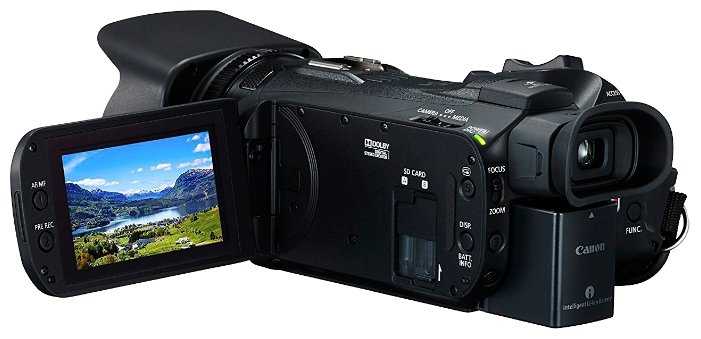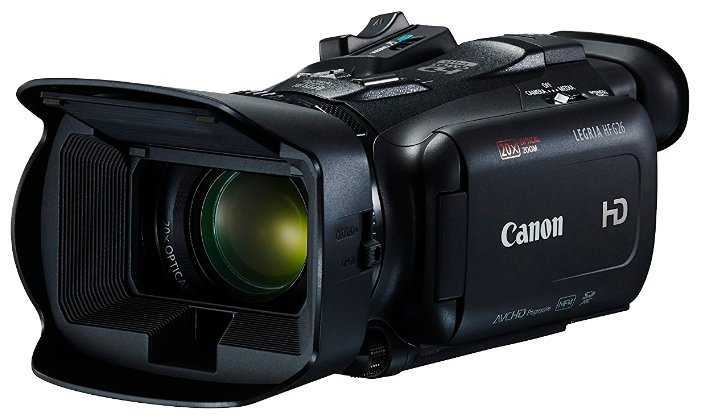
Видеокамера Canon LEGRIA HF G26 — подробный обзор, плюсы и минусы на основе 265 отзывов

9/10

Отлично

9/10 Отлично 265 отзывов · агрегировано из 12 источников Как мы считаем рейтинг?
Flash
AVCHD
Full HD 1080p
1CMOS
фоторежим
zoom 20x/400x
видоискатель
оптический стабилизатор
SD
SDHC
Все характеристики →
182
49
16
9
9
Средняя цена в магазинах 68 355
Смотреть все цены ↓
Загружаем цены...

265 отзывов пользователей о Canon LEGRIA HF G26

Пользовались Canon LEGRIA HF G26?
Поделитесь своим опытом и помогите другим сделать правильный выбор

182
49
16
9
9
Profile no image

Скромный эксперт

21.03.2013

8/10

Оценка пользователя

Хорошо

I am a very experienced Amateur videographer. I shoot a lot of video but have never had any formal training or education relative to photography. I bought my first contemporary camcorder 7 years ago and it was a standard definition Canon. It was inexpensive and the image quality reflected that. Regardless of the standard definition, it had trouble focusing anytime I panned the camera, even slowly. It did have one feature that I found delightful ... programmable zoom. I could set it either fast or slow and it would zoom at a fixed rate no matter how far or quickly I moved the zoom lever. It was great.Then 5 years ago when HD camcorders came down in price a bit I bought a really nice Sony HDR-UX10. The image quality was spectacular, the touch screen very nice and menu intuitive. The 20X optical zoom was awesome. Today, they sell used on Amazon for nearly what I paid for it so you can see it was a great camera. However, it did not have a programmable zoom and the zoom lever was so short that even the slightest movement (or as best I could produce) caused the camera to zoom much too rapidly. I got dizzy watching my own videos. Indoor footage with standard indoor lighting was dull and grainy 99% of the time. The LCD screen was relatively small and even at its brightest, was very hard to see outdoors in bright sunlight conditions. The Sony micro-SD memory cards were the most expensive in the market and the cheaper after-market cards came from China and had compatibility issues.Then I saw the Vixia HF G10 on sale. Canon had just come out with a newer version and dropped the price on this by nearly 40% so I somehow managed to convince my wife to spend $1045 on a new camera. I'm really glad I did. Aside from the awesome 1080p image quality (standard HD), here's what I like about the Vixia ....1) Programmable Zoom ... not only can you set the zoom rate at various rates, you can also set it to buffer itself ... meaning you can set it to start zooming slowly, then automatically speeds up to the set rate and then automatically decelerates as it reaches the end of the zoom range. You can also set it in reverse order if you wish also. There are other adjustments you can make to the zoom such as setting the start and stop points as well. I also like that you can set one rate to zoom on the camera lever as well as a different rate using the hand held remote zoom buttons.2) Large 3.5 inch LCD screen is so much easier to distinguish detail than the 2.8 inch Sony. It's also a higher resolution screen that is much brighter but still a bit washed out in direct sunlight. I've ordered a nice hood for it to shade the screen for $25 incl shipping.3) Some reviews have issue with the difficulty they have with the required pressure needed to navigate the touch screen menus. It was noticeably different than the Sony but took me about and hour to completely recalibrate my brain and it's not the least bit difficult for me now ... not an issue for me at all.4) Menu navigation is pretty intuitive although it is organized in a peculiar way. It's not any more difficult than the Sony menu system and although some reviews had an issue with it, I didn't have much trouble figuring out most of the functions I needed for 90% of my needs. Granted there are things in there I don't understand, but that's because the camera has features I've never seen before.5) Another thing I really like about the camera is the low light performance. The larger sensors and lens collecting more light actually work the way it is described. The same indoor footage is about 100% better than the Sony footage. Video shot in the living room with a single 60watt energy efficient flouresant (domed ceiling fan light) looks awesome ... not as good as outdoors by any means but totally acceptable. Video I shot in the church windowless gymnasium was beautiful.6) The camera appears to be larger than the Sony. However, it fits more comfortably in my hand and is more ergonomical with better access and feel to controls. It also feels lighter to me.7) The 32Gb hard-drive and 2 SD slots capable of each running 64Gb cards is way more memory than I'll ever need. The Sony by comparison had an 8Gb card with a battery that lasted 1 hour, forty-five minutes. I would usually download to my laptop and charge the camera every night when we were travelling. Now I can go several days without doing anything .... I purchased a Wasabi after-market battery for $25 that has nearly a 6 hour capacity. I charged the after-market battery as instructed in the manual and the camera recognizes the "remaining battery time" perfectly (some reviews of the battery claimed the camera didn't recognize it correctly). They just didn't charge it correctly.8) The lens is noticeably wider than the Sony lens and just seems to frame everything much better. The lens "hood" works well to keep reflections from around the lens from entering the camera ... something the Sony had a small issue with.9) In "Auto" mode, the camera
источник
Profile no image

Скромный эксперт

20.01.2013

10/10

Оценка пользователя

Великолепно

***UPDATE****After owning this camera for over a month I must say that I am beyond impressed with the quality and features of this camera. Initially, yes I was a bit lost as I had never worked with a video camera that gave the user so much control over the settings. It does great in full auto, but it would be a shame not to take advantage of the plethora of options and control available to the user in manual mode. The footage it creates is stunning for the price. I jumped the gun a tad when I wrote my original review regarding the convoluted menu. After a few days of tinkering the menu becomes second nature and is actually very easy to navigate through, you just have to familiarize yourself with it. If you're on the fence the only thing I would suggest is to wait a few weeks for the price to drop even lower. (The price fluctuation on this camera in particular is interesting)The more I use this camera the more I like it. The only issue/complaint I still have is like everyone else, I feel the original battery is a total joke. Get a spare or two if you plan on using this for more than 30 minutes, as the supplied battery will be drained within a half hour. One other issue is the location of the custom dial; I still don't like where Canon put the dial, but I have gotten used to it and it works like a charm.Otherwise, this is a great camera. I don't have the time or patience to deal with a million things in post, and this camera makes post a breeze as one doesn't have to spend days enhancing scenes to get a higher quality image; it produces great shots right off the bat.***********Excellent camera for both amateurs and the seasoned pro. Whether you're making a professional flick, a die hard low/no budget filmmaker or simply looking to film the family vacation at Disneyland, this camera will deliver. Hands down.NOTE: The frequent complaint about the complicated menu is in fact true to a point, but it should be noted that this problem is really just the annoyance of a learning curve and pretty much limited to the ADVANCED features of the camera in MANUAL MODE, so don't let that scare you off, as one can shoot in full auto all the time and still produce stunning results without ever having to even switch to manual mode, but once you learn and become familiar with the camera you will never want to shoot in auto mode again.You will WANT to shoot in manual mode most of the time, so prepare to be frustrated for a few days as you learn the advanced menu features. I think Canon decided to pay homage to Stephen King by modeling the menu system after the hedge maze from 'The Shining' - The good news is you catch on quick, but it will test your patience the first few times.PROSExcellent Video QualityShoots great in low lightExcellent sound from internal micAuto features and smart technology work greatAdvanced options and manual control for pro shoots or auto for simplicityCustom white balance with added Kelvin temp scale options that allows you to balance for basic lighting and then get creative by being able to cool or warm a shot as much as you want.Cinema Mode allows instant creativity without 10 hours of menu tutorials.CONSThe BATTERY - Yes, it's a total joke. Smaller than a 9 Volt and lasts about .5 hours - Less if you review footage or have to navigate through the menu system. (Which you will)LCD Screen - It's touchscreen (which is convenient) but within 5 minutes the screen will be smudged up. Sun or bright light + smudge = a screen cleaning every 5 minutes. Cell phone screen protectors are an option, but a cheap protector can fuse to the screen in the sun and bubble.User assigned buttons and wheel/dial are good in theory, but Canon designed them for people with 5 left hands, so using them usually produces shake and noise.Still Photos - Save the photography for the DSLR rig - The photo quality is good but that's about it.Price - Pro if you haven't bought it yet - Con if you paid $1500.00 for it a few months ago only to see the price drop to under $1000.00 - That hurts.Long winded review after 12 hours of testing, filming and familiarization:I put emphasis on the ease of use because I have read so many horror stories about how one practically needs to have a degree in rocket science to navigate through Canon's convoluted menu system in order to set up the camera to crank out good video. I quickly learned that this is not the case. If you can send a text or update your Facebook status, you will have no problem with the menu. You just have to LEARN it. Regardless of your background, the menu becomes a breeze after you learn it.HOWEVERFor the advanced settings, don't get me wrong; the menu can and will be a tad overwhelming at first and even the pro camera folks will probably find themselves muttering some creative profanity as they learn the various menus and how to navigate through the plethora of available manual settings. The settings themselves are very easy to adjust, ONCE YOU GET TO THEM -My biggest problem was the
источник
Profile no image

Скромный эксперт

21.01.2014

10/10

Оценка пользователя

Великолепно

I purchased this a couple years ago for a long road trip and wanted something that had some key features. Having already been using a tape based HD video camera I wanted to move to one that was totally digital, had good battery life and would create crystal clear recordings that wouldn't look dated years from now.After a lot of research I settled on the VIXIA HF G10 and have never regretted my choice! It is definitely a camera that you'll want to take some time to experiment with and get used to before you record those important moments. Once you do, you won't be disappointed with the results. I've recommended this camera to friends and co-workers numerous times since purchasing it. There are definitely a few things to consider before purchasing one for yourself.Pros:• Amazing low light recording capabilities. I've used this to record in the dimly lit trails of Carlsbad Caverns and the results were fantastic.• Large amount of internal memory. Although it has two SD card slots, it took me quite a bit of time to fill the internal memory after my initial purchase.• Two SD card slots. Between the internal memory and extra SD slots, you can shoot a tremendous amount of footage before needing to clear it off.• Nice large swing out screen.• Good quality video across a large dynamic range.• Good quality viewfinder for those times when it's impractical to use the swing out screen.• Built in microphone is really good but you will want an external mic if you are in a windy environment. I've stood directly in front of a mass of speakers at a live stage performance and it handled the sound beautifully.Cons:• Touch screen is not really responsive. If you're used to a modern touch screen on a smart phone, this can be a bit frustrating at times.• Menus and settings are not very intuitive. You get used to it, but if you haven't picked it up in a while you tend to forget where some settings are.• File format requires some additional software or processing once it's exported off the camera. When I initially purchased this camera it was not as widely supported, but that is not as big an issue anymore. It's also a bit tricky when considering how to archive your older footage.• Expensive, but it was worth every dollar I paid for it.
источник
Profile no image

Скромный эксперт

21.11.2011

10/10

Оценка пользователя

Великолепно

There's a million articles around about all the merits and disadvantages of the multitude of options available on this camera (24p, full HD, AVCHD, compression, etc.). I'll leave those discussions alone. What I will say is that the quality of video produced by th G10 is outstanding. Wide dynamic range, beautiful low light (indoors), very acurate color - it's all there. A few subtle but key features make this a terrific camera: 58mm filter attachment (let's me access my SLR arsenal of filters), solid built in microphone (it's pretty darn good), light weight yet solid feel, beautiful display as well as a good electronic view finder, manual focus ring, and more.My first outting (to the zoo) I set it to "Cinema" which defaults to 24p with a "dull" wide dynamic range filter. I was actually pretty disapointed with the picture, and the 24p doesn't do much for me (I rendered to Blu-Ray and played back on my Vizio HDTV). Next outting, I mounted a circular polarized filter on the lens and set the camera to M (Manual). I selected the highest bit rate (MXP) which produces full 1920x1080 and set the frame rate to 30p. Wow. On an overcast Novemeber day (here in Colorado), the footage was amazing. From motion, to dynamic range, to color reproduction the video is truly the best I've ever shot. Auto mode is fine as well, however I think it sets the frame rate to 60i, which I do not like (messy in editing).I've also played around with some of the other features (there are a bunch of "filters" available in Cinema mode, which are pretty nice versions of standard NLE filters - I recommend doing this sort of thing in a NLE). The 8 blade iris does produce nice bokeh, although nothing like my f1.4 prime slr lens. The "teleMacro" feature happens automatically in AUTO mode, and I still don't see how it is any different than just zooming in with the apeture opened up.I teach introductory video production using macs, but prefer a PC at home. I have not imported any video to my Mac yet, but the full HD video is cumbersome on my PC (Intel i7). This is not a reflection of the camera, but you should be aware that full HD is a beast. The Canon software seems like it might actually be useful for cataloging and importing (a first for Canon!).Complaints: Not many. You will need to buy an additional battery. The lens hood is a great feature, but it seems flimsy. I would have prefered a full sized accesory shoe. I could have come up with a better place to put the headphone jack and the external microphone jack. I would also have added another "shoulder strap point" similar to an SLR. The touch screen is not a friendly as my iTouch (you have to press pretty hard). This also makes your preview screen constantly smudged. I often film from the hip, so I would have made the trigger button(start/stop) easier to push while holding this way.Add ons: Get a bigger battery. Right away I slapped a 58mm UV protective filter on the end (keep the lens safe and clean). I bought an after-market lens cap with a keeper cord. I rigged a shoulder strap from some climbing gear (prusik cord and spectra sling) to keep it tied in (no drop!). I do intend to film some rock climbing from a static line, so I'm trying to figure out a good holster system to keep the camera safe while I jumar up and down. I'm looking at a simple slr zoom holster.Summary: My last camcorder was a HV30. Great HDV camera, but the mechanism was noisy, and the image quality was pretty flat (no dynamic range). Plus, I'm done with 1440. While expensive, the G10 is a remarkable step up. Be prepared for cumbersome editing with full HD, but the improvement in quality and dynamic range, especially at low light as well as the "pro" feature set, make this camera well worth it.UPDATE: Well, after three months, I'm even more impressed with the G10. I've learned alot more about the unit, and I think I'll retract my comments about 24f. You can access this in either P mode or the "cinema" mode, and you can also select the other frame rate options from either. I have stuck with 30P as my monitors and HDTV don't refresh at a multiple of 24 (and I just like 30fps more). I use (and teach) both mac and pcs for editing. I use the G10 for personal video, and I publish to blu-rays, so I have stuck to my PC so far for editing the video. I'll update more when I get around to putting some of the footage on my mac at work. A great camcorder - no doubt. You're only alternative is to spend a bunch more or go the DSLR video route (which has it's own advantages and disadvantages).I noticed that when the internal memory starts filling up, it takes a few seconds to complete a full stop from writing the file. It's really not a problem, but a curiosity (could also be from so many files in one drive?). Any ideas?UPDATE: I've gone on and imported video to an iMac and MacBook without problem. I've also had a chance to use a Canon HF400 (same sensor, smaller glass). I used the HF400 a
источник
Profile no image

Скромный эксперт

25.02.2012

10/10

Оценка пользователя

Великолепно

I chose this over the Vixia M41 which uses the same sensor because the wide-angle range of this lens is much more useful for indoor events. I imagine the lens should be superior too since it's got quit a bit more glass. :)I was initially afraid that the heavy feature set and bias towards shooting in manual mode would be overwhelming for someone who doesn't consider himself a videographer by any stretch, but just a dad with kids who like watching videos of themselves. Although I have to say, I am somewhat knowledgeable of the technical aspects of photo and video equipment, which probably helps.After taking it out of the box for a few hours, I have figured out most, if not all, of the settings I would care about, and have taken some amazing night-time and low-light shots - in manual mode, no less! The video quality, especially in low light, simply blows away anything I have ever used - super clear and sharp with nice auto white balance. Focus is fast and accurate - even in low light. No more working like a dog to get decent videos from my Nikon D7000 SLR - which it is capable of under good conditions, but requires A LOT more effort. The AVCHD .MTS file format works great on Windows 7, WD TV Plus and PS3. Other have complained, but I find no issues using the viewfinder along with the high capacity battery which sticks out more than the standard battery - although it would have been nice if the viewfinder could tilt (it just extends outwards).Battery life seems seriously good with the high capacity battery - the battery that came with it is merely adequate. You will definitely suffer from "range anxiety" like electric car owners if you take a field trip with the standard battery. :)Some reviewers complained about the touch screen, but I read (RTFM'd) that you actually have to apply slight pressure to make the screen sense your "touch". I can see why iPhone users would think it doesn't work - it's more a "press screen" than a touch screen. Once you figure that out, it works great.Produced a fun short film of the kids in very little time on the morning of day 2 of owning this camera. The software that came with it is very rudimentary, but I actually like it over my trusty copy of Sony Vegas because it's so much simpler to use. (Hate the fact that the software only takes .WAV files for music though)The downside is the rather large size of this camcorder, but I guess the lens had to go somewhere. With the lens hood on, it extends farther than my D7000 with a normal zoom lens on, and is making me think I need a new camera bag to fit it all into.Highly recommended if you can ignore the price. (I decided life was passing by while I was fretting over it and taking lousy videos on my SLR and point and shoot - but it is an expensive buy no matter how you look at it)oh, and to my fellow old guys, forget about reading the manual that came with it - the print is horrendously small and the contrast is poor - I don't need reading glasses, but I couldn't bear reading it. Just download the pdf version online and read it on the computer - it's a pretty straightforward manual.****** UPDATE April 16, 2012 *******Now I am starting to miss my DSLR a little bit... even when I set the aperture to F/1.8, everything is still visibly in focus unless I use the lens at telephoto settings, which then makes it very hard to hand hold. Video quality is still outstanding nonetheless. I have, however, started using both my camcorder and DSLR to shoot the same events, using the camcorder audio as the master. After I use Sony Vegas to edit and combine the videos from the 2 cameras (I have since abandoned the video editing software that came with the camera - too rudimentary), I get a slightly more interesting end product with different perspectives from the different cameras and lenses. Have to be careful to match the white balance on both cameras though, but that can be adjusted in post-production using the video editing software, but it's easier if you match the color balance of both cameras ahead of time (if you have the time before a shoot). Yes, it's all relatively simple if you use a little imagination, decent software, a fast PC (core i7 on Win 7),and a little bit of technique - seriously, I have very little technical skills in videography, but the end results have been very pleasing and a lot of fun for the whole family.Another update on the user manual - I did end up reading the paper (book) manual that came with the camcorder. The print is still small, but I did end up reading it while waiting for my kid at school. It wasn't as painful as I had feared.
источник
Profile no image

Скромный эксперт

31.12.2012

10/10

Оценка пользователя

Великолепно

This Canon Vixia HF G10 is a great little video camera and produces professional results. I'll share with you some of my observations:BACKGROUND:As the marketing and branding director of a large solar company, I was tasked with finding a good camera we could use to make promo commercials/videos at an affordable cost. We didn't want to spend $8,000 on a camera or pay $8,000 for someone to do the video for us, yet at the same time, we didn't want to buy a cheap $500 camera and get crappy results. So this was the one we chose and I think we made a good choice.MANUAL ADJUSTMENTS:First, the manual adjustments make this a breeze to work with. I can set the maximum level for the mic input (great when using wireless lavalier mic packs), can set the white balance to a custom level for unique lighting situations, and so on.POWERED IS:One thing I want to clarify is that this camera DOES have the powered image stabilization (Powered IS). I have seen multiple reviews of this camera around the internet where it says the Powered IS is not an included option... it is and it works great.LENS SIZE:The most noticeable difference between this camera and some of the lower end Canon Vixia's is the size of the lens. This is a full-size 58mm Canon lens, not the tiny little ones found on most other consumer grade Canon video cameras. This of course produces much better image quality as we've seen in side-by-side tests with our Canon Vixia HF S200. Another noticeable improvement with this lens is it's wider than previous generations, allowing you to use it indoors with ease and without worry about not getting an entire room in a shot.INCLUDED BATTERY:The included battery is a joke and won't even last a full hour of recording. Luckily, 3rd party manufacturers sell the extended batteries at a very affordable price, right here on Amazon. I believe the extended battery we purchased was only about $25 and provides up to 300 minutes of recording. The extended Canon battery costs over $100 and produces the same results.SDXC:Another bonus with this camera is its ability to support SDXC cards. The older generation Vixia's were limited to SDHC cards and with the HD recording options of this camera, SDXC gives peac of mind that you won't ever hit the camera's buffer during recording.I'll update this review as we continue to use the camera and will provide feedback for those looking into buying this camera. What I can say, however, is that this is definitely the best pro-sumer grade video camera Canon has produced to date and I don't think you can go wrong purchasing it.
источник
Profile no image

Скромный эксперт

05.01.2012

10/10

Оценка пользователя

Великолепно

I bought this camera after comparing it with the Panasonic in the similar class, the Panasonic reportedly has fan noise issues so I settled for Canon. The other reason I picked canon is because I have some expensive filters already which I use on my Digital camera which I could use on this camcorder as well. I bought this camera to take videos of my recent trip to Vietnam. I also bought 2 32GB class 10 SDHC cards. The camera has 32GB internal memory so that gave me plenty of space. I also took an external hard drive (500GB) and my laptop in case I had to copy over data if my memory fills up. On my month long vacation I shot approximately 12hrs of video @24p in Cinema mode, and I did not run out of space, I could have avoided lugging around the laptop and hard drive.The camera is very easy to use, I did have problems with the zoom button, although I slowed down the zoom speed it would still accelerate too fast if I applied too much pressure on the toggle switch, something that can be fix with practice. In Cinema mode, using Filter 2, I got some stunning colors. The image stabilizer works well, but if you are shooting on the move ie walking and running you might want to consider a camcorder stabilizer like a steadycam merlin. The LCD only consumed slightly more battery compared to the viewfinder, so I ran it on LCD all the time. The battery that comes with the camera is good for 4hrs of shooting, I tend to shoot less than that, so I could recharge every day. But I did carry some after market extended batteries just in case.I use Linux (Ubuntu 11.10), plugged in the camera via USB and it all 3 internal storage drives cleanly mounted, if you mount via usb copying can be slow, if you have an SD card reader you can read the contents directly from the card to your computer much faster, the camera lets you copy internal memory to card in slot B, so once you copied all your data from the SD, you can copy the contents of the internal memory by 1st copying it to SD and then copying to you computer. Since the video was shot in 24p, you have to remove pulldown from the video, mencoder utility in linux can be used to remove pulldown, infact I am converting all my video into H.264 format. Conversion speed is depended on your computer, I have a X86 i5 with 8GB ram, WD 3T HDD, and 1GB of raw data takes 55minutes to convert to H.264 format at (4400 variable bitrate, lower bitrate will be faster but less quality). I have not even opened the packaging on the software that came with the camera, it is useless to me anyway.Pros:* SSD based, 32GB internal + 2 slots for SD cards, lots of space for recording very HD video at 24p* Light weight, ergonomic, easy access buttons.* Lens hood is a great add cuts glare* Is compatible with filters you already have for 58mm lens.* In cinema mode, Filter 2 the colors are stunning, skin tones slightly reddish under certain lights. Filter 1 gives very good skin tones* Very good LCD screen, consumes less power.* Comes with all the cables, remote including mini HDMI.Cons:* Copying data via USB is slow* relay recording needs to be set each time you power on/off camera coz it does not save that in memory.* noticed some gel wobble when shooting on the move (fast pace walk)* slight vignetting at 100% wide angle (normal for wide angle lenses), a little zoom will fix that.* Audio recorded is slightly tinny, an external mic could make it sound a lot better.Overall I love this camera, friends and relatives said my videos looks like it was taken with a movie camera, and the colors are stunning.
источник
Profile no image

Скромный эксперт

14.04.2011

10/10

Оценка пользователя

Великолепно

Since I was a little kid with an 8mm film camera, I have tried in vain to make videos that had the look and sound of professional TV and movie productions.I failed in many ways, many times. Sometimes due to my meager skills, sometimes due to the short comings of my cameras.The Vixia HF G10 changes that. I can no longer blame my equipment.Let me say now, I am not a professional video/film maker. I have had no formal training. My videos are for my own enjoyment, I record special moments and travels for myself and my family. I seldom display or publish videos on the Web.I placed my order on Jan. 5th, the day of Canon's new product announcement. Amazon was great, as usual, and kept my pre-order updated until the camera was released. I received it last week, and was immediately struck by the quality of the images.So far, I have just been learning about the G10, and its features. I've made some stunning video studies of my flower and vegetable garden. Whether played back on the camera's LCD screen, or on my big screen HD television, the images are sharp, clear, vibrant, and have the look of a professional documentary. In addition, the on camera microphones are far superior to any camcorder I've ever used. I have some large wind chimes near my garden and the playback of audio through my TV is astonishing. I have a Sennheiser MKE 400, but have not used it as yet, the on-camera sound is excellent.What I like: Coming from a DV tape camera, the memory cards are the best thing since sliced bread. The 'touch screen' is very good. I did not think I would like it, but it is easy to use, responds well, and the menu system is somewhat intuitive. The Manual mode provides tons of recording and exposure options. In Programmed mode the camera will make several automated exposure adjustments as the scene or lighting changes. In Av mode the DOF control is excellent, and there are built-in ND filters available in Av mode that have already come in handy. I have not used Tv mode, but in full Manual the controls are easy to access and perform as well as my Canon EOS still camera.Three modes of Auto focus and excellent, easy to use Manual focus. Zoom speed adjustment, very cool.Cinema Mode: Sounds like a gimmick, works like a charm. The primary feature in Cinema Mode is a set of 9 filters for various cinematic effects. I like them all, and look forward to using them to highlight my scenes in my videos. It would be easy to over use these, I think. But the Nostalgic, Sepia, and Old Movie filters will surely get used, as will the Dramatic B&W. I'm thinking the Vivid would work on panoramic landscapes.The whole memory card/built-in memory thing is wonderful. Transfer to a Win 7 PC is easy and fast. So far I'm sticking with the MXP 24P (true 1920 x 1080). It is the luxury I paid for, and I'm going to use it.Things I don't need: Still photos - nice but I have a great still camera. In camera editing and Decorations: just fluff to me. I guess these things have market appeal, but why does Canon add them to a camera aimed at the upper end video customer?Things I don't like: The initial impression that the G10 is a small, cheap-looking, plastic camcorder (I got over that when I saw how it performed). The shallow angle of the lens opening prevents adding after market wide angle conversion lens; apparently the only lens that currently fits is the very expensive Canon lens. The BP808 battery is small, and you need 2, or a larger BP819. There is no separate battery charger included, so you need one of those, too. The hot shoe is the Canon mini-shoe, so you need an adapter to use after market mikes or lights, or buy the expensive Canon accessories.My still camera is a Canon 5D Mk2. It has fantastic video performance as well as awesome still image performance. I wanted the G10 to give me more flexibility for different situations; run-and-gun, handheld kind of stuff, ad hoc filming which I find difficult with the 5D Mk2.That's about all I can think of now. I would buy this camcorder again without hesitation. I would and do recommend it to anyone looking to take that next step up in video making.I'll try to post a short video soon, showing some of the images from the Vixia HF G10.
источник
Показаны отзывы 1-8 из 265.
Загружаем цены...


Как менялась цена на Canon LEGRIA HF G26

Характеристики Canon LEGRIA HF G26

Общие характеристики
HD-формат : Full HD 1080p
Широкоформатный режим видео : есть
Число пикселей матрицы : 3 Мпикс
Тип стабилизатора изображения : оптический
Оптический Zoom : 20 x
Матрица
Тип матрицы : CMOS
Количество матриц : есть
Физический размер матрицы : 1/2.84"
Объектив
Фокусное расстояние объектива : 3.67 - 73.4 мм
Выдержка : 1/2000 - 1/2 сек
Диаметр фильтра : 58 мм
Ручная установка экспозиции : есть
Ручная фокусировка : есть
Функциональные возможности
Стабилизатор изображения : оптический
ЖК-экран : есть (3", 460000 пикс.)
Сенсорный дисплей : есть
Видоискатель : есть, 1560000 пикс.
Фоторежим
Фоторежим : есть
Фотосъемка в режиме видеосъемки : есть
Широкоформатный режим фото : есть
Интерфейсы и носители
Выход на наушники : есть
Запись на карту памяти : есть
Микрофонный вход : есть
Максимальный объем карты памяти : 64 ГБ
Дополнительная информация
Ширина : 231  мм
Высота : 84  мм
Минимальная освещенность : 1 люкс
Глубина : 231 мм
Вес : 880 г
Эффекты
Индикация пересвета : есть
Карты памяти
Тип карты памяти : SD, SDHC, SDXC
Экран
Разрешение ЖК-экрана : 460000 пикс.
Тип
Разрешение HD : Full HD 1080p
Дополнительно
Особенности : ЖК-экран, видоискатель, запись на карту памяти, ручная фокусировка, сенсорный дисплей
Разъемы и интерфейсы : AV-выход, USB, выход HDMI, выход на наушники, микрофонный вход
Комплектация : бленда объектива с интегрированной заслонкой, блок питания CA-570, аккумулятор BP-820

Информация о характеристиках носит справочный характер.
Перед покупкой уточняйте характеристики и комплектацию товара у продавца

Альтернативы с более высокой оценкой

9.3/10 баллов

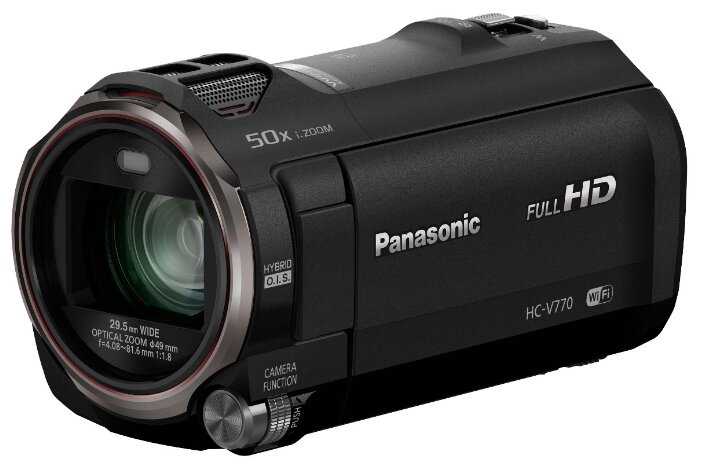
Panasonic HC-V770

364 отзывов

от 88400.00 руб.

9.1/10 баллов

Canon EOS C500 Mark II

33 отзывов

от 1641740.00 руб.

9/10 баллов

Panasonic HC-V760

136 отзывов

от 73900.00 руб.

9/10 баллов

Canon LEGRIA HF G26

265 отзывов

от 68355.00 руб.

8.9/10 баллов

Panasonic HC-V260

318 отзывов

от 44421.00 руб.

8.9/10 баллов

Sony HDR-CX110E

143 отзывов

от 35100.00 руб.

8.9/10 баллов

Panasonic HC-VX980

70 отзывов

от 139990.00 руб.

8.9/10 баллов

Sony FDR-AX700

55 отзывов

от 263205.00 руб.

8.8/10 баллов

Canon XA40

18 отзывов

от 207317.00 руб.

8.6/10 баллов

Panasonic HC-VX1

37 отзывов

от 120963.00 руб.

8.6/10 баллов

Sony FDR-AX53

88 отзывов

от 116534.00 руб.

8.6/10 баллов

Panasonic HC-V380

231 отзывов

от 81500.00 руб.

8.6/10 баллов

Sony HDR-CX405

208 отзывов

от 51343.00 руб.

8.5/10 баллов

Panasonic HC-VXF990

63 отзывов

от 323731.00 руб.

8.5/10 баллов

Canon LEGRIA HF R806

411 отзывов

от 53350.00 руб.

8.4/10 баллов

Sony HDR-CX250E

49 отзывов

от 39517.00 руб.

8.4/10 баллов

Sony FDR-AX43

27 отзывов

от 166460.00 руб.

8.3/10 баллов

Blackmagic Design Pocket Cinema Camera 4K

37 отзывов

от 215000.00 руб.

8.3/10 баллов

Panasonic HC-X920

120 отзывов

от 79244.00 руб.

8.2/10 баллов

Panasonic HC-X2000

9 отзывов

от 327490.00 руб.