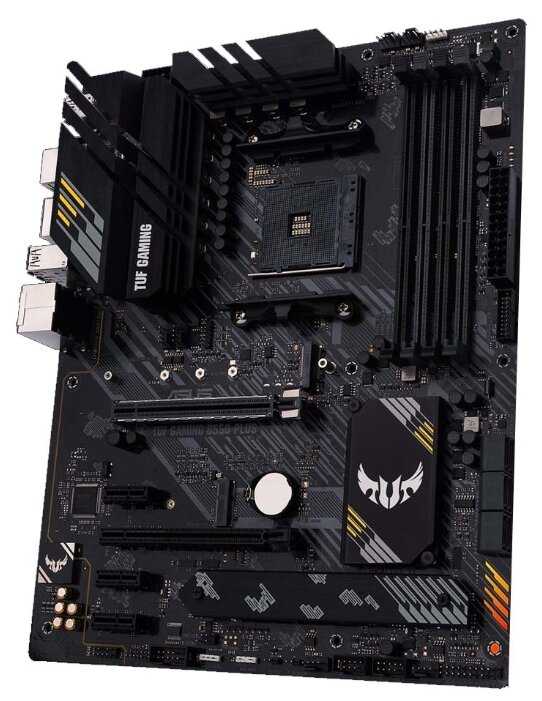
Отзывы о Материнская плата ASUS TUF GAMING B550-PLUS
Плюсы по отзывам пользователей - Почему стоит купить ASUS TUF GAMING B550-PLUS?:
- Легкая совместимость с процессорами AMD Ryzen:
- Заводится с первого раза с Ryzen 3000 и 5000 серией без обновления BIOS, включая Ryzen 5 3600, 7 3700X, 9 5900X и 5800X3D.
- Поддержка апгрейда на будущие поколения Ryzen без проблем, что делает плату перспективной для ползучего обновления.
- Процессоры стартуют на повышенных частотах автоматически благодаря Precision Boost 2, достигая 3.95–4.19 ГГц в играх без ручного разгона.
- Качественная система питания VRM:
- 10-фазная подсистема с 82 ступенями DrMOS по 50A на ядро, справляется с 16-ядерными Ryzen 9 3950X и 5950X без перегрева.
- Температуры VRM остаются низкими даже под нагрузкой, что обеспечивает стабильность для повседневного использования и умеренного разгона.
- Богатство портов и разъемов:
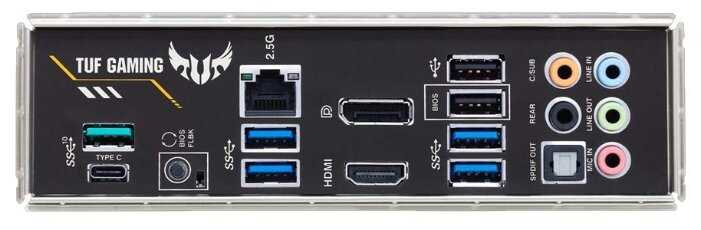
- Множество USB (включая Type-C), HDMI, DisplayPort, 6 SATA, 2.5G Ethernet для быстрого интернета и оптический аудиовыход.
- 5 разъемов для корпусных вентиляторов с PWM-регулировкой, плюс поддержка ARGB-подсветки через Aura Sync.
- Усиленный слот PCIe для видеокарт предотвращает провисание тяжелых GPU вроде RTX 3080 или RX 6700 XT.
- Удобный BIOS и обновление:
- Интуитивный интерфейс с обилием настроек для разгона памяти (до 3800–4600 МГц) и CPU (PBO до 5000 МГц), XMP/DOCP активируется легко.
- Функция BIOS Flashback позволяет обновлять прошивку без процессора, что упрощает установку новых CPU.
- Настройки не сбрасываются после обесточивания, обеспечивая стабильность.
- Хорошее охлаждение компонентов:
- Радиаторы на VRM и одном слоте M.2 держат температуры ниже 60°C для чипсета и SSD (Samsung 980 Pro до 46°C под нагрузкой).
- Плата остается холодной даже с Ryzen 9 5950X, без необходимости в активном охлаждении VRM.
- Поддержка PCIe 4.0 в основном слоте M.2 для быстрых SSD без троттлинга.
- Стабильность и надежность сборки:
- Работает без сбоев месяцами, включая системы с 64–128 ГБ RAM и несколькими SSD/HDD.
- Качественный текстолит, компоновка с достаточными расстояниями между слотами для кулеров и памяти.
- Подходит для игровых ПК и повседневного использования, с низким уровнем шума вентиляторов в автоматических режимах.
- Поддержка разгона и производительности:
- Легко разгоняет память до 3600–3800 МГц (G.Skill Trident Z, Crucial Ballistix) и CPU до 4500 МГц на Ryzen 5 3600.
- Улучшает FPS в играх по сравнению со старыми платами B450, снижает просадки кадров.
- Автоматическая оптимизация PBO дает прирост без риска, частоты CPU достигают 5000 МГц в бусте.
Минусы по отзывам пользователей:
- Проблемы со звуковой подсистемой Realtek:
- Качество звука среднее или хуже старых интегрированных карт (ALC S1200A), шумы в наушниках под нагрузкой на GPU.
- Драйверы глючные: не детектят наушники/микрофон без перезагрузки, нет простого эквалайзера без эффектов вроде реверберации.
- Микрофон с фронтальной панели не работает, требуется дискретная звуковая карта для нормального качества.
- Неустойчивая работа с оперативной памятью:
- XMP на 3200–3600 МГц не всегда стартует с первого раза, возможны BSOD, перезагрузки или ошибки DRAM LED.
- Проблемы со слотами: иногда работает только 3 из 4, настройки сбрасываются после обесточивания.
- Сложности с 4 планками или высокими модулями (Crucial, Patriot), требуется ручная настройка таймингов.
- Сбои BIOS и обновлений:
- Зависания на белой лампочке после обновления, отказ запуска без сброса настроек.
- Старые версии BIOS (0608) не видят все диски, обновление через флешку иногда морозит систему.
- Редкие заводские браки: плата умирает через недели, с проблемами DRAM или полным отказом (гарантийные случаи).
- Повышенные температуры чипсета:
- В простое 43–48°C, под нагрузкой до 59°C, выше чем у CPU, требует дополнительного вентилятора в корпусе.
- Радиатор чипсета частично перекрывается видеокартой (RTX 1660 Super), что усугубляет нагрев.
- Нет датчика температуры VRM в ПО, мониторинг только через HWInfo.
- Ограничения слотов M.2 и расширения:
- Только один слот PCIe 4.0, остальные PCIe 3.0 или для WiFi-карт (не для SSD), всего 3 порта с подвохами.
- Нет разъема для фронтального USB Type-C, требуется PCI-адаптер.
- Отсутствие PS/2 порта, что неудобно для старых клавиатур.
- Глючное ПО Armoury Crate:
- Не видит обновлений, требует ручной установки драйверов, ругается на службы Windows.
- Проблемы с RGB: не работает в первом слоте DIMM, подсветка мигает в выключенном состоянии.
- Функции вроде шумоподавления — маркетинг, дублируют Windows, сложно настроить.
- Неполная комплектация и мелкие неудобства:
- Нет термопары, колодки для фронтальной панели, болтиков для крепления платы; инструкция куцкая, пины плохо описаны.
- CD с софтом вместо флешки, устаревший подход.
- Тонкий текстолит прогибается при подключении ATX-разъема, шумный дроссель VRM при скроллинге.
- Ограничения для экстремального разгона:
- Не подходит для оверклокеров с Ryzen 9 5950X: не выжимает максимум, лучше X570-платы вроде Strix.
- Только один радиатор M.2, второй слот без охлаждения; SAT A-порты работают нестабильно в паре (1+3 или 2+4).
- Нет остановки всех кулеров для бесшумной работы в простое.
108 отзывов пользователей o ASUS TUF GAMING B550-PLUS
Пользовались
ASUS TUF GAMING B550-PLUS?
Поделитесь своим опытом и помогите другим сделать правильный выбор
Exelente motherboard
Buena motherboard con una gran calidad tiene caracteristicas que encuentras en gamas mas altas a un menor precio y aunque dice que soporta 3600Mhz solo he conseguido 3530Mhz pero no es un gran problema igual la recomiendo.
Excelente Motherboard
Es una buena motherboard, económica y con todas las características que se ocupan para una PC gamer. La utilice con un Ryzen 5600x y tuve que actualizar el BIOS mediante el Qflash que tiene incorporado esta motherboard. Como es una técnología reciente mi procesador y el BIOS no detectaban la RAM y tuve que utilizar la versión BETA del BIOS. Son problemas que se resolveran a medida que salgan las nuevas versiones de la Motherboard ya con el BIOS actualizado de fabrica.
Muy buena relación precio calidad.
La motherboard va de maravilla, sin ser gama alta no le envidia nada a las demás, tiene todo lo necesario para tener un desempeño formidable. Lo primero que hay que hacer es actualizar el bios, ya que es posible que no venga actualizado. Le instalé un Ryzen 3600 y memorias de xpg de 3600mhz, gpu asus GeForce 970. La temperatura en el cpu la siento un poco alta con carga de gráficos hasta los 80 grados, es posible que requiera una disipador más potente. Le instalé 1 ssd para sistema y 2 discos mecánicos los cuales tienen una muy buena transferencia por los puertos sata3. En general estoy muy satisfecho con la MB.
Para Ryzen 5600x
La tarjeta es una ATX fue un poco dificil de instalar al principio por su tamaño, y por el hecho de que en mi computadora los cables eran un desastre, pero después de unos acomodes aquí, y allá, logre instalar la tarjeta perfectamente.
El rendimiento es excelente, y el proceso de actualización de la motherboard por medio del flashback con el usb fue bastante sencillo y rápido también, tomo menos de 10 minutos, uno puede encontrar instrucciones en la pagina de internet sobre como realizar este proceso.
Una tarjeta madre que cumple
Excelente tarjeta madre sin problemas instale un AMD RYZEN 7 3700X y memoria DDR4 XPG a 3200 MHz y sin problemas, actualice la BIOS, pero por que la quería bien al punto, pero con la BIOS con la que viene de fabrica jalo perfecto. Una tarjeta que da lo que promete, muy buena estética y los componentes se notan de muy buena calidad y durables como lo publicita la linea TUF de ASUS, casi un mes trabajado con ella y todo perfecto. La recomiendo 100%, por parte de AMAZON todo llego en tiempo y forma.
RGB lindo, de agradece.
- Llegó super rápido y en perfectas condiciones.
- No me ha dado ningún problema.
- La BIOS es muy amigable, muy correcta.
- Cuando prendes la PC se ve el logo de TUF Gaming, muy bonito.
- Se siente de buena calidad.
- Incluso trae unos stickers, muy bonito detalle.
- No me ha dado ningún problema.
- La BIOS es muy amigable, muy correcta.
- Cuando prendes la PC se ve el logo de TUF Gaming, muy bonito.
- Se siente de buena calidad.
- Incluso trae unos stickers, muy bonito detalle.
Excelente placa madre
Está bien diseñada y tiene muy buen performance
Excelente producto
Todo muy rápido y de excelente calidad
Worked perfectly although one should know putting an m.2 in cuts out some sata ports but I think that’s all 550 type motherboards
So far, so good. No issues with a Ryzen 3700x, 1080, +hub with 6 RGB fans (came with the case) and 32gb of random Crucial Vengeance something another ram.
Comes with two M.2 NVME slots which is nice, though, one of them shares (Overrides, rather) one of the SATA ports. It's no big deal, though.
The bios GUI is really nice.
I didn't install any of the bundled software though so I can't really comment on any of that functionality.
Be careful about ram you put in it, it's picky and will have issues using the actual "rated" speed profile of some. Or refuse to boot, or crash your entire PCI* system under load after awhile.
Comes with two M.2 NVME slots which is nice, though, one of them shares (Overrides, rather) one of the SATA ports. It's no big deal, though.
The bios GUI is really nice.
I didn't install any of the bundled software though so I can't really comment on any of that functionality.
Be careful about ram you put in it, it's picky and will have issues using the actual "rated" speed profile of some. Or refuse to boot, or crash your entire PCI* system under load after awhile.
Really love it. (any issues are purely my fault) Would buy again for another build. Had some trouble with the system panel header but easily resolved with a night's sleep. Had a hard time mounting the cooler as I'd put the one that I could access easily on first and took hours of work to finally input the second clip but that was only my fault. The processor was an easy install, no hiccups, and the fans were plug and play. What really blew me away was the RGB. I wasn't even aware this motherboard had RGB and yet it's one of the coolest features of the build. once I remove my temporary GPU and install my RGB 2060 Gaming Z, the whole thing should look stunning without having it look like RGB barfed on my PC. Nice clean aesthetics and great layout. Only problem is it's really hard to put in the I/O shield (which I bent in my newby-ness), and the mounting screws were an awkward fit, popping out several times before I just replaced them with some laying around from a previous build of a family member's. Super amazing, but a few tips
1. Remember to get the i/o shield in before you get the motherboard screwed in
2. Don't use the stock screws, find slightly tighter fit screws (Use PC screws!!!)
3. Make sure you line up the arrow on the processor
4. Make sure you put the top latch of the cooler in first if you're using air cooled (don't recommend water unless you have something like a Ryzen 9 3900x and RTX 2080 etc.)
5. Make sure the cables are hidden as best as possible/sleeved or covered somehow, so you don't have a hideous mess of cables.
1. Remember to get the i/o shield in before you get the motherboard screwed in
2. Don't use the stock screws, find slightly tighter fit screws (Use PC screws!!!)
3. Make sure you line up the arrow on the processor
4. Make sure you put the top latch of the cooler in first if you're using air cooled (don't recommend water unless you have something like a Ryzen 9 3900x and RTX 2080 etc.)
5. Make sure the cables are hidden as best as possible/sleeved or covered somehow, so you don't have a hideous mess of cables.
So I decided to save a few bucks and buy Asus instead of Gigabyte which is what I've been buying for over 15 years since my last POS Asus board. NEVER again. This board just doesn't seem to like Windows being installed on an NVMe SSD. Also the Armoury Crate software wouldn't install after finally getting Windows loaded on the NVMe. It just kept running in a loop bringing up a command prompt over and over. It installed fine when Windows was installed on an HDD, but not on the NVMe SDD. If it was for me I'd send it back and just get another Gigabyte board, but it does work now and my daughter really wants to play some games so....This was the setup I built...
AMD Ryzen 5 2600 Processor with Wraith Stealth Cooler - YD2600BBAFBOX
Corsair Vengeance LPX 16GB (2x8GB) DDR4 DRAM 3200MHz C16 Desktop Memory Kit - Black
Silicon Power 512GB NVMe M.2 PCIe Gen3x4 2280 TLC R/W up to 3,400/2,300MB/s SSD (SU512GBP34A80M28AB)
AMD Ryzen 5 2600 Processor with Wraith Stealth Cooler - YD2600BBAFBOX
Corsair Vengeance LPX 16GB (2x8GB) DDR4 DRAM 3200MHz C16 Desktop Memory Kit - Black
Silicon Power 512GB NVMe M.2 PCIe Gen3x4 2280 TLC R/W up to 3,400/2,300MB/s SSD (SU512GBP34A80M28AB)
I was unable to get video out of my card until I switched to HDMI, which is apparently a "quirk" of these boards, and I can't blame ASUS that much for that, since I got video once I found a long enough HDMI cable. What I can blame them for is the keyboard working exactly once to get into the BIOS, then never again. I tried four different keyboards, and input appears to be flat out broken now for no reason whatsoever. Returning, buying something else.
This was a very easy MB to work with, the install and setup went smoothly. I only had one issue and that was when I updated the Bios to the latest version, it came up with a question about the raid and I just hit enter since I was not using raid with 1 SSD NVME drive. Anyway, when the system booted it could not find a Windows Boot drive. Somehow the Windows boot record was erased and I had to re-install Windows, which was not a big deal since this was a brand new system install. The system is a Ryzen 7 3700X CPU, with a RTX 3060 TI GPU and a Corsair 750w PSU.
I had no issue with this set up.
swapped my 2 tb sshd drive, rtx 2070s, with a ryzen 7 3700X.
Only thing i had to do was enable legacy boot to get sshd to boot.
After that windows loaded and reactivated, i installed new drivers via asus web site and got newest bios.
+++ system even runs my old ddr 3200 and 3200 speed. something x370 would never do.
swapped my 2 tb sshd drive, rtx 2070s, with a ryzen 7 3700X.
Only thing i had to do was enable legacy boot to get sshd to boot.
After that windows loaded and reactivated, i installed new drivers via asus web site and got newest bios.
+++ system even runs my old ddr 3200 and 3200 speed. something x370 would never do.
This is a good motherboard for the value overall, but taking away 2 stars for false advertising.
The motherboard I received was NOT flashed for use with my Ryzen 7 5800x. Upon startup, I would get stuck on the "Press DEL or F2 to open BIOS" and nothing would happen when I hit either of those keys. After lots of hardware troubleshooting, it turned out when I switched back to my Ryzen 5 it would start up fine. The ASUS EZ flash made it really easy to update and took 5 minutes, but it would have saved me a lot of trouble if I had known to start off that way. If you don't have an old CPU to update with on hand, don't buy this motherboard.
This is a great board, yes the x570 is better, but I have no regrets buying this board. It handles everything I have installed perfectly with loads of headroom for future upgrades.
Plenty of slots to add USB, RGB, Case Fans, Audio, sata drives, and more.
So far I've not seen any bottlenecks on coming from the board, or any temperature issues. Only issue I have had is that it uses the realtek codec which sucks for volume.
Plenty of slots to add USB, RGB, Case Fans, Audio, sata drives, and more.
So far I've not seen any bottlenecks on coming from the board, or any temperature issues. Only issue I have had is that it uses the realtek codec which sucks for volume.
Its worth the price at $170 bought this at $206 usd. Up to now its good holding up nice.
I may say i used to have vga cables and first few runs didnt read from hdmi so i plugged both vga and hdmi on my gpu seems to have fixed the problem. Even tho i havent tried the hdmi from the board it self.
I comtacted the seller when shipping and they where nice great company.
Board came sealed and came with the guide sticker rear I/o shield and 2 sata cables.
All B550 will support ryzen 3rd and 4th gen.
I may say i used to have vga cables and first few runs didnt read from hdmi so i plugged both vga and hdmi on my gpu seems to have fixed the problem. Even tho i havent tried the hdmi from the board it self.
I comtacted the seller when shipping and they where nice great company.
Board came sealed and came with the guide sticker rear I/o shield and 2 sata cables.
All B550 will support ryzen 3rd and 4th gen.
Great mobo so far, just updated the bios, changed the ram to fit my Corsair Vengeance RGB PRO 32GB (2x16GB) DDR4 3200 and we are good to go. Working great so far, have 2 SSDs, 1 Hard drive, 3 RGB fans connected to the power off the motherboard.
Came before spected great mother board not the most spensive but it has all you need 3.0 pice 4.0 Rgb lights and more still need to upgrade my graphics card but right now no problems at all
No issues with this one. I have always had good luck with ASUS and this motherboard is no exception. Easy to build on. Not exceptionally clear that the NVME closest to the processor is PCI4.0. Especially since the heat sink is on the other NVME slot. But I like this board with its very minimal RGB nonsense.
In store or online i never had mb's come DOA ..
(two of the same model .. even replacement)
at first like everyone else, thought it could be psu
~nope
(Arc 750 Rosewill)
750 watts
(two of the same model .. even replacement)
at first like everyone else, thought it could be psu
~nope
(Arc 750 Rosewill)
750 watts
I've been using the board for a couple of weeks and I think it's great so far. There is one small issue with it in that one of the 6 sata ports does not work. Luckily, I only have a need for 5 of them, but for people like me with a lot of SATA SSDs and HDDs, it's kind of scary to only have just enough for everything to work. Otherwise, everything is functioning perfectly!
The board I got had bios version 1004 which had support out of the box for Ryzen 5000 series. I had some stability issues at first but they were soon resolved after updating the bios and installing all the chipset drivers. I had some issues but overall I would still recommend this board. I have it paired with a 5600x and it runs great.
Показаны отзывы 1-24 из 108.
График изменения цены ASUS TUF GAMING B550-PLUS
Характеристи ASUS TUF GAMING B550-PLUS
| Процессор | |
| Производитель процессора : | AMD |
| Сокет : | AM4 |
| Поддерживаемые процессоры : | AMD 3rd Gen Ryzen |
| Количество сокетов : | есть |
| Чипсет | |
| Производитель чипсета : | AMD |
| Поддержка SLI/NVLink/CrossFire : | 2-Way CrossFireX |
| Чипсет : | AMD B550 |
| Память | |
| Количество слотов оперативной памяти : | 4 |
| Тип памяти : | DDR4 DIMM, поддержка ECC/non-ECC |
| Режим работы оперативной памяти : | двухканальный |
| Тип памяти : | DDR4 DIMM, поддержка ECC/non-ECC |
| Максимальная частота памяти : | 4600 МГц |
| Максимальный объем памяти : | 128 ГБ |
| Слоты расширения | |
| Количество разъемов M.2 : | 2 |
| Слоты PCI-E подробно : | 2 x PCI-E 4.0 x16, 3 x PCI-E 4.0 x1 |
| Слоты накопителей подробно : | 6 x SATA 6G, M.2 (Key M) 2242/2260/2280/22110 (PCIe 3.0/SATA), M.2 (Key M) 2242/2260/2280/22110 (PCIe 4.0/SATA) |
| USB подробно : | 2 x USB 2.0 Type-A, USB 3.2 Gen1 Type-A, USB 3.2 Gen1 Type-C |
| Аудио/видео | |
| Производитель звукового чипа : | Realtek |
| Звук : | HDA |
| Звуковая схема : | 7.1 |
| Звуковой чип : | Realtek ALC S1200A |
| Название видеопроцессора : | любая |
| Сеть | |
| Скорость Ethernet : | 2.5 Гбит/с |
| Чипсет Ethernet : | Realtek RTL8125B |
| Беспроводные интерфейсы : | без Wi-Fi |
| Дополнительные параметры | |
| Поддержка RAID : | SAS RAID 0, 1, 5, 10, SATA RAID 0 |
| Поддержка RAID : | есть |
| Область применения : | игровая |
| Особенности : | поддержка UEFI |
| Форм-фактор материнской платы : | ATX |
| Комплектация : | -заглушка тыловых портов ввода/вывода, - 2 кабеля SATA, - упаковка винтов для M.2 SSD, - упаковка винтов для M.2 Rubber |
| Тип системы охлаждения : | пассивное |
| Задняя панель | |
| Разъемы на задней панели : | 2 x USB 2.0 Type-A, 4 x USB 3.2 Gen1 Type-A, DisplayPort, HDMI, LAN RJ-45, USB 3.2 Gen2 Type-A, USB 3.2 Gen2 Type-C, выход S/PDIF оптический |
| Внутренние разъемы | |
| Внутренние слоты и разъемы : | COM-порт, питания процессора 8-pin, разъем для подключения ленты ARGB, разъем для подключения ленты RGB, разъем питания 24-pin |
| Дополнительная информация : | есть слот для модуля беспроводной передачи данных: 1 x m.2 for e key wi-fi, модуль приобретается отдельно |
Информация о характеристиках носит справочный характер.
Перед покупкой уточняйте характеристики и комплектацию товара у продавца