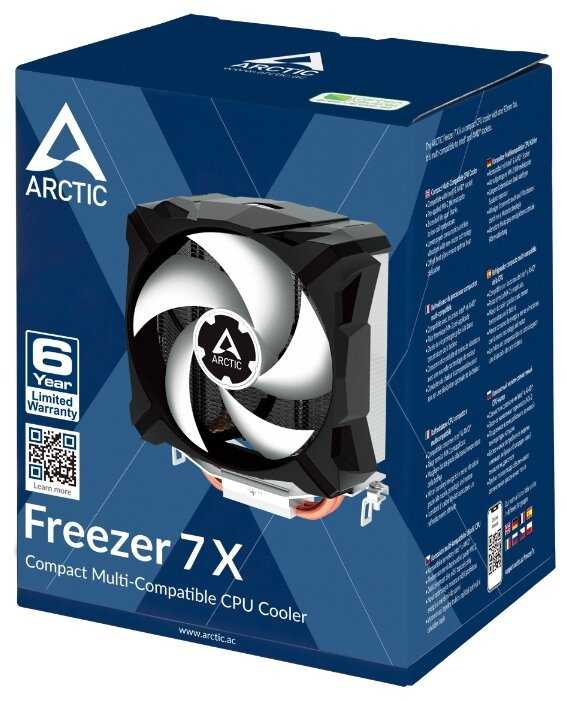
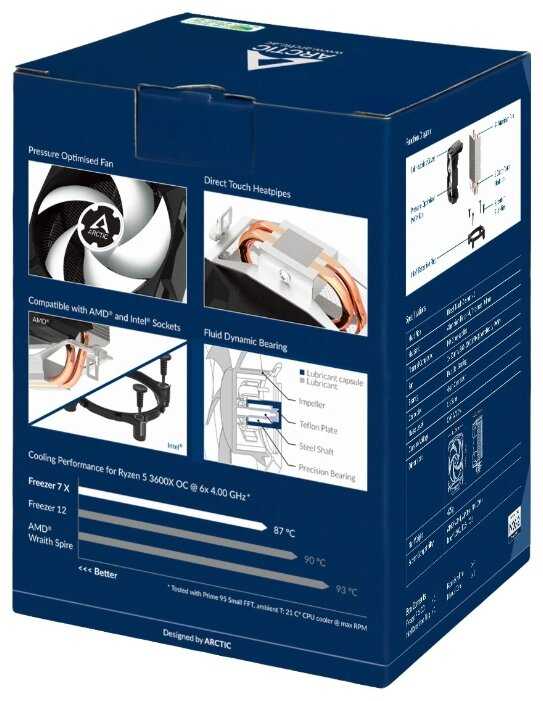
Отзывы о Компьютерная Система Охлаждения Arctic Freezer 7X


  • Тихий вентилятор
  • Эффективное охлаждение
  • Легкая установка
  • Доступная цена
  • Хорошая совместимость
  • Хлипкие клипы
  • Большой размер
  • DOA случаи
  • Шум со временем
  • Сложная ориентация на AMD

Рейтинг: Хорошо 109 отзывов

428 место из 1637 в категории Кулеры и системы охлаждения для компьютеров
63
18
4
9
15


Краткие характеристики:

  • максимальная рассеиваемая мощность (TDP): 70 Вт
  • высота кулера: 132.5 мм
  • для AM4
  • AM3
  • AM3+
  • LGA 1151
  • FM2
  • LGA 1150
  • FM1
  • LGA 1155


Плюсы по отзывам пользователей - Почему стоит купить Arctic Freezer 7X?:

  1. Низкий уровень шума:
    • Вентилятор работает почти бесшумно даже под нагрузкой, многие пользователи отмечают, что его не слышно на фоне других компонентов, в отличие от стокового кулера.
    • Подходит для тихих сборок, таких как HTPC или медиа-ПК, где шум критичен; несколько отзывов хвалят тишину при idle и нагрузке до 2000 об/мин.
    • Шум ниже 35 дБ, что делает кулер идеальным для повседневного использования без раздражения.
  2. Эффективное охлаждение:
    • Снижает температуры на 10-20°C по сравнению со стоковым кулером; примеры: idle 25-30°C, нагрузка 40-50°C для Intel Core 2 Duo или Phenom II.
      • Держит процессоры TDP до 130 Вт в пределах 50-60°C под нагрузкой, включая игры вроде Battlefield 3 или стресс-тесты.
  3. Простая установка:
    • Не требует снятия материнской платы; клипы вставляются пальцами или плоскогубцами, процесс занимает 10-15 минут для опытных пользователей.
    • В комплекте термопаста MX-2, готовая к применению; подходит для сокетов Intel (775, 1156, 1366) и AMD (AM2/AM3).
    • Легко снимается вентилятор для доступа к винтам, что упрощает монтаж.
  4. Доступная цена и качество:
    • Стоимость около 25 долларов обеспечивает охлаждение на уровне более дорогих моделей; 6-летняя гарантия от производителя.
    • Прочная конструкция с медными тепловыми трубками и большим радиатором; многие отмечают надежность в долгосрочном использовании.
  5. Подходит для апгрейда:
    • Хорошо справляется с разгоном (OC) на 20-30% без перегрева; примеры: Q6600 на 3.3 ГГц держит 60°C под нагрузкой.
    • Универсальность: работает с процессорами Intel и AMD, включая старые сокеты; улучшает производительность за счет снижения троттлинга.
  6. Компактный для своего класса:
    • Вентилятор 92 мм обеспечивает хороший поток воздуха без чрезмерного размера; помещается в большинство mid-tower корпусов.

Минусы по отзывам пользователей:

  1. Проблемы с креплением:
    • Хлипкие пластиковые клипы (пины) ломаются при установке, требуют усилий и осторожности; несколько пользователей сломали 1-2 клипа, пришлось импровизировать с винтами.
    • Сложно вставлять клинья в силиконовые чепики без предварительной подготовки; риск прогиба материнской платы, особенно на старых сокетах вроде 775.
    • Инструкция визуальная и неполная, без текстовых объяснений; для новичков установка может занять час и вызвать страх повреждения компонентов.
  2. Большой размер и совместимость:
    • Радиатор мешает слотам RAM (особенно высоким модулям) и может упираться в VRM или блок питания; на AMD ориентация вентилятора ограничена вертикальной (вверх/вниз).
    • Не влезает в компактные корпуса (HTPC или mini-ITX); медные трубки длинные, требуют отгибания конденсаторов или поворота на 90-180°.
    • Блокирует ближайший слот ОЗУ, что проблематично для сборок с 4 модулями; на некоторых платах (ASUS P5GC-MX) упирается в компоненты.
  3. Проблемы с надежностью:
    • DOA (неисправен из коробки): вентилятор не крутится сразу, требует ручного толчка; несколько случаев брака, возвраты через Amazon.
    • Со временем появляется шум или свист (через 3-12 месяцев); подшипник изнашивается, PWM не всегда работает на ASUS платах (полная скорость или 0 RPM).
    • Гарантия только при прямой покупке у производителя; пластиковые клипы хрупкие, ломаются при демонтаже.
  4. Неидеальное охлаждение для высоких нагрузок:
    • Для сильного OC или TDP >125 Вт температуры могут достигать 60-70°C под нагрузкой; хуже стокового в некоторых случаях на AMD Phenom.
    • Не всегда покрывает весь чип (площадь контакта меньше); на старых CPU (Athlon X2) хуже, чем ожидалось (54°C vs 42°C сток).
    • Зависит от airflow в корпусе; в плохо вентилируемых боксах эффект снижается.
  5. Мелкие дефекты качества:
    • Логотипы и наклейки отваливаются, краска стирается; радиатор может прийти с царапинами или без защиты в упаковке.
    • Вентилятор не стандартный (92 мм proprietary), замена сложна; PWM не распознается на всех платах, приводит к ошибкам BIOS.
  6. Ограничения для AMD:
    • Крепление не позволяет направить воздух назад; блокирует охлаждение VRM, что критично для старых плат AM3.


109 отзывов пользователей o Arctic Freezer 7X

Пользовались Arctic Freezer 7X?
Поделитесь своим опытом и помогите другим сделать правильный выбор

Profile no image

Интеллектор-2NDKQ

27.08.2024

10/10

Оценка пользователя

Великолепно

отличная модель
  • +

    Весьма просто устанавливается и демонтируется

    Хороший кулер за свои деньги

  • -

    Пока не выявил

Когда в первый раз устанавливал, то беспокоился из-за того, что он не полностью закрывает процессор, но это не факт для беспокойства, работает прекрасно

оригинал отзыва
Profile no image

Квантум-9WZSB

04.04.2024

10/10

Оценка пользователя

Великолепно

отличная модель
  • +

    Цена.

    Неплохо охлаждает, в среднем 75 градусов при нагрузках.

    Легко установился.

    4 медных трубок, вполне не плохо для такой цены.

  • -

    Не самый тихий в позднее время.

    Качество перпелера.

Неплохой кулер, R3 3200G хорошо охлаждает. Покупать советую если сэкономить пытаетесь, если-же есть деньги, то можно посмотреть вариант получше.

оригинал отзыва
Profile no image

Сириус-7KMEF

04.04.2024

10/10

Оценка пользователя

Великолепно

отличная модель
  • +

    Легко устанавливается

  • -

    Пока не обнаружены

Брал до этого другой кулер, есть с чем сравнивать по установке

оригинал отзыва
Profile no image

Зета-Орион-3NSHE

12.04.2024

10/10

Оценка пользователя

Великолепно

Отличная модель
  • + отличный товар
беру этот бренд не первый раз
оригинал отзыва
Profile no image

Спектроник-3YHDF

06.12.2023

10/10

Оценка пользователя

Великолепно

Отличная модель
  • + тихий
  • - нет
очень хороший
оригинал отзыва
Profile no image

Эксопилот-5ZYEL

12.09.2023

8/10

Оценка пользователя

Хорошо

Хорошая модель
  • + Не шумный. Сокет 1155, мать GIGABYTE GA-B75M-D3V. Ничего не задевает.
  • - Через несколько дней использования начал периодически кратковременно звенеть.
Советую выбрать этот продукт.
оригинал отзыва
Profile no image

Сириус-2EOPE

12.09.2023

10/10

Оценка пользователя

Великолепно

Отличная модель
  • + тихий и хорошо охлаждает
  • - отсутствие инструкции по установке
Мне лично понравился и компьютер стал очень тихим
оригинал отзыва
Profile no image

Туманник-7VKGV

12.09.2023

10/10

Оценка пользователя

Великолепно

Отличная модель
  • + тихий
  • - -
мощный
оригинал отзыва
Profile no image

Кварковец-2CUHK

05.03.2014

10/10

Оценка пользователя

Великолепно

  • + Наличие широкоимпульсной модуляции (4pin), медные трубки, низкий уровень шума.
  • - Хлипкая система крепления к материнской плате площадок под винты. Не универсален - только под 775 сокет. Медные трубки сильно выступают за контуры радиатора.
    UPD через 3 месяца засвистел и был выкинут)
Для монтажа на материнскую плату требуется сначала установить площадки с отверстиями под винты крепления кулера. Площадки устанавливаются через силиконовые разрезные чепики, которые расклиниваются миниатюрными и крайне хлипкими клиньями. Советую заранее разработать клиньями белые силиконовые чепики иначе при установке на материнку вы банально не сможете засунуть в них клинья на всю длину - придется прилагать много усилия, так много что начинаешь опасаться за прогиб материнской платы. Материнскую плату тоже лучше...
оригинал отзыва
Profile no image

НаноРейдер-9DEXC

09.11.2012

10/10

Оценка пользователя

Великолепно

  • + Наличие широкоимпульсной модуляции (4pin), медные трубки, низкий уровень шума.
  • - Хлипкая система крепления к материнской плате площадок под винты. Не универсален - только под 775 сокет. Медные трубки сильно выступают за контуры радиатора.
Для монтажа на материнскую плату требуется сначала установить площадки с отверстиями под винты крепления кулера. Площадки устанавливаются через силиконовые разрезные чепики, которые расклиниваются миниатюрными и крайне хлипкими клиньями. Советую заранее разработать клиньями белые силиконовые чепики иначе при установке на материнку вы банально не сможете засунуть в них клинья на всю длину - придется прилагать много усилия, так много что начинаешь опасаться за прогиб материнской платы. Материнскую плату тоже лучше не полениться и вынуть из корпуса - при постановке клиньев угрожающе сильно прогибается. Так при установке кулера один клин и сломал - заменил на крепление винт/гайка. При установке радиатора на материнку p5gc-mx 1333 медные трубки упираются в оперативку, а при развороте на 180 градусов в кондеры. Поворачивая в положение +-90 градусов трубки упираются либо в блок питания либо в радиатор северника. Вобщем трубки длинные. Выбрал меньшее из зол, слегка отогнув кондеры. На этом неприятные ощущения закончились. Кулер очень не шумный. На процессоре Е5300@3.2ггц строго держит 52 градуса в вообщем то плохо проветриваемом корпусе. В этом ценовом коридоре кулеров под 775 сокет лучше не встречал. Советую к покупке тем кто не боится помаяться с установкой)
оригинал отзыва
Profile no image

ТехноНаблюдатель-1AOSS

08.12.2012

6/10

Оценка пользователя

Плохо

  • + 1. малошумный
    2. большой, много алюминиевых пластин и медных трубок.
    3. Большой вентилятор.
    4. Очень хорошее охлаждение.
  • - 1. Узкое расстояние между пластинами, в которое набивается тонны пыли, которую очень непросто оттуда достать без демонтажа.
    2. Очень сложная установка.
    3. Вентилятор в центре,...
оригинал отзыва
Profile no image

КиберНаблюдатель-8WNOQ

25.05.2010

10/10

Оценка пользователя

Великолепно

  • + Отличный кулер. Поставил на Intel Core 2 Quad Q9500. Со своей задачей справляется отлично. Тихий, лёгкий. Поставил быстро. Есть возможность ставить его во все четыре стороны, можно направить струю воздуха на верх к вентилятору блока питания, если, конечно, не будет мешать радиатор мамы.
    Перед установкой вентилятор лучше снять, снимается и ставится он очень легко (на защёлках). Термопасту менять не стал (она уже была нанесена на подошву). Протестировал стресс-тестом LinX, на максимальной нагрузке проц. нагрелся до 58...
оригинал отзыва
Profile no image

Аргонавт-2RBIT

04.10.2009

2/10

Оценка пользователя

Ужасно

  • + хорошо выглядит, большое количество термотрубок, можно разобрать и сделать несколько нормальных кулеров поменьше,
    в полости между неровным основанием кулера и процессором можно провозить героин и другой контрабас
  • - КРИВОЕ основание, качество обработки его поверхности - как на чугунных батареях отопления, соответственно плохой...
оригинал отзыва
Profile no image

Плазмоид-1BNLO

14.11.2023

10/10

Оценка пользователя

Великолепно

Отличная модель
оригинал отзыва
Profile no image

Зета-Орион-6ELBV

21.03.2024

10/10

Оценка пользователя

Великолепно

Отличная модель
оригинал отзыва
Profile no image

ТерраБот-6XHWF

08.08.2025

10/10

Оценка пользователя

Великолепно

Отличная модель
оригинал отзыва
Profile no image

Кронос-1YGCZ

14.10.2025

10/10

Оценка пользователя

Великолепно

Отличная модель
оригинал отзыва
Profile no image

ХроноГость-4TDSW

16.05.2025

10/10

Оценка пользователя

Великолепно

Отличная модель
  • + Компактный, тихий, качественный!!!!
оригинал отзыва
Profile no image

Нейрон-2VCGX

20.03.2013

8/10

Оценка пользователя

Хорошо

So far so good. I installed it an hour ago and have yet to hear my CPU fan spool up.Four years ago I bought a Dell Studio XPS 435MT, an infamously noisy desktop. That first time I turned it on sounded like a jet was taking off in my house. I replaced the case fan (which was the culprit, per Dell) and the noise level went down considerably. Still, from time to time it would get a bit loud and that was due to the CPU fan, especially when under load.I finally decided to get a new fan, coinciding with an upgrade to SSD. I like that this new fan is considerably bigger than the previous one and the fins feel cooler to the touch (which means they are a better conductor of heat and can thus dissipate heat better). My old one had the only benefit of a really stout metal base with screws that were additionally held down with springs. This Freezer 7 Pro has these really cheap plastic clips with expander inserts (sort of like expanding drywall screw sleeves). Luckily for me (and this may apply to you, so, buyer beware), my motherboard already had metal inserts so that the CPU fan would secure to the motherboard. Well, at first I didn't feel so lucky when I realized the new cooler's base wouldn't attach to the motherboard. The metal insert/sleeve prevented the new fan's plastic clips from being inserted properly. As I was doing this swap along with a Samsung SSD drive install, I happened to have 4 spare screws for mounting hard drives to the chassis. These screws fit perfectly in the metal inserts AND the base of this CPU cooler. I went ahead and secured the base, then mounted the CPU cooler to the base (make sure you orient the base properly so that a) the CPU cooler can be attached to the mount using the two long screws, while b) the fins point toward a case fan that vents to the outside.I have to note that this new fan, despite being intended for LPGA1366 CPUs, has a footprint that is a tad smaller than my CPU's and even that of the previous fan. Let's hope that doesn't come back to bite me.As soon as I turned on the computer, the BIOS complained of a CPU fan failure. I wasn't happy at all. I did confirm that the new fan was spinning so it wasn't like what some other users had experienced (that sometimes led to CPU failures). So I went into the BIOS, made some updates relating to the SSD (boot drive sequence, etc), and restarted the machine. The second time there was no BIOS error relating to the CPU fan and Windows started promptly.Computer upgrades almost never work right off the bat. Anything that can possibly go wrong usually does. I am very satisfied that I was able to readily circumvent the snag I hit with the plastic clips.
оригинал отзыва
Profile no image

Нейрон-8YOST

30.03.2013

10/10

Оценка пользователя

Великолепно

I built a computer to go in my living room for streaming video/music etc. so it had to be quiet. My typical mode is to use large fans running slowly to keep the noise down. With the stock AMD cooler on the cpu it was running 112-115 degrees F and i wanted to get it down from that. I read several reviews of this cooler and decided to give it a try since it has a pretty good size fan. My installation was fast and easy. This heatsink took no more than 15 minutes from powering the PC down to restarting it. The mounting hardware for an AM3+ mobo consists of two small brackets and two screws. You simply remove the old cooler, wipe the thermal compound off, loosely screw the brackets to the heatsink and press the new cooler into place. You do have to unsnap the fan from the heatsink to get to the screws, but this is very easy.The little brackets slip right over the existing heatsink mounting ears and you tighten the screws down to mount it. Put the fan back on, plug the power in and fire it up. The Intel mounts appear to be a little more complex than AMD, but all the parts are included even the thermal compound on the heatsink. The cooler is very quiet, and has reduced my temps as reported by the mobo sensors to 85-90 degrees F. (AMD Phenom II 6 core) There are a couple of things I should mention, the cooler has to mount so that it blows either up to the top of the case or down to the bottom on my mobo (Gigabyte GA-78LMT-S2P). I don't know about any other AM3+ motherboards, but this particular one has the mounting ears top and bottom. This may or may not be a problem to you, but my power supply is at the top of the case and the 120mm fan on the bottom sucks the heat right out the vent on the back of the power supply. Also, I could not find any markings on the fan to show the direction of the air flow, but the fan pushes air over the fins instead of pulling it across the fins. One more thing, this cooler is pretty large, so look at the specs and measure to make sure it will fit your case. All in all a very good cooler at a very good price.
оригинал отзыва
Profile no image

Нейрон-9WVSU

15.03.2013

10/10

Оценка пользователя

Великолепно

First of all please go read Almighty Ruler's post. I did and it helped me tremendously. I'll try to cover things he didn't and one problem I had.Make sure you remove the fan from the heatsink before you attempt any part of the installation. This is impossible to install with the fan attached.Shut down your computer and remove your old fan and heatsink. If your CPU has thermal compound on it, you must clean it off. I used some isopropyl alcohol (97%) which you can buy at any drug store and about 10 q-tips and made sure it was immaculate.The instructions are difficult to read but I just studied the orientation of each part and copied what it did and I was fine. Make sure you insert the white push pins into the mounting plate BEFORE you insert it onto your motherboard. I tried inserting it into the motherboard and it didn't work out so well.The white push pins will click into the mounting plate. When you insert the black push pins they will also click and fit snug inside the white push pins (you will have to apply a bit of force to get the black pins inside the white ones).Next you place the heatsink on top of the mounting bracket and CPU. You will have to press down on the metal brackets where the holes are on the heatsink to push the screw into the hole.Then carefully attach the fan and plug it into your motherboard.I did all this, started up my computer and noticed that it was running about 22°C hotter than with my old, dying fan. I didn't know what was wrong until I read a post online. I had not screwed in the heatsink as much as it could have gone. I opened up the computer, screwed the heatsink in as much as it could go and then my CPU temperature dropped by about 22°C.Very important to make sure the heatsink is firmly in place, as close to the CPU as possible! That was what made the difference for me.This fan is definitely quiet and worth the $25 I spent. So nice not to have the constant buzzing any more.
оригинал отзыва
Profile no image

Плазмонавт-7PDWI

12.01.2012

10/10

Оценка пользователя

Великолепно

I recently acquired, Battlefield 3, and S.T.A.L.K.E.R Call of Pripyat (with Complete 2012 mod installed for higher visuals) , 2 very graphic intensive games. Both games take their toll on both the cpu and gpu.I have an Intel Q6600 Quad Core @ 2.4 ghz, with a EVGA GTX 570 1.5G, 8 G of DDR-2 RAM, Windows 7 Home Premium 64 Bit. Not the best build, but nonetheless has ran both game fine on the highest settings. My case is a Xeon Mid size case (not the best cooling case).When I started monitoring the temps on the CPU, using Core Temp and Speed Fan (just to have the 2nd opinion), I noticed that at idle , my pc was running at 40-50 degree celsius. On full load with Either Battlefield 3 or Pripyat, the load temps were getting up to the 75-83ish range which is too high in my opinion.After reading the reviews for the Arctic Cooler 7 Pro Rev 2, I decided it was time to try to bring my temps down.Before buying, I did try the arctic silver 5 on my heatsink, installed it, and temps dropped about maybe 2 degrees per core. NOTE: I cleaned everything , the cpu, heatsink properly etc. and still only managed a slight drop in temps.A day after I received the Arctic Cooler 7 Pro Rev 2 from Amazon, I shut down my pc and let it cool for about an hour, and proceeded to remove/clean everything related to the old heatsink.Installation was fairly simple, and did not have problems with the 'weak' pins as others have noted. The Instructions are very self explanatory for someone that knows what to expect as far as knowing the difference between socket 775 etc. But for a first timer, yes the instructions could be a little more detailed, but changing a cooler is not exactly what an average pc owner does as this falls more in the realm of geek/repair/builder types. The cooler comes with the MX-2 Paste from Arctic Cooling pre applied. I did think about immediately removing the paste and adding my own AS-5 but decided to try it out with the MX-2 first.After I installed, restarted my Pc.and Idle temps first day were 27-30 Celsius, and Max load on Battlefield 3 , 3 hours of Gaming, 48 Celsius max!By the 2nd day (thermal paste has a 'curing period' which is about 1-3 days depending on the paste), the Average idle temp is 30, and load temp is 48, on Battlefield 3 , and call of pripyat 3 hours each. Temps have been same since, over 2 weeks ago. I'm just reviewing now, because I did not want to post a review based on a 1 day experience. I'll update about longer term temps/issues if need be.Strongly recommend this to any gamer on a budget, be it casual , or enthusiast.
оригинал отзыва
Profile no image

Аэронавт-4CKMF

11.03.2013

10/10

Оценка пользователя

Великолепно

I bought this cooler to replace the stock fan on a core i7 sandybridge cpu (2600K). The stock fan let my cpu idle around 40 °C, which means I could not overclock the cpu. With this cooler, my idle temps dropped to 25 °C. I was able to easily overclock the cpu to 4.5 GHz. Even under 100% load for an hour, the temps do not exceed 73° C. (Typically they are between 55 °C and 65 °C when gaming. I must also mention that the cooler does not make any noticeable noise. The only time I have heard it was when stress testing.Installing the the cooler was a breeze as well. You DO NOT have to access the back of the motherboard to install this cooler! Meaning you can leave your computer built and simply take off the old cooler and replace it with this one. The one down side to this cooler is the size. I have an Asus P8P67 and the edge of the fan blocks one of the secondary RAM slots. (Personally I only use two of the primary RAM slots so this is not a problem for me.) One last thing to note is I believe the fan can only point from side to side. I do not think it can be mounted to blow air up or down.
оригинал отзыва
Profile no image

Зета-Орион-6AWIF

24.10.2012

8/10

Оценка пользователя

Хорошо

This is the first Freezer pro product I have used before. I have it sitting on a AMD A10-5800K. Seems to do a good job of keeping it cool (idles around 32c, max load is around 53c). Installation was pretty easy too. And its very quiet. So lots of good things going for this heatsink.Couple of things to keep in mind if you have an AMD CPU. First, the mounting brackets that are included only allow you to install this HSF with the fan pointing at the bottom of the case, or toward the top of the case. You cannot make the fan point toward the rear of the case. This setup also prevents the lower rear fins from providing any VRM cooling (the fins are angled downward to help with cooling those off).Had I done a little more research, I would have discovered that Arctic Cooling does make a cooler specifically for AMD boards. Its the Artic Cooling Freezer 64 Pro. I would recommend trying to hunt that one down if you have an AMD system. Also, it looks like the installation would be just a little bit easier, since it has a more conventional AMD style lever/clip system.Really though, the Freezer 7 Pro was cheap, easy to find, easy to install, and seems to do its job pretty well. But I am taking off one star for the mounting issue. An extra bracket would have easily solved that problem and cost Artic Cooling next to nothing to fab up and throw in the box.
оригинал отзыва
Показаны отзывы 1-24 из 109.

Лучшие цены сегодня на Arctic Freezer 7X


График изменения цены Arctic Freezer 7X

Характеристи Arctic Freezer 7X

Общие характеристики
Назначение : для процессора
Диаметр вентилятора : 70
Сокет : AM4, AM3, AM3+, LGA 1151, FM2, LGA 1150, FM1, LGA 1155, LGA 1156, FM2+, LGA 775, LGA 1200
Количество тепловых трубок : 2
Количество вентиляторов : есть
Тип подшипника : гидродинамический
Дополнительно
Тип коннектора : 4-pin PWM
Регулятор оборотов : программный
Вес : 425 г

Информация о характеристиках носит справочный характер.
Перед покупкой уточняйте характеристики и комплектацию товара у продавца
Похожие товары с лучшей оценкой

9.8/10 баллов

Deepcool AG500

439 отзывов

от 2915.00 руб.

9.7/10 баллов

GamerStorm AG500 ARGB

243 отзывов

от 4630.00 руб.

9.7/10 баллов

Deepcool AK400 DIGITAL

56 отзывов

от 3165.00 руб.

9.7/10 баллов

Lian Li UNI FAN SL V2 120 (G99.12SLV21W.00)

623 отзывов

от 3040.00 руб.

9.7/10 баллов

ID-COOLING ZERO M15

272 отзывов

от 640.00 руб.

9.6/10 баллов

Arctic Liquid Freezer III 240 (A-RGB)

223 отзывов

от 9654.00 руб.

9.6/10 баллов

Thermalright Peerless Assassin 120 SE

97 отзывов

от 3415.00 руб.

9.6/10 баллов

Lian Li UNI FAN SL120 V2 PWM ARGB

543 отзывов

от 2600.00 руб.