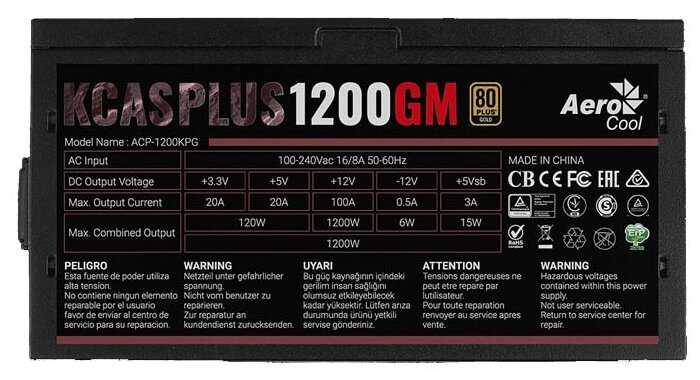
Плюсы по отзывам пользователей - Почему стоит купить AeroCool KCAS PLUS 1200GM 1200W?:
- Высокий запас мощности (1200 Вт):
- Держит пиковую нагрузку до 1200 Вт без проблем, загружается максимум на 55% в игровых сборках.
- Подходит для серьёзных конфигураций с RTX 4090, i9-12900K, Xeon и двумя видеокартами.
- Работает стабильно 3–6 месяцев и дольше под высокой нагрузкой без перегрева.
- Стабильное напряжение под нагрузкой:
- Напряжение остаётся ровным даже при полной нагрузке и разгоне процессора.
- Железо получает нужное питание, программы работают без сбоев.
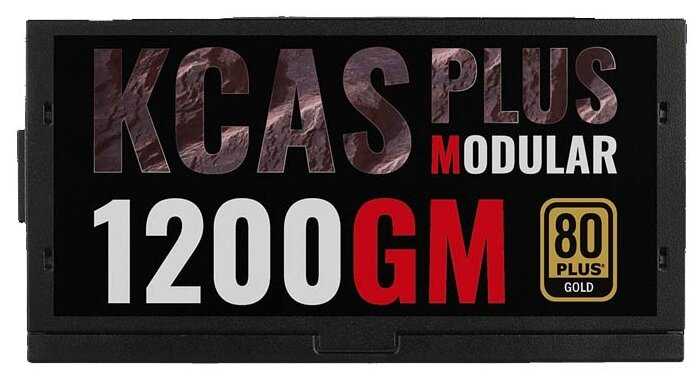
- Высокий КПД по 80 PLUS Gold в любой загрузке.
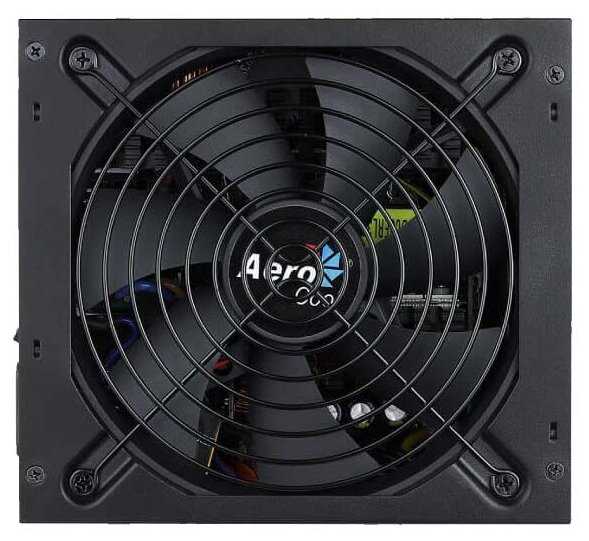
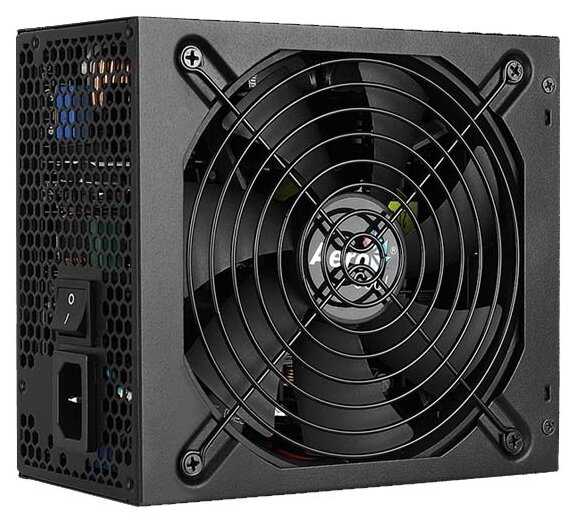
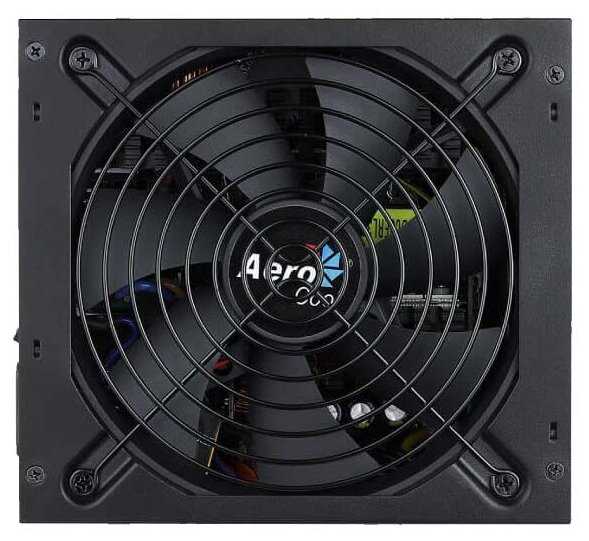
- Тихая работа вентилятора (140 мм):
- Умная регулировка оборотов, шумит только при нагрузке свыше 60%.
- Минимальный уровень шума даже при 50–750 Вт, бесшумный в повседневных задачах.
- Большой воздушный поток эффективно охлаждает элементную базу.
- Полный набор защит и качественная элементная база:
- Защита от перегрузки, короткого замыкания и всех стандартных рисков.
- Качественные материалы корпуса, много вентиляционных отверстий.
- Прошёл дополнительную сертификацию 80 PLUS Gold.
- Модульная конструкция кабелей:
- Отстёгивающиеся кабели упрощают установку и прокладку.
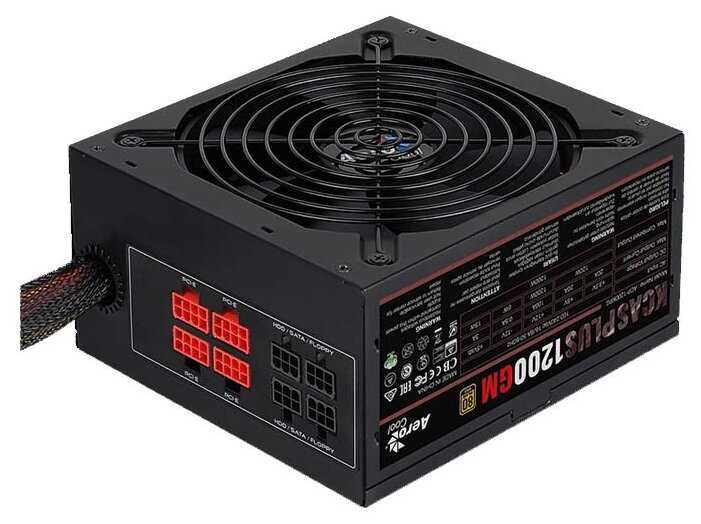
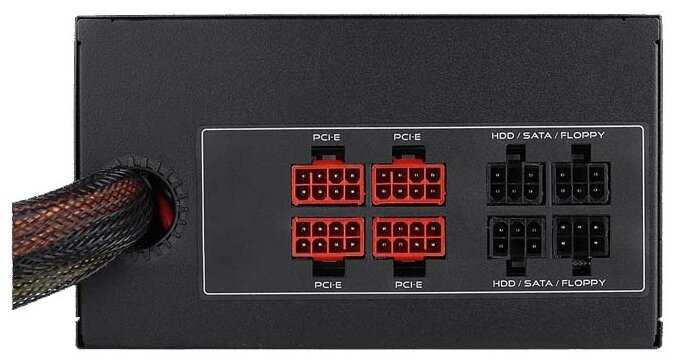
- Достаточно разъёмов: до 12 SATA, 6–8 PCIe, 4–6 Molex (по отзывам пользователей).
- Поддержка APFC и ATX 2.4 стандартов.
- Хорошее охлаждение и низкий нагрев:
- Корпус не сильно греется даже при нагрузке до 50%.
- Автоматическое управление вентилятором обеспечивает стабильную температуру.
- Долговечность у большинства пользователей:
- Работает 2–3 года без проблем в игровых и рабочих станциях.
- Исправно держит нагрузку от 2x GTX 1080 и профессионального железа.
Минусы по отзывам пользователей:
- Проблемы с надёжностью (случаи сгорания):
- Из 7 компьютеров 3 вышли из строя за год; 2 блока Aerocool сгорели до гарантии.
- Отказы через 3 месяца: отключение без нагрузки, повреждение материнских плат.
- У некоторых "взрываются только у избранных", но риски реальны.
- Жёсткие провода, плохо гнутся:
- Сложно прокладывать в корпусе, требуют усилий для укладки.
- Упомянуто несколькими пользователями как неудобство при сборке.
- Шум вентилятора при максимальной нагрузке:
- Шумит и потрескивает на пике, особенно через 3 месяца работы.
- Не всегда тихий, как ожидалось, под 100% нагрузкой.
- Высокая цена:
- Дорого для такой мощности (10 тыс. руб.), хотя оправдано характеристиками.
- Ценник отмечен как основной минус несколькими покупателями.
- Неточности в описании разъёмов:
- Реально 4 Molex и 12 SATA вместо заявленных 6 и 10 — критично для некоторых.
- Грубая ошибка в характеристиках за немалые деньги.
- Короткие кабели PCIe:
- Длина между коннекторами маловата, не всегда удобно для больших корпусов.
- Не полная модульность и начальный запах:
- Не все кабели модульные.
- Запах палёного пластика в первые 2 дня у некоторых.
174 отзывов пользователей o AeroCool KCAS PLUS 1200GM 1200W
Пользовались
AeroCool KCAS PLUS 1200GM 1200W?
Поделитесь своим опытом и помогите другим сделать правильный выбор
Awesome 200 mm fans
I put two of these AeroCool 200mm fans to go with the 200mm front bezel mounted fan in my new rig which also happens to be AeroCool. So far, these have to be the quietest 200mm fans in all the world.
I put one in the case top tray, and one in the motherboard side panel. The only time I hear these fans is when my rig first fires up. I also hear the CPU fan, perhaps more than the three 200mm fans.
The fans throw off a nice blue shade into the case and up the wall of my computer room. They compliment the RGB lighting of my ASROCK X570 Steel Legend Wifi ax motherboard and Ryzen 2700x CPU cooler.
At this point, I will buy these again and keep as spares or for future use.
I put one in the case top tray, and one in the motherboard side panel. The only time I hear these fans is when my rig first fires up. I also hear the CPU fan, perhaps more than the three 200mm fans.
The fans throw off a nice blue shade into the case and up the wall of my computer room. They compliment the RGB lighting of my ASROCK X570 Steel Legend Wifi ax motherboard and Ryzen 2700x CPU cooler.
At this point, I will buy these again and keep as spares or for future use.
Great fit for TT Armor+ case
I have an old (10 years) Thermaltake Armor+ case that I love. The factory side panel fans were not made to last though. The original fan was a slimline (20mm) fan and they are hard to find. The last fan I bought was a 3omm fan that I "customized" to make work in this case. It has been rattling for some time and I decided to try once more to find a suitable fan. This AeroCool fan fit perfectly and saved me the torture of listening to the ticking of the old (and 3rd or 4th) fan I had installed. This fan spins at a higher speed than the original one so it is a little noisier, however, it is a low steady noise and not a problem when I have my headphones on. I am thrilled to have found a fan that fits and works this well. Note that the factory fan is listed as a 230mm x 20mm. This fan is 200mm x 20mm, but the mounting holes are 230mm so it fits without a problem.
Thin & Sturdy
Pros:
-Thin
-Sturdy Blades
Cons:
-There is only one position for the mounting screws; some other fans have two positions.
Other Thoughts:
This is the thinnest 200mm fan I could find that doesn't look like the blades will droop over time. I got this to use for the top exhaust in a Cooler Master HAF XB EVO case. The HAF XB mounting points don't line up correctly with this fan, so I had to drill extra holes in the fan frame and mount it diagonally with only two screws. It wobbles a bit as a result, but not enough to be a problem. I also had to use cable ties to keep the blades from making contact with my CPU cooler (Cooler Master Hyper 212X Dual Fan). I knew this would be an issue before buying it, so it's not really a con, just a heads-up to anyone with a similar setup. In my case, function is more important than aesthetics.
-Thin
-Sturdy Blades
Cons:
-There is only one position for the mounting screws; some other fans have two positions.
Other Thoughts:
This is the thinnest 200mm fan I could find that doesn't look like the blades will droop over time. I got this to use for the top exhaust in a Cooler Master HAF XB EVO case. The HAF XB mounting points don't line up correctly with this fan, so I had to drill extra holes in the fan frame and mount it diagonally with only two screws. It wobbles a bit as a result, but not enough to be a problem. I also had to use cable ties to keep the blades from making contact with my CPU cooler (Cooler Master Hyper 212X Dual Fan). I knew this would be an issue before buying it, so it's not really a con, just a heads-up to anyone with a similar setup. In my case, function is more important than aesthetics.
Blue Lights Are Nice
Big, quiet and blue. My favorite combo.
I mounted this in a NZXT Phantom Full Tower case as a side intake fan. I didn't know at the time, but NZXT uses a proprietary fan size and mounting hole spacing. I started installing it and realized I couldn't get 3 of the holes lined up. So I improvised and used one screw and heavy duty double sided tape for the other three locations, centering it as well as I could. No problems for a couple months before I sold the case and it stayed on there while being moved around. Good fan. Good price/performance.
Nice fans
I bought 2 of these to replace the stock white fans in my white Corsair 600T. I was hoping to use my Bitfenix fans, but the Corsair case only fits 20mm thick fans. These fans are quiet and push plenty of air. I have the case next to a HAF XB case with the Bitfenix fans in it and I actually prefer the color of these fans. It is a very nice shade of blue which goes great with the white case. I would buy these again without a doubt.
overpriced
I had to buy this fan because it was the only one I could find in 200mm that wasn't 30mm in width. This one is actually 20mm so it fit in my case (Corsair Obsidian 650D). I don't like the cheesy blue lights, so I put some electrical tape over them. The quality is pretty cheap, to be honest. I suppose that makes it lighter, but I feel like this fan will not last me very long. I guess time will tell, but I think it is a bit overpriced for what you are getting.
Perfect fit for a Corsair 600T case.
This fan came nicely packaged. I'm using it as a front intake on a Corsair 600T case and it's a perfect fit. The blue led lights are a very nice diffuse blue and are not overly bright.
The volume of air it puts out, while not a cyclone, still does an adequate job of projecting airflow through the case.
AeroCool makes some nice products that I think can be compared with some of the better name brands at a little lower price.
The volume of air it puts out, while not a cyclone, still does an adequate job of projecting airflow through the case.
AeroCool makes some nice products that I think can be compared with some of the better name brands at a little lower price.
Good fan
needed a 12v fan for additional cooling on my RV fridge. Good air flow and much quieter than the stock muffin fan. I actually installed 2 side by side. They've been doing the job for a couple of months now. Fridge is now able to make ice while keeping the fridge below 41 F. Wan't a fan of the light at first, but now I kinda like looking up and knowing it's working, cause you sure can't hear it.
Attractive and looks well built.
Replaced a dead 240 mm fan with this 200 mm fan (larger original size could not be located). This smaller size made mounting more difficult and visible, but I will locate case where mods not so obvious to most viewers. It features no speed control so runs full speed from the PSU and may be louder until I built a controller. Seems to cool okay as case is cooler using SSDs instead of HDD.
Great case fan, pleased!
I hooked mine up to an X58 MOBO 3-pin chassis fan connector inside a Thermaltake tower. Very quiet as advertised and since my BIOS has 2 speeds for the chassis fan, it idles at around 550 RPM. Great case ventilation so I've never had the chassis fan go into high-speed operation and therefore have no idea of noise generated at full speed. Red lighting is a nice touch.
Good fit for selected ThermLake CPU cases
This particular computer case requires a large, but relatively thin (20mm) fan for the top of the case. Very few are designed that will fit. This one seems to fit, but it is also somewhat noisier than the previous replacement that I purchased. Useful life on the other one was 4 years, running almost continuously.
Quality power supply for the price
For the price, this is a very good quality power supply. It's very quiet, and the cable lengths are adequate for my full size tower. Also nice to see a power lead in the box, because for some reason I didn't expect one. Another plus is the amount of air holes in the unit, this is handy because I like to use compressed air to keep it clear of dust every 6 months or so.
If you found my review useful please hit that useful button,
Thanks for reading.
If you found my review useful please hit that useful button,
Thanks for reading.
Excellent Quality for the price, hard pushed to beat this with anything close to the price bracket
A lot of PC builders will scoff at PSU's such as this, insisting you must spend £100 (or more) on High end EVGA/Seasonic?Corsair PSU's or you'll burn your house down as soon as you switch any PC powered with anything else on. I'm not one of those PC builders. I've built three PC's this last year or so using different variations of these power supplies (1x500Watt, 1x600Watt and 1x500Watt RGB version). All of them have worked flawlessly so far. Often an indication (and it's only an indication) of quality with a PSU is the weight. While these are not the heaviest PSU's on the market, they certainly carry some weight to them and feel good quality. The cables are lengthy enough to be comfortable in all but the absolute largest of tower cases. I've built in cheap CiT, Aerocool and my most recent NZXT 340S Elite case, cables have been comfortably long enough to route and cable manage effectively. The cables are sheathed in a braided cover and look fine for the most part. the multi coloured cables under the sheathing are not to everyone's taste though. If you're on a budget, check out your power draw requirements on PC Partpicker and buy one of these with a little headroom (My power requirement for the last PC was estimated at 437Watts, so I bought a 600W version). They're Bronze 80+ rated which is in itself not a definitive indicator of quality, but it is an indication. I have no trouble sleeping at night with one of these, while they are not as good as higher end PSU's they are fine, and significantly cheaper. My house hasn't burned down yet either.
Killed two motherboards so far
I thought this was a bargain and now I know why. I’ve now gone through my 2nd motherboard before realising this was the problem. For a month or two it was fine then started crashing to a beige screen (a new one for me) when pushing the GPU. And just crashing in general but that’s hard to immediately pin on the PSU.
Then I had the PC running and got a blue screen and it never came back on. Powered up but nothing but the fans spinning. I changed motherboard after testing the CPU and RAM in another build. Using a different GPU and same GPU it worked fine. For an evening. Then crashes. Beige screen. Won’t turn on properly.
I’m using plug surge protection so I can rule that out. This leaves just the cheap PSU.y system can be using more that 480W so it wasn’t being pushed. On the side of the box in say Haswell ready. This stock has been laying around for years which is not good for electronics. Avoid at all costs
Then I had the PC running and got a blue screen and it never came back on. Powered up but nothing but the fans spinning. I changed motherboard after testing the CPU and RAM in another build. Using a different GPU and same GPU it worked fine. For an evening. Then crashes. Beige screen. Won’t turn on properly.
I’m using plug surge protection so I can rule that out. This leaves just the cheap PSU.y system can be using more that 480W so it wasn’t being pushed. On the side of the box in say Haswell ready. This stock has been laying around for years which is not good for electronics. Avoid at all costs
The replacement unit worked O.K. but the first one went up in smoke...
Using the i3 P8H61-MX board with a GeForce GT610, a SATA DVD-ROM and a regular SATA hard drive I get a power consumption of 37 watts with a HiDef video running. This is an improvement on the previous 800 watt power supply which drew 50 watts for the same board and configuration. The unit is fairly quiet also, although no different from the previous 800 watt PSU. This was a replacement for the first one which had a problem. See below for the report on the first unit:
I fitted the unit and started the computer. The boot process began normally but then I noticed smoke coming from the power supply and a burning smell. I immediately switch off the PC at the mains socket. The pink SATA power cable that was running from the PSU to the DVD-ROM had partially melted, but the part that followed on to the SATA Hard Drive was O.K. I suspect that both the DVD-ROM and the SATA drive had enough power to boot properly, but for some reason the pink cable over-heated.
I repeated the process using the other SATA power cable, but the same thing happened. The PC booted normally but had to be aborted due to the pink cable over-heating. Afterward I noticed that some of the power cables had melted into each other and at one point on one of the pink cables there was bare wire showing.
Fortunately my PC was not damaged and I have re-fitted the old power supply unit.
I fitted the unit and started the computer. The boot process began normally but then I noticed smoke coming from the power supply and a burning smell. I immediately switch off the PC at the mains socket. The pink SATA power cable that was running from the PSU to the DVD-ROM had partially melted, but the part that followed on to the SATA Hard Drive was O.K. I suspect that both the DVD-ROM and the SATA drive had enough power to boot properly, but for some reason the pink cable over-heated.
I repeated the process using the other SATA power cable, but the same thing happened. The PC booted normally but had to be aborted due to the pink cable over-heating. Afterward I noticed that some of the power cables had melted into each other and at one point on one of the pink cables there was bare wire showing.
Fortunately my PC was not damaged and I have re-fitted the old power supply unit.
This is good. Does the job
https://www.amazon.co.uk/dp/B00JKVHKSU/ref=cm_cr_ryp_prd_ttl_sol_2
For a budget PSU.. This is good. Does the job, house didn't burn, At least have a bronze certificate, I'm alive and powers up my PC. The bad thing about this really is it's quite bad to mange in terms of managing the cables. That's about it really.
This PSU has the following connectors (shown on the box)
One 20+4 PIN
One 4+4 PIN
Six SATA
Three 4 PIN Molex
One PCIe 6+2 PIN
One FDD 4 PIN
For a budget PSU.. This is good. Does the job, house didn't burn, At least have a bronze certificate, I'm alive and powers up my PC. The bad thing about this really is it's quite bad to mange in terms of managing the cables. That's about it really.
This PSU has the following connectors (shown on the box)
One 20+4 PIN
One 4+4 PIN
Six SATA
Three 4 PIN Molex
One PCIe 6+2 PIN
One FDD 4 PIN
very happy!! recommended
update: A few months have gone by, pc is running great and no more problems i had before. very happy would recommend! i purchased this as same day delivery it arrived at 5:30pm i had the old one out and this new 850 watt version in no hassle by 6pm and gaming by 6:30 till 2:40am on ultra settings all night max res, i replaced my 700watt psu because i sometimes could game for a couple of hours and othertimes half hour before random ahut downs and the psu was boiling hot and loud, it stopped me gaming for two years or more cos i wasnt sure of the cause but yesterday decided to replace psu with this, i built a beast and it still runs everything ive tried on max display settings and i never had a single shut down last night while gaming, the psu was way cooler and definitely not Boiling hot like the last 700Watt it is also much much quieter than the old one.. i will be back to update in a week or two but problem solved so far would recommend
Great value and good quality
Installed this in a build running a Ryzen 2600X and an RX 580. Works absolutely fine. It’s very quiet, I can’t hear it at all over the very slight wind noise of the case fans. It’s packaged nicely, and has all the core connections you need, including lots of SATA power cables and a UK wall plug. It’s got a nice weight to it too and feels much sturdier than I expected. Installation was dead easy and if you’ve got a good case there’s no problem hiding all the unused cabling. The cables are sleeved with a black plastic braided cover, although the sleeving doesn’t quite extend all the way to the plug on the 24 pin motherboard connector. All in all it’s good for the price I paid (£30). It’s definitely not a total bargain basement dodgy power unit!
Edit - Over a year later and so far so good. No problems yet.
Great fan!
I used this fan for an unusual application. I mounted it behind my refrigerator in my 5th wheel camper for air circulation.
It is super quite, powerful, and doesn't use much amp draw at all.
Very pleased with this purchase.
It is super quite, powerful, and doesn't use much amp draw at all.
Very pleased with this purchase.
Pleasant performer so far. Reliable PSU
When I selected this power supply I wasn't sure just how well it would perform, I had a so so experience with a different power supply purchase that had made me a bit cautious. Installing this power supple as smooth and straight forward - no nasty surprises or hidden issues as of yet. I have tried it in two motherboards, its currently seated in my mini itx build with a rog b550-I and a ryzen 5 2600x paired with a 1660 super in a small form factor Silverstone sg13.All of this said, I would have had an easier time with cable management in the small build had I went for a full modular psu, though in fairness that is a design choice I should have factored in.
I have had no issues running an overclock through ai suite and no power offs relating to the power supply getting hot or having any other potential problems - My system I quite stable and performing well. If cable management isn't a priority and your system TDP is in a good range for a 700watt PSU I can easily recommend this aerocool - in my usage its perfectly and so far a keeper.
Thinking outside the box
I had an old case that had this size fan at the top but it was a special design and they don't make it anymore. I found it for 80 and was like bump that.
I got this fan cause it had a thin design.
I made sure it would fit in the spot. Went to the hardware store due to the current hardware wouldn't have worked with this special install.
I used some bolts and nuts and mounted to the top of the case.
It was quite and works like a charm.
I got this fan cause it had a thin design.
I made sure it would fit in the spot. Went to the hardware store due to the current hardware wouldn't have worked with this special install.
I used some bolts and nuts and mounted to the top of the case.
It was quite and works like a charm.
No niggles.
Bought the 600w version because of the two PCIe connections to reserve the possibly of a cross-fire set-up in future.
Appears to be good value although ONLY time will tell. On a 75watt power draw is completely silent.
Package and more importantly cable details very good - some more expensive PSUs actually present you with puzzles in this regard, why?
Cables also appear to be long in my experience - used in a mid-tower system - and although not modular the un-used cables were easy and neat to accommodate next to the PSU. Cable quality good imo.
All-in-all quite impressive - so far - may buy another soon.
Note, 600watt version has a 2x4pin CPU connection which can be easily split to provide a single 4-pin that most motherboards use; mentioned as not obvious - initially looks like another 8-pin PCIe connection - you can't make a mistake in this but you may initially wonder where the 4-pin is! However this is the one short cable imo, and can't be routed around/under the motherboard. No biggie.
Appears to be good value although ONLY time will tell. On a 75watt power draw is completely silent.
Package and more importantly cable details very good - some more expensive PSUs actually present you with puzzles in this regard, why?
Cables also appear to be long in my experience - used in a mid-tower system - and although not modular the un-used cables were easy and neat to accommodate next to the PSU. Cable quality good imo.
All-in-all quite impressive - so far - may buy another soon.
Note, 600watt version has a 2x4pin CPU connection which can be easily split to provide a single 4-pin that most motherboards use; mentioned as not obvious - initially looks like another 8-pin PCIe connection - you can't make a mistake in this but you may initially wonder where the 4-pin is! However this is the one short cable imo, and can't be routed around/under the motherboard. No biggie.
It fits, replacement for Corsair Graphite 600T
I purchased 2 of these based on another review to replace my failing fans that came with my Corsair Graphite 600T. These fit fine and work like the originals. The front fan on the Corsair case isn't the simplest to replace but it's not the fault of the fan. I purchased the blue version and they provide a nice glow for this case.
Well.. my house has not burnt down
I think for any pc builder buying pcu’s are finding at the moment there are not many available at the moment..
I thought I would write this review as it seems every “wanna be pc builder” who has 2 million years experience will tell you this unit will burn your house down!! Well for starters.. this is impossible as a live in a caravan but being all serious now.. I had the unit for over 2 months now and I am very impressed.. the 12v rails add up to around 550w, seems a good weight and ok not the one I wanted but really have no complaints atal..
my best advise here is don’t read the “know it alls” reviews.. they’ve been on YouTube and watched a video and think they are Microsoft approved or something 🤦🏻
I thought I would write this review as it seems every “wanna be pc builder” who has 2 million years experience will tell you this unit will burn your house down!! Well for starters.. this is impossible as a live in a caravan but being all serious now.. I had the unit for over 2 months now and I am very impressed.. the 12v rails add up to around 550w, seems a good weight and ok not the one I wanted but really have no complaints atal..
my best advise here is don’t read the “know it alls” reviews.. they’ve been on YouTube and watched a video and think they are Microsoft approved or something 🤦🏻
Показаны отзывы 1-24 из 174.
График изменения цены AeroCool KCAS PLUS 1200GM 1200W
Характеристи AeroCool KCAS PLUS 1200GM 1200W
Информация о характеристиках носит справочный характер.
Перед покупкой уточняйте характеристики и комплектацию товара у продавца