

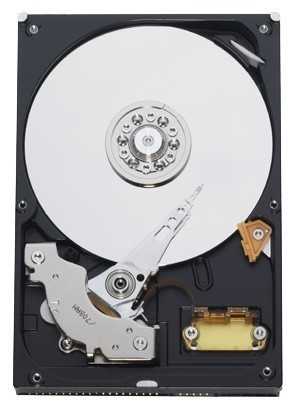
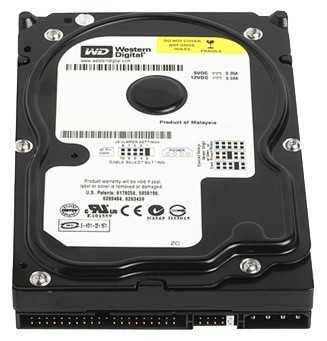
Жесткий диск Western Digital WD Blue 80 ГБ WD Blue 80 GB (WD800JB) — 19 отзывов, плюсы и минусы
Рейтинг:

 Хорошо
Хорошо
Средняя цена в магазинах 3 869 ₽
Краткие характеристики:
- WD Caviar Blue
- 3.5"
- IDE
- 80 Гб
- 7200 rpm
- буфер 8 Мб
19 отзывов пользователей о Western Digital WD Blue 80 ГБ WD Blue 80 GB (WD800JB)
Пользовались
Western Digital WD Blue 80 ГБ WD Blue 80 GB (?
Поделитесь своим опытом и помогите другим сделать правильный выбор

НаноПилигрим-9AXSC
05.02.2018
8/10
Оценка пользователя
Хорошо
- + Отзыв по модели wdc wd800jb-00jja0
Диск 2004 года, и им разве что орехи не кололи. Ни одного бэда, а самое главное - контакты на плате не окисляются, и не нужно их время от времени чистить от окислов, откручивая плату.
Относительно термоустойчив; судя по данным смарта, ранее девайс нагревался в работе до 81 градуса, но по прежнему жив - - Греется на копировании информации при принудительном...
НеоВояжер-7WFWB
01.05.2017
8/10
Оценка пользователя
Хорошо
- + Не шумный и надёжный
- - Греется. Без охлаждения греется до 46, без него - 37. И это в простое!
Громкое самотестирование по смарту. Начинает гудеть
Медленный на наше время - IDE
Купил б/у на сайте объявлений, год выпуска 2005, чёрный. Наработка...
НаноПилигрим-5FHVX
23.11.2015
10/10
Оценка пользователя
Великолепно
- + Отличный диск, ни в какую не хочет умирать ))
- - Маловато будет, но выкидывать жалко )
По датчикам 15312...
Странник-9POTB
27.02.2011
10/10
Оценка пользователя
Великолепно
- + Отличный ЖД.Работает уже более 5 лет.
Сейчас проверил программой HD Life , там показало сколько он отработал именно включенным : 1 год 3 месяца 24 дня...
Гиперион-0QGLM
18.11.2010
10/10
Оценка пользователя
Великолепно
- + Только положительные качества.
- - их нет
Этот винт работает 4 года, и без нареканий. побольше бы таких...
Пульсар-0TTRV
06.03.2013
10/10
Оценка пользователя
Великолепно
I have purchased several of these Western Digital HD's, both IDE and SATA, and haven't had a problem yet. Of course, I started purchasing them after one of my towers had the click of death and the WD HD was fried. However, I did replace the main drive with a new WD 160GB but I'm using the used ones for several reasons. The dead computer and my daily use one are both Dell and both were getting on in years but, again, I'm too cheap to even buy a new computer now because I don't want Windows 8 or all the stuff I had to remove from my wife's new one we purchased last year. Both the Dells were running on XP and that was pretty much a trouble-free OS for us. I did get a used 40GB WD HD on eBay that had a fresh install of XP Pro so I cloned it to the new HD using Acronis True Image 2009 and it was a snap and works perfectly... plus I now have a backup of my OS should I ever need it. The HD on my daily use PC was starting to click so I pulled it, did a fresh install of XP Home on this drive and put it in and it's also working fine. I also added one of these drives as a second drive to just save files to as a backup. I have yet another used WD HD in a Connectland external enclosure to back up whatever I need... and yes, after you lose an HD you tend to go overboard in backing up stuff.My old PC was loaded with only what I need to stream movies or to watch something off an Internet and I added a WiFi card. It has now replaced a nice laptop that sat in the TV room to be used rarely and it was like getting a new computer. All-in-all I'm pretty happy with these used HD's and for about 10 bucks each I can't complain about the price. Formatting them was easy and installing was also a breeze. If you're not one for used items then pay some more for new but I'm not all that confident that these older ones might not outlive some new ones. They get 5-stars and the only downside is that they're 80GB but since I have two installed and one for backup the size hasn't been an issue for me. If I had newer towers I'd likely be going with new ones. Lastly, be sure to search carefully on the model numbers or you may be thinking it's a SATA and it's really an IDE because they very slightly in the numbers. As an example, the WD800JD is SATA and the WD800JB or the WD800BB are IDE. I have tried using the converters but my Dells don't read the HD when I do so.
Гиперион-1TCHH
10.09.2012
10/10
Оценка пользователя
Великолепно
Even though verified and formatted by vendor, the formatting received was not recognized by my Windows. No instructions. No Western Digital EZ-Drive utility. Not an issue, treat the used drive as if a factory original bare drive for PC geeks like us.When rebuilding a crashed system, the Windows XP Install CD will format it. If given a choice, choose FAT32 format if under 100GB, and NTSF if over. Old PC Geeks will know why. New Geeks think we are crazy.If formatting as a second drive, set the pins to "SLAVE" or "CABLE SELECT", and then in the CMD window, type(as an example): FORMAT D: /FS:FAT32 /V:SLAVE ... set the D: to your SLAVE drive letter, FS attribute to match your PRIME drive (FAT32 or NTFS), and V attribute to a helpful name (no spaces) of your Slave Drive. To determine your PRIME drive format, open the Properties window tab for that drive. For XP, it is usually NTFS by default.
Сатурниан-9UERO
30.12.2012
10/10
Оценка пользователя
Великолепно
easy installed works perfect i have no complaints everything was ready right when i opened the package just plugged installed and happyness.
Показаны отзывы 1-8 из 19.
Как менялась цена на Western Digital WD Blue 80 ГБ WD Blue 80 GB (WD800JB)
Характеристики Western Digital WD Blue 80 ГБ WD Blue 80 GB (WD800JB)
Информация о характеристиках носит справочный характер.
Перед покупкой уточняйте характеристики и комплектацию товара у продавца
Альтернативы с более высокой оценкой









Wizemart © 2026.
Рекомендательная система по умному выбору товаров по отзывам и рейтингам
