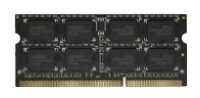
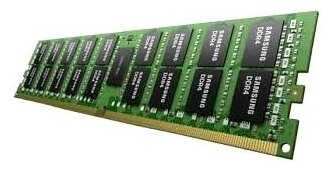
Оперативная память 16 ГБ 1 шт. Samsung M393A2K43CB2-CVF — подробный обзор, плюсы и минусы на основе 106 отзывов
5.8/10

Плохо

5.8/10 Плохо 106 отзывов · агрегировано из 3 источников Как мы считаем рейтинг?
16 ГБ DDR4 2933 МГц DIMM 23400 МБ/с 21 1.2 В 1 шт.
56
13
14
6
17
Средняя цена в магазинах 1 186
Смотреть все цены ↓
Сравните Samsung 16GB 2933MHz CL21 (M393A2K43CB2-CVFGY) с другой моделью
Загружаем цены...

Похожие товары в этой цене

7.8/10 баллов

Corsair 1 ГБ DDR2 800 МГц DIMM CL5 CM2X1024-6...

Характеристики:
  • DDR2 800 (PC2 6400) DIMM 240 pin
  • 1x1 Гб
  • 1.9 В
  • CL 5

153 отзывов

1 417 руб. в среднем

7.4/10 баллов

Samsung 2 ГБ DDR2 800 МГц DIMM CL6 M378T5663E...

Характеристики:
  • количество модулей в комплекте: 1 шт.
  • объем одного модуля: 2 ГБ
  • тип: DDR2 DIMM 240-pin
  • тактовая частота: 800 МГц
  • тайминги: 6-6-6

27 отзывов

1 171 руб. в среднем

7.2/10 баллов

Samsung 2GB 1333MHz PC3-10600 DDR3 DIMM

Характеристики:
  • тип: DDR3
  • объем одного модуля: 2 ГБ
  • тактовая частота: 1333 МГц
  • Форм-фактор: DIMM
  • количество модулей в комплекте: 1

10 отзывов

1 307 руб. в среднем

6.8/10 баллов

Crucial 2 ГБ DDR3 1333 МГц CL9 (CT25664BA1339...

Характеристики:
  • DDR3 1333 DIMM 240 pin
  • 1x2 Гб
  • 1.5 В
  • CL 9

28 отзывов

1 219 руб. в среднем

6.8/10 баллов

MLLSE Оперативная память 1GB DDR 400 PC-3200

Характеристики:
  • тип: DDR2
  • объем одного модуля: 1 ГБ
  • объем одного модуля (точно): 1 ГБ
  • тактовая частота: 400 МГц
  • форм-фактор: DIMM

6 отзывов

1 353 руб. в среднем

6.4/10 баллов

Kingston DIMM DDR2 (PC2-5300)

Характеристики:
  • тип: DDR2
  • объем одного модуля: 2 ГБ
  • объем одного модуля (точно): 2 ГБ
  • тактовая частота: 667 МГц
  • форм-фактор: DIMM

14 отзывов

1 204 руб. в среднем

6.1/10 баллов

Kingston Fury (KVR800D2N6K2/4G)

Характеристики:
  • количество модулей в комплекте: 2 шт.
  • объем одного модуля: 2 ГБ
  • тактовая частота: 800 МГц
  • тип: DDR2 DIMM 240-pin
  • тайминги: 6

15 отзывов

1 399 руб. в среднем

5.9/10 баллов

HyperX Оперативная память Kingston 2GB DDR2 667...

Характеристики:
  • тип: DDR2
  • объем одного модуля: 2 ГБ
  • тактовая частота: 667 МГц
  • Форм-фактор: DIMM
  • количество модулей в комплекте: 1

4 отзывов

1 014 руб. в среднем

5.7/10 баллов

Samsung 16 ГБ DDR3 1866 МГц DIMM CL13 M393B2G...

Характеристики:
  • DDR3 1866 DIMM 240 pin
  • 1x16 Гб
  • буферизованная
  • ECC
  • 1.5 В

8 отзывов

1 186 руб. в среднем

5.7/10 баллов

Hynix 2 ГБ DDR2 DIMM (HYMP125U64CP8-S6)

Характеристики:
  • количество модулей в комплекте: 1 шт.
  • объем одного модуля: 2 ГБ
  • тип: DDR2 DIMM 240-pin
  • тактовая частота: 800 МГц
  • тайминги: 6-6-6

10 отзывов

1 358 руб. в среднем

5.1/10 баллов

AFOX 8 ГБ DDR3 DIMM CL11 (AFLD38BK1P)

Характеристики:
  • количество модулей в комплекте: 1 шт.
  • объем одного модуля: 8 ГБ
  • тип: DDR3 DIMM 240-pin
  • тактовая частота: 1600 МГц
  • тайминги: 11

5 отзывов

1 379 руб. в среднем

4.8/10 баллов

Samsung 512 МБ DDR2 667 МГц DIMM M378T6553EZS...

Характеристики:
  • DDR2 667 (PC2 5300) DIMM 240 pin
  • 1x512 Мб

4 отзывов

974 руб. в среднем

106 отзывов пользователей о Samsung 16GB 2933MHz CL21 (M393A2K43CB2-CVFGY)

Пользовались Samsung 16GB 2933MHz CL21 (M393A2K43CB2-CVFGY?
Поделитесь своим опытом и помогите другим сделать правильный выбор

56
13
14
6
17
Profile no image

Плазмоид-2IRSO

01.06.2022

10/10

Оценка пользователя

Великолепно

Отличная модель
источник
Profile no image

Плазмонавт-7YQZN

10.07.2023

10/10

Оценка пользователя

Великолепно

Отличная модель
источник
Profile no image

Christine

06.12.2020

10/10

Оценка пользователя

Великолепно

For Your Information Google Playstore Users
Having used the Lenovo Thinkpad, the Samsung Galaxy Tab 2, the Acer Chromebook and now the Samsung Chromebook 3, I know that the Chromebook is superior to the other devices. It is less "touchy" than the Thinkpad, which I found too sensitive to touch. It is almost the same size and weight as my Galaxy Tab 2, plus has the keyboard, which I LOVE! The Acer is similar but bigger and heavier...not benefits to me.

I have one HUGE suggestion for anyone who needs apps from Google Playstore like I did. My device did not come loaded with the Playstore App but I had researched enough to know it was capable of using it. After hours of experimentation on my own, I finally called 1-888-891-0696. They gave me their Chromebook reps, who told me I had to call Google to get the necessary update. I called 1-844-613-7593 and was told that they used to handle calls regarding the update but they no longer do, so directed me back to Samsung. This time I called 1-800-SAMSUNG and got a rep that told me they are not capable of doing Google updates, only Google can. She happened to ask did I have any updates that needed attention on my device. Being new to the device, I wasn't sure, but she walked me through it and in fact I did. IT WAS THE GOOGLE PLAYSTORE APP that I needed!!! Problem solved! Just look down near your photo in the box for the update sign.

Once I completed the update and downloaded the Playstore App, I was able to get the Brother printing app I needed, as well as others that I commonly use.

Hope this review can save others from the initial hassle I endured because the Chromebook 3 looks terrific in any other way.
источник
Profile no image

Kaye

06.12.2020

10/10

Оценка пользователя

Великолепно

I run my business on this Chromebook
I'm a heavy user and completely in the cloud and this is my only computer. I use it for business. I have it linked to my Android Note 8 (through a third party Chrome app) and it's seamless. It will run apps from the Google Play store. I usually have many multiple tabs open, expect it to operate like a full blown PC laptop and it generally does exactly what I want it to do. I watch videos, do photo editing, type thousands of words a day on it, stream movies and create Google Docs, Slides and Sheets. I bought this to replace my three year old version of the same Chromebook because all of the letters were worn off the keyboard and some of the keys weren't working ... I'm actively using my Chromebook probably 8 or more hours a day so it would probably last even longer for most people. It's lightweight and fits easily in a tote or backpack. It holds up well. I use it sort of all day and night and I haven't found anything it won't do. The only place I notice this being slow is ironically when I open up Google Inbox and then I get to practice patience for a minute. Occasionally it will get sort of slow and then I'll go to settings and clear the image cache and that takes care of it. I handle a lot of images so the memory fills up a bit after a while. It comes with 100 gigs of free storage for two years from Google and I'm sold on Chromebook. I usually run it off home wi-fi but I can also tether it to my phone or use public wi-fi. The bluetooth connects easily to everything. The keyboard is nice. I type 100 wpm and I like the keyboard and touch pad a lot. The keys are responsive and quiet. It's a nice, clean, simple design and easy to keep clean. The only thing I wish Samsung would do is make a little indent where the power cord goes in to help guide the plug in because you kind of have to look when you're plugging it in. The power cord is super compact and is just the plug and cord with no big clunky thing on it. I've been able to find cloud based solutions for every piece of software I was using previously and I don't miss the PC at all since I went into the cloud in 2015. I really don't miss having to constantly update my system and all of the software. Google updates are super fast. You basically just restart and you're ready to go. It boots in seconds although I usually just leave it on constantly. I set my browser downloads to save to my Google Drive so there's no personal information stored on the Chromebook at all. It's under $200 and it's better than my $1200 PC laptop I replaced when I switched to Chromebook three years ago. It's absolutely silent. No fans grinding away. I sit with it in my lap all day long and it never gets hot. I don't play video games but I imagine that it would play cloud-based games fine. I've inadvertently had more than a dozen YouTube videos playing at the same time and it was sort of noisy but it wasn't lagging. And when you want to replace it, you just backup anything you've stored on the small hard drive and run the power wash on it. The only program I couldn't find a cloud solution for was Scrivener. But now you can get a virtual hard drive in the cloud for a fairly reasonable monthly rate and run any software you want on the Chromebook. It holds up to constant use and it's really sturdy despite being really slim and lightweight. The screen hinge is super strong and it's hard to imagine it breaking unless you dropped it.
источник
Profile no image

Andrew

06.12.2020

10/10

Оценка пользователя

Великолепно

This thing rocks!
This thing is great! I bought the 4GB model which will hopefully last me a few years but it's nice and snappy now. The 16GB of SSD storage is perfect as I use it for school and the biggest file I might be storing would be a picture. It integrates perfectly with my google account! This thing boots up super quick and it sleek and beautiful. It's lightweight, has a long battery life and although it's smaller than a standard laptop, the keyboard is easy to use.

Google and partners have done great with Chromebooks and have plenty of features to accommodate. There are multiple physical keyboard shortcuts running along the top of the keyboard to quickly adjust settings. There are also several different hotkey menus which are accessed by keyboard combinations.

The only thing I'm bummed about is the lack of Google Play. I'm still giving this thing 5 stars because the Play store should be released soon as it is already available on other Chromebooks.

I would highly recommend this to anyone, but especially to someone wanting something that is affordable, easy to use and just a bit more than a tablet.

UPDATE 7/21/17 - STILL ROCKS
I've gotten more use out of this thing than I first envisioned. I have a Samsung Galaxy S8 and can easily access my Google Drive files that I create and edit on the Chromebook via Goggle Docs. It's still nice and snappy; I have Amazon Prime music running in one tab, working on a Google Docs file in another and browsing Reddit or searching something on a third tab and there's no hesitation. I've enabled the beta build and enjoy several Google Play Store applications. I added an SD card which has expanded on the 16GB of storage. I'm getting very used to the multiple finger shortcuts on the touch pad when navigating Chrome. For instance: putting 2 finger tips on the touch pad and swiping left or right will act as the forward or back button. Also, "clicking" on a link by using 2 fingers and pressing on the touch pad, you bring up a menu to open in a new tab among other things. I watch Netflix and HBO Now and can definitely notice the lack of 1080p but it's a "get what you pay for" situation, and I knew that going in. This thing is still fantastic for what it is. If you want a proper laptop then buy one -- this is a Chromebook. I'll be back to give another update in a few months.
источник
Profile no image

Douglas Willis

06.12.2020

10/10

Оценка пользователя

Великолепно

... a Chromebook now for three years and am totally satisfied. I bought this This Samsung 11
I have been using a Chromebook now for three years and am totally satisfied. I bought this This Samsung 11.6" as a replacement for an older Chromebook that is showing its age a little. For the price you can't beat a Chromebook. I do 99% of my work on a Chromebook. Chromebooks are light weight and start up immediately and are very easy to use. I've gotten to where I despise Windows computers due to their bulk and all of the crashes and problems I've had over the years with Windows.
My old Chromebook is an Acer and I've had absolutely no problems with it. I chose to purchase a Samsung Chromebook this time just to try out a different company and because it was inexpensive ( I paid $189.00). To be honest, I like the feel of the Acer keyboard a little better than this Samsung, but that's probably because I'm so used to the Acer. I've used the Acer so much that I've worn off the letters of several keys. This Samsung works as expected and is a good, basic Chromebook.
источник
Profile no image

SuzyQ

06.12.2020

10/10

Оценка пользователя

Великолепно

Love it!
I love this Chromebook! The keyboard is easy to use, and there is no external noise to contend with. All that was necessary for set up was turning it on and logging into google account, exactly as advertised!
I use a computer, primarily for internet access and saving/posting photos. It is fantastic for the things that I need a computer for.
Defiantly well worth the money & then some. I highly recommend the Samsung Chromebook for browsing the internet, and for note taking.
I couldn't be happier with this product!
источник
Profile no image

TheSentinel

06.12.2020

10/10

Оценка пользователя

Великолепно

Perfect for students
I have used this computer daily now for about 6 months, spending hours per day on it for an EMT/paramedic class. I haven't added any apps to it or done anything other than log into my online portion of school and complete lectures, so I can only speak for its basic tasks.
It's extremely fast and has very little lag when opening pages or surfing the web.(*cough'Quizlet'cough*) I use this hooked up to my mobile hotspot from my cell phone mainly, and it allows me access anywhere I have cell service. At school my cell service sucks so I have it set to automatically connect to Wi-Fi and it works great. The size is perfect, it's easy to toss it in my satchel or backpack along with my textbook and notebooks and have plenty of room. I use the Amazon basics sleeve to protect it, and use an electronic mouse to help perform tasks a little quicker. It's highly recommended that you purchase an SD card for this to store any documents etc., as it doesn't have large built in memory. I feel this computer is perfect for students who don't want to carry around a large laptop and add more weight to your already heavy backpack, but can still perform most of the same tasks as the larger ones and do the majority of school work you need to do. I highly recommend.
источник
Показаны отзывы 1-8 из 106.
Загружаем цены...


Как менялась цена на Samsung 16GB 2933MHz CL21 (M393A2K43CB2-CVFGY)

Характеристики Samsung 16GB 2933MHz CL21 (M393A2K43CB2-CVFGY)

Общие характеристики
Поддержка ECC : Да
Буферизованная (Registered) : Да
Объем одного модуля : 16 ГБ
Характеристики
Тип : DDR4
Тактовая частота : 2933 МГц
Совместимость : Samsung
Форм-фактор : DIMM
Пропускная способность : 23400 МБ/с
CL : 21
Тип памяти : DDR4
tRCD : 21
tRP : 21
tRAS : 41
Количество чипов каждого модуля : 18 , односторонняя упаковка
Напряжение питания : 1.2 В
Количество рангов : 2
Количество контактов : 288
Упаковка чипов : двусторонняя
Особенности : ECC, Registered
Количество модулей в комплекте : 1 шт.
Частота памяти : 2933 МГц

Информация о характеристиках носит справочный характер.
Перед покупкой уточняйте характеристики и комплектацию товара у продавца