Отзывы о Оперативная память Kingston ValueRAM (KVR26N19S8/8)
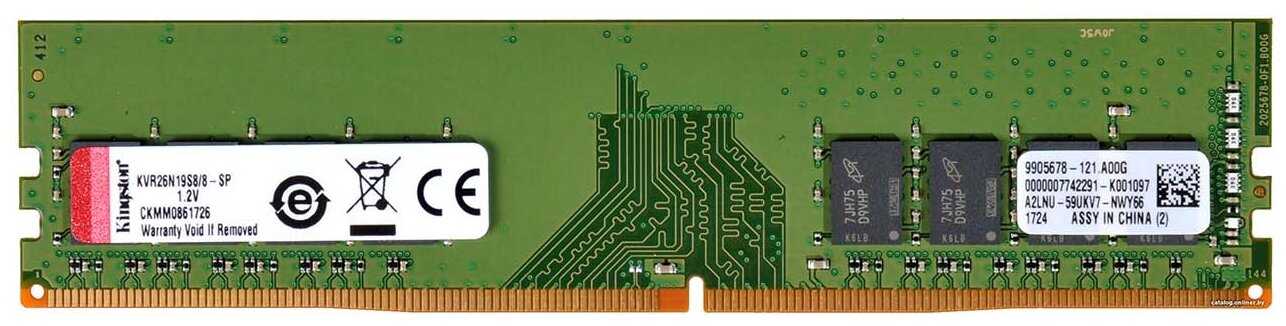 |
Оперативная память Kingston ValueRAM 8 ГБ DDR4 2666 МГц DIMM CL19 KVR26N19S8/8 | Яндекс Маркет | 7 660 ₽ | Посмотреть |
|
Оперативная память Kingston ValueRAM 8 ГБ DDR4 2666 МГц DIMM CL19 KVR26N19S8/8 | Яндекс Маркет | 7 934 ₽ | Посмотреть |
1176 отзывов пользователей o Kingston ValueRAM (KVR26N19S8/8)
Пользовались
Kingston ValueRAM (KVR26N19S8/8)?
Поделитесь своим опытом и помогите другим сделать правильный выбор

Фотон-1SREG
23.05.2025
10/10
Оценка пользователя
Великолепно
Отличная модель
- + работает
ИнфраГость-7QHYY
28.02.2024
10/10
Оценка пользователя
Великолепно
Отличная модель
- + работаеь
Странник-5PZCU
26.05.2025
10/10
Оценка пользователя
Великолепно
Отличная модель
- + на сезон отлично
ТерраБот-1WKZG
30.06.2025
10/10
Оценка пользователя
Великолепно
Отличная модель
- + цена и качество
- - нет
Сириус-0HEJS
29.05.2025
10/10
Оценка пользователя
Великолепно
Отличная модель
- + все отлично.она работает
Вояджер-1LNBU
06.03.2025
10/10
Оценка пользователя
Великолепно
Отличная модель
- + работает нормально
ОмниКод-5CXMM
14.07.2025
10/10
Оценка пользователя
Великолепно
Отличная модель
- + работает !
Вояджер-9CBYC
22.04.2021
10/10
Оценка пользователя
Великолепно
Отличная модель
- + Все хорошо, доставили вовремя, память работает без проблем
НеоВояжер-5VQLR
28.11.2023
10/10
Оценка пользователя
Великолепно
Отличная модель
- + Память, как память. Главное работает.
НоваГость-9IFGN
02.03.2025
10/10
Оценка пользователя
Великолепно
Отличная модель
- + Работает как положенно.
- - пока не выявил, мало поработали
Сириус-0RFRZ
25.05.2024
10/10
Оценка пользователя
Великолепно
Отличная модель
- + Узенькие платы, не сильно торчат из материнской платы, абсолютно новые, запечатаны пломбами в упаковке
НаноПилигрим-2BHJA
12.03.2025
2/10
Оценка пользователя
Ужасно
Очень плохая модель
- - не работает одна планка
ИнфраГость-0HZSC
25.05.2024
10/10
Оценка пользователя
Великолепно
Отличная модель
- + Рабочее
- - Нету
Фотон-5ADVD
25.05.2024
10/10
Оценка пользователя
Великолепно
Отличная модель
- + Все работает без нареканий.
Капеллан-0GPZG
18.03.2025
10/10
Оценка пользователя
Великолепно
Отличная модель
- + работает все хорошо
Нейрон-9BKJM
13.03.2025
10/10
Оценка пользователя
Великолепно
Отличная модель
- + Пришло хорошо упаковано. Продавцу респект все в срок и во время. Работоспособность не проверял, как проверю отзыв дополню.
ТерраБот-7NRWO
13.08.2012
10/10
Оценка пользователя
Великолепно
I build my own system every few years. This always involves buying at least three things simultaneously- a new motherboard, a new CPU and new RAM because all three of these things have to "match" in terms of the current technology. This is not true of other components- you can keep your power supply and your case and your hard drives -even your graphics card- for instance, but these three function as a unit.I had gotten into thinking a lot about my CPU and MB and treating RAM as commodity. I know that to over-clockers and component wonks and people who have to have the latest technology this is unthinkable but from my POV I figured that since I am not a gamer, as long as I had enough RAM of the right type- and I need a lot for programming- the exact details and the specific maker were not important to me the way my CPU or MB or disk drive speed and size were.So I built my system and *one day* not very long after, I start to get very weird errors with crashes. Ultimately I discovered that the RAM I bought failed, as in had begun to malfunction. Now, it's a long painful way from having your system crash, at first infrequently and then often enough to be forced to stop hoping it will go away to suspecting your RAM as the culprit. Along that long unhappy road lies *just about every other combination of interactions between various possibly malfunctioning parts of your computer including software, driver, antivirus, OS, disk drive motherboard and all your motherboard components etc etc etc. Yeah.. that was a long road involving just the crappiest, most avoidant, non-native speaker, new-representative-each-time customer service you can imagine at the end of which lay exactly zero help.So after I understood it was the RAM, I decided to go for quality in the RAM department on my replacement purchase and bought this Kingston HyperX Ram because it comes with a lifetime guarantee and because if you read what professional reviewers and enthusiasts have to say, it's wicked fast and super high quality.Fast forwards a while and I still have the same system because it's working just fine for me. My computer starts to behave badly again. Of course my mind immediately suspects the RAM. So I called Kingston and got a real live representative from my home country who walked me through the process of testing the RAM with software called Memtest86 during which time we established it was not their RAM after all. That's a good thing, but the better thing was the gracious, prompt, non-evasive, attentive customer service representative who kept with me through the entire process following up in email etc. As if I wasn't just another one of their millions of customers who bought one of their many products, which is what I am. My doctor isn't that nice to me.Maybe they have such great support as a publicity stunt / loss leader to get people talking about how great they are. Maybe they build the cost of their gold-plated customer service into their product. Maybe they fab such high quality RAM that their customer service reps sit around all day like the Maytag repair man wishing the phone would ring to save them from doing another Suduko puzzle. Whatever it is, it works.I highly recommend both this RAM and Kingston generally for all your memory needs and me, a non-component-geek is actually brand loyal to something I didn't think I would ever bother even distinguishing in the market RAM. Who knew?
Странник-4IAQV
15.12.2012
8/10
Оценка пользователя
Хорошо
Works fine so far. Amazon should have specified that the default XMP profile of this memory runs at 1600 MHz/1.65 V, because it's cheap. Had I known that beforehand I would have gone for a 1600 MHz/1.5 V memory. So for this memory, in BIOS, you can either enable XMP to automatically change the frequency to 1600 MHz and voltage to 1.65 V (1333 MHz/1.5 V for XMP disabled), or you can do a manual overclock (1600 MHz), and I increased the voltage to only 1.55 V. 1.5 V/1600 MHz probably would work as well, but Kingston only tested this product at 1600 MHz/1.65 V because, again, it's cheap. Something to note is that with XMP enabled (1600 MHz/1.65 V), WEI memory gets a 7.9, but with manual (1600 MHz/1.55 V), WEI actually drops to 7.8, which is quite surprising. IBT and p95 works both fine without crashing.12/26/12 updateI found out why the WEI dropped to 7.8. By changing to the default 1333MHz profile (1333MHz, 9-9-9-27, 1.5V) and manually increase the frequency to 1600 MHz, voltage to 1.55V, and the timings to auto, the timings got to 9-11-11-29! (WTF?) So no wonder even WEI recognize it as being slower than XMP 1600 MHz, 9-9-9-27, 1.65V). That being said, even though the system seems to be stable according to p95 and IBT, games like crysis crashes frequently (quit to desktop, not BSOD though). I am suspecting either I did something wrong with the CPU OC or the memory. Will try to figure out.Meanwhile, as I read more and more, I am just getting increasingly angry at those memory sticks. I mean who makes 1600 MHz/1.65V memory nowadays? Even though it's debated whether 1.65V will damage the ivy bridge chipset, why can't Kingston make 1600MHz/1.5V memory recommended by Intel? The competitors like G.SKill or Corsair all make 1600MHz/1.5V memory at the same price. I bought Kingston because I thought Kingston HyperX is a good brand, and this is what I get!I am inclined to take off another star, but I'll see if 1600 MHz/9-9-9-27/24 at 1.5 V is stable, or try to lower the timing from 1333MHz. It's still annoying though....
Лунатик-9ZCGY
20.08.2011
6/10
Оценка пользователя
Плохо
Suffice to say I love the flexibility and speed, plus the overhead of 24GB of RAM in this kit, but I am afraid I am returning it to Amazon.com because I need about 1690Mhz out of the RAM and I'm only able to o'clock it to 1606Mhz in the Windows GUI//1620Mhz in BIOS...sorry to say. I had two extended phone calls with Kingston Tech Support, Hyper-X Division (Tech 2 as it's known at Kingston), and the techs each time tried their best to help me out with adjustments on the RAM in BIOS so that a small overclock could be realized, but no go both times...so I am rating the kit 3 stars because it's just OK, not exceptional, certainly not that good either, which 4 and 5 stars represents.Kingston Tech Support will say that any Hyper-X memory will overclock substantially, however there is a caveat to that statement when you get up to the large RAM lots, like 24GB is the largest batch they sell. It is much more difficult to stabilize 24GB RAM vs any other sized kit, and you just can't expect even the great Hyper-X RAM to o'clock faithfully to well beyond its rated capacity for speed, which is 1600Mhz. Turns out the RAM can't be clocked much over 1600Mhz in any case, and it was Kingston Tech Support who admitted after my queries about the RAM that I would need the 1866Mhz RAM in my PC for things to click right--and we shall see about that very, very soon.I don't normally call Tech Support for advice with components like this, but I thought that there might be some trick or treat that I was missing with this 1.65V RAM in the house, inside my Core i7 970 CPU-equipped HAF X 932 PC No.1 in my studio (I have 3 OEM desktops I built 100% in there, PC No.1 being the premiere PC). But nope, I had caught all the tricks and treats that were applicable to the RAM kit before I even called. I had (EVGA Classified E760 motherboard with PHOENIX BIOS) opted to up the QPI to 1.35V from 1.1V; upped the voltage to as high as 1.72V to 1.75V, but the RAM performed best at OEM rated 1.65V; I changed two other key values to 1.3V-1.4V from their 1.1V recommended EVGA factory setting; and I upped the VTT to 1.325V over a 1.200 base, all things that Kingston agreed were appropriate for an attempt at overclocking the RAM somewhat, but no! Would not work at those, or any other settings including the XMP setting, which is not for overclocking anyway!So I had to Pasadena on keeping the RAM, and will arrange with Amazon.com an exchange next week for the Kingston Hyper-X 1866Mhz RAM 12GB kits x 2 to come floating down my way, at a HUGE increase in cost by the way, but do so I will because I love the 24GB of RAM over my 12GB of G. Skill PII 1600Mhz RAM that I had before the Kingston RAM. I am not faulting the G. Skill RAM at all, as it DOES overclock to more than 1750Mhz without much sweat, but I have grown fond of having the 24GB in the house for PC No.l, and that's the way it's going to be...the 1866Mhz RAM will give me plenty of cushion to cover a mere 1694Mhz overclock in BIOS, we are certain about that!That's the story with this pretty Blue RAM from Kingston's Hyper-X Division, which by the way only gets Level 2/Tech 2 Support at Kingston's toll-free telephone numbers. I wish it were different but it is what it is...OK RAM, but nothing special and it had to be returned to accommodate my needs for higher than a 1606Mhz overclock speed.Wavey Davey - 8-20-2011
Астрон-2LLZL
13.02.2013
10/10
Оценка пользователя
Великолепно
Does what it's supposed to do. Sixteen GB of ram memory. NOTE: make sure that your OS and your motherboard support the 16 BG, or else it won't work as desired. CAUTION: I am no computer expert, so I messed up the installation at first: I opened the cabinet, forgot to don my anti-electrostatic band; released the four latches; pulled out the old four sticks; then, using one hand only, I put in the new dimm sticks starting by inserting the CORNER opposite the latch; then the corner next to the latch; then I pushed in the latch-side corner; then forced the latch closed, for all four dimms. Then after I turned on the computer, it started working slow, erratically, and messing up my software. I managed to create a lot of chaos and had to turn off the computer without a proper shutdown because of all the mayhem. SOLUTION: I read the instructions, donned my anti-static electricity band, removed the dimms VERTICALLY with both hands; then I reinstalled them VERTICALLY with both hands, and both corners in at the same time; then pushed evenly on both ends; then when it bottomed out, I pushed down firmly and evenly until the latch snapped and engaged the dimm on it's own, untouched by me. Did the same for all four, and now my computer works perfectly, fast, and all 16 gb are available.
ОмниКод-5LLSL
19.03.2012
10/10
Оценка пользователя
Великолепно
I bought the dual-channel 8GB memory, but what I was 'supposed to' buy was the quad-channel 16GB set. I actually bought 4 sets of the 8GB pairs, so this review could have 4 times the weight of other reviews.Why did I get dual channel memory when my pc supports quad-channel? All memory supports all channels. Single channel (I can't think of a single platform that still actively advertises that), dual channel (what most people have), triple channel (some AMD and i5/i7 processors support this), and quad channel (currently only supported on LGA2011 sockets, as far as I know) memory is all the same. The memory doesn't have all that much to do the channels (this is simplified). The determining factor in how many channels your pc supports is based on your CPU/motherboard chipset. As far as memory is concerned, if it's the right speed, and if you have enough, it 'should' support all the channels your PC does. The catch is, most memory modules have very slight differences, even among the same manufacturing batches. If the timing is at all off, you won't get the benefits of having more channels. For this reason, most people suggest buying memory kits that are guaranteed (through testing) to work together at the same speed. If you just want to add some memory to your PC and be done with it, by all means, go for it.I bought 4 sets of 8 GB of 'dual channel' memory because it was cheaper than buying 2 sets of 16 GB of 'quad channel' memory. It was cheaper by around $45-50. That was a few weeks ago. Now... at the time of this review... the savings aren't as good, and I may have gone with the quad channel kit. Also, all of the DIMMs I got were manufactured mid-February of 2012 (as stated by CPU-Z).As for the actual review. All 8 sticks of memory have the exact same timings, so I am able to run them as quad channel. They're staying nice and cool (which is more than I can say about my CPU, I may have to reseat the CPU cooler) and are performing quite well. This may as well be considered Low-Profile memory and isn't blocking my overly large CPU fan (Frio OCK) which is a feat in itself.In summary, I bought 4 sets of GB RAM because I'm cheap. It's worked out quite well, and I have no complaints. The memory is working as it should and there's not much else to add.
Плазмонавт-6OAJD
06.01.2013
10/10
Оценка пользователя
Великолепно
Purchased this product together with the Kingston Cooling Fan for HyperX PC Memory KHX-FAN, 16 GB set, 4X4.PROS: Installed easily. MB- AMD 785G(RS880/SB710), Alvorix (HP p6677c Desktop), recognized the memory without any issues.The CPU, Processor: AMD Athlon(tm) II X4 635 Processor, AMD64 Family 16 Model 5 Stepping 3,Processor Count: 4, Propos, was getting hot. Added aftermarket Noctua Ultra Silent CPU Cooler Cooling NH-U9B SE2, and my system has never gotten over 43C with the most demanding processor use. Idles at consistent 23C.The only time my system uses over 4G of memory is when I'm using multiple virtual machines or when running chkdsk on an external HD through an USB 2.0 port. Then I've seen it max out at 15.3 GB of RAM usage.For a cheap machine (HP,) this computer as set up is about as good as it gets for the initial purchase price. Only upgrade left is a 6-core AMD processor.Researched the specifications of the computer and the RAM at Kingston's website. Read reviews here. Purchase and delivery through Amazon timely. Very good experience thoughout the entire process.CONS: None in 7 months of use.
Вектрон-9QMIM
29.03.2013
10/10
Оценка пользователя
Великолепно
I needed to boost the memory of my secretary's 1.5 year old HP desktop.It was booting VERY slow and it would take Word 20 seconds to launch. This memory has helped performance a lot.We went from WIndows 7 64 bit with I think 2 GB of RAM ot 8 GB of RAM and the performance picked up noticably, but not as much as I hoped. That is not the fault of this RAM. it is the fault of the Athlon X2 processor in the machine. It seemed like a good deal to get my secretary an inexpensive computer since all she does is Word, Excel, Filemaker and internet. I wish I would have spent $50 more and gotten a more robust processor.It will last us another year or two before I have to replace the machine, thanks to a few bucks on this RAM. Good purchase, and I am not sure that there is a better name for a better price in RAM than Kingston.
НоваГость-4VQGG
03.09.2012
10/10
Оценка пользователя
Великолепно
I replaced Komputerbay 32GB ( 4 X 8GB ) DDR3 PC3-12800 1600MHz DIMM with Low Profile Blue Heatspreaders 240-Pin Dual / Quad Channel RAM Desktop Memory KIT 9-9-9-24 XMP ready with this Kingston set yesterday. You can read about my experiences fully in my product review for the Komputerbay memory. I could never get the Komputerbay memory to run stable, but the Kingston memory has passed thorough testing and my desktop has, so far, run stable. I'll update this review if I have any problems.This is the third set of Kingston memory I've ordered this year and haven't had a problem with any of them. I've also ordered dozens of Kingston server memory modules for work and have never had a bad module or any stability issues with this brand.Physically, the modules seem to be well built with a hefty feel to them. I prefer the low profile heat spreaders because this gives me more flexibility with aftermarket CPU coolers, whereas other modules with the large fins tend to interfere with certain aftermarket coolers. I plan on installing a Cooler Master Hyper 212 EVO CPU Cooler with 120mm PWM Fan (RR-212E-20PK-R2) soon and suspect I will not have an issue with it hitting the memory modules.You might be able to get a set of memory for cheaper than this Kingston set, but if you care about stability and productivity then I highly recommend spending the extra money on Kingston.UPDATE 10/17/2012 - haven't had a problem since I installed this memory - not one blue screen!
Показаны отзывы 889-912 из 1176.