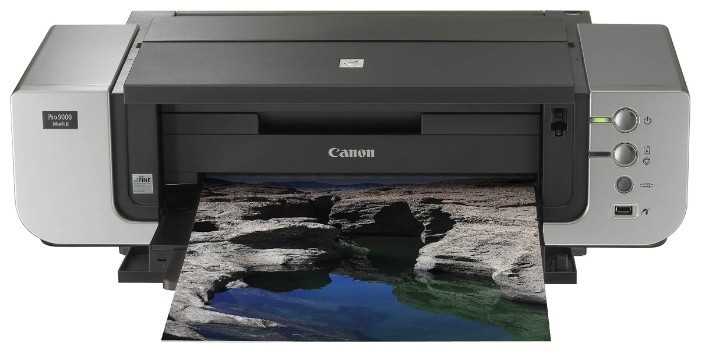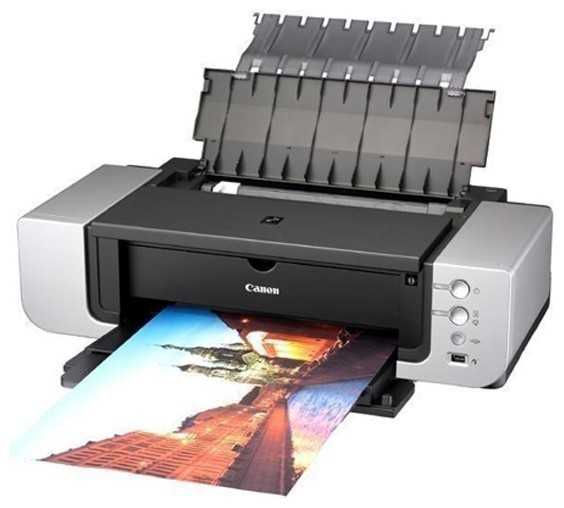
+ Самая популярная линейка картриджей. Великолепное качество. Высочайший интеллект (не требует вмешательства в обслуживание). Хорошая скорость. Сравнительно низкая стоимость листа (без стоимости бумаги).
- Основная программа печати Easy-PhotoPrint поддерживает только файлы .jpg, а Easy-PhotoPrint Pro выполнена в виде встраиваемого приложения и позволяет выводить на печать только 1 изображение, чтов итоге в двое увеличивает время печати. Бумага плотностью выше 180 выгнутая в обратную сторону с верхнего лотка не загружается,...
Вояджер-1TXNN
17.05.2010
10/10
Оценка пользователя
Великолепно
This printer blew me away! Wow, I've had it for a few weeks now, and I can't find anything to complain about, except the software it comes with: on some prints which had areas of solid color, that color DID NOT come out the same on different prints, even though the color was absolutely identical (same rgb values in Photoshop for instance). However, printing those same tiff images from photoshop produced identical solid color on different prints. So, the problem is their software. However this is not a deal braker for me in any way as I don't even like the way their software works. Not to mention that photoshop interface for this printer is actually better then canon standalone software: it has more options and everything is intuitive and simple.From the first moment, the easy of use, setup, and above all - quality of print results have been nothing short of extraordinary. I was very close to buying a three times more expensive Epson printer, as I do a lot of photography and am glad I don't have to spend my days and nights going blind in a darkroom. This is the first time that I can say with confidence that color photography, as a wet process, is dead. I will do some comparisons to some cibas I have from years ago and if this thing manages to pull at least similar quality, I will be in heaven, as great cibachromes not only cost an arm and a leg, but there are very few (im)mortals on this planet who know how to do them well...All in all, if you are considering this printer, think no more, but take advantage of the great deal they are having right now. I got mine for $350 after rebate which is an incredible deal.BTW, so far I printed about 25 8x10 color photographs, mostly for fun, and they came out absolutely stunning. With some older bubble jets, this would be the end of my color cartridge, but when I check the ink level, it shows that nothing was used up! I am almost inclined to believe that something's wrong with the software and that there is much less ink left than what it's telling me. So I will see how many prints I do before I have to buy more print cartridges and will add that info here at a later date. I will be doing a lot of printing in the next few weeks so new inks will be in order soon I imagine.However, if inks are really still almost full as it's telling me, then that would be nothing short of a miracle.ADDITIONAL INFO, after another month of use:By now I have printed almost 100 8.5 x 11 in prints, full color all of them. They all had to have borders in specific colors, which means that actual image size in full color was slightly less then 8x10, perhaps 7x9 or so. But around the edges was a half an inch solid color which most often was light purple. This meant heavy use of p-magenta and p-cyan inks. By now, those two are reportedly very low, almost empty, however, the printer still prints, so I am not replacing them just yet. I will when they are completely empty.I bought those two inks separately in a local photo store for about $14.00. However, all the other ink are almost completely full!I also did a quick comparison test with my old ciba prints. I compared prints made from a 4x5 in Velvia slide, and printed as a ciba, as a RA4 color print from an internegative, and then I did a test print with this printer, on a pearl paper (ciba was done on super glossy paper). The results from Canon Pro9000 MkII are way better then color photograph produced from an internegative. Compared to CIBA print, the yellows, blues and greens from the CANON Pro9000 MkII are pretty much as saturated and detailed as the CIBA. The only difference I found was in reds, however, the comparison is not fair as I have not tried to compensate for that, nor have I gone through a serious calibration process yet. I will try to color correct for those lacking reds, and will post more comments later. All in all, compared to Ciba prints, this printer ilooks very promising. I would not be surprised if I achieve pretty much the same quality after more testing and adjusting. After all, even good ciba prints are possible only after major voodoo work, they don't come out spectacular "out of the box".A few other prints, at full 8.5 x 11 in, just as a quick comparison to the same image produced from color negative as a wet process, showed Canon prints superior in every respect: sharpness, color, saturation, everything was much better, which makes me very happy. And best of all - there is not a hint of prints being produced on a bubble jet printer at all! I can spot a bubble jet print, even those which come from expensive, pro printers, but this one, perhaps because it's dye inks sink into the paper, are indistinguishable from regular color photographs, even under a magnifying glass.One note on paper: it seems that different papers absorb these inks differently. Those that absorb them better will leave colors less saturated and lighter, while those which do not absorb as much will leave those inks more on the top of the paper, making f
Аргонавт-1TSKU
28.01.2012
10/10
Оценка пользователя
Великолепно
-Quality of prints- First things first, this is a professional grade printer so it is not going to achieve its full potential until you properly calibrate the unit and have a very high quality image to print from. That being said, once you have all the color profiles on the same setting, your monitor calibrated, and have color corrected your photos in Photoshop, or equivalent editing software, the print quality is exceptional. It easily surpasses big chain store printing and rivals that of even professional venues. With this quality you also get archival print life ability up to 200 years when properly stored and printed on archival quality media, thus allowing you to print beautiful portraits that will retain their beauty for life times to come.-Setup- The setup procedure is straight forward and Canon has done a good job providing intuitive instructions on how to carry out installing the print head, ink, and the software. Once the drivers are installed you will want to perform an Auto print head alignment THEN after that is carried out go back into settings and perform a manual one to double check the printers accuracy. In my case it was very close (did not have to change values more then +2) but it was still slightly off and slightly off will not do.-Print speed and consistency- This printer is not a speed demon and it won't be winning any printer drag races, this is a unit that strives for accuracy and detail. Canon's claims on print speed are well based and I typically see right around 50 seconds for a 4x6 and roughly 90 seconds on a 8x10. This may be slow to some, but a positive side affect of its slow speed is the fact that the print has adequate time to dry. This is especially important for glossy media. Color consistency once calibrated is outstanding and I am rarely finding myself reprinting to correct it, saving time and money.-Value- Print costs of this unit are very decent, at a $12 cartridge price Red River Paper quoted for ink; $.19 for 4x6, $.28 for 5x7, $.64 for 8x10, $1.23 for 11x14 and $1.98 for a 13x19 then add price of paper. Using this to determine whether or not you will save money is helpful, but the real gain is in quality and convenience. Being able to color match your workflow to you printer is a real plus and not having to worry about the local photo print shop's knowledge on proper printer calibration is another large plus. This will allow you a larger level in control over your print outcome and also give the satisfaction that a high quality image came from your own home! For $499 msrp the printer is a very good deal for any serious photo enthusiast with plenty of room to grow as you do.
Вектрон-2PKDY
19.07.2009
10/10
Оценка пользователя
Великолепно
This is a truly wonderful printer. The prints are amazingly crisp and accurate and vibrant. If you can imagine it, capture it, see it: This printer will print it for you. What I see on my LCD computer screen is what I get on the print. Extremely easy to install and use. If you just want to crank out a bunch of 4X6s for your family or print large art prints, this printer does it with ease: The "make prints of photos" software function makes this a breeze. It leads you through easy steps to making your prints and shows you images all along of what you are planning to print (instant previews all the way through) until you finally commit the "print" button. I love this SW. It's quiet. It can take a large stack of photo paper so you can select what you want to print and walk away.The print quality is astonishing. It's just as good as anything you'll get from a photo lab. And at the price of this printer?! Amazing. I haven't made 13X19s yet (that paper is on the way) but everything I've printed has knocked my socks off. This printer opens up whole new avenues for my photography. I alsways looked forward to someday having a color darkroom. Well, now I have it, without all the space used, the chemicals stinking and going bad in their bottles, and BETTER print no-fade life.[Update 11-Aug-2009: I've made several 13X19 prints now and they are luscious. Just eye-popping. It makes you want to just print off all your favorite shots at 13X19 RIGHT NOW! But what would I do with them all ... Bottom line: Print quality knocks your socks off. Everyone to whom I've shown the 13X19s has been suitably impressed. They clearly show the limitations of the film/sensor and lenses, not the printer. Wow.]The only negative on this printer would be size: It's big. But, I don't really see how they could have made it much smaller, since it accommodates 13X19 inch paper(! It has all sorts of clever panels that fold open when you need them to print larger papers, etc., and they fold away to keep the overall size smaller, unless you need them. For all the paper sizes I am using: 4X6, 5X7, 8.5X11, and 13X19, the paper hopper is the vertical one, which means the footprint required by the printer is much smaller than would be required by a horizontal paper feed. It's also much easier to access and load than horizontal feed would be. Nicely engineered and thought-out.I have been mostly using the premium Canon glossy paper (well worth it) but also some Kodak glossy paper. All results are excellent. Here are the papers I've been mainly using:Canon Glossy II 4 x 6 Inch Photo Paper Plus Glossy 400 Sheets (2311B031)Canon Photo Paper Plus Glossy II 8.5in x 11in 20 Sheets (2311B001)Canon Glossy II 13 x 19 Inch Photo Paper Plus Glossy 20 Sheets (2311B026)I love this printer! Best thing I've bought for photography since my first digital SLR.My computer: Dell Dimension 2400, 2GB RAM, Windows XP Professional[Update 21-Oct-11: I am now using a Dell Studio X something or another, 12GB RAM, very large HD, etc. and Windows 7. The transition was seamless from XP and the old computer.][Update 11-Sep-09:] I wondered a little whether this printer would do as well with documents put together in MSWord, Publisher, etc. Good news: The results are just as good. Wonderful printer.[Update 1-Oct-2010:] I have been using this printer for a long time now. I've gone through at least 2000 prints (no kidding) and I continue to love this printer. It is honestly amazing (much better than photo processes. One of the beauties of digital is that you only have ONE LENS to worry about. After capture, exactly what the CCD records can be displayed or printed.)This update is to report my experience with some non-Canon materials in this printer. The Canon inks (and papers to a lesser degree) are expensive; and we all know this is how the OEMs actually make their money: By selling us supplies. Tempted by the prices, I've tried some other materials. I am now using nothing but Canon inks and paper.I have used some of the after-market inks sold on Amazon. They worked OK; but the prints just didn't have the snap and zing I was used to. But the show-stopper was this: These after-market ink cartidges constantly (constantly!) clogged, or, if they didn't clog, they produced fine streaks in any areas of the photo with large, constant tone (sky, still water, bokeh areas). These were particularly obnoxious in bokeh areas and sky. I tried all the trouble-shooting and nothing worked consistently. I've (literally) thrown all these away and use nothing but Canon ink now -- with perfect and completely consistent results. I also used some Ilford paper that was OK; but the price difference just didn't justify going away from the Canon Glossy II papers (see links above).My bottom line: Use nothing but the Canon inks (especially) and paper. They really are worth the money. I had to learn this the hard way.[update on 4-Apr-2011:] I have now used
Странник-6DURC
23.05.2012
10/10
Оценка пользователя
Великолепно
I purchased this printer after researching different printers.. Setup was very easy although they could include the usb cable other then that. Downloaded latest drivers from canon and away I went!! After being use to multi purpose printers that claim great photo quality, I was absolutely amazed at the quality of the first photo that came off this printer and the speed at which it was produced!! So quiet!! After printing off 4-5 8x10 prints I checked the ink expecting to see the levels going down... at my surprise they still showed full, something the all in one printers would never do of course I will monitor them more to see if the deplete faster once they show a lower level. I was using an ultra-premium paper (not canon) and expected to have to download the ICC profile for that manufacturer however the color matched what I was seeing on my moniter... which I do have calibrated with the Spyder 3 calibration unit. I made this purchase off Ebay.. everything was factory sealed the only reason I mention that fact is even though I saved off msrp I am so happy with this printer that I would gladly have paid MSRP which is still reasonable compared to some of the other printers of this caliber
Лунатик-4GOBV
27.01.2013
10/10
Оценка пользователя
Великолепно
Great so farEZ set up, beautiful outputWell worth the cost ($250)Just got it and set it up so I need to do more to see how it works and lasts.So far I'm impressed, had a Canon I960 (still have it working great after 6+ yrs)I hope this one is as good as the I960Large format means it is a large printer, make room b4 you purchase it!
Интеллектор-0DXHR
20.01.2012
10/10
Оценка пользователя
Великолепно
There can be no doubt that the Canon PIXMA Pro9000 Mark II is the best computer printer I have ever owned. The photo prints are of excellent quality and it prints the largest format I will ever use. And I got it at an unbelievably low price. (Not from Amazon.com)I also own the Canon PIXMA MP990. Oddly, it makes better continuous tone (black and white) prints. This is accomplished by including a grey ink cartridge in the trey. I got it after reading some reviews. But, this is supposed to be about the Canon Pro9000 Mark II.What can I say against a large format printer that can print perfect photographs? Okay, so both printers seem to stall and click, and take a while to start printing, and neither of them are that swift after they get going. I don't care. The results are worth everything. Even if I had to confine my ink supplies to the Canon brand.With both Canon printers I get great results even though I have been using non-Canon ink cartridges. These are so cheap compared with the Canon brand that I can't resist. The fact that Canon doesn't like me doing this is evident by their statement that using non-Canon inks voids the warranty. But both of these printers are built like tanks. After breaking them in with the Canon inks supplied, and then using them for over a year, I just saved a lot of money.I'm kind of sold on Canon in general. I have four Canon Cameras. My best is the EOS Rebel 2Ti SLR. While I'm not a professional photographer, and my funds are very limited, I still struggle for perfection. I just have to do everything on the cheap.
ТехноНаблюдатель-1RDRS
24.12.2011
10/10
Оценка пользователя
Великолепно
After setting up the Pro9000 MarkII, I was horrified with my first print out... it looked washed out (and nothing like what I saw at the store), so I tried it again and it looked slightly better, but nothing like what I saw in the store. I began wondering if what I saw in the store came from this printer. I tried it again and my daughter thought I was taken (i.e., sold a bill of goods). The next day I went to Macy's to take my granddaughters to see Santa, and after they took the pictures, I asked want printer they were using and they told me a DS40 which had the quality I was looking for. At that point I decided to go home and put the Pro 9000 back in the box it came in... and exchange it for the DS40 (which had a list price of approximately $1,200); however, I couldn't believe the staff at B&H would lie to me... so I tried it again. This time I used the photo paper the salesman told me I should use with the printer... and used the software that came with the printer... and the results were amazing. The results were the equivalent to what the DS40 had produced. I am thinking, perhaps the washed out look was because it was new and it must take a few tries before it begins working properly... but I love the quality now and would have made a big mistake had I taken it back. The printer is relatively fast... and produces excellent high quality photos, in fact I framed a picture to hang in my sun-room and my daughter now wants it for her house... This printer is an excellent choice for photos taken with my Canon 5D... now, I need to find back drops to create a mini studio.
Спасибо за регистрацию на портале Wizemart, вам на почту пришло письмо с подтверждением регистрации, пожалуйста перейдите по ссылке внутри него для подтверждения вашего e-mail