

Отзывы о Дигитайзер Wacom PTH-860




Где купить
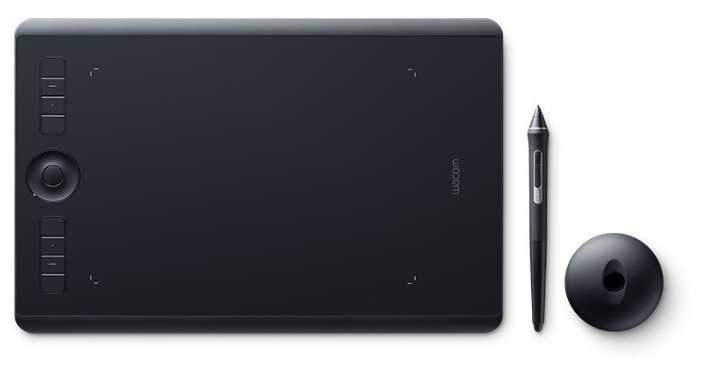
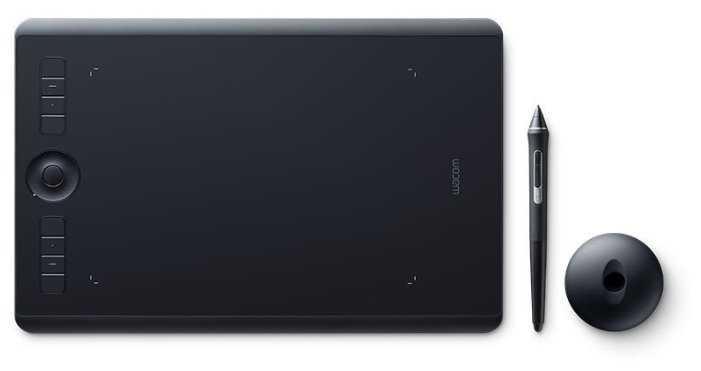
Дигитайзер Wacom PTH-860
|
Графический планшет WACOM Intuos Pro Large PTH-860 черный | Яндекс Маркет | 64 099 ₽ | Посмотреть |
|
Графический планшет WACOM Intuos Pro Large PTH-860 черный | Яндекс Маркет | 64 099 ₽ | Посмотреть |
|
Графический планшет WACOM Intuos Pro Large PTH-860 Ростест (EAC) черный | Яндекс Маркет | 69 123 ₽ | Посмотреть |
Реальный опыт использования WACOM PTH-860 - анализ 154 отзывов
Графический планшет Wacom позиционируется как профессиональное решение для цифровых художников, дизайнеров и инженеров, чья работа требует высокой точности и эргономики. Его ключевое преимущество — технология пера с 8192 уровнями нажатия и распознаванием угла наклона, что обеспечивает беспрецедентный контроль над линией. В сочетании с программируемыми кнопками и сенсорным кольцом это позволяет настраивать рабочий процесс под индивидуальные задачи — от ретуши фотографий до 3D-моделирования. Однако новичкам может потребоваться время, чтобы адаптироваться к отсутствию экрана и крупному формату устройства.
Качество сборки соответствует премиальному сегменту: магниевый корпус, съемный кабель с поворотным разъемом и прорезиненные ножки исключают случайные повреждения. При этом абразивная поверхность планшета стала палкой о двух концах — с одной стороны, она обеспечивает тактильную обратную связь, близкую к бумаге, с другой — ускоряет износ наконечников. Пользователи отмечают, что даже с защитной пленкой ресурс стержней редко превышает 2 месяца при ежедневной эксплуатации.
Программная часть — сильная сторона устройства. Драйверы Wacom автоматически оптимизируют параметры для популярных приложений, а возможность создавать профили под разные проекты экономит часы работы. Однако в нишевых программах (например, Krita или OpenCanvas) иногда возникают конфликты, требующие ручной настройки. Bluetooth-подключение стабильно, но при одновременном использовании беспроводных наушников возможны кратковременные задержки.
Планшет идеален для студийного использования: большая рабочая зона, эргономичное перо и долгий срок автономной работы делают его основным инструментом для иллюстраторов и CAD-инженеров. Однако мобильным художникам он подойдет меньше из-за веса и отсутствия чехла. Также устройство проигрывает гибридным моделям с экраном в задачах, где критична визуальная синхронизация (например, анимация).
Вердикт: это выбор профессионалов, готовых инвестировать в долгосрочный инструмент. При всех минусах (цена, расходники) планшет окупается за -6 месяцев коммерческого использования. Для хобби или редких задач лучше рассмотреть бюджетные аналоги, но если речь о ежедневной работе — Wacom остается безальтернативным лидером в точности и надежности.
Плюсы по отзывам пользователей - Почему стоит купить WACOM PTH-860?
- Высокая чувствительность пера и поддержка угла наклона:
- 8192 уровня нажатия обеспечивают точное воспроизведение толщины линий и плавные градиенты, что критично для цифровой живописи и каллиграфии.
- Распознавание угла наклона до 60° позволяет имитировать техники рисования реальными инструментами (например, кистями).
- Ластик на обратной стороне пера ускоряет работу — не требуется переключать инструменты в программе.
- Настраиваемые элементы управления:
- 8 программируемых кнопок и сенсорное кольцо для быстрого доступа к функциям (масштабирование, отмена действий и т.д.).
- Возможность создания нескольких профилей под разные приложения (Photoshop, Illustrator, Blender).
- Поддержка жестов тачпада для навигации, что редко встречается в конкурентных моделях.
- Стабильная работа по Bluetooth:
- Bluetooth 5.0 обеспечивает соединение без задержек даже на расстоянии 5-7 метров от ПК.
- Автономная работа до 15 часов — не требует постоянного подключения к сети.
- Совместимость с ОС Windows, macOS и Linux без конфликтов драйверов.
- Большая рабочая область (311x216 мм):
- Соотношение сторон 16:10 соответствует большинству мониторов, минимизируя дискомфорт при переходе с экрана на планшет.
- Позволяет использовать широкие движения рукой, что важно для детализированных работ.
- Толщина 8 мм и вес 1.3 кг делают устройство устойчивым, но не громоздким.
- Прочность и эргономика:
- Корпус из магниевого сплава выдерживает ежедневную эксплуатацию в студийных условиях.
- Резиновые ножки предотвращают скольжение, даже при интенсивной работе.
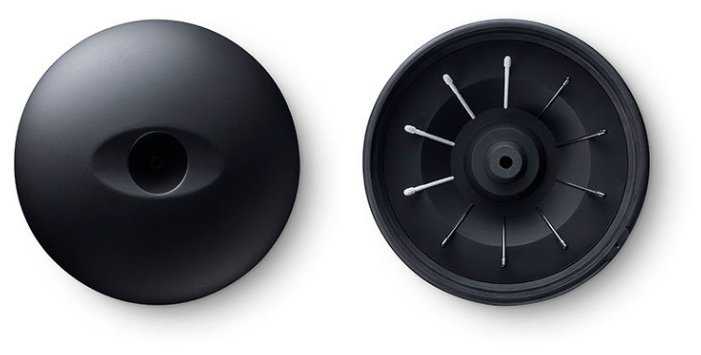
- Подставка для пера со сменными наконечниками (6 типов в комплекте) подстраивается под индивидуальные предпочтения.
- Совместимость с профессиональным ПО:
- Драйверы автоматически оптимизируют параметры для Adobe Creative Cloud, Clip Studio Paint, ZBrush.
- Поддержка режима «правша/левша» с переворотом интерфейса.
- Интеграция с облачными сервисами для мгновенного экспорта проектов.
- Многоуровневая кастомизация:
- Настройка жесткости пера (от 5 до 50 грамм) через фирменное ПО Wacom Desktop Center.
- Калибровка цветопередачи для работы с HDR-мониторами.
- Функция «горячих зон» для быстрого доступа к часто используемым инструментам.
Минусы по отзывам пользователей - О чем стоит задуматься перед покупкой:
- Абразивная поверхность, ускоряющая износ наконечников:
- Шероховатое покрытие (текстура 650 grit) требует замены наконечников каждые 2-3 недели при активном использовании.
- Отсутствие защитной пленки в комплекте — пользователи вынуждены покупать сторонние решения (например, XP-Pen Artist 22 Pro).
- Высокая стоимость оригинальных расходников (10 наконечников — $15).
- Проблемы с драйверами на некоторых ОС:
- Конфликты с устаревшими версиями Windows 10 (требуется ручная установка обновлений).
- Отсутствие поддержки Linux в режиме Bluetooth.
- Сбои в распознавании пера в Photoshop при одновременном использовании других графических устройств.
- Отсутствие встроенного дисплея:
- Новичкам сложно адаптироваться к разделению экрана и рабочей области планшета.
- Требует дополнительной калибровки при работе с несколькими мониторами.
- Громоздкость для мобильного использования:
- Габариты 430x287 мм усложняют транспортировку — не подходит для работы в кафе или поездках.
- Отсутствие чехла в комплекте.
- Непродуманная реализация правого клика:
- Функция активируется задержкой пера на 1 секунду, что замедляет workflow.
- В Clip Studio Paint жесты периодически конфликтуют с настройками по умолчанию.
- Случайные сбои давления пера:
- В 5% случаев перо теряет чувствительность в середине линии — требует перезагрузки драйверов.
- Проблема обостряется при работе от батареи ниже 20%.
- Высокая цена:
- Стоимость на 30-40% выше аналогов (XP-Pen, Huion) с похожими характеристиками.
- Не включает критичные аксессуары (перчатку, пленку), которые приходится докупать.
*Плюсы и минусы, которые пользователи называют чаще всего на основе практического опыта использования.
154 отзывов пользователей о WACOM PTH-860
Пользовались
WACOM PTH-860?
Поделитесь своим опытом и помогите другим сделать правильный выбор

PurpleBoots
04.01.2021
4/10
Оценка пользователя
Ужасно
Gutted
I had high hopes for this tablet. I already own a small version of this that is not bluetooth and really enjoyed using it. I was excited to get the chance to upgrade to the medium when the price dropped, so expected the exact same performance from this as I got from the small.
That is not the case, as this medium size does not support multi-touch gestures. A disaster for a Mac user with multiple screens that I slide between. This can't be used as a full-time mouse because of the lack of gesture support. I hit problems as soon as I needed to scroll down a page that didn't have a scrollbar. The only way this can be operated is with the pen. So now I have had to resort to using a mouse and pen while working on Painter and Photoshop and just using the mouse for general computer use. I am sorely disappointed by this.
The bluetooth battery life is reasonable. A three-hour art session saw the battery drop by 40%. The battery also drops a few percent while stored away for a day or two.
My other big bugbear with this, which annoyed me with the small size too, is the surface damage done by the nib. My brand new tablet was marked all over by the time I had finished my first piece of art. It no longer looks new and pristine, but old and used like my two-year-old small tablet. It just scores too easily for my liking and I am not heavy-handed with it. It is just rapid wear and tear. There must be a way to have a nib that doesn't score the surface or a surface that is not so easily marked.
I would not have bought this if I knew multi-touch wasn't supported on this. Gutted.
That is not the case, as this medium size does not support multi-touch gestures. A disaster for a Mac user with multiple screens that I slide between. This can't be used as a full-time mouse because of the lack of gesture support. I hit problems as soon as I needed to scroll down a page that didn't have a scrollbar. The only way this can be operated is with the pen. So now I have had to resort to using a mouse and pen while working on Painter and Photoshop and just using the mouse for general computer use. I am sorely disappointed by this.
The bluetooth battery life is reasonable. A three-hour art session saw the battery drop by 40%. The battery also drops a few percent while stored away for a day or two.
My other big bugbear with this, which annoyed me with the small size too, is the surface damage done by the nib. My brand new tablet was marked all over by the time I had finished my first piece of art. It no longer looks new and pristine, but old and used like my two-year-old small tablet. It just scores too easily for my liking and I am not heavy-handed with it. It is just rapid wear and tear. There must be a way to have a nib that doesn't score the surface or a surface that is not so easily marked.
I would not have bought this if I knew multi-touch wasn't supported on this. Gutted.
amageek
04.01.2021
8/10
Оценка пользователя
Хорошо
Great replacement mouse
I love using small tablets like this instead of using a mouse. I’d highly recommend every heavy computer user to buy one.
This Wacom is as good as any other I’ve had. It’s as sensitive as you need it to be, fully adjustable and super responsive. The drivers are great once setup, but they have their issues. I disconnect the tablet sometimes to take with my laptop. When I reconnect I loose mouse mode and have to either reboot or re select it in preferences. Sometimes it randomly looses mouse mode and sometimes touch mode gets stuck on for no reason. All driver issues and not hardware related. Sort it wacom. Other than that, it’s perfect as mouse replacement or for drawing.
I had rsi from using a computer too much for my job, the movement of a mouse constantly over a day took its toll. Using a pen like this solved all my issues. After 10 years using a pen instead of a mouse I can confirm it helped me massively. It’ll take time to get used to the change but persevere with it.
This Wacom is as good as any other I’ve had. It’s as sensitive as you need it to be, fully adjustable and super responsive. The drivers are great once setup, but they have their issues. I disconnect the tablet sometimes to take with my laptop. When I reconnect I loose mouse mode and have to either reboot or re select it in preferences. Sometimes it randomly looses mouse mode and sometimes touch mode gets stuck on for no reason. All driver issues and not hardware related. Sort it wacom. Other than that, it’s perfect as mouse replacement or for drawing.
I had rsi from using a computer too much for my job, the movement of a mouse constantly over a day took its toll. Using a pen like this solved all my issues. After 10 years using a pen instead of a mouse I can confirm it helped me massively. It’ll take time to get used to the change but persevere with it.
G. Weirs
04.01.2021
8/10
Оценка пользователя
Хорошо
Great tablet for drawing in Illustrator CC
I'm a beginner, and I chose the medium size, which I'm more than happy with. It's very slim and lightweight, but feels well-built for the price. On the Wacom UK website, the price for this is £179.99, but on Amazon, I paid £109.99 (new) which is a steal.
It connects via BT to my Dell XPS (Win 10), and charges fairly quickly. I can also use it via USB although I wish the USB lead was a bit longer as I prefer to use the port on the other side of my laptop (the far side, because my laptop is hooked up to an external monitor, which it's sitting to the side of... anyways), but I use BT instead.
The colour is pretty cool. Would be nice if they came out with other colours, but that's not the most important thing here to consider.
The pen feels nice in my hand and it comes with 4 standard nibs (one's already installed and the other 3 nibs are inside the pen, revealed by unscrewing the top of the pen. The nib tool is built into the top of the pen too. It has a nice weight, and feels natural to hold. The two buttons don't get in my way but is easy to reach with my thumb because I place my thumb just below the bottom button, normally. Drawing on the tablet feels natural. Looking up at the screen whilst drawing takes a little practice but feels quite natural.
Online registration was fairly straightforward, and I was able to claim all 3 software that's on offer. I haven't installed them because Illustrator and Photoshop serves my needs.
Wacom's software + driver were very easy to install and setup. You can customise your tablet and pen settings for both general use and per-app use, which is very handy.
The only thing I would ask for from Wacom at this point would be to release a Paper version (like Intuos Pro Paper but without the hefty price tag) in Medium size. It kinda frustrates me I can't lay a piece of copy paper over the tablet and trace over it with the pen, even though there are other ways around that.
It connects via BT to my Dell XPS (Win 10), and charges fairly quickly. I can also use it via USB although I wish the USB lead was a bit longer as I prefer to use the port on the other side of my laptop (the far side, because my laptop is hooked up to an external monitor, which it's sitting to the side of... anyways), but I use BT instead.
The colour is pretty cool. Would be nice if they came out with other colours, but that's not the most important thing here to consider.
The pen feels nice in my hand and it comes with 4 standard nibs (one's already installed and the other 3 nibs are inside the pen, revealed by unscrewing the top of the pen. The nib tool is built into the top of the pen too. It has a nice weight, and feels natural to hold. The two buttons don't get in my way but is easy to reach with my thumb because I place my thumb just below the bottom button, normally. Drawing on the tablet feels natural. Looking up at the screen whilst drawing takes a little practice but feels quite natural.
Online registration was fairly straightforward, and I was able to claim all 3 software that's on offer. I haven't installed them because Illustrator and Photoshop serves my needs.
Wacom's software + driver were very easy to install and setup. You can customise your tablet and pen settings for both general use and per-app use, which is very handy.
The only thing I would ask for from Wacom at this point would be to release a Paper version (like Intuos Pro Paper but without the hefty price tag) in Medium size. It kinda frustrates me I can't lay a piece of copy paper over the tablet and trace over it with the pen, even though there are other ways around that.
Jaleel
04.01.2021
10/10
Оценка пользователя
Великолепно
A great investment for a beginner or someone looking for a sleek lightweight tablet on the go
I needed a new tablet to help at Uni and freelance work and these are the tablets they have us use in lessons. But I figured I'd get my own so I can draw on the go and at home. No need to worry about batteries or cables coming loose - I really like having a portable cable as my previous tablet had the usb cable attached which meant over time it was bending a breaking. Having a pen stylus that needs no batteries is a weight off my shoulders so I don't have to preserve my drawing time to save battery life. I can't fault this tablet. Only thing I would say is that when installing the software and tying to get the free drawing program it wouldn't let me gain access so I did have to call up customer services to get that resolved (in the end I haven't used the Corel paint program much as I do find it difficult to draw with, as I'm used to Photoshop)
Susan R
04.01.2021
10/10
Оценка пользователя
Великолепно
Happy with new purchase!
My first 'proper' pen tablet, and while I'm still on the learning curve I'm very happy with my purchase. Lightweight slimline design, sturdily built and was so easy to set up and connect via cable, then bluetooth. Slips into my laptop case alongside my laptop, adds very little depth to the case so very easy to transport when needed. Included software bundle easily downloaded and installed with no problems and there is lots of online tuition to help in the learning process for these applications.
David R
04.01.2021
10/10
Оценка пользователя
Великолепно
Perfect for editing.
This is a game changer when it comes to editing images, and I guess (since I don't really use for that) drawing. It is insanely precise, it works perfectly fine with both Lightroom and Photoshop. If you own a recent laptop that has ditched all USB-A ports (such as the new MacBook Pros or DELL XPS 13) the bluetooth version is a must, but I don't mean this in a bad way; bluetooth connectivity is superb and also being tethered is so 20th century, there is no latency and the battery last for various sessions of editing. You can charge the battery with any standard micro usb (the same one that you already use to charge other devices) so no issues there. Included with the tablet is a micro usb to USB-A cable, so if you need a USB-C you will need to pick it up separately (or if you don't already own one a dongle) but it really isn't a big deal since you probably won't need it (I have only connected the tablet to laptop once, when I was setting it up).
Make sure you download the drivers that come with the tablet so that you can personalise the buttons and functions to your liking. I for instance only use a portion of the pad since I feel 7 inches is a bit too much, but then again it is all personal preference. That tablet also comes with some free software but I personally can't comment on it since I have not use them.
TIP: if you are into drawing of want to get into it, Sketchbook Pro is free and totally compatible with WACOM tablets
Make sure you download the drivers that come with the tablet so that you can personalise the buttons and functions to your liking. I for instance only use a portion of the pad since I feel 7 inches is a bit too much, but then again it is all personal preference. That tablet also comes with some free software but I personally can't comment on it since I have not use them.
TIP: if you are into drawing of want to get into it, Sketchbook Pro is free and totally compatible with WACOM tablets
Peter Lee
04.01.2021
10/10
Оценка пользователя
Великолепно
Really useful
I'm a training instructor and as well as running courses in classrooms in our centres and at client locations, I sometimes need to deliver classes over the internet using conferencing software and hardware. One issue with this is how on earth do you use a whiteboard? I decided to buy one of these tablets to see if it was any use.
The first thing you notice is that it is smaller than you think. The box contains the tablet, which has rubber studs on the back and four mappable buttons along the top, the stylus, and a USB cable. Software is downloadable from the Wacom website. It's a cinch to set up - you can pretty much just plug it in and use it straight away, but the software allows you to remap the buttons on the tablet for your own chosen functionality, configure the screen size (important if you are using multiple monitors and have your desktop extended across them all, as the tablet assumes that the complete width of all your monitors is a single screen, unless you tell it otherwise in the app) and so on. The stylus doesn't use batteries and has some spare tips inside - just unscrew the barrel and they're stowed inside.
It takes a bit of getting used to. As soon as you hold the stylus over the tablet it works as a mouse, and if you tap on the tablet surface it registers as a click, so if you really take to it I suppose you could even ditch your mouse. Of course, the tablet works with graphics software such as Photoshop and Gimp, but it also works with the likes of Microsoft Paint, Paint.Net and Windows Ink within Windows 10. For my purposes (sketches during courses) I found that Microsoft Paint or Windows Ink were absolutely fine. Sure, these "lesser" packages don't support pressure sensitivity whereas the likes of Photoshop do, but for me they were perfect. The hardest thing to remember is that as you draw on the tablet, nothing appears on it, just on the screen, but after a little while I found that it became second nature. Weirdly I did find that if I tried drawing in Paint.Net with the tablet some things didn't work so well, such as if I wrote with the stylus, or tried to draw freehand circles, but it was fine in other programs.
If you're a trainer like me and you want something that will let you doodle on the screen, present courses remotely with a virtual whiteboard, or if you fancy dabbling with photo editing, this tablet is small, light, portable, and doesn't break the bank. Of course, bigger and snazzier ones are available, but this one was a brilliant buy for me.
The first thing you notice is that it is smaller than you think. The box contains the tablet, which has rubber studs on the back and four mappable buttons along the top, the stylus, and a USB cable. Software is downloadable from the Wacom website. It's a cinch to set up - you can pretty much just plug it in and use it straight away, but the software allows you to remap the buttons on the tablet for your own chosen functionality, configure the screen size (important if you are using multiple monitors and have your desktop extended across them all, as the tablet assumes that the complete width of all your monitors is a single screen, unless you tell it otherwise in the app) and so on. The stylus doesn't use batteries and has some spare tips inside - just unscrew the barrel and they're stowed inside.
It takes a bit of getting used to. As soon as you hold the stylus over the tablet it works as a mouse, and if you tap on the tablet surface it registers as a click, so if you really take to it I suppose you could even ditch your mouse. Of course, the tablet works with graphics software such as Photoshop and Gimp, but it also works with the likes of Microsoft Paint, Paint.Net and Windows Ink within Windows 10. For my purposes (sketches during courses) I found that Microsoft Paint or Windows Ink were absolutely fine. Sure, these "lesser" packages don't support pressure sensitivity whereas the likes of Photoshop do, but for me they were perfect. The hardest thing to remember is that as you draw on the tablet, nothing appears on it, just on the screen, but after a little while I found that it became second nature. Weirdly I did find that if I tried drawing in Paint.Net with the tablet some things didn't work so well, such as if I wrote with the stylus, or tried to draw freehand circles, but it was fine in other programs.
If you're a trainer like me and you want something that will let you doodle on the screen, present courses remotely with a virtual whiteboard, or if you fancy dabbling with photo editing, this tablet is small, light, portable, and doesn't break the bank. Of course, bigger and snazzier ones are available, but this one was a brilliant buy for me.
LB74
04.01.2021
2/10
Оценка пользователя
Ужасно
Bluetooth issues with other Bluetooth products
After having a Bamboo Fun for years and never felt the need to upgrade to an expensive Wacom, my Bamboo broke and I was forced to buy this tablet. Being a designer I found two issues with this, one serious and one easily rectified...the small tablet is too small for drawing on. Your wrist easily falls off when moving the pen around. I think the medium tablet would be better for designers. Most importantly, the Bluetooth feature of the tablet works great as long as your Mac mouse isn't connected via Bluetooth. When it is connected, the pen has serious lag issues that I couldn't find a way around. It appears you can't have both connected at the same time.
Показаны отзывы 1-8 из 154.
Где купить
Дигитайзер Wacom PTH-860
|
Графический планшет WACOM Intuos Pro Large PTH-860 черный | Яндекс Маркет | 64 099 ₽ | Посмотреть |
|
Графический планшет WACOM Intuos Pro Large PTH-860 черный | Яндекс Маркет | 64 099 ₽ | Посмотреть |
|
Графический планшет WACOM Intuos Pro Large PTH-860 Ростест (EAC) черный | Яндекс Маркет | 69 123 ₽ | Посмотреть |
График изменения цены WACOM PTH-860
Характеристи WACOM PTH-860
| Основные характеристики | |
| Тип : | графический планшет |
| Ширина : | 430 |
| Толщина : | 8 мм |
| Вес : | 1300 г |
| Количество линий на дюйм (lpi) : | 5080 |
| Формат : | A4 |
| Длина : | 430 мм |
| Длина рабочей области : | 311 мм |
| Ширина рабочей области : | 311 мм |
| Диагональ экрана : | 10.1"-10.8" |
| Размер экрана (точно) : | 10 " |
| Дополнительные характеристики | |
| Количество уровней нажима : | 8192 |
| Bluetooth : | есть |
| Совместимость с ОС : | Android, OS X, Windows |
| Интерфейсы : | Bluetooth, USB |
| Дополнительные функции : | мультитач, перо |
| Подробная комплектация : | графический планшет Intuos Pro Large, перо Pro Pen 2, 6 стандартных наконечников, 4 наконечника фломастера, подставка для пера, цветные идентификационные кольца, руководство по установке, USB-провод (2 м) |
| Служебные поля | |
| Дисклеймер для карточки : | software |
| Перо : | есть |
| Чувствительность пера к наклону : | да |
| Express Keys : | есть |
| Multitouch : | есть |
| USB : | есть |
| Дополнительная информация : | максимальная высота считывания пера 10 мм, время отклика 200 точек в секунду, общее количество кнопок 8 шт, угол наклона пера 60°, точноcть пера 0.25 мм, кнопок на пере 2 шт |
Информация о характеристиках носит справочный характер.
Перед покупкой уточняйте характеристики и комплектацию товара у продавца
Похожие товары с лучшей оценкой




Wizemart © 2026.
Рекомендательная система по умному выбору товаров по отзывам и рейтингам
