

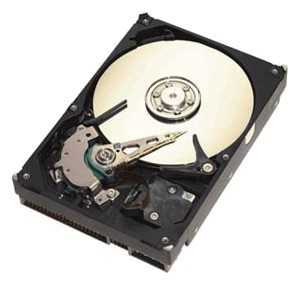
Отзывы о Жесткий диск Seagate Barracuda 400 ГБ ST3400832A
Рейтинг:

 Неплохо
Неплохо
Средняя цена в магазинах 7 260 ₽
Краткие характеристики:
- Barracuda 7200.8
- 3.5"
- IDE
- 400 Гб
- 7200 rpm
- буфер 8 Мб
 |
Жесткий диск Seagate ST3400832A 400Gb 7200 IDE 3.5" HDD | Яндекс Маркет | 9 530 ₽ | Посмотреть |
20 отзывов пользователей о Seagate Barracuda 400 ГБ ST3400832A
Пользовались
Seagate Barracuda 400 ГБ ST3400832A?
Поделитесь своим опытом и помогите другим сделать правильный выбор

Вектрон-6ICNJ
04.10.2020
10/10
Оценка пользователя
Великолепно
Отличная модель
- + Не убиваемый!!!!Работает уже 10 лет без нареканий!!!
- - Нет
Дроид-9FBVV
14.12.2011
2/10
Оценка пользователя
Ужасно
No review can be made.I ordered this disc to replace my old damaged 40 GB 5,200 revs disc (made that awfull sound when the heads are damaged), mainly because the country I live in, you can only find the same brand of anything for like 2-3 years (while supplies last), and of you don't like it (or it sucks) you're left with only one option, ORDER IT. Since I wanted the best, fastest, for my money, I ordered the Barracuda. A mistake I will not be making again, the disc aparently, in the words of the seller "was damaged during transport". It made the same sound as mine, but this one wouldn't even work enough to format it, or even be recognized by my PC. I emailed the seller saying that the disc had the heads, or something else, wrong; the first thing they did was question my assesment, and ask me to describe the symptoms of it. After they believed me they told me to send it back to them in order to replace it with a working one. Since I don't live in the US, this was even more expensive for me, than buying another one.So here I stand, with two options, order another one, risking it comes "damaged in transport" again, or giving up and buying the crap the sell by the supermarket in my town.So, do I recommend buying a Seagate Barracuda? yes. Online? no, go to the store to get it, unless you can afford sending it back half a dozen times before they "transport" it right.
НоваГость-1KABG
16.02.2009
10/10
Оценка пользователя
Великолепно
I recently purchased the Seagate Barracuda 400GB drive for an older utility computer we have that stores photos and music. If you're running out of disk space on an otherwise functional computer, adding one of these drives is fairly simple task but will involve opening up your desktop PC and moving a few things around. Note that there are 2 types of packages for these drives: retail and OEM. The retail versions come in the box you see in the photo and include printed instructions and a software disk containing utilities to help you format the drive and migrate your data from your old drive (if applicable) or make the new drive a bootable drive. By contrast, the OEM drive is simply the physical drive without all of the packaging and software but you can get both the instructions and software from the Seagate website. Depending on how familiar you are with your PC, you should be able to get this drive installed and formatted in 30 to 60 minutes. Once installed, you'll enjoy 400GB of fast, quiet disk storage -- and getting a few more miles out of that old computer!
КиберНаблюдатель-4NYQE
12.11.2007
4/10
Оценка пользователя
Ужасно
I purchased the Barracuda 7200.8 about 13 months ago and have been very happy with it...until now. I'd been using it as my primary slave to a 30 GB Western Digital. I powered up the computer after it had been shutdown for about 12 hours and suddenly, my BIOS wouldn't recognize the Barracuda. I'm not a very excitable person, so I thought I would systematically try different configurations and jumper settings, use the drive as a stand-alone master, and run through every prudent step before giving up on the drive. After all, it has tons of files that I had been trying to preserve...(why else buy a large capacity hard drive?).Well, several days later, I'm afraid I'm left with a useless drive. I certainly can't say that a hard drive should last for only 13 months because I have this 30 GB Western Digital drive that I've used as a master for over four years now. I have a Maxtor that is in my son's computer that is even older.Large hard drives should be dependable. A company like Seagate shouldn't try to be on the cutting edge of storage if their reliablity suffers. I'm a bit angry, but mostly very disappointed. Find another brand for long time usage.
ТерраБот-5ITYG
10.04.2006
8/10
Оценка пользователя
Хорошо
Bought one of these some time ago, only to discover upon opening my Dell Dimension 8300 that internal drive was running SATA rather than IDE controller (contrary to system info provided by Dell!). Well... not that I'm griping. ;-) Instead of small IDE card, which, with new drive would add pretty significantly to heat in already pretty loaded-up PC innards (DVD-RW, CD-RW, Floppy, 120GB SATA HD, Audigy Sound Card, high-end nVidia gfx card, Full RAM, Memory Card Reader, etc. ad nauseum ), I decided the drive probably would serve best as an external add-on. So, also from Amazon, bought an Ultra brand 3.5" USB/Firewire box for about same price as inexpensive IDE cards (already mentioned needing no more heat sources inside PC case!), connected *idiot-proofed* ribbon cable, closed it up, plugged it in, turned it on (nice little on/off switch located on back of Ultra box), connected it to my PC, and viola! When PC fired up, here it was -- all ready to go without even needing the included start-up disk or anything (altho' disk probably has latest drivers and other Seagate goodies). Within' a couple of weeks, I had re-recorded my entire compliment of 500+ CD and other media music collection to it with no problems whatever, also copied over my ~7000 MP3 format music collection, my seemingly endless digital photos, backed up some of my personal files, setup info, yada yada yada... and still have about 175GB left for other goodies (more new tunes, hopefully)! The drive seems rock solid and steady: ships with the awesome Seagate warranty, and after using it for over three months now, have had NO problems! GREAT drive, HIGHLY reccomended (well, maybe I ought'a wait a few more months... ). NOTE: Nothing whatever to do with the drive, but unfortunately Ultra external box (with cooling fan, on/off switch, etc.) is fairly noisy, but at least I could mount it away from my ears on a nearby book cabinet shelf where it shouldn't be in danger of bumps or being knocked over. The final verdict? Overall, a quite inexpensive and painless-to-install purchase and in my case -- always adding new CD *albums* -- a solid hard working HD doing hard time without complaints. Again, Highly recommended. Already earned the four stars given; if it lasts as long as advertised (and guaranteed), it'll be a 5-star bargain for sure! :-)
Гелиос-3TSFU
14.10.2006
2/10
Оценка пользователя
Ужасно
I bought this drive because of its capacity, and because it's one of the few large drives that can operate successfully in my PVR (ReplayTV 5040). After installing the PVR software I installed the drive. The machine booted and successfully downloaded my local program details. I then programmed the PVR to record junk programs just to fill the drive, approximately 160 hours at the best video quality picture, which it did with no problem. Considering the installation successful, I then erased all programs and scheduled recordings of programs that I wanted to view. Two weeks later I turned my PVR on to find it in a constant reboot cycle. Unplugging, manually rebooting, the two techniques that normally solve this problem, produced no change. I then disassembled the PVR to remove the drive so I could run Seagate diagnostics. The drive was so hot that I could not touch it without using a towel, and had a "burned electronics" odor. Once it cooled, I connected the drive to my computer to run diagnostics. The Seagate program recognized the drive by model number but could not test anything, and said the drive was defective, and to check warranty status, which lasts until 2010. Seagate now has the drive and is in the process of shipping a replacement. I have since installed a 320GB Hitachi in my PVR and it is performing flawlessly. For reference the PVR is installed in a cool well ventilated location so I do not believe anything external precipitated the drive failure. While lost recorded TV programs is of no major consequence, I don't believe I would trust this drive for critical use in a PC, or as a data backup device.
ОмниКод-4WOWZ
10.06.2007
2/10
Оценка пользователя
Ужасно
I should have listen to all the bad reviews about this drive. I went with the good reviews instead, and also because it was on sale for $99.99. Big mistake. Wasted 2 hours transferring data to this extra drive, then it clashed. This drive was extremely hot as I was checking to see what was happening. I could have used it to iron my clothes! Needless to say, I removed the drive, return it, and swear I'll never get another Seagate. I wish I could rate this drive a minus 5 stars.
Спектроник-7MXAC
14.09.2005
10/10
Оценка пользователя
Великолепно
I researched the market looking for an external storage solution for my notebook; with external drive high prices and modest 1 year warranty going for an internal IDE of my choice and installing it in a $30 USB 2.0 enclosure was economical and easy.The Drive; what is in the box? 3.5" drive, IDE cable, screws, 1 extra jumper, user manual, and applications CD (Installation Wizard, SeaTools diagnostic utilities, and BounceBack Backup Software). No other internal drive comes with back up software, period. The Barracuda 7200.8 drive speed secret is tucked in Seagate use of new 3 platters drive design (3x133 Meg each) versus the (4x100 Meg) or (5x80 Meg) platters designs other drives' makers use, since the drive head will spend less time spinning and traveling to find and read/write data.Installation: First install CD software, Second: set the drive jumper to Master or Salve, Third: install the physical drive in a bay or an enclosure. Fourth: run the installation Wizard, which will guide you to format and partition the drive to either FAT or NTFS format. Of course you could partition the drive to 2 or more drive and assign any Alpha letters to it as you wish. Note: the final actual drive size after formatting is about 372 Meg.Benefits: 3 months running fine, use the drive to (1) Backup my C drive, the BounceBack software install an icon that runs active in Windows quick launch system tray so it can run on demand, it also pops up every week to remind you to backup, or you can customize it to backup on any interval, (2) Store digital photos, MP3, graphic files, large data bases, burn and store DVD and family movies to folders rather than DVD+R discs, (3) Transfer data from and to other computers' since the USB enclosure is portable and swappable.Performance: The Barracuda deliver an impressive performance running at 7200 RPM despite its 8 Meg cache size. Real world tests (using my hand watch) it copies an average of 1 Gig per 1 Minute, (it is actually faster than my internal Laptop's 5400 drive), the tests shows that its faster when transferring fewer larger files, and it's slower when coping a lot of smaller files. The drive runs cool and very quiet, you only see the light blinking without the humming noise other drives make.Conclusion: if you are looking for a massive storage, innovative, silent, and solid performer, and 5 years warranty peace of mind, the Seagate 400 Meg Ultra ATA is for you. If you're looking for an external solution, get you an aluminum USB 2/Firewire enclosure and $ave. It's cheap, fun, Windows recognize it instantly, and it install in 5 minutes.
Показаны отзывы 1-8 из 20.
|
Жесткий диск Seagate ST3400832A 400Gb 7200 IDE 3.5" HDD | Яндекс Маркет | 9 530 ₽ | Посмотреть |
График изменения цены Seagate Barracuda 400 ГБ ST3400832A
Характеристи Seagate Barracuda 400 ГБ ST3400832A
Информация о характеристиках носит справочный характер.
Перед покупкой уточняйте характеристики и комплектацию товара у продавца
Похожие товары с лучшей оценкой










Wizemart © 2026.
Рекомендательная система по умному выбору товаров по отзывам и рейтингам
