

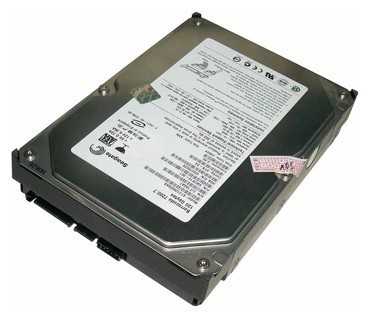
Жесткий диск Seagate Barracuda 160 ГБ ST3160827AS — 10 отзывов, плюсы и минусы
Рейтинг:

 Отлично
Отлично
Средняя цена в магазинах 2 545 ₽
Краткие характеристики:
- Barracuda 7200.7
- 3.5"
- SATA 1.5Gb/s
- 160 Гб
- 7200 rpm
- буфер 8 Мб
10 отзывов пользователей о Seagate Barracuda 160 ГБ ST3160827AS
Пользовались
Seagate Barracuda 160 ГБ ST3160827AS?
Поделитесь своим опытом и помогите другим сделать правильный выбор

МехаРейнджер-4VCVU
15.12.2021
10/10
Оценка пользователя
Великолепно
Отличная модель
- + Надежность
- - На момент выхода их нет
Был куплен в 2005 году, проработал в основном ПК 10 лет, после чего был отдан вместе со старым системником родителям. После окончательной смерти последнего...
НеоВояжер-5HHNH
10.03.2018
10/10
Оценка пользователя
Великолепно
- + До сих пор работает! Проблем с ним особых нет, кроме шума.
- - Тот самый шум/треск, но это спустя 13 лет! Если как я понял
Если как я понял он был...
Астрон-3RFCJ
26.09.2014
10/10
Оценка пользователя
Великолепно
- + Надежность
- - Устарел
У знакомых сгорела материнка, и они купили новый системник. Старый отдали за ненадобностью и там был этот жесткий диск. Форматнул,...
Капеллан-3BVSG
28.05.2012
8/10
Оценка пользователя
Хорошо
- + Верой и правдой отслужил 5 лет, считаю, что это достаточно!
- - Медленный, на плате есть место, на котором даже лак облез от нагрева 0.о
Через 4 года стал хрустеть, стали появляться ошибки в файловой системе (то файлы не читаются, то...
Фотон-4YJKG
24.06.2012
10/10
Оценка пользователя
Великолепно
- + До сих пор работает. Скоррость работы снизилась через 6 лет. Форматирование. изменение структуры разделов помогает на 5-6 месяцев. Ну а...
Дроид-4WXYZ
29.02.2012
10/10
Оценка пользователя
Великолепно
- + Работает с 2005 года, стабильно и без нареканий. Как и у предшественников сменилось в корпусе всё и не по одному разу, да вот и корпус с недавнего времени другой,а старичёк ещё...
Гиперион-1HQMB
22.09.2011
10/10
Оценка пользователя
Великолепно
- + Бесперебойная работа с 2005 г.
- - Таких не обнаружил.
Диск стоял на компьютере с 2005 г. С тех пор много воды утекло: сменил видеокарту, материнку, оперативную память, процессор... А хард как работал так и работает. Протестировал недавно - битых секторов нет. Хотя, из уважения к его "пенсионному" возрасту,...
КиберНаблюдатель-2MGSF
30.03.2010
10/10
Оценка пользователя
Великолепно
- + надежный работаю с 2005года можносказать не выключаюсь и ни одного сбоя.
- - При запуске не множко шумноват,...
Показаны отзывы 1-8 из 10.
Как менялась цена на Seagate Barracuda 160 ГБ ST3160827AS
Характеристики Seagate Barracuda 160 ГБ ST3160827AS
Информация о характеристиках носит справочный характер.
Перед покупкой уточняйте характеристики и комплектацию товара у продавца
Альтернативы с более высокой оценкой










Wizemart © 2026.
Рекомендательная система по умному выбору товаров по отзывам и рейтингам
