

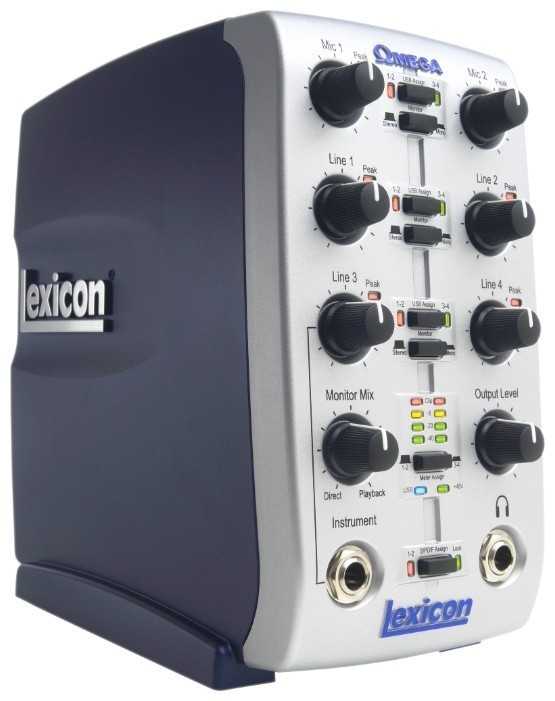
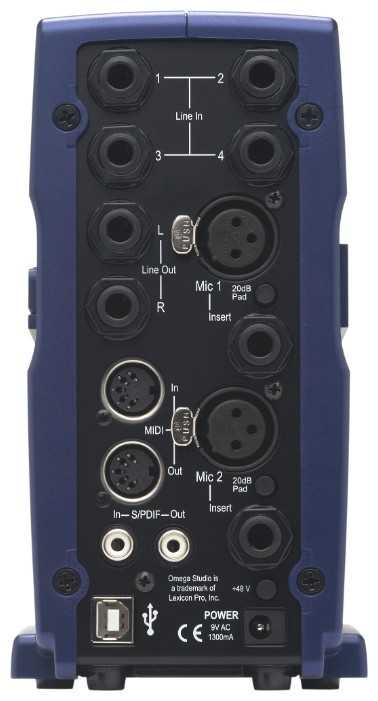
Внешняя звуковая карта Lexicon Omega — подробный обзор, плюсы и минусы на основе 24 отзывов
5.9/10
Плохо


Разрядность ЦАП: 24 бит
Макс. частота дискретизации: 48
внешняя
USB
инструментальный вход (Hi-Z) / разъем Insert …
Количество входных аналоговых каналов: 4
Количество микрофонных входов: 2
Количество выходных аналоговых каналов: 2
Средняя цена в магазинах
1 401 ₽
Смотреть все цены ↓
Сравните Lexicon Omega с другой моделью
Часто сравнивают:
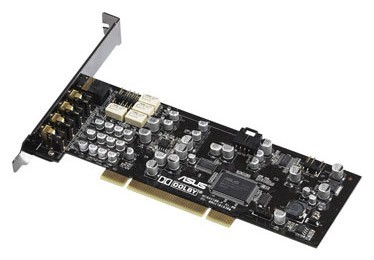
vs ASUS Xonar D1
Альтернативы с высокой оценкой
24 отзывов пользователей о Lexicon Omega
Пользовались
Lexicon Omega?
Поделитесь своим опытом и помогите другим сделать правильный выбор

Спектр-6CKLT
19.07.2021
10/10
Оценка пользователя
Великолепно
Отличная модель
- + 1. Много входов и выходов,
2. Раздельное назначение пар каналов на входы DAW,
3. Моно/стерео мониторинг для каждой пары каналов,
4. Мощный усилитель наушников (уши 64 Ома орут),
5. Материалы, сборка, компоновка и удобство. - - Нет.
Непонятно, кто ставит низкие оценки, но я на полном серьезе рекомендую эту аудиокарту для оснащения небольшой студии.
Моя почти девять лет служит верой и правдой. Работала студией звукозаписи, концертным и диджейским...
Моя почти девять лет служит верой и правдой. Работала студией звукозаписи, концертным и диджейским...
КиберНаблюдатель-9BYEB
12.07.2013
10/10
Оценка пользователя
Великолепно
- + небольшой размер,качество сборки,вход для гитары или микрофона.
- - пока не обнаружил
Пользуюсь совсем мало, но основное то что мне нужно она выполняет,а именно:работает без щелчков и задержек как в FL STUDIO 10 так и при обычном прослушивании музыки.Установилась без проблем,перед подключением карты к ноутбуку(у меня ноутбук Lenovo Z 370 Windows 7) нужно (установить обязательно!!!) драйвера с диска идущего в комплекте,ставиться всего пара секунд.Подключать карту при включенном интернете!Громкость приличная есть еще запас громкости слушаю на середине уровня! Теперь создавать и мониторить свою музыку будет еще удобней и качественней!))) Работаю в паре с наушниками AKG K67 TIESTO! Звук то что надо.
Вояджер-7MJTM
08.07.2013
10/10
Оценка пользователя
Великолепно
- + небольшой размер,качество сборки,вход для гитары или микрофона.
- - пока не обнаружил
Пользуюсь совсем мало, но основное то что мне нужно она выполняет,а именно:работает без щелчков и задержек как в FL STUDIO 10 так и при обычном прослушивании музыки.Установилась без проблем,перед подключением карты к ноутбуку(у меня ноутбук Lenovo Z 370) нужно (установить обязательно!!!) драйвера с диска идущего в комплекте,ставиться всего пара секунд.Громкость приличная есть еще запас громкости слушаю на середине уровня! Теперь создавать и мониторить свою музыку будет еще удобней и качественней!))) Работаю в паре с наушниками AKG K67 TIESTO! Компрессия то что надо.
Пандорец-0RVKC
22.01.2014
8/10
Оценка пользователя
Хорошо
- + Звук,сборка,фантомное питание +48v
- - 48 кГц
Достаточно громкая,не глючит и не отпадает.С Cubase работает...
Вектрон-6NRBQ
01.12.2013
8/10
Оценка пользователя
Хорошо
- + Хороший звук и не высокая цена. Имеет достаточно массы, что бы не летать за случайно дёрнутым шнуром.
- - Понижает пропускную...
НоваГость-5LLGM
13.05.2012
2/10
Оценка пользователя
Ужасно
When I get a signal to the recording soft wear the audio is just a staticy mess most of the time. Or, for the five times it's recorded with little or no static, the levels are far too quiet even with the volume all the way up. Yes, just five times in over four years.When I got this interface I'd sit down with it and after adjusting settings for an hour or two, trying to get a signal, it wouldn't record. To keep from smashing it in frustration I'd need to take several weeks or months off. Then I'd try again, with the same results. And again.And again.And again.And again...I bought it from Sweetwater so tried their message boards for more info and pointers. The info was never specific enough for my set up, citing settings or functions my soft wear doesn't have.I tried other message boards. Google. The manufacturer's website. Asked friends. Got one of Sweetwater's tech support guys on the phone and he did everything he could think of. I sent it back to Sweetwater and they couldn't get it to work so they sent it to the manufacturer who said it was fine (and I'm not so sure I believe them after all that I've tried to get it to work.)When I took it to Guitar Center last week one of the employees did get it to work in the store after over two hours of working on my DAW settings and I meticulously took screen caps and notes for all the settings. When I got it home, with the exact same settings, it recorded static again. After a re-boot it recorded a slightly staticy guitar sound that was too quiet to be of much use, even after I turned both the guitar's and Omega's volume pots up.I've installed, re-installed, un-installed, updated, re-updated, rebooted, restarted, closed and re-opened, jiggled cables, adjusted, tried other ports/jacks/cables/plugs, and reset EVERYTHING several times.It still doesn't work right.Now I pretty much have an $180 paper weight. I don't have so much as one good sound clip from this thing after bending over backward and jumping though every hoop. The only reason I don't beat it into tinny bits with a big rock and throw it onto a bond fire while screaming in manacle laughter is because, someday, I might, maybe, get the *&%$ing thing to work right.I made a web page of my screen caps/notes to help other people who need to work with this and have a similar set up. Alas, I can't post a link here, but I will find a way to direct you to it.If you have questions/comments/or info on how I might get this to work better, please comment on here and I'll do my darndest to reply.
Спектроник-3PWNU
11.11.2011
10/10
Оценка пользователя
Великолепно
The Lexicon Omega is a clever device, very easy to use, even with other softwares than Cubase, that comes included with the package. I connected two Shure microphones to it, and the USB cable, using an Apple adapter USB > Apple connector, to my iPad 2. After a few tests, I got a quite nice piano recording quality, using the MultiTrack DAW app on the iPad . I have not yet tested all the possibilities the device offers, but from the experience I had so far, it is quite easy to use. Next test shall be with my MacBook using some other recording softwares. Anyway, I recomend it as an inexpensive way of making quick recordings, that can then be polished with some other softwares. And for about 145 dollars, it is a really good deal. The only restriction I could notice is not caused by the Lexicon Omega itself, but by the Apple adapter. Using the same MultiTrack DAW software on my iPhone 4, I got a message saying that the adapter is not compatible with the iPhone 4. So, I could not make a video with the quality The Lexicon Omega allows. That's a pity, and something Apple should take care. The solution was using the iRig Mic, thal also gives a good recording quality, but depending on the used software, does not offer the controls the reviewed device allows.
Квазар-8XDXL
04.08.2009
10/10
Оценка пользователя
Великолепно
I bought my Lexicon Omega over a year ago and have written 11 songs with it so far and have five more in various stages of composition. I don't know what the other guys are talking about it disonnecting. I've had it connected to three different computers and it has NEVER failed, not even once. My original laptop I was connected to worked great but lacked the power for Cubase to run more than one VST plug in at a time. I've done most of my music composition on my desktop which is a powerful system by standards from two years ago and rarely have a problem running more VST's than I need.Now while it does what it Lexicon advertises flawlessly there are a few other things I really like about this. I bought my Omega last May when I first got deployed to Baghdad and it has been my primary sound system. Movies, music videos, games, whatever all run just fine. It actually frees up some computer memory because is it has it's own D/A converters inside. If you are using it correctly you will NOT be connected to your computer's sound card at all. Just disable it. I use mine daily and it has never once disconnected as other users claim. We're on generators and get power spikes and sudden cut off's every couple of days when they switch over. I'm always at work in the day so I never know until after the fact when I get back to my room and the computer is off. The Omega has NOT ONCE ever failed to reconnect on power up.With all that being said, there is more. I found another use. Every Sunday night is Karaoke night here where I am stationed and I go every weekend. Well, a few weeks ago they were having trouble with their mixer so I went and grabbed my new laptop and my Omega. I loaded the Omega software and got it up and running in a matter of moments. Plugged in the karoake guy's external hard drive and installed WinAmp with the karaoke plug-in. Turned off the phantom power and plugged in their mics with 1/4" jacks, connected the Omega to the Fender PA system and started up a song for the soundcheck. WHAMMO!! We were getting FLAWLESS hiss free music from the laptop being mixed with vocals through the Omega. It worked to perfection and I have DJ'd every karaoke night since then.The only thing it's missing for doing karoake is reverb. You would need a hardware reverb unit for that because VST's won't work for live sound. Well, they can, but there are latency issues when you try to run them live. I don't think this machine or Cubase was designed to playback through the VST's live. Recording dry or using the mixer live has zero latency, as advertised. After recording, playback with VST processing works fine, but that's not the Omega, that's Cubase. Luckily the room we use is very large and quite echoey so we get really good natural reverb. Do date no one has ever complained or asked for more echo. If you needed it, a $50 harware reverb unit off of Ebay would do the job.I only have one complaint about the machine and it's minor and will probably be gone in two weeks when I get home to TX. When I adjust the volume on mine I get a sight crackling and static noise which immediately ceases once the volume adjustment is made. I believe this is from the power. We have 220 volt power over here that runs on 50hz. I have a transformer to change the voltage to 110, but it doesn't change the 50hz frequency to 60hz. This has been known to cause static issues in high end electronic audio devices so I'm hoping that when I get home on US power this will go away.So, I give this product nothing but a thumbs up. Zero disconnection problems on three different computers. I'll bet these other guys have the audio in the computer conflicting somewhere. I seem to remember having a small issue with that which was easily resolved on the first laptop I was connected with, but that was a year ago. The issue with that was the computer, NOT the Omega. After a full year of heavy use in an extrememly dusty and harsh environment on incorrect power, it is still working GREAT!
Показаны отзывы 1-8 из 24.
Как менялась цена на Lexicon Omega
Характеристики Lexicon Omega
Информация о характеристиках носит справочный характер.
Перед покупкой уточняйте характеристики и комплектацию товара у продавца


Wizemart © 2026.
Рекомендательная система по умному выбору товаров по отзывам и рейтингам
