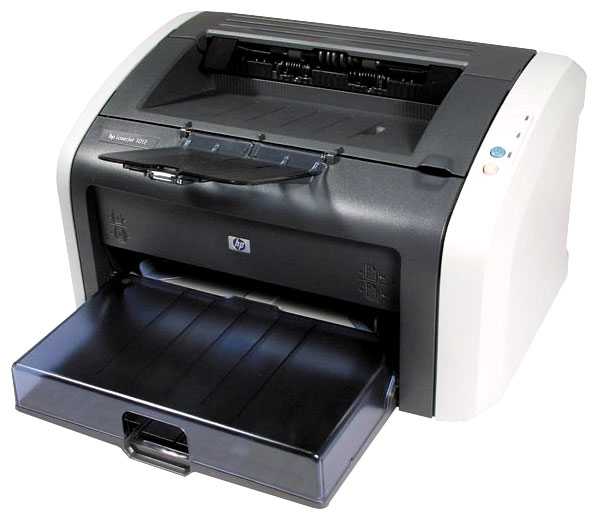
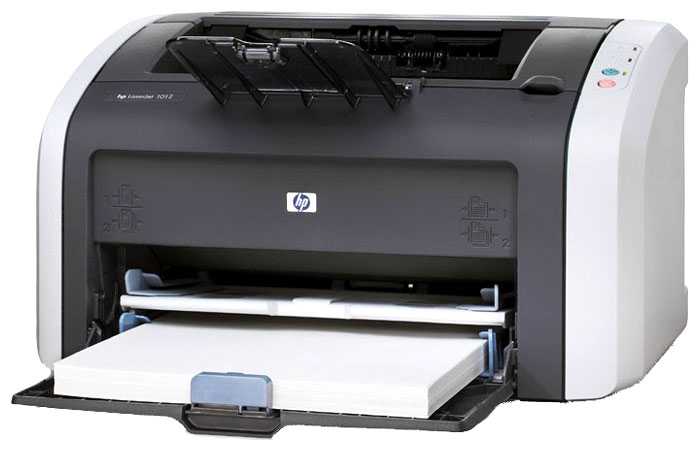
Принтер лазерный HP LaserJet 1012, ч/б, A4 — подробный обзор, плюсы и минусы на основе 36 отзывов
9.1/10

Великолепно

лазерный черно-белая A4 настольный лазерная USB DOS / Linux / Mac OS / Windows
27
8
1
Средняя цена в магазинах 74 715
Смотреть все цены ↓
Загружаем цены...

36 отзывов пользователей о HP LaserJet 1012, ч/б, A4

Пользовались HP LaserJet 1012, ч/б, A4?
Поделитесь своим опытом и помогите другим сделать правильный выбор

27
8
1
Profile no image

КиберНаблюдатель-4GFVP

24.09.2012

8/10

Оценка пользователя

Хорошо

This is a great little printer, except you will have a hard time getting it to work on Windows 7. HP no longer makes drivers for this version of Windows. Here is how I got mine to work:Make sure the printer is ON and plugged into USB port.1. From devices and printers: Add new printer | Local printer.2. From ports screen: Use existing port | pick DOT4_001.3. From available printers pick brand HP (not Hewlett Packard if both on list).4. Model: pick HP LaserJet 3055 PCL 5 (pick Microsoft if more than one choice).5. Optional: replace current driver (if it asks).Then change name, decide if you want to share on network and it will work.... for a while... until you get blank pages that say:"Unsupported Personality: PCL" in the upper left hand of the page, each time you try to print.As far as I know, there is no fix for this, but there is an easy workaround.The failure comes from the printer's buffer being full and thrown into an error (wrong model).Pay attention:Because it is the printer's buffer, all you have to do is print in smaller batches, and turn the printer off and back on between jobs to clear the error.Mine gets away with about 90-120 pages of text at a time.So a 420 page job will be split into 4 batches.It restarts in about 5 seconds, so I don't see it as an issue, I got used to it.Again, if it weren't for this little annoyance caused by HPs unwillingness to support it, I'd give it a 5 star; excellent printer.
источник
Profile no image

Пандорец-2IGQC

29.08.2012

8/10

Оценка пользователя

Хорошо

I bought this printer more than seven years ago and have never had a serious problem with it. It is perfect for moderate use in the home. However, HP made the regrettable decision not to support this printer with Windows 7 drivers. I have been using an imperfect workaround. When I am ready to buy a new printer, I will try to find a manufacturer that continues to support its products.
источник
Profile no image

Кронос-1GMHD

17.02.2009

10/10

Оценка пользователя

Великолепно

Nestled within the humble shanty next to the electronic brain resides a HP LaserJet 1012, the pride of my printer fleet.Well, it's the only printer I currently own so is it a "fleet"?After several years of ink jet-type printers and seldom needing color printing and tiring of the so-so text printing ability and especially tired of the high-cost of those dern' ink cartridges I made the decision a few years ago to buy a non-ink jet printer.Digging through a multitude of reviews a few years back... what was it? Four or five years ago? I decided upon one of the lower priced name-brand offerings, the 1012.Golly shucks gee willikers. Installation was a snap with Win98 and later Win98 SE and then XP when I switched over to that O/S. No experience with Vista as some of the gripers about the 1012 have mentioned but perhaps those human units should have done their research before expecting Vista be compatible with everything under the sun.I was warned upon purchase that the toner cartridge pre-installed typically was not as full as a "new" cartridge bought when a replacement was needed.I am not a "heavy" printer user but I do print what I believe is a fair amount of output. I only replaced the original toner cartridge a couple weeks ago after many thousands of printed pages.Thus, I am thrilled to my inner-most core of my persona and to the very marrow of my bones for the longevity of that toner cartridge. To the point of being ecstatic especially when compared to the operating costs of those ink-jet critters.The 1012's output has always been clear, sharp, and easily readable and never left me unsatisfied.I also was sated by being able to quickly and easily use a toner-saving mode for output that did not have to be of the highest quality yet still clear, crisp and quite readable; such as communications with my cheap kinfolk and various friends and cohorts incarcerated at various prisons at the federal and state levels.I took advantage of the ability to manually insert a single sheet of paper to be printed when I wanted to use a paper-type not present in the storage tray. That one-piece insertion is also used to print on both sides of one paper.There are likely other features I never used thus can not comment upon but I seldom bother to read manuals and the 1012 has done all that I want or need a printer to achieve.Oh, for the horde of impatient rush rush rush bunch in the crowd though my experience with laser-type printers (is there actually a laser in there or is that a LIE!!!!???) is limited I have never felt the 1012 was slow. Nay!!!!! I have never felt my life was compromised in the least in regards to the time it took the 1012 to digest then regurgitate that digital data that led to the printed page rolling out of the 1012's innards.Of the many purchases I have made in the past few years this little work-horse HP LaserJet 1012 rates among the best purchasing decisions I have made.If no longer made try to find a new one in stock somewhere and grab it.If only used is available, well, any purchase of a used item entails some risk but considering how well my little marvel has held up I would be willing to risk a used printer purchase of the 1012.Happy printing, herd.
источник
Profile no image

Астрон-6XJYV

04.04.2010

8/10

Оценка пользователя

Хорошо

This is a solid little printer that is extremely reliable and uncomplicated, taking a minimum of desktop space. As I have used HP Laserjets since 1990,I know whereof I speak. I have owned the HP 1012 for five years now and hope to get another five out of it as a primary and eventually a secondary printer.There was a review where it stated the HP 1012 was no longer compatible with Windows 7 and HP would not issue a driver for it as it was a Category 6 machine, meaning HP discontinued all support to include revised printer drivers. While an unfortunate decision from HP, there are several workarounds on the Internet that use printer drivers from other HP machines to facilitate use on Windows 7. I was able to make the change within minutes and my HP 1012 fired up immediately, no changes in printing. This printer seems to use the same printer driver as the HP 3055 and the fix is readily available via Google.I would also suggest HP revisit its decision to classify the HP 1012 Category 6 in the interests of maintaining good customer relations. Planned obsolescence is never a good thing and HP should avoid it. The HP 1012 is a solid little machine and hopefully successor models do not fall victim to the "thrifting" that plagues many manufacturers.
источник
Profile no image

Нейрон-5FQDS

12.11.2009

10/10

Оценка пользователя

Великолепно

SuperMediaStore has cartridges under $20 if you buy 5 at a time AND they get 200 more copies than the HP cartridges (2200 yield vs 2000). I am over 70,000 copies on both of my 1012s and it has been an unbelievable workhorse. My wife and I are both teachers, we push these machine daily, and neither machine has given us any problems. I bought both of mine on ebay for less than $50 each and am looking to add a third. I am usually not a HP booster, but they got it right with this machine.
источник
Profile no image

Небулоид-4PULF

25.02.2009

10/10

Оценка пользователя

Великолепно

I bought this printer in Nov of 2003 and still with us. Basically used for home and school use with 4 kids. Toner replacement is about once a year to 18 months depending on use. The toner maybe costly but it prints thousands of pages. It can print black and white pictures in which the quality will be dependent on the compression of the pix. Overall, very sturdy, reliable and cost effective.
источник
Profile no image

Аргонавт-7TGMD

08.07.2004

10/10

Оценка пользователя

Великолепно

I will make this short and sweet. I love the HP 1012.There are painful issues when buying low cost lasers beyond the cost of replacement toner.The laser drum has a limited life span and will eventually fail, possibly do to the corrosive effects of heat and humidly over a period of six months to a year. In many lasers this is a separate assembly which has a rated life span of about 20,000 pages. That is great if you print all those pages within that time period but some users are finding that the drum fails regardless of per page use because of the above. They may print two thousand pages in one year and still have to purchase a new drum when the printing begins to fail. The pain is that a drum costs almost as much as a discounted laser printer does in the first place. This is a rip because these drums are not much more substantial than an empty coke can. Truly this is a case of "selling you the razor and hoping to make money when you need the blades". Look at all the Amazon reviews of other lasers where people have had them for more than six months. Do you begin to feel their pain?The HP apparently does not have a separate drum assembly. When you replace the cartridge you are replacing this also. That is probably why their cartridges appear to cost slightly more per copy than the other low cost lasers that I looked at. HP states their cartridge is guaranteed to be good for at least six months after it has been opened and that an unopened cartridge has a shelf life of two years in the plastic package.What HP doesn't want you or I to know is that they are rather conservative with the supply of toner and that the toner is designed to wear out long before the cartridge and drum does in the home environment of limited usage. If you really plan to print with the HP 1012, you may use that laser cartridge up long before six months is out. You may be interested in knowing that you can save two thirds the cost of a new cartridge by melting a hole in the used one and pouring in new toner designed for the HP 1012. You plug the hole and drop the little guy back in the printer and print away. Some people are reported to be able to do this up to four times before the little cartridge gives out completely and you must buy a new one. Anyone who can refill a salt shaker can be taught how to refill the HP 1012.This tactic drops the true cost per page way down compared to those other printers I looked at. To calculate their true cost per page you have to figure in buying a new drum or amortizing the total cost of the printer and pages printed until you must throw it away. Almost all of them can be refilled in a similar manner to the HP or you can pick up remanufactured toner cartridges for them. Do a web search for "HP 1012" laser "toner refill" using GOOGLE and you will eventually figure out how it is done. You can buy both the toner and a little twelve dollar tool kit to melt the hole from various sources on the net.Everyone else in these Amazon reviews have already hit on the other key reasons I grabbed an HP from one of Amazon's affiliates.ADDITIONAL 1012 PROS1 The printer has no fan and is super quiet.2 The 1012 uses only two watts in standby, you could leave it on 24X7 and it will draw as much as an instant on monitor or TV in standby.3 When printing it draws less than 300 watts, the others I looked at almost cause brownouts as they draw so much current while printing.4 The toner save feature works very well, I find it suitable for most of my print outs.5 It is so small it will fit almost anywhere. I placed mine behind my LCD montior screen in the area where there once was old huge CRT monitor body.CONS1 Printing on 3x5 cards is slower than normal printing, from hitting the command to send to the printer and the first card actually coming out. I suspect there is some driver issue causing this.It is not irritating but noticeable when you are used to get the first page in eight to ten seconds.My inkjets take far longer and they don't print on 3X5 cards correctly.2 Turning the 1012 off while printing will cause a paper jam and the HP 1012 lights will flash indicating a problem when you turn it back on. You have to take out the toner cartridge being careful not to expose the drum to light; I covered mine with the black plastic bag it came in. Then you must pull the jammed sheet of paper carefully forward thru the exposed assembly. This only happened to me once when I realized I had submitted a long WORD document of several hundred pages when I only wanted two pages excerpted out of it. I panicked before thinking because this printer is so fast and it was churning out all these pages when I only wanted two! The correct way to cancel a print job is open the Win XP printers' folder and click on CANCEL to stop the current job.I don't work for anyone in the computer industry. I have owned a number of HP printers over the years and still do. They always seem to be well built. The last inkjet I bought was an EPSON. I truely loat
источник
Profile no image

Альфа-Юнит-8NJFV

11.04.2008

10/10

Оценка пользователя

Великолепно

This printer is great. It was a great buy. Same printer selling for over $100.00 on ebay. Works perfect. I have the same model printer at work and was familiar with it. It is reliable and fast. I would reccomend it to anyone with home office.
источник
Показаны отзывы 1-8 из 36.
Загружаем цены...


Характеристики HP LaserJet 1012, ч/б, A4

Основные характеристики
Тип устройства : принтер
Тип печати : лазерный
Цветность печати : черно-белая
Максимальный формат : A4
Количество страниц в месяц : 7000
Область применения : персональный
Размещение : настольный
Принтер
Технология печати : лазерная
Максимальное разрешение по X для ч/б печати : 1200
Максимальное разрешение по Y для ч/б печати : 600
Скорость ч/б печати (A4) : 14 стр./мин
Время выхода первого отпечатка (ч/б) : 8 c
Лотки
Подача бумаги (стандартная) : 150 шт.
Подача бумаги (максимальная) : 150 шт.
Вывод бумаги (стандартный) : 100 шт.
Емкость лотка ручной подачи : 10 шт.
Расходные материалы
Минимальная плотность бумаги : 75 г/м²
Максимальная плотность бумаги : 163 г/м²
Печать на различных носителях : пленка, фотобумага, этикетки
Ресурс ч/б картриджа/тонера : 2000 страниц
Количество картриджей : есть
Тип картриджа/тонера : HP 12A (Q2612A)
Память/Процессор
Объем памяти : 8 МБ
Максимальный объем памяти : 8 МБ
Интерфейсы
Интерфейсы : USB
Прочее
Совместимость с ОС : DOS, Linux, Mac OS, Windows
Потребляемая мощность (при работе) : 250 Вт
Потребляемая мощность (в режиме ожидания) : 2 Вт
Уровень шума при работе : 48 дБ
Комплектация : картридж, сетевой шнур, кабель USB
Ширина : 370 мм
Высота : 208 мм
Глубина : 230 мм
Вес : 5.9 кг
Дополнительная информация : Выход первой страницы 10 сек. Режим экономии тонера. Режим энергосбережения. Режим экономии бумаги.

Информация о характеристиках носит справочный характер.
Перед покупкой уточняйте характеристики и комплектацию товара у продавца
Альтернативы с более высокой оценкой

9.9/10 баллов

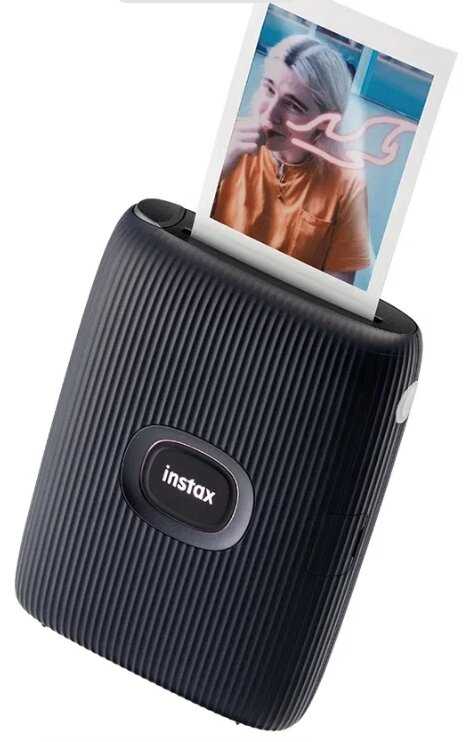
Fujifilm Instax Mini Link 2

234 отзывов

от 16777.00 руб.

9.5/10 баллов

Pantum P2500W

272 отзывов

от 24439.00 руб.

9.5/10 баллов

Xiaomi Mijia AR ZINK

1203 отзывов

от 18277.00 руб.

9.4/10 баллов

HP LaserJet 1018, ч/б, A4

99 отзывов

от 82636.00 руб.

9.4/10 баллов

Pantum M6507, ч/б, A4

2451 отзывов

от 27980.00 руб.

9.4/10 баллов

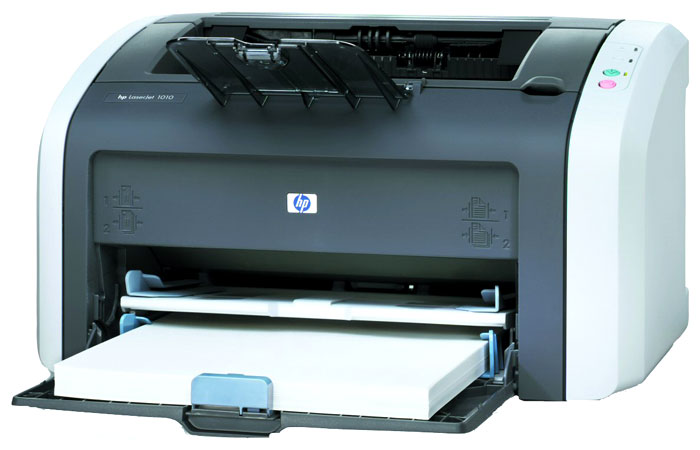
HP LaserJet 1010, ч/б, A4

53 отзывов

от 25958.00 руб.

9.4/10 баллов

Xiaomi Mijia Photo Printer 1S, цветн., м

1259 отзывов

от 14548.00 руб.

9.4/10 баллов

Xiaomi Mi Portable Photo Printer

1224 отзывов

от 8988.00 руб.

9.3/10 баллов

Canon SELPHY CP-1500

52 отзывов

от 30892.00 руб.

9.2/10 баллов

Canon MF655Cdw

83 отзывов

от 53926.00 руб.

9.2/10 баллов

Canon I-SENSYS LBP6030, ч/б, A4

124 отзывов

от 20768.00 руб.

9.2/10 баллов

deli P2000

45 отзывов

от 15784.00 руб.

9.1/10 баллов

HP LaserJet 1012, ч/б, A4

36 отзывов

от 74715.00 руб.

9.1/10 баллов

HP Color Laser MFP 179fnw

207 отзывов

от 61303.00 руб.

9.1/10 баллов

Pantum P2506W

65 отзывов

от 20666.00 руб.

9.1/10 баллов

Canon LBP-810, ч/б, A4

20 отзывов

от 19857.00 руб.

9/10 баллов

HP LaserJet Pro M404dn, ч/б, A4

102 отзывов

от 82000.00 руб.

9/10 баллов

Canon Pixma G1420

86 отзывов

от 54022.00 руб.

9/10 баллов

Epson EcoTank L8050 [C11CK37405]

158 отзывов

от 47166.00 руб.

9/10 баллов

Canon PIXMA G1430 (5809C009)

22 отзывов

от 20632.00 руб.