

МФУ лазерное HP Color LaserJet Pro M283fdn, цветн., A4 — подробный обзор, плюсы и минусы на основе 154 отзывов


Обзор реального опыта использования HP Color LaserJet Pro M283fdn, цветн., A4 - анализ 154 отзывов
Данное МФУ HP 283n — это узкоспециализированное решение для офисов и домашних пользователей, где приоритетом являются скорость и качество печати, а не мобильность. Устройство демонстрирует отличную производительность: лазерная технология обеспечивает мгновенную готовность к работе, а скорость в 22 страницы в минуту позволяет обрабатывать большие объемы документов без простоев. Качество цветной печати и сканирования на уровне профессионального оборудования — это подтверждают пользователи, работающие с графикой и каталогами. Компактные габариты и уровень шума в 6.4 дБ делают его удобным для небольших помещений, а сенсорный интерфейс упрощает настройку даже для неопытных пользователей.
Однако отсутствие Wi-Fi и AirPrint существенно ограничивает сценарии использования. Для печати со смартфона требуется проводное подключение к сети, что неудобно в домашних условиях или в офисах с несколькими рабочими местами. Кроме того, высокая стоимость оригинальных картриджей (до 40 тыс. рублей за комплект) делает устройство нерентабельным для активной эксплуатации — владельцы отмечают, что проще купить новый принтер, чем регулярно менять расходники. Проблемы с прошивкой, блокирующей альтернативные картриджи, и сложности с гарантийным ремонтом добавляют рисков при покупке.
МФУ подойдет для малого бизнеса или домашнего офиса, где печать осуществляется с одного компьютера, а объемы не превышают 500–1000 страниц в месяц. Его стоит рассматривать как замену устаревшим струйным моделям — лазерная технология обеспечит экономию времени и стабильное качество. Однако тем, кто нуждается в беспроводной печати или планирует активно использовать цветную печать, лучше выбрать модель с индексом «w» или обратить внимание на конкурентов с более доступными расходниками.
Отдельного внимания заслуживают противоречивые данные о двусторонней печати: часть пользователей отмечает автоматическую функцию, другие сталкиваются с ручным переворотом листов. Вероятно, это связано с ошибками в описании или различиями в региональных версиях устройства. Перед покупкой стоит уточнить этот параметр у продавца и проверить настройки драйверов.
В итоге HP 283n — это надежный, но нишевый продукт. Его главные козыри — скорость, качество и долговечность, но отсутствие современных беспроводных интерфейсов и дорогие расходники требуют взвешенного подхода. Если эти недостатки некритичны, а приоритетом является производительность, устройство станет удачным вложением. Для остальных случаев рекомендуется рассмотреть альтернативы с поддержкой Wi-Fi и совместимостью с перезаправляемыми картриджами.
👍Почему стоит купить HP Color LaserJet Pro M283fdn, цветн., A4 - Преимущества по отзывам пользователей
- Высокая скорость печати (21–22 стр./мин) и стабильная производительность:
- Лазерная технология обеспечивает мгновенную готовность к печати без прогрева, что критично для офисных задач.
- Скорость не снижается при цветной печати, что повышает эффективность при работе с графикой и документами.
- Автоматическая подача бумаги и одностороннее сканирование ускоряют обработку многостраничных документов.
- Качество печати и сканирования:
- Цветные отпечатки имеют насыщенные оттенки и точную детализацию, что подтверждается сравнением копий с оригиналами.
- Разрешение сканера 600 dpi гарантирует четкое оцифровывание текстов и изображений даже при мелком шрифте.
- Сенсорный дисплей с интуитивным управлением:
- Диагностика статуса устройства, настройка режимов печати/сканирования и доступ к факсу через единый интерфейс.
- Поддержка многоязычного меню, включая русский язык.
- Компактность и низкий уровень шума (6.4 дБ):
- Габариты 42×46×31 см позволяют разместить устройство в ограниченном пространстве.
- Тихая работа снижает дискомфорт в офисных и домашних условиях.
- Поддержка бумаги разной плотности:
- Возможность печати на носителях до 200 г/м² (с ручной подачей), включая конверты и этикетки.
- Интеграция с приложением HP Smart:
- Удаленная печать и сканирование через смартфон, создание ярлыков для частых задач (например, сканирование в PDF).
- Надежность и долговечность:
- Пользователи отмечают работу предыдущих моделей HP (112, 178) более 10 лет без поломок.
- Пластиковый корпус с усиленной конструкцией предотвращает деформацию при активной эксплуатации.
👎О чем стоит задуматься перед покупкой - Недостатки по отзывам пользователей
- Отсутствие Wi-Fi и AirPrint:
- Подключение только через Ethernet или USB, что ограничивает мобильность и требует прямого доступа к устройству.
- Модель с индексом «n» не поддерживает беспроводные функции, в отличие от версии «w», что неочевидно из описаний.
- Высокая стоимость оригинальных картриджей:
- Комплект из 4 картриджей (ресурс 1200 стр.) стоит ~40 тыс. руб., что сопоставимо с ценой самого МФУ.
- Прошивка блокирует неоригинальные расходники, а чипы на оригинальных картриджах залиты клеем, усложняя перезаправку.
- Ручная двусторонняя печать вместо автоматической:
- Пользователь должен вручную переворачивать листы, несмотря на заявленную в описании «автоматическую» функцию.
- Отсутствие USB-порта для прямого подключения накопителей:
- Печать с флешки невозможна — требуется промежуточное подключение к ПК.
- Проблемы с гарантийным обслуживанием:
- Брак (например, черные полосы при сканировании) сложно устранить из-за отсутствия авторизованных сервисов в регионах.
- Долгий прогрев перед началом печати:
- Задержка вывода первого листа при холодном старте, что критично для срочных задач.
- Ограниченная емкость лотка (50 листов):
- Не подходит для печати крупных тиражей без частой дозагрузки бумаги.
*Плюсы и минусы, которые пользователи называют чаще всего на основе практического опыта использования.
Альтернативы с высокой оценкой

HP LaserJet Enterprise M430f, ч/б, A4
- функции: принтер, сканер, копир, факс
- назначение: для большого офиса
- печать: черно-белая лазерная
- скорость: 40 стр/мин (ч/б A4)
- макс. формат печати: A4 (210 × 297 мм)
115 366 руб. в среднем
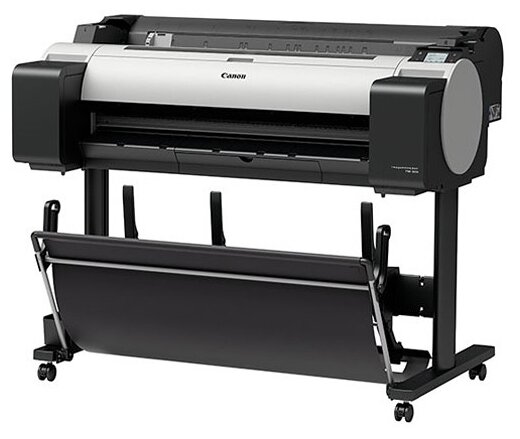
Canon imagePROGRAF TM-300
- высокое разрешение печати
- экономия чернил
- многофункциональность носителей
- ненадёжная печатающая головка
- дорогие расходники
- ограничения по рулонам
153 835 руб. в среднем
154 отзывов пользователей о HP Color LaserJet Pro M283fdn, цветн., A4
Пользовались
HP Color LaserJet Pro M283fdn, цветн., A4?
Поделитесь своим опытом и помогите другим сделать правильный выбор

Дроид-7QNYM
21.11.2024
Оценка пользователя
Великолепно
- + Сразу ВСЁ: принтер, сканер, копир и в цвете при высокой скорости! Есть двухсторонняя автоматическая печать и автоматическая подача сканируемых листов.
- - Не особый минус, НО!При покупке именно этой модели будьте внимательны: в конце полного наименования модели стоит буква n... Это означает, что он сетевой, но не работает в сети Wi-Fi. Для кого это необходимо и актуально читайте и изучайте товар перед покупкой. У принтера, предназначенного для работы с Wi-Fi на конце стоит буква w. Для меня не особо актуально, но обидно, что поздно обнаружил этот нюанс.
Астрономад-2DMCA
21.11.2024
Оценка пользователя
Великолепно
- + Многофункциональный, не шумит, качествено работает
- - Не увидели недостатков
Пульсар-6RUOO
21.11.2024
Оценка пользователя
Хорошо
- + Можно печатать в любом цвете
- - Нет
Астероид-5FCZX
29.11.2024
Оценка пользователя
Ужасно
- +
ТТХ соответствуют описанию товара
- -
Цена расходных материалов
На сегодняшний день (30..10.2024) цена всех четырёх картриджей почти что 40т. рублей - немногим дешевле самого принтера. 1200 страниц - если вы печатаете раз в месяц - всё ок, если каждый день - разоритесь на картриджах. Их еще и нет в наличии. Далее, по неоригинальным картриджам - принтер их не принимает. Попробую перепрошить принтер, не уверен, что поможет. Вишенка на торте - в интернете полно гайдов по замене чипов на картриджах - так вот, с недавних пор hp заливают свои чипы клеем - т.е., извлечь чип из картриджа, не повредив этот самый чип - задача не для дилетанта
МехаРейнджер-5FETG
21.11.2024
Оценка пользователя
Великолепно
- + Качественный, с большим функционалом, тихий, надежный
- - Отсутствуют
Гелиос-3QPRC
21.11.2024
Оценка пользователя
Великолепно
- + Есть встроенный факс
- - Никаких нареканий
Вояджер-2DQJU
20.06.2025
Оценка пользователя
Великолепно
- + Отлично печатает, быстро, компактный, куча функций втч дуплекс.
- - нет, если покупать картриджи совместимые или заправлять оригинал. Безумные цены на ориг картридж.
Зета-Орион-2BQDW
21.11.2024
Оценка пользователя
Великолепно
- + Качественный, функциональный, компактный, хорошо выглядит, удобный
- - Для меня, их нет
Как менялась цена на HP Color LaserJet Pro M283fdn, цветн., A4
Характеристики HP Color LaserJet Pro M283fdn, цветн., A4
Информация о характеристиках носит справочный характер.
Перед покупкой уточняйте характеристики и комплектацию товара у продавца



Wizemart © 2026.
Рекомендательная система по умному выбору товаров по отзывам и рейтингам
