

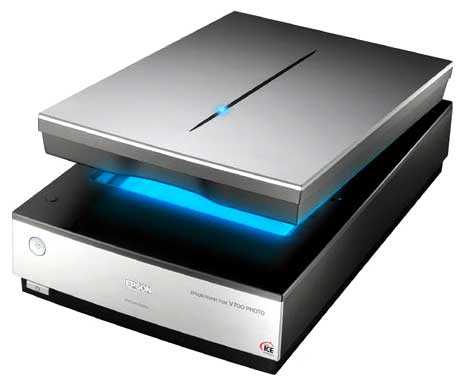
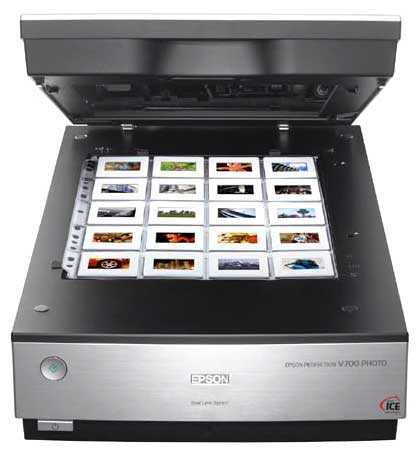
Сканер Epson Perfection V700 Photo — подробный обзор, плюсы и минусы на основе 28 отзывов
7.3/10
Хорошо


планшетный
CCD
A4
набор рамок в комплекте / поддержка Linux …
планшетный
Разрешение по X: 6400 dpi
Разрешение по Y: 9600 dpi
FireWire (IEEE 1394) / USB
Средняя цена в магазинах
14 875 ₽
Смотреть все цены ↓
Сравните Epson Perfection V700 Photo с другой моделью
Часто сравнивают:
vs Epson Perfection V19
Альтернативы с высокой оценкой

8.6/10 баллов
Epson Perfection V19
- высокое разрешение
- компактный корпус
- питание через USB
- проблемы с драйверами на Windows 10
- шумный механизм
- медленная работа на высоких dpi
14 875 руб. в среднем
28 отзывов пользователей о Epson Perfection V700 Photo
Пользовались
Epson Perfection V700 Photo?
Поделитесь своим опытом и помогите другим сделать правильный выбор

Спектроник-1YVYQ
29.10.2012
10/10
Оценка пользователя
Великолепно
- + Покупал аппарат для сканирования пленочного архива (слайды ещё ORWO и негативы). Очень качественное сканирование. Хорошая прикладная программа к нему. Профессиональный режим позволяет вытянуть максимум из пленки - удаляет дифекты, восстанавливает цвет и пр. Сканировал до 6400, но большой разницы с 4800 не заметил.
При загрузке 24 кадров сканирование занимает около 3-х часов - долго идет итоговая обработка кадра около 7 минут (при максимальных исправлениях),...
Странник-7ZXMJ
17.01.2011
8/10
Оценка пользователя
Хорошо
- + Достоинств много.
- - Отвратительная вилка.
Брали для сканирования электронно-микроскопических фотографий (слайдов) в лабораторию.
На сегодняшний день только он и его старший брат - V750 справляются со сканированием широких слайдов "на просвет" (хотя, вспомнил,...
На сегодняшний день только он и его старший брат - V750 справляются со сканированием широких слайдов "на просвет" (хотя, вспомнил,...
Альфа-Юнит-4ETIV
17.08.2009
10/10
Оценка пользователя
Великолепно
- + Относительно шустрый (в сравнении с hp8200 безумно шустрый), сканировал фотопленку. "Прямой софт" - user friendly, глюков заметить не успел.
- - Большой - но он же и не любительский
Покупал для сканирования фотопленки. Сравнивать в работе могу только с hp 8200, но сравнение неуместно, т.к. этот очень старый и ужасно медленный и кадры ужасно получаются (проверял 1200/2400...
Вектрон-1QRKH
15.07.2012
2/10
Оценка пользователя
Ужасно
Although I haven't yet completely given up on purchasing Epson's V700 scanner, it won't take much more frustration for me abandon my efforts to actually use this prosumer-level product.First the facts of the matter: I had to return each of THREE different Amazon shipments of the Epson V700 scanner due to blemishes/flaws/specs on the back (under)side of the Epson V700 scanner glass.The first unit featured a translucent "blurb", approx. 1 mm in diameter, on the underside of the scanner glass (on the bottom pane, used to scan reflective objects). My guess is that it was a small drop of lubricating oil that had dripped onto the glass. I returned the unit to Amazon, requesting a replacement unit.The second unit featured two small flecks of matter on underside of the scanner glass (again on the bottom pane, used to scan reflective objects). I returned the unit to Amazon, requesting a replacement unit.The third V700 unit featured three small flecks of matter on underside of the scanner glass (once again on the bottom pane, used to scan reflective objects). I returned the unit to Amazon, requesting a replacement unit.At this point Amazon (whose replacement efforts were exceptional) opted to throw in the towel and is in the process of refunding my money.Although these flaws were small, when I'm spending over $500 for a sophisticated scanner I believe I am entitled to expect that the purchased scanner unit should arrive with scanner glass that does not include underside surface flaws.And although I am personally capable of removing the top side and personally cleaning the underside of the scanner glass, I refused to accept the three Epson V700 units with such flaws because I shouldn't have to personally repair a brand new product that I've just purchased .My assessment includes two prospects: (1) Epson Quality Assurance has fallen asleep at the wheel and allowed an unacceptable number of V700 units to leave the factory with dirty scanner glass, or; (2) the units have left the factory with clean glass, but the subsequent handling, jostling, bumping during shipment have resulted in dislodging extraneous particulate/liquid matter within the sealed unit, which then migrates/clings to the underside surface of the glass.Although I have yet to give up on purchase of the V700, I'm writing this review to strongly suggest that Epson address this issue, so that prospective customers like myself can predictably anticipate that their scanner is delivered with scanning glass that features a clean underside surface.
Пульсар-4PLXM
15.11.2010
2/10
Оценка пользователя
Ужасно
EPSON PERFECTION V700 SCANNER - FAR FROM PERFECTIONI have owned, loved and recommended Epson products since the 1980's. The quality was always great, as was their technical support, customer service and customer satisfaction. Because of this, I have owned ONLY Epson photo printers and scanners. I do own another brand laser printer, a Brother, I love it.I have actually intervened in a sale at Best Buy where the salesperson was pushing an HP photo printer on a customer and told them to buy Epson, as there was no comparison in the quality of the print, the product and the support. The customer ended up walking out of the store with the Epson printer.My satisfaction with Epson came to a halt the other day when I experienced a problem with my still under warranty Epson V700 scanner. I scanned approximately25 photos and the carriage stopped moving, red light flashed and it was dead.I called tech support, they kept asking me the same stupid questions over and over, and finally decided I had a hardware failure and the unit needed to be serviced. They referred me to an authorized Epson repair service in my state, and told me to contact them to have the unit repaired. I asked about shipping, they said that Epson would take care of it.The next morning I called the authorized repair service, no answer, left messages, no calls back. Called about 50 times, only got voice mail. Finally I got someone on the phone who told me that I must ship the unit to them by FedEx or UPS for repair.I called Epson's tech support again, and they told me they will not pay the frieght, that would be on me, even though the unit was still under warranty. I checked the cost to ship with insurance, about $50.00 each way.Needless to say, I am not a happy camper, either with the performance of the scanner or the fact that I have to shell out another $100.00 for a scanner that was obviously defective out of the box.I will not purchase an Epson product again, nor will I ever recommend their products to friends, colleagues, family or strangers at Best Buy.Too bad Epson hasn't maintained the high standards of quality, customer service and satisfaction it did in the past.
Кронос-0UVUQ
21.05.2009
10/10
Оценка пользователя
Великолепно
Let me say up front that, because the V700 ships with a SilverFast image management program, this is essentially a joint review of device and software.We're a family of photographers with a lot of legacy negatives and slide material, some ours, some inherited from our parents. We've tried several scanners, with so-so results, and found them slow and somewhat clunky to use. Which meant we made little headway with the huge quantity of material we were trying to get into digital format.The reviews convinced us to try the V700, and we've been delighted. First, I won't say it's perfect - at this price point, we didn't expect to have a totally professional experience. If it were possible, we'd probably give it a 4.5 instead of a 5. Some of the glitches noted by others can be at least mildly irritating. Still, even with the basic SilverFast software shipped with it, it works much better than anything else we've tried. (And using the SilverFast Studio Ai with ME makes it even better - you have to order this separately, but you can get it as a download.)When used with the shipped SilverFast program, the device is intuitive, which results in a fast learning curve. (The videos on the SilverFast support site are extremely helpful should a question arise.)What has impressed us the most is the adjustability of the import controls, especially the ability to adjust F-stops 3 up or down on negative imports, which literally brings most heretofore unviable negative images "back from the dead." As to transparencies, the adjustments provided for their import are also helpful. If you combine this adjustment capability with Photoshop controls, it is truly amazing how much life you can return to images so faded or discolored that they're almost invisible to the naked eye. Evidently there's a lot more information left on even the worst of old slides and negatives than our cursory examination led us to believe.Also, we like the speed. The scan process is reasonable as to time required. Also, the ability to scan multiple images at once is cool. Which reminds me of the plastic holder issue. The V700 ships with a good assortment of sizes. Still, it would have been nice to have been offered the option of purchasing spares with the scanner at perhaps somewhat less than the rather breathtaking price charged by after-market vendors like SilverFast.As to ICE, unlike the experience of other reviewers, we definitely notice a difference when using ICE, especially on images with large areas of solid color. If you want to use ICE, do go through the steps of specifying exactly how you want to use it, as this very much affects not only speed but also the end output. The degree of detection and correction sensitivity that you set is critical. If you set the sensitivity high, you can get rid of just about any dust, etc., but the tradeoff for this much "cleaning up" is a significant degree of image softening. A setting somewhere in the middle seems to work best. We don't use ICE for closeup people images, instead doing any cleanup in Photoshop. Also, at least in our opinion, we would not use ICE to clean up material that is going to be reproduced in print form.There's more one could say, but I think the above is what we've observed from our experience that would matter to most users.In summation, we really like this product and recommend it.
Зета-Орион-3VPVL
12.01.2010
2/10
Оценка пользователя
Ужасно
This scanner is an incredible piece of equipment. Unfortunately, it stopped working after around a year. It just started clicking, making noises, and flashing a red light... They make clear that "Epson is not responsible for any repair cost on units that are out of their warranty period." Regardless, this was a hardware failure after around 14 months of intermittent use.Epson's customer service is all based in the Philippines. The only time you speak with anyone in the U.S. is when you speak with customer relations.My company had purchased an extended service warranty, which is not an equipment replacement, it is simply a warranty that allows you take your scanner into an "Epson service center" for them to repair. Our offices are based in NYC and Epson only had three locations that were "certified Epson service centers". One was in Brooklyn, 8 miles away, the 2nd was in West Babylon, NY, 33 miles away and their final suggestions was in Weymouth, MA, 187 miles away. The cost alone, in man hours on the phone, and shipping equaled half the cost of a new scanner. And sending it to the repair center did not guarantee its repair.We spent $30 to send our scanner to Brooklyn. The owners of the facility were uncooperative, rude, sexist, and refused to do work on our scanner until they received a retainer for $35. We requested an invoice from them, and they refused. It took days to get this handled. Meanwhile, they only test scanners on PC's with Microsoft based OS. Had Epson communicated with the service center, they would have know I work on a MAC. So if you are in the NY area, stay away from ARON and DAVID at TOTAL OFFICE SOLUTIONS INC. 6202 17TH AVENUE BROOKLYN, NY 11204(718) 331-3545... They should be stricken from the list as service reps.In trying to deal with this further, I brought the matter to Epson again. I had two dropped calls with no return call. I finally spoke with a person in California in customer relations. The conditions regarding the service center in Brooklyn and the preverbal stalemate with Epson themselves leaves the customer with no option but to buy a new unit or find another company to purchase from.I will never buy another Epson product again. And I encourage you to do the same.
Нейрон-4YIVB
19.07.2008
2/10
Оценка пользователя
Ужасно
For 500 dollars the least the manufacturer could do is throw in some film holders that aren't absolute garbage. I shoot medium format film through a Fuji GA645, a camera justifiably well known for having a razor sharp lens, near perfect exposure, and to-die-for autofocus. Imagine my surprise when my first negatives scanned soft and out of focus.So I poke around Flickr a bit and discover that film laid flat on the scan bed with the film holder pressing it to the glass gives markedly better results than actually inserting the film in the holder as instructed by Epson. 10 minutes of swearing while trying to accomplish this not so easy feat (go ahead and try for yourself), and 20 minutes of scanning (while still swearing) later, I discover that, lo and behold, the Flickr folks are right.Negatives flat on the glass scan vastly better than negatives in the holder. In fact, at 4800dpi, negatives flat on the glass so exceed my needs that I turned the resolution down a notch. I'll go one step further and say that if Epson had included film holders that weren't total GARBAGE, i.e., a double glass plate system designed to hold the negative at EXACTLY THE FOCAL PLANE, I might be giving this system five stars instead of one.I don't know what misbegotten moron over at Epson decided to cheap out, and I don't care. I'll be searching the web for some sort of film holder that actually, you know, WORKS, (or other solution, maybe I can design and manufacture my own, get rich fixing Epson's grievous failings) since laying it on the glass in perfect alignment without curl or dust is such a monumental pain. If I can't find a solution shortly, this thing is going to be returned, and good riddance.It'll be a cold day in damnation before I buy another Epson product.EDIT: Ok, it is possible to get somewhat decent scans out of this heap. Follow these instructions:First, turn your film holder over and pull out the little feet. Turn them around 180 degrees so the arrow points toward the plus sign, then put them back in. For some reason the focal plane is a bit high off the glass, about 3.5mm. Guess how high the feet are set at the factory? If you guessed 3.0mm, give yourself a gold star.Way to go, Epson, you big wet bag of smelly FAIL.If that doesn't work, then turn your Adjustment Options completely off and run a test scan. According to the Photo-i review I read, Digital ICE in Quality mode is garbage, while Digital ICE in Speed mode is actually somewhat useful. Your mileage may vary.If your scans still look awful, plug betterscanning into your search engine and go buy a new film holder. Everyone that's ever used those aftermarket jobbies (that I could find, anyway) says they see a marked improvement. As it is apparent from even web sized photos that they're designed and constructed better than the OEM GARBAGE, I can see why.For real black and white film (not the chromagenic C-41 process stuff, scan that stuff just like color, only with Image Type set to 16 bit grayscale) turn off all the adjustment options except possibly Unsharp Mask. Of course, since you're going to be slowly going crazy in Photoshop with the Spot Healing Brush taking out all the dust, you might as well turn that off too, since even at Medium the Unsharp Mask sometimes gets a bit of aliasing on diagonal lines.I reiterate: You could not pay me enough to own another Epson product.
Показаны отзывы 1-8 из 28.
Как менялась цена на Epson Perfection V700 Photo
Характеристики Epson Perfection V700 Photo
Информация о характеристиках носит справочный характер.
Перед покупкой уточняйте характеристики и комплектацию товара у продавца
Обзоры и руководства на Epson Perfection V700 Photo




Wizemart © 2026.
Рекомендательная система по умному выбору товаров по отзывам и рейтингам
