

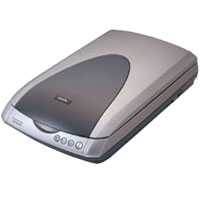
Сканер Epson Perfection 4180 Photo — подробный обзор, плюсы и минусы на основе 12 отзывов
4.5/10
Ужасно


планшетный
CCD
A4
поддержка Linux / поддержка Mac OS …
планшетный
Разрешение по X: 4800 dpi
Разрешение по Y: 9600 dpi
USB
Сравните Epson Perfection 4180 Photo с другой моделью
12 отзывов пользователей о Epson Perfection 4180 Photo
Пользовались
Epson Perfection 4180 Photo?
Поделитесь своим опытом и помогите другим сделать правильный выбор

Вояджер-1VCSG
17.06.2008
2/10
Оценка пользователя
Ужасно
It may have been a great scanner if it wasn't always out of stock every time I tried to order one. Jody Bissoon
Кварковец-2TNXX
27.02.2006
10/10
Оценка пользователя
Великолепно
I have been using the Epson line of scanners for over 5 years now and once I switched to them I can't go back!Excellent products.I upgraded to the 4180 from an Epson 3120(?) (which is the one that got me hooked on Epson) when the 4180 first came out and it has never let me down!I use it on both Mac & PC platforms and both are seemless.I'm a professional designer and use it regularly to capture clients art for thier creative and this scanner is the closest I can come to sending it out to have slides/film/photos/print materials drum-scanned!matter of fact, I have not had to have anything drum-scanned since I got my 4180!It paid for itself the first batch of color slides I scanned with it.Its fast and reliable. It interacts well with the 'Import' function of Photoshop and the descreening function is invaluable!I have had to use other scanners in the past (HP, ScanJet, Kodak, etc..) and NONE have come close to being able to make an existin printed image usable compared to the Epson!All the rest capture the print screen and make the image useless.But the Epson has a GREAT descreening filter that makes fullsized scans at even 600dpi usable for print. Allowing for cropping and enlarging by nearly 100%!!!the software works well, and is easy to figure out. if you're a beginner the 'Simple' screen will get you almost everything you need, but for seasoned users, the 'Advanced' screen has about every option in easy to find/use menues and screens.The sharpening for photographs is astounding!Only function I have found to be somewhat inacurate is the film/slide scanning autodetect. I will sometimes not show the full neg/slide. But this is simple enough to solve by switching the preview mode to 'Normal.' And no other scanner on the market can come close to the quality/resolution when scanning a slide/neg in my opinion!I would give it a 4.75 out of 5 stars, but Amazon doesn't allow for part-stars, so I rounded up!
НаноПилигрим-0IVKV
24.01.2005
8/10
Оценка пользователя
Хорошо
This scanner performs well for the user who expects very good scans from flatbed and negatives/transparencies at this price point.PROS:Costs under $200.Scans negatives and transparencies--35mm, mounted slides, and 120.Includes very easy-to-use-and-integrate software.Installs easily (on WinXP SP2).Makes scans that are very usable in Photoshop CS.Is able to make scans that I don't need to mess with (for web, email) without using Photoshop.CONS:35mm holder allows filmstrip to buckle.Minor software tweaks would be desirable.No good way to store film holders when one of them is in use.I'm an amateur photographer who develops his own film. I had been getting my film developed by an excellent, and inexpensive, local chain that also provided a CD-ROM of scanned images for each roll processed. Once I started developing my own b/w film, I wanted a scanner that could do decent scans so that I could continue to keep medium-resolution "contact sheets" on my PC. I thought that the 4180 might do the trick at a pretty inexpensive price point. I was right.It scans well, within timeframes that are reasonable. I've read other reviews here, and I'm not sure what everyone expects of their scanners--but given your connection (USB 2.0, etc.) and whatever else you have going on, I think you'll find this scanner performs as expected. It takes a while to do medium-to-hi-res scans, but that's what I expect of a scanner. I expect it to transmit to my PC pretty darn quick, but the scanning part can take its time.The scanner software does not always detect the framelines between 35mm frames correctly. I think this might be what another reviewer was referring to regarding black lines. Usually, re-previewing the set of frames corrects this. Worst case scenario, you just preview and scan the whole set of frames and then go back and scan that problematic one individually. It's really not a big deal.If you're intending to scan a great deal of 35mm negatives, slides, or 120 transparencies/negatives quickly, then this is not the right scanner for you. The provided film holders don't hold a lot of frames. I do appreciate being able to scan 12 35mm negatives simultaneously, but when you're dealing with rolls of 24-36, it does take some time. Luckily you don't have to be present during most of the scanning process.The 35mm frame is very good at holding the film, but because it isn't a sandwich of glass, it does not hold your film flat if it's not flat already. Artifacts in the resulting scan are common, especially at the ends of 35mm strips.The software should have a way of overriding the "selection" of frames by the software. Usually it's accurate, but when it's not I'd rather not have to redo a single scan because the software selected a too-narrow area or one that overlaps two frames.The enclosed software is very good. It includes a densitometer, editable histogram, and other tools for working with your scans. I have not worked much with the grain removal and dust/scratch removal tools, but I'm more comfortable working with those problems in Photoshop.For excellent thumbnails and fast, very good printable scans, I've found this scanner to be excellent.
Плазмоид-7DDEU
26.09.2004
8/10
Оценка пользователя
Хорошо
It's hard to believe that the first flatbed I bought back in 1997 only had 300dpi optical, no transparency function at all and cost $300. Times do change. I have only had my 4180 for a few days but so far the perfromance is quite impressive. Flatbed scans of photographs and documents are nice and crisp. I haven't done any negative scans but I did load in some of my favorite Kodachromes and the results were quite good. Scanning transparencies at 3200dpi gave excellent results in prints up into the 8X10 range. I suspect that you could crank this thing up to the point where you would run out of grain before you run out of pixels. The supplied scanning software, which includes Photoshop Elements is pretty easy to navigate and did not present any problems for me. My first batch of prints from slides were at least as pretty as the Cibachromes I used to do, that's saying a lot. Naturally a flatbed does not have the same dynamic range on transparencies that a dedicated film scanner would. Even so I am pleasantly surprised at the quality of slide scans I am getting right out of the box. I would like to have seen hard copies of the documentation but I can live without it if it knocks the price down some. I have a basement full of equipment in storage and have been agonizing about building another darkroom. I'm going to miss watching prints come up in the developer but this is so easy and the results are so good that I'm afraid my days under the safelight are over. One last point. You may want to make sure you have lots of RAM if you buy this unit. Four 3200dpi slide scans are going to deal you four 25Meg files. So far the 4180 looks like a good choice for a photographer on a budget. Note 9-20-05 As one of our IT guys kindly pointed out, RAM is not the issue I had thought. I am told the temporary files generated by large scans end up on one of the hard drives and are not stored in RAM while being processed. Otherwise I would have to still say that this represents a terrific value for a photographer watching their budget. I have done a lot of negative scans both in color and B&W since writing the original review. These have been quite satisfactory. The B&W roll film scans are especially pleasing. Hope this helps.
Пандорец-1PFXI
27.12.2004
4/10
Оценка пользователя
Ужасно
I picked this unit up after returning a brand new Canon 8400F that had lots of dust/dirt inside the glass. It was not a good switch.The build quality of the scanner is okay but seems less sturdy compared to the Canon.I'm using these scanners with Macintosh computers and the Epson software is clunky and less than intuitive (I spend my life on PCs). For example, when a "scan to application" completes, the Epson Scan software reverts back to the Settings-Preview-Scan screen with no indication the scan is complete and that you need to click the close button to initiate the process of selecting the scan and application to transfer the image to. And it's so slow that even after you click the close button there is a 30 second pause before the next window opens (and this is on a high-end system). There is no option to have this close automatically and transfer the file like you can on the Canon.The motor noise is quite loud, loud enough to wake a sleeping person in the same house.The buttons work okay but not as good as the Canon in terms how they can be programmed.I don't know if I got a bad unit but when running it though a thorough test, I found a repeatable problem of random & multiple horizontal black stripes across the image in several scan types (scan & save, scan to application, scan to print). The problem unexplainably went away but this was after the unit was fully warmed up (> 1 hour of use) so it could be a temperature issue with the electronics. Note the image file is not corrupted but simple void of data in several stripes across the entire screen.Lastly, I compared similar scans of the same photos at the same resolution and other settings and the Canon was better as rated by several people viewing them side-by-side.I may go back and get a Canon 8400F with clean glass.
Фотон-8PAXU
20.07.2005
10/10
Оценка пользователя
Великолепно
Like all scanners, the secret to this one's the software. In this case, Adobe Photoshop Elements 2 and ABBYY FineReader 5.0 Sprint Plus come bundled. Photoshop has some neat filtering elements, and while I've just started to play, I've gotten some good results restoring old portraits and enhancing some less-than-perfect newer prints.The OCR feature in FineReader is a bit quirky; correcting misreads isn't all that simple. That's the only negative I've found so far.
ОмниКод-7CRSR
04.05.2005
4/10
Оценка пользователя
Ужасно
I had scanned a few slides. It was slow but they turned out well. If you have to scan a lot of slides though I would not recommend this scanner because it will take a very long time. The following two days, I scanned some photos that seemed OK. On day four when I turned the scanner on there was a loud grinding noise and the red light started flashing. I went over the troubleshooting steps and there is nothing I can do but return it.
Супернова-4NOKW
08.10.2004
2/10
Оценка пользователя
Ужасно
The good: The 4180 does deliver a lot for the money. I have used this scanner primarily for Kodachrome slide capture and the color accuracy is very very good. At 4800 dpi it produces a 35mm slide with a 113MB Bitmap so choose your scanning resolution carefully. The enclosed Photoshop software will quickly fix or improve many "problems". The scanner software interface is easy and intuitive, especially under "home" mode.The bad: I'm on my 3rd scanner in as many weeks. At scan #500, a CCD failed, leaving me with a green line across all my slides. Scans of photos did not have this same problem. One week after that a RED line at scan #1000. Now I have the same thing at scan #1200 only it's intermittant, and is a blue line. The good news is that tech. support is knowledgeable and friendly. They can only tell me to exchange it or send it in under warranty. Examining each slide wondering which ones I need to re-scan, or wondering if it will get worse is not an experience I'd wish upon anyone. Obviously I cannot recommend purchase of this scanner, but if you do, purchase an exchange or extended warranty with it.
Показаны отзывы 1-8 из 12.
Характеристики Epson Perfection 4180 Photo
Информация о характеристиках носит справочный характер.
Перед покупкой уточняйте характеристики и комплектацию товара у продавца
Обзоры и руководства на Epson Perfection 4180 Photo




Wizemart © 2026.
Рекомендательная система по умному выбору товаров по отзывам и рейтингам
