

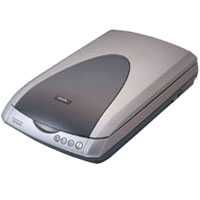
Сканер Epson Perfection 3170 Photo — подробный обзор, плюсы и минусы на основе 19 отзывов
7.8/10
Хорошо


планшетный
CCD
A4
набор рамок в комплекте / поддержка Linux …
планшетный
Разрешение по X: 3200 dpi
Разрешение по Y: 6400 dpi
USB
Сравните Epson Perfection 3170 Photo с другой моделью
19 отзывов пользователей о Epson Perfection 3170 Photo
Пользовались
Epson Perfection 3170 Photo?
Поделитесь своим опытом и помогите другим сделать правильный выбор

Квантум-1SWGC
02.10.2004
8/10
Оценка пользователя
Хорошо
This scanner was bought as a gift for me, and I've had it at over half a year, long enough to get a feel for it.I don't do a lot of heavy duty scanning, so it has taken me a while to learn this machine. My family's first reaction was "It looks like a Jedi Knight of a scanner." (I honestly didn't believe them to be that much of a Star Wars fan.) However, be warned, this is not a small machine. It is about 1 2/3 the length of a regular sheet of paper. Looking at it, I wouldn't say that they have wasted space inside it, just that it requires the space. Some scanners can be set on their side, this one cannot.Pros: Looks Good... Not that important, but it is nice, as I'm looking at this machine whenever I'm at my desk, whether I like it or not. Nice Goodies... I liked that it came with the film and slide adapters. I wish I had it when I was given a single slide instead of a print out that somebody had taken. Since my family doesn't do the whole slide thing, I never could really look at the photo, and the slide was since then lost (or more likely, thrown out). The film, on the other hand, has been used, and seems to be able to the job. Software Interface... Fairly easy to learn. If you don't want to mess with it, just set it to Full Auto Mode (sounds like a machine gun), and off it goes. Comes with cables... If you've bought a newer printer, you'll know what I mean. I just bought a new printer, and now have to check that I have the cables. It is nice to know that some hardware is still packaged properly. There's nothing worse than having to wait a couple of days before you can use your brand new toy. Speed... Only when XP SP 2 came out did I discover that I didn't have USB 2.0 on my computer (the motherboard's manual says it does IF you have a certain chipset, which I don't). This certainly explained why, at most resolutions, the scanner had to start and stop very frequently. Now that I'm running on USB 2.0, 1200 dpi has a few stops, very short, but other than that, it scans very nicely, and at a respectable speed. I haven't done any time trials, but I am satisfied.Cons: RAM... You'll need tons of it to scan at higher resolutions (which is probably why you are looking at this scanner). I have 512MB, and while it usually isn't so much a problem scanning (it still can be sometimes), when you try to edit your stuff (why you scanned it), you may find yourself running out. I tried upgrading my RAM, but found out that it's not stocked, and has no ETA. Also, CPU resources are used a fair bit. Quality... I'm not sure who's fault this is. I am trying to figure out how to get the colours to better agree. There is also a loss of image sharpness, along with the vividness of colours, when scanning photos. I may be able to eventually correct this, but it will require a fair bit of experimentation. Black and white documents seem to scan a lot better, although when copying them, somewhere between scanner and printer, the lines get thickened just slightly, and get a shadow. When using default settings on the copy center program, I get a blue background that is printed onto my document. I have solved that by switching to text, black and white input.All in all, one star off for the scanning problems described above. I would have taken two (or more) off if I had been unable to solve the copy center problem, and couldn't get anything else fixed, but I am still optimistic.Revision - 25 October, 2004 - I have been searching around for scanner tips, with some moderate success. Armed with these tips, I retackled the professional mode, and was pleased with what I saw. Although not perfect, I was able to use the colour corrections with good success, and came up with some good scans of pictures I was planning to edit. I'm still leaving the fifth star off because I feel that some of this should have been in the scanner manual. I am still fairly new to the scanner/photography world, just in case somebody was wondering.
Кронос-4CJTK
28.03.2004
8/10
Оценка пользователя
Хорошо
I bought this scanner mostly for restoring old photos and scanning old negatives. The scanner was a breeze to install and set up with my system running Windows XP with 512 mb of RAM. Image scanning is very quick at the default setting (300 dpi) and with excellent image quality. The photo restore works fairly well, but on some photos, it actually changes the color of the dust and scratches on the photo. Overall, this is an excellent scanner, but there are two issues that annoy me that I think I need to share. First of all, it doesn't come with a manual. Yes, it does come with a quick setup pamphlet with a basic "get started" guide, but if you're like me and absolutely HATE sitting there at the computer reading the operating manual, you'll be just as ticked off as I am about this. I'm one of the few who actually likes to get the manual for whatever I buy and sit down and read it first before setting the thing up. You have to wait till the software is installed and the scanner is set up before you can actually see how the complete system and software work.The other problem I've found with this scanner is that when you scan a negative in the "thumbnail" mode (which is supposed to recognize the negative and preview it in a full page format), the negatives almost always get severely cropped. I scanned a picture of my parents wedding day and both the top of their heads were chopped off. After going into the annoying help file, I found that Epson says that it's normal for some negatives to get cropped severely if the background is very light. Just this alone almost made me pack this back up and ship it back to Amazon ... but then after digging around the help files endlessly, I found that you can scan the negative in a "full preview" mode (which actually will scan the negative, template, and anything else on the glass), and draw a marquee around the negative which will give you the full image. After finally figuring this out, I've found that the scanning quality of the negative is outstanding! I can't believe the quality of the pictures I can print from a negative that was taken over 60 years ago! If those few negatives are minor to you, I think you'll find this to be an excellent all around scanner. Picture quality is fantastic and the software that comes with it works well. I'm very happy (now that I've figured it out) that I made this purchase and would highly recommend it.
Квантум-2ZOOV
23.07.2004
10/10
Оценка пользователя
Великолепно
I am very satisfied with this scanner. I just upgraded it from a 4 year old Canon which doesn't compare with this one in any way(I just got a new printer from Canon too, which I hate).I had absolutely no problem hooking this up, installing the software and getting it to work, and using this to scan slides, photos and make photo copies. I haven't found the Epson software buggy at all, as some other people have commented. After you scan something in you have to close the scanner and then wait a few seconds for the next screen to pop up. This isn't intuitive at all and may make people feel like it's buggy, but I don't see any problem with the functionality at all. It also comes with Adobe Photoshop Elements, which has a great reputation. I am not so thrilled with that, however, since it's very cumbersome and takes up a lot of RAM (even though I have 512 megs, it still is slow). This isn't Epson's fault, and you can do cool things with the program anyway.I just got finished with the first experience as a copier. Essentially, you get a color copier here, since this scans right to your printer. Love it. I also loved that I could save the documents onto the computer as PDF files. So, without paying for the program you get to save things in a great format.I scanned several slides, and am happy with the results. Make sure you save them as high resolution. That goes for the photos too. This does make the scanner slow down, especially for the slides, but I don't think you'll get anything faster in this price range.Again, this scanner is relatively low-priced for all that it does, and what it does it does WELL.I would really recommend this scanner.
Зета-Орион-5SYBZ
02.12.2004
10/10
Оценка пользователя
Великолепно
This is a great scanner for the money. Installed quickly with no problems into Windows XP Home. Just make sure you install software first and then plug in the scanner. So for I have scanned black/white & color negatives with exceptional quality. I have had the same results with black/white & color photos. I usually import my older photos needing restoration into Adobe 7 for touchup. I have read all of the input relative to this scanner and have not encounter any problems; such as dirt under the glass or high pitched squeal during scanning. The biggest drawback I see to this product is Epsons lack of a good reference manual. Overall this is an excellent product and I dont think that you can find a better unit in this price range.
Аргонавт-4NJHX
10.10.2004
8/10
Оценка пользователя
Хорошо
I'm kind of having mixed emotions about this one. While it produces some of very decent quality scans , the software that claims to be the help (as the copy function or scan and mail) in fact is the nail in the chair padding. It takes time to realize that without this bunch of garbage that Epson has packed with the default installation we will do much better.The scanner by itself is very versatile,it is reasonably quick and has very good color rendition. It accepts MF film that makes many things for the inspired photographer much simpler. I'm not sure does it posses as much of the physical resolution as it claims to be, but I will describe it of as decent and reliable. It takes your works into much more expensive level that was out of reach (by monetary meanings) for most of us only couple years ago.I would give it 3.5 stars. 5 stars for hardware for the price range, and 0 stars for shamefull software.
Сатурниан-8GPHF
25.10.2004
6/10
Оценка пользователя
Плохо
Having never owned a scanner I'm am quite impressed with the quick and beautiful job this thing does of putting my old photos into the computer. But the bundled software really leaves alot to be desired. A really elegant piece of software is usually immediatly comfortable and intuitive. Epson's "Smart Panel" software leaves me cursing and gritting my teeth. I've figured out pretty much how to quickly do whatever I want (except right now I cannot even figure out how to quickly change my default save folder), but after using this program I almost feel dirty. It is that sloppy. It's too bad. I guess I never thought about what scanner software would entail. I just figured it would be something simple, something like 'select your resolution/settings, choose your destination, scan.' It's amazing how convoluted the programmers made the interface.
НаноРейдер-0YKOJ
20.01.2004
10/10
Оценка пользователя
Великолепно
Having used Microtek and HP in the past, both are of so-so quality, especially Microtek as I exchanged 3 of their model of the time and had 3 unique problems. And doubly-especially HP because of the ridiculous prices that hinge on their petty namesake (and the problems that developed were pretty bad too)... but before I digress...Epson's 3170 scanner is of solid build, has a head lock so it can be transported with reasonable assurance it won't become misaligned.Just be sure to install the software, shut down, connect the scanner, reboot. That's all.I often scan negatives because (a) the photo developers can't alter their appearance and (b) negatives are going to be sharper than prints. At 3200DPI, I can easily make 13x19" prints that look astounding, especially after using 3rd party noise removing software (it was made for digital camera images, but it works great for film as well!) Can't say the name, but if you searched google for a neat image noise removal software, you'll find the product(s). I'd also mention the printer I use, but then I'd sound like a ringer for Epson, which I'm not. But it is a very high end printer... :-)I will say this: HP's TMA device for scanning negatives made it easier to put in negatives (though not remove), and extra care is needed to remove negs from the Epson module because the shutter-like edges have a wavy appearance. (WHY?!) That aside, one should always take good care of handling negatives so I won't take away a point. Maybe 1/2 point.Quality counts. And it's not called "perfection" for nothing. This is worth every penny.
НеоВояжер-0CGGM
05.06.2004
10/10
Оценка пользователя
Великолепно
This scanner is perfect for what you might call a "power home user." I scan a lot of stuff, and it's fast and easy with this machine. There also are modes for different kinds of documents - newspapers, magazines, photos, text documents, etc. - that make it easy to get the best image from the scanner.You can't beat the resolution. It's a lot of bang for your buck in that respect. There are other scanners for about the same price that aren't nearly as good.It's also fast. Older scanners I have used take forever to get an image. This really is just a matter of seconds.And the bundle I bought came with a free edition of PhotoShop CE - I didn't need it because I use regular PhotoShop, but it was a nice touch.If you think you will be using your scanner a lot, and with lots of different materials, this is the one to get.
Показаны отзывы 1-8 из 19.
Характеристики Epson Perfection 3170 Photo
Информация о характеристиках носит справочный характер.
Перед покупкой уточняйте характеристики и комплектацию товара у продавца
Обзоры и руководства на Epson Perfection 3170 Photo




Wizemart © 2026.
Рекомендательная система по умному выбору товаров по отзывам и рейтингам
