

Elgato Video Capture — подробный обзор, плюсы и минусы на основе 394 отзывов
8.5/10
Отлично


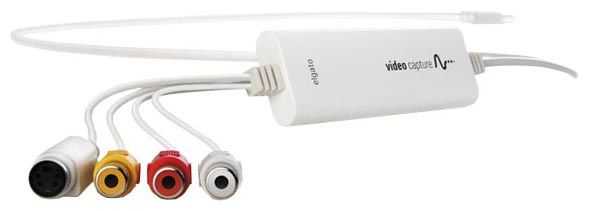
внешнее
устройство видеозахвата
USB
Mac OS X 10.5.6 Leopard
Макс. поддерживаемое разрешение: 640х480
вход S-Video / вход аудио / вход видео композитный
394 отзывов пользователей о Elgato Video Capture
Пользовались
Elgato Video Capture?
Поделитесь своим опытом и помогите другим сделать правильный выбор

ОмниКод-1DLKO
02.04.2012
8/10
Оценка пользователя
Хорошо
My apologies for this long review. Hopefully, though, it will be useful to someone.I've spent some time the past 2 weeks comparing competing products for transferring home videos into digital format on my Windows 7 PC for long-term preservation and so that I can edit the videos on my PC. I tried or considered three different products including this Elgato Video Capture, and one high-end video transfer company, all on the same Hi8 analog video cassette with a family video that is 15 years old. Along the way, I have gotten some familiarity with the various technologies available today for transferring magnetic tapes into digital form. I found out some interesting things, and thought I would share them, in the hope that it might help others.First, and you probably already know this, if you have any video memories on magnetic video tape, you want to get them transferred into digital form onto your PC or DVD or Blu-ray as soon as possible, before the video badly deteriorates. This especially includes regular VHS tapes, Video8 tapes, and normal Hi8 tapes, all of which are analog formats and are particularly susceptible to deterioration starting after about 10 years. Somewhat less susceptible to deterioration are Digital8 (which is also recorded on Hi8 tapes) and MiniDV tapes, because those are digital formats. But even for digital tapes, it is still magnetic tape which deteriorates over time, and you need to get those videos off of there. Seriously, at the risk of sounding like a doomsayer, if you have precious memories on magnetic video tape, you need to transfer that video off of those tapes and into digital form as soon as possible, or risk losing them forever. It's not hard to do, and you'll sleep better at night when you get it done!In my case, I have a bunch of precious Hi8 family video tapes recorded on a high-end Sony consumer camcorder between 10 and 19 years ago, and I am rescuing these Hi8 videos a little on the late side. I wish I had started this project 5 years ago instead. These tapes are still watchable, but they have developed some lines and drop-outs and "hiccups" and digital artifacts. With multiple playback retries, I can fortunately still coax out fairly high quality from these tapes.A quick note: Digital8 and MiniDV video tape camcorders have USB ports on them for digitally transferring your videos to your PC or Mac. If this is your situation, there is NO need to purchase one of these video transfer products (like Elgato Video Capture). You will get the best quality, by far, by using a USB cable to connect your camcorder to your PC or Mac, playing back your video in the camcorder, and using any of a whole bunch of different inexpensive software products on the market that will allow you to capture video from the USB port on your computer. This way, you are getting the digital video in its original form, which is great. You will get worse quality if you use a video transfer product that captures the video off of the video ports on the camcorder, because the camcorder is converting the digital video into analog, then the video transfer product converts the analog back to digital (not ideal, for sure).So, for the rest of this review, I will assume you have analog magnetic video tape (like VHS, Video8, or normal Hi8), in which case you need a video transfer product like this Elgato Video Capture or something similar.A note about video resolution: The analog video tape formats (VHS, Video8, and normal Hi8) all have native video resolutions less than 640x480. All of the video transfer products on the market record the video from these formats at either 640x480 or 720x480. It doesn't really matter which of these two resolutions the product records at. The point is, all of the video transfer products record at higher resolution than the original video, so you are capturing all of the resolution of the original video when you do the video transfer, which is good.A note about overscan lines at the bottom of captured video: As documented all over the Internet, when capturing digital video from an analog video source like an analog magnetic video tape, you will end up with some additional fuzzy lines at the bottom of the captured video. This is totally normal. When played back on a regular TV, these overscan lines are usually chopped off because they appear "below the bottom of the screen," but the digital capture grabs them. To get rid of those lines, you can crop or zoom in slightly when you do your video editing. Interestingly, this Elgato Video Capture device automatically does a minor zoom on all captured video to remove those fuzzy lines.A remark about video editing: Two of the products below (Elgato and Hauppauge) produce video files that use H.264 compression. This is an excellent video compression standard for viewing, and is supported by just about all video editing software. However, if you are going to do significant video editing, you may want to use some video conv
Гравитон-0YGLP
04.02.2013
10/10
Оценка пользователя
Великолепно
WOW! I have, as I'm sure many of you have had, all these old family videos or just funny things you have recorded off of TV or whatever your case may be. So I had this bright idea to look up such a product to convert my old VHS tapes to digital versions on my Mac and/or PC. My VHS tapes are obviously old and take up lots of space and are getting to the point where I'm afraid this old VHS player will eat the tape and my memories will be gone forever! So I came across this product.First I'd like to say that I kept reading reviews on it as well as a few other products and people would say how easy it was. "My mom could use this", "anyone can use this", "easy as 1, 2, 3" and more similar sayings. Well I had my doubts as I'm sure you've read that before then had a major let down and an epic fail on the product. Well let me clear things up, THIS product is so easy to use! It's unbelievable! I literally opened the packaging, pulled the cd out, inserted it into my MacBook Pro, the installer openned. It instructed me to grab the icon and drag it to my "Applications" folder, then it installed. The next thing was to connect the USB device. After that it walked me through, connecting the audio and video to the VCR or DVR. Simple enough right? Then it says "start recording" then when you're through, press "stop recording" from there it lets you edit the beginning and the end of your clip.After you "Trim" your clip the applications gives you a few options, upload to youtube, edit in iMovie, and a few others I can't recall. You can simply click on the file path click the file name and it brings a new folder window open so you can move the file to your desired location. Then the thing that I love the most, is that in iMovie it's so simple to edit your clips. You can (from the original VHS rip) just rip the full tape then edit it in iMovie, OR you can "start" and "stop" recording and edit as you go with the clips. If you do this option make sure that you pause your VCR because the tape will continute to play even after you say "stop recording" on your computer, which is fine of course.After you edit your videos either in iMovie or in the Video Capture Device application itself. You can directly upload to YouTube, Facebook, sync with your Apple iPhone, iPod, iPad, Apple TV, and the Windows editings applications. (I use my Mac so I haven't used it on a PC yet.) It's so simple to use and so practical. Like my title says, it's the best $90 i've ever spent! For $90 you can save all of your home videos and family videos of you as a kid or of your kids or your old family or whatever! It's the coolest thing I've purchased in a long time and the most practical by far. Whoever invented this product deserves some huge award!The ONLY negative thing I can say about this product is this. When you are watching your VHS tape in the Video Capture Device software application, it shows you what you are recording as it's playing of course. So with that said you have to sit there and watch the tape to know when you want to stop. Unless you want to just edit it later in iMovie. But that's not the negative, the negative is when you try and fast forward or rewind your VCR, the computer will show it fast forwarding but after about 10 seconds tape time. The screen will show "no signal" I guess because the tape is moving so fast or something, I don't know. So with that said if you are unaware of what is on your VHS tape, you should watch it on the VCR first and take notes or fast forward throught he tape skimming for the part you want to record, then start from there. Not the biggest deal in the world I know and given all the Pro's of this product, it's one Con is NOT enough to burst my bubble.I hope this review helps you and I promise, if you purchase this product you will NOT be disapointed, I can't stop talking about how great it is!Sincerely,Philip
Небулоид-9MWKS
09.11.2011
10/10
Оценка пользователя
Великолепно
I just bought the Elgato Video Capture and I absolutely love it. It's dead simple and does exactly what I want.In the box:- Elgato Video Capture hardware- Elgato Video Capture software CD-ROM (for Mac 10.5.8+ and Windows 7)- Cyberlink PowerDirector 8 CD-ROM- Proof of purchase key (on the Video Capture software CD envelope, which I never had to type in anywhere for some reason)- Composite-to-SCART adaptor- Composite video/RCA stereo cable (which is only three feet long, so you may want to invest in a longer cord)Something to keep in mind if you're going to purchase this used like I did, the one I bought came with everything but the Cyberlink PowerDirector 8 CD and the composite to SCART adaptor, so I can't comment on either of those items. But I believe if you have iMovie or Windows Movie Maker, you probably won't need the PowerDirector program. Also, although I don't intend to install this on Windows (especially considering my laptop is running Vista, not 7), I'm very happy that this device works on both Mac and Windows.Setup (I'm using an Intel iMac, running Leopard 10.5.8 with 4GB RAM):Setup was quick and painless: connect the composite cables into the back of the device you want to record from (in my case, the TV 1 area on the back of my DVR). Connect the other ends into the Elgato capture hardware and then plug the USB into a USB port on your computer. Then install the application by putting the CD in and then dragging the app icon into the /Applications folder. Boom, done.The Software:The app itself is very straightforward and I haven't had any issues with it crashing or hanging. The app is in a setup format:Screen 1: Naming the video file and choosing how long the recording will be. The time length option is only for letting you know how many MB the final file will be, rather than a time restriction.Screen 2: Selecting the video input and aspect ratio. Here, you can select if the video input is S-Video or Composite and if the aspect ratio is 4:3 or 16:9. Personally, I would play around with the aspect ratio to get the best looking picture. For instance, even though my TV is a widescreen, I chose 4:3 in the app and adjusted my TV to stretch 4:3 (non-HD) video across the screen (making it 16:9) and that was the best choice for video quality (in my opinion). I used 16:9 in the app to record a 16:9 (HD) video. It really depends, so I would suggest doing a couple of tests with different settings to see what will give you the best video quality.Screen 3: Audio check. Nothing to do here except make sure you have sound.Screen 4: Recording. There are two checkboxes for automatically stopping the recording after 10 minutes and muting the sound (not of the recording but of the playback over your computer speakers) and a large red record button. There is next to no lag time when you press the record button. Also, there's a timer at the bottom of the screen that shows how long you've been recording, as well as how large the file is becoming (which is very helpful to know). A 30 second clip is about 6mb, so make sure you have plenty of space on your hardrive.Screen 5: Viewing and trimming the video. If you recorded too much, you can trim the beginning and end (no ability to trim video from the middle). You don't have to utilize this feature if you plan on editing in iMovie later but it's very helpful if you just want to trim, export and go.Screen 6: Once you make it to this page, the video will export to the location of your choice (which you can choose in the Preferences pane). This screen lists where the file was saved, as well as giving you options to play the video in Quicktime Player, add to iTunes, edit with iMovie and upload to Youtube (the app stays open if you choose any of the options). At the bottom are two buttons to exit the app or begin the process again.The Preferences are also short and sweet:Tab 1: Choose where the videos will be saved, which format the video will be (Automatic, MPEG-4 or H.264) and a checkbox for checking for updates automatically [haven't had any updates (and I probably won't since I'm on Leopard) but I feel better knowing that updates will come in the app rather than requiring me to go searching all over].Tab 2: Video adjustments (Brightness, Contrast, Saturation and Hue controlled by percentage sliders, which you can adjust while watching the video, before recording)Tab 3: Audio adjustments (Volume)Video and Audio Quality:Here are some screencaps showing the video quality:Screencap of a 4:3 recording (originally 4:3 video stretched to 16:9 on the TV): [...]Screencap of a 4:3 recording (originally 4:3 video kept at 4:3 on the TV): [...]Screencap of a 16:9 recording (originally 16:9 video kept at 16:9 on the TV): [...]I was worried the video quality wouldn't be very good, based on some of the reviews, but I'm very happy with it. It's not HD quality but I didn't expect it to be (you're using composite cables... can't get much better than 480i). It's slightly fuzzy but otherwise, v
Спектр-3WBTP
02.11.2011
2/10
Оценка пользователя
Ужасно
Maybe this product works flawlessly on a Mac, but it doesn't on a pretty new PC (and the manufacturer's packaging and website says it works on PCs). I sure wish I had made a point of reading all the 1 star reviews for this product before I purchased it, because there are consistent themes: poor audio quality, dropping picture frames, and what I've personally experienced, problems with the device working/software recognizing the device is plugged in to the USB port, and lousy customer service. Lesson learned.This product is advertised as having an easy installation. You connect the device to a video source, plug it into a 2.0 USB port on your computer, install the drivers and software via the included CD, and then go. If it had actually worked, it would indeed be easy. My computer isn't even a year old, it has the 2.0 USB ports, I have the necessary software and hardware, and I got the error message "Please connect the Elgato Video Capture" device to a 2.0 USB port, even though it was already connected.So I tried a couple of things on my own. I went to the Elgato website and re-downloaded the drivers and software in case there was any difference (since it appeared to download several additional drivers, it looks like the CD may have been out of date). I unplugged the device and tried it in all 6 of the USB ports. Still didn't work. Rebooted the computer several times. No difference. So I decided to contact technical support.Let me first say, this isn't easy. I suspect Elgato doesn't want to talk to you because they make it just about as difficult as possible to contact them as they can. If you click on support from the product page, it just keeps taking you in an endless loop, without giving you any mechanism to contact them. You have to click on the "Support" link in the footer to get anywhere. And even then you have to "submit a ticket" a click the box saying you want to talk to a phone representative to get the toll free number. So I did that. After giving the CSR all my contact information, explaining very briefly what I had done and what the problem was, he asked if I had another computer to test the product on (I don't) so he said sounds like you have a dead device. So I requested a replacement from Amazon and was prepared to try again.Got the new device and got exactly the same results. The first device wasn't damaged at all, the problem lies elsewhere (or Elgato has a substantially high defective rate). So I called back yesterday at around 3pm PST. The CSR pulled up my previous ticket, I told him what new had happened, and he informed me that the problem was above his level, and that he would have to pass the problem up to the technicians above him. Problem was, they had all left for the day. It was 3pm PST, and the help line is supposedly available until 8pm PST, so five hours before the end of support hours, there was no effective help for anyone who called in. He would have to submit a support ticket and have someone call me back the next day (today).So no one called. I waited until 1pm PST to call them, but didn't want to wait too long in case they were gone early again. The CSR I talked to had me re-install the drivers and software from the website (he basically admitted that what's on the CD may well be out of date, that it may contain third party software that they no longer use. In that case, why are they shipping out product with CDs that contain the wrong software?), had me uninstall the software and reinstall it again, had me check to see if the device was showing up on my computer in my list of "devices and printers", and that there were no exclamation marks next to the drivers installed (showing some deficiency) and then declared that that was the limit of his skill set, he would have to submit a report up the technical chain and that I would "receive an email" in 24 hours. I told him that had already been done yesterday, it was almost 24 hours as it was, and all I was going to get was an email? No phone call? No one to talk me through this and figure out the problem? He told me an email was all he could offer me.The technical support is difficult to get, substandard and unacceptable. Every other manufacturer I've ever dealt with gave the toll free phone option up front, easily accessible. The good ones actually include the technical support contact information on, or inside the product, you don't have to hunt on their website to find contact information. The first CSR incorrectly pronounced the first device dead based on 60 seconds of information, the second and third I spoke with by their own admission had limited skill sets and couldn't do much. The people who supposedly can and will know more, won't respond to me until 1 - 3 days after the support ticket is filed, and even then, only by email, they aren't willing to get on the phone and actually speak with me and try to help me get the situation resolved. I've never had a technical support departm
НаноРейдер-3XVMK
10.07.2012
10/10
Оценка пользователя
Великолепно
Like most people who're older than 20, I have a stack of older videotapes of various family events gathering dust on a shelf somewhere in my house. These videos may be dusty because they're not the kind of thing I'd want to watch often, or even regularly. But they DO represent valuable family history that can't be replaced if lost or destroyed, and although they're not something I'd watch often, I want to preserve them. But the truth is that analog video tape degrades over time. Oxide particles become brittle and chip off the tape surface, resulting in degraded picture and sound, and eventually rendering the tape unplayable.What to do? I'd known about such analog-to-digital conversion units for years -- they are not new to the market by any means. But it was something that, in the hustle and bustle of everyday life, I just hadn't gotten around to researching quite yet. However, when my wife sent me a link to a service that puts tapes in digital format for $25 PER HOUR OF TAPE, I figured now was the time to finally get started on this project.I've been using Apple computers since the days of the II+, so the name Elgato was familiar to me already, and after having a look around at some of the other options out there, this was the unit I settled on. Other units either had universally shaky reviews (both professional and user), such as the Roxio Easy VHS to DVD for Mac or they were solutions which cost much more money, designed to be a much sturdier, higher-use product for the a/v professional, not the weekend warrior like me. If that type of unit is really what you want or think you need, there are companies out there who will happily sell you a product that does the same thing as this one, for two to six times the price, such as the Canopus / Grass Valley ADVC-110 Advanced Digital Video Converter - 77010150100. I'm sure you'll get a wonderful piece of pro-grade equipment which will outlive you. ;o)But if what you need and want is a sleek, compact, easy-to-use (and understand) video conversion unit which has very good quality and that inimitable "it just works" Mac-like interface, look no further than this Elgato video capture device. One thing we tend to forget, in this age of 1920 x 1080 and progressive-scan 1080p and retina display resolutions is that NTSC (which is what virtually all broadcast TV and video tapes were until the advent of digital broadcast) is still only 640 x 480. Always has been, always will be: that's the written standard for NTSC. On one of today's high-res monitors, a 640 x 480 window looks rather small and cheap indeed...nevertheless, that's what all of our TVs' resolutions used to be. The point is that you don't NEED an Avid console to render digital video at that resolution; a small and sleek device like the Elgato is plenty to extract the maximum resolution capable out of the format and convert it to digital.And the interface is - as I mentioned - drop-dead simple. It allows you all the basic functionality you'd need, offering you choices about how you want to store the media after conversion (YouTube upload and import-to-iMovie features are standard), and guiding you through the few steps of the process. Seriously, your mom could do this; it's that well-explained. And, at it's current price on Amazon, you could only pay a professional service to do three hours of tape before you exceeded the cost of purchasing the Elgato and doing it yourself, at your own pace -- and having a solution available to do it again, should you ever need or want to. This one's a no-brainer: if you're looking to convert hours and hours of old NTSC video to digital format where it can be safely stored away from the ravages that afflict analog tape, you really can't do better than this unit. All you could do is spend more, and why would you want to do THAT?
Вектрон-9OGPJ
25.03.2013
2/10
Оценка пользователя
Ужасно
I read many of the reviews of the Elgato Video Capture Device, pro and con. I read of some success stories, but many reviews complained about poor documentation and support, as well as out of sync audio. I went ahead and baought it based on the overall positive trend of the reviews. Bad idea. After spending many days tranferring high quality, store bought, lightly played, music instrucation VHS tapes, I gave up. The reviews were right - the audio sync is a major problem, at least on my set up (2 yr old high end Dell, Win 7, Mitsubishi HS-U747 VHS recorder). The audio starts out fine, then gradually lags to a delay of several seconds. This was true on 30 min and 2 hr+ videos. In the few cases where the audio lag did not happen I had to do several transfers before I got one to work. I made no changes to the set up that could have contributed to the successful tranfers. I tried rebooting many, many times and reinstalled the SW 2-3 times from CD and website (these were the same versions anyway). None of this made any difference. I started out every session with a PC reboot and did not run any other programs. I even tried disconnecting from the internet and turning off my security SW.The SW install was problematic and I had to install it several times with PC lock ups along the way. Once I got past that, the transfer process was easy - the only positive I can give to this product. However, I found I was only able to get about 1 of 10 transfers to be acceptable for audio. That is not reliable enough for me so I returned the Elgato and bought a Hauppauge HD PVR. That device has a similar mix of pro/con reviews, so I will review it after using it for a few transfers.This is my first review and this product is so bad I decided to write one. I gave this the lowest possible rating because the Elgato Video Capture Device simply DOES NOT WORK.
НоваГость-7WNRE
26.09.2012
10/10
Оценка пользователя
Великолепно
I have a 2.4 G MacBook and the Elgato video capture allowed me to easily transfer from VHS to DVD some family movies for our kids to (someday) reflect upon. The video capture was easy and, when it came to iMovie and iDVD, I followed the following (see below) kind of rough-hewn instructions and made simple, relatively unedited copies combining several clips from several tapes. The Elgato app software is dragged and dropped in Finder applications and then a double click on the application starts the program prompts. When finished with Elgato's procedure:In iMovie* Make a project and add videos to it in the way You want it* When edited it to Your liking then* Go up to Share Menu and here - Select "Share to Media Browser" and as Large (Not HD or other resolution)(I never use "Share to iDVD" in any version of iMovie at all - as result degrades)* Now close iMovie and* Open iDVD - (If You got a brand new Mac then it doesn't come with iDVD so You must get it in another way)* In the new iDVD Project goto Media Button and here to Movies and now You find it and can import it into Your iDVD project.* When You are done with the layout of this* Press Burn button and insert a New DVD disk WHEN iDVD ASKS FOR IT - NOT Prior to this !These instructions leave a little bit to be desired, but if you work with the applications for a bit, it will all work out. Apparently, iDVD is not present on some newer Mac systems, but my system is from 2008 and is updated to Lion and 750 G HD. 2G RAM and iDVD is resident, application software on my system. You must dedicate some real time and some editing/converting time to complete the tasks, but Elgato offers an option that allows you to set a shut-off time, permitting you to simply leave Elgato grinding away and come back later to initiate the ensuing, editing and publishing steps.The cost of the unit was, for us, about the same as what it would have cost to have a third-party produce DVDs from our VHS tapes. The main advantage to procuring this unit was that we were able to have the final DVDs have only the images that we wanted to capture as we were able to edit out the superfluous, creating an efficient, less monotonous rendition of our family's history. Matter of fact, one part of one of the disks might be entered in Funniest Home Videos. It's pretty bad.
Нейрон-4SCSE
27.02.2013
6/10
Оценка пользователя
Плохо
definitely was easy to set up and get rolling, i was recording within minutes of opening the package. have had a couple recordings error out at the end, but i was actually still able to salvage the recording the 2nd time it happened (the file was still actually there, so i copied it before i "ok'd" the error - hitting okay seems to deletes this interim file). quality cannot be adjusted and is probably equivalent to the primary media that it is being used for (VHS tapes) and okay for smaller screens, but once you hit the big screen it is pretty obvious that you don't have a high-res recording. this is pretty much the same experience you would have if you were playing the original VHS media straight on a big screen, but i didn't realize that it limits your higher-quality original media to these low settings. because of that (and a shake that it seemed to impose to one of my videos that wasn't there when i played it straight to my TV afterwards - though i haven't TOTALLY ruled out that it could somehow be the VCR being fickle), it isn't the total solution that i hoped for. it will probably be perfect for converting all my miniDV recordings from my old video cam, and may be okay for other applications as well, but seeing the quality degradation on an HD recording and the "shakies" stopped my conversion to digital for now - i was hoping to be able to just click and go for everything i have, and don't have a block of time right now to compare quality or see if shakes were a one-time thing or VCR anomaly.don't fear to get this if you are just converting old stuff, will likely make you 100% happy for its ease of use.
Показаны отзывы 1-8 из 394.
Как менялась цена на Elgato Video Capture
Характеристики Elgato Video Capture
Информация о характеристиках носит справочный характер.
Перед покупкой уточняйте характеристики и комплектацию товара у продавца




Wizemart © 2026.
Рекомендательная система по умному выбору товаров по отзывам и рейтингам
