

Компьютерный корпус Antec Solo II — подробный обзор, плюсы и минусы на основе 13 отзывов
7.7/10
Хорошо


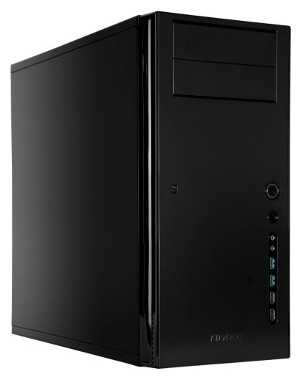
ATX / Micro-ATX / Mini-ITX
Midi-Tower
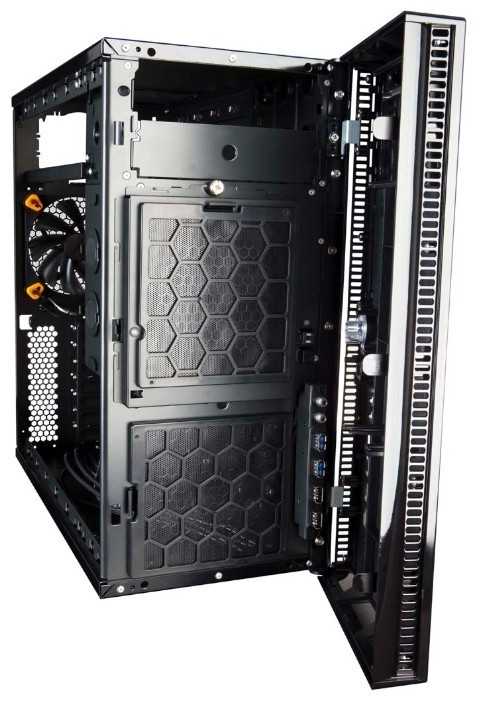
Количество интерфейсов USB на лицевой панели: 3
Количество интерфейсов USB 3.0 на лицевой панели: 2
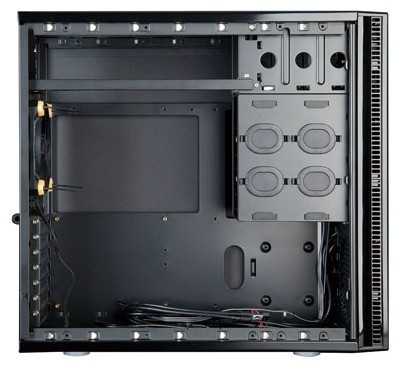
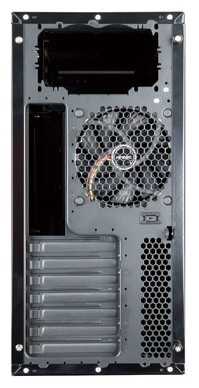
Количество слотов расширения: 7
горизонтальное расположение
сталь
Сравните Antec Solo II с другой моделью
13 отзывов пользователей о Antec Solo II
Пользовались
Antec Solo II?
Поделитесь своим опытом и помогите другим сделать правильный выбор

Сатурниан-6RRYL
23.07.2012
10/10
Оценка пользователя
Великолепно
- + Бескомпромиссный конкурент корпуса Fractal Design Define R3. Толстая двухслойная сталь. Корзины для жестких дисков расположены прямо, а не боком, что дает значительно лучший обдув при менее низких оборотах вентилятора. Все сделано для максимальной тишины и отсутствия вибраций. Звукопоглощающее покрытие боковых стенок. Жесткие диски (до 3 штук) могут крепиться через силиконовые...
ОмниКод-9YIOR
07.03.2013
10/10
Оценка пользователя
Великолепно
I read here and there where people say a computer case isn't that important other than cosmetics. This is far from the truth. The case is what holds all that expensive hardware together. Aside from features that may determine how easily it is to add/remove internal devices, what type of external ports and where they're located, a good case can mean the difference of overheated hardware or damage due to flexing, which is a real possibility with a cheesy case. Just think about every time a case is moved: If it's flimsy, the motherboard, graphics card, etc. could be getting tweaked in the process. If you have invested a lot in computer components, protect them by not buying a $25 case and get a great one like this Antec Sonata Series SOLO II.I bought an Antec case over ten years ago and my server resides in it today. The thing weighs about 25 lbs. completely empty. To indicate just how old it is, it is beige in color. When is the last time you bought beige computer components? Well, this new Antec SOLO II is also very solid. Just one of the side panels I'd wager weighs as much as some entire cheap towers. This helps reduce vibration and noise. My computers run 24/7 in my bedroom so I can't have systems that sound like a Hoover. The addition of a new Samsung 500GB SSD certainly helps as well as the PC Power & Cooling 610-watt Silencer power supply. This is my main/gaming system. I also have the server I mentioned that operates an Apache web server, TeamSpeak 3 server, and a Plex media server. I have a dedicated Home Theater PC in both the bedroom and living room and a Linux system functions as my firewall/router. Yes, I am a computer geek.Another feature I love on this case is the fact there are no damn doors that have to be opened to access my DVD or USB connections. My previous (Ultra) case had this, and though it may seem cool at first, you'll regret it down the road. Now if there were a refrigerator behind that door, I might enjoy that a lot.There are four USB ports on the front panel, neatly arranged vertically and vertically aligned with adequate spacing for even chubby USB devices. Two are USB 2.0 and two are 3.0. There are no Firewire connectors (Thank you, Jesus). The power button is about the size of a U.S. penny and has a blue LED ring around it. The reset button is below this, and while being smaller, is still easy enough to press. I point this out because my Ultra case's reset was so tiny it was difficult to press even with the tip of my pinkie. I'm not going to push a button unless I intend to, so don't make it so accident-resistant.Installation of my hardware was pretty easy except for the CPU heat sink. I installed it after mounting the motherboard because it is fairly large, so getting to the screws was difficult. It would have been easier with a long flexible Allen tool, but I got it with a typical L-shaped wrench. I will post a photo of my case here with notes so you can see the finished result. I am very happy with this case and the system is a beast. I posted a Passmark Performance Test v8.0 overall rating of 5013.8 and Windows Perfomance Index is 7.9 (highest possible) in all areas except CPU, where it hit 7.8. I could probably overclock the i7-2600k a bit more and get that extra tenth, but why bother. My browser and drive windows are open by the time I release the mouse button so that's good enough for me. If you're looking to build a good gaming computer, consider using mine as a template and buy this case. It rocks!My Antec Sonata SOLO II system:This case (of course)ASRock Z77 Extreme 4 motherboardIntel i7-2600k CPU O.C.@4.6 GHzGIGABYTE GV-N680OC-2GD GeForce GTX 680 2GB Graphics16GB GSkill RipjawsX DDR3 2133 MHz RAMSamsung 840 Series Solid State Drive (SSD) 500 GBSeagate Barracuda 750GB SATA 6.0Gb/s 3.5" Internal Hard DrivePlextor PX-L890SA DVD WriterZALMAN CNPS11X Extreme V-Shaped Dual Heatpipe Design w/120mm Long Life Bearing CPU CoolerPC Power and Cooling S61EPS 610W Continuous P/S
НаноРейдер-1HSNO
20.07.2012
8/10
Оценка пользователя
Хорошо
Being in the market for a new system, I was looking for a smaller case to move to from my current Antec P180, while retaining a quiet rig. The Antec SOLO II seemed to be what I was looking for - a smaller case that retained the solid Antec build quality without needless windows and fan cutouts that would weaken the case and make it susceptible to vibration. Of course, the case by itself does not make a quiet system and all the components were carefully chosen for quiet performance. Taken together, my system is effectively silent.Specific comments are as follows:Cable Management. This is not as easy as in other cases since you can't just shove everything between the mobo tray and the side panel and be done. There is very limited depth behind the motherboard tray, so the cable management needs to be done a little more creatively and a modular PSU will be a big help. Having said that, once you rearrange your expectations, there is enough space for cable management (there are a lot of useable nooks) and Antec makes the built in cables (e.g., USB, etc.) black for the most part so they can be run along the bottom of the chasis without being visually obtrusive. If you get really desperate, as long as you have only one optical drive, you can use the second optical drive bay to store cables. For a clean build it helps to have your cables black and sleeved so that they blend with the case.Cheap Black Paint. This may be the case for all black cases (this is the first time I've worked with one) but if you screw something into the case firmly (like the power supply) and then want to readjust, you will find that when the screws are removed, all the black paint is gone and all that is left where the screws were is aluminum. I used a marker so that it's only obvious up close but I would think they would use something that doesn't come off so easily.Wide Optical Drive Bay. I cannot comprehend what Antec were thinking when they designed the optical bays, but they are much wider externally than an optical drive so an optical drive has a 2mm gap on both the left and right sides. It looks like crap.Rubber Mounting Fans. There is no room behind the front fan filters for properly rubber mounting the fans. Essentially, once the fans are rubber mounted, you have to destroy the rubber mounts by cutting off the front nubs in order to properly close the filters (otherwise, while the filters will close, the nubs will push up against the filters and eventually warp them outward at the edges). Normal mounting with metal screws does not exhibit this issue.Poor QC. My case was missing one of the optical drive rails.No Top Fan Filter. The top exhaust port does not include a dust filter. Considering that it is on top of the case, this is simply inexcusable. I purchased a 120mm magnetic dust filter for this intake that fits perfectly on the underside.Built-in Parts. Almost everything is removable. I really appreciated being able to physically remove the LEDs from the case along with their wires and also the back fan with its fan controller. However, the length of the USB3 header cable is way too long - I understand that this was probably done so that someone using a USB3 add in card with an internal header can hook up to the front ports but for a typical build with the header on the motherboard, the cable can be run all the way to the top of the case and then down the case and still have enough slack to connect to a mobo header. The fact that the cable is in essence two cables, makes it really annoying given the limited room for cable management.Drive Suspension. This is really a neat design as it keeps my WD drives from making a peep (other than seeks) but it is *barely* a retention system - you should not move the case at all using the suspension or the drives are likely to slide right on out. You can, however, choose to mount drives traditionally.Solid Build. The case and panels are rigid and definitely help to keep the whole system quiet.Excellent Airflow. I am currently using four slow pwm fans (two front, one CPU and one back) and the case airflow is excellent. Using the comprehensive thermal monitors included in my motherboard reveals that temps are kept very low given the low airflow.Other Thoughts. I don't really understand making a black case and then including silver screws and rivets.Overall, I am pleased with the case but there is room for improvement despite Antec's claims of perfection.
НоваГость-4GSHW
02.01.2012
10/10
Оценка пользователя
Великолепно
This is not a gaming case. It only has two external 5.25", three internal 3.5", and one internal 2.5" slots. This is a case for most people's desktop requirements. This case is perfect for my two hard drivea and two CD/DVD drives.It has a beautiful glossy finish. However, owners will need to buy a silicone gun & reel polishing cloth (available from any sporting goods store) to remove fingerprints. A little more polishing is needed on this case as compared to aluminum ones, but when you are finished the finish is really nice to look at.The side panels have a polycarbonate piece added onto the steel, which makes for a heavier panel, but also makes for a quieter system. Don't drop the side panel onto your foot because you are expecting a light aluminum panel. This is not a light case and the sides do not wiggle.The three internal 3.5" slots employ trays and are very easy to use. You can also use their suspension system to install only two 3.5 drives, but the instructions warn you that they might fall when the case is moved. For me, this makes the suspension system useless. Also, the suspension bands block a good deal of the airflow; if you use the trays, remove the suspension bands entirely. Besides, the trays are so easy to use and have soft rubber mounts to absorb vibrations. The trays slide through the front of the case and detach, allowing you to screw hard drives into the tray while the tray is sitting on your ESD mat. I hate the hard drive cages of other manufacturers which must be completely removed, populated, and then reinstalled.Assuming you are not using the silly suspension system, the orientation of the hard drives, i.e. parallel to the case, makes it easy to install hard drives. You remove the tray through the front, screw the drive into the tray, slide the combo into its slot, and connect SATA wires to the front of the tray.The top of the case has a vent for the power supply. This is great if you are using a fanless PSU, but it is also okay for PSUs with fans. Antec sized the vent to perfectly fit its large PSUs, e.g. their High Current Pro 750 and 850 watt models which are 7.1" long. Anything shorter will allow someone to see inside the case and air will leak into the case there as well. Does this really matter? Probably not, but a little more noise would escape. Also, the vent does not include a true air filter; the vent will not exclude dust, as each hole is the size of the business end of a ballpoint pen.Installing the PSU is a pain because the only under-support is the horizontal bar you see in the photos. You almost need three hands to hold the PSU while screwing it in.The power button is the best possible design because it is a large circle, i.e. easy to press with a human finger.Only one fan is included, on the rear, and it is a TrueQuiet 2-speed 120mm model. Antec should have included a 3-speed TriCool one instead, as the TrueQuiet fans do not move as much air. Two filtered 120mm mounts are included on the front of the case in between the front panel and the hard drive cage, but fans are not included. I highly recommend that buyers immediately add two fans of their choice -- I suggest Noctua or Antec -- because the interior case temperatures will be too high without them. I installed two Noctua 120mm fans running at full speed and the Intel i5 CPU temperature hovers around 30C, the Western Digital 500GB Black drive runs at 27-29C, and the Crucial Ballistix memory runs at 22-23C.Because there is no drive cage on the bottom, you can install some really long graphics cards depending upon your mainboard. And the bottom front fan will have an unobstructed airpath to those cards. The top front fan cools the hard drives.The four bottom pads are made of the same soft rubber as the hard drive mounts. I suspect they absorb more vibrations that the usual hard rubber ones typically found on the bottom of cases.The front of the case is where the fans draw their air, unlike Antec's Sonata cousins which draw air from the side. All air is filtered through two air filters. One thing that is not obvious at all from the photos is that there are actually three front vents, a vertical one on each side and one at the bottom. The bottom vent means that this case should not be mounted on the floor or even just 1-2" above a rug unless you want to clean the filters every week.There are two USB 3.0 jacks, two USB 2.0 jacks, a headphone jack, a microphone jack, a power switch, and a reset switch on the front panel. There is an LED which appears as a blue ring around the power switch; this is well done but a little bright. I do wish Antec had supplied an eSATA jack, however. I am happy they did not include a FireWire jack -- FireWire is so last century -- but you might not agree with me. The two USB 3.0 ports are fed by a 20-pin motherboard header. If your motherboard does not include one of these headers, you can buy an add-on card to provide the 20-pin header.Don't forget to dow
Туманник-3CRKX
08.05.2012
8/10
Оценка пользователя
Хорошо
I bought this on a whim for $58 (108 less 50 immediate discount for signing up for an Amazon/Chase Visa credit card).My previous case was perfectly serviceable, but I wanted something slightly smaller and as quiet as possible. I was not disappointed, although I would not have bought it at the full price.The case now holds these components:Gigabyte GA-H67A-UD3H-B3 motherboardIntel i5-2500 CPU, not overclockedIntel 80 GB solid state driveSamsung 1 TB hard driveWestern Digital 1.5 TB hard drive4 GB Crucial RAMSamsung DVD driveScythe Slipstream 500 rpm intake fan in front, blowing over drives.Included Antec exhaust fan, on low setting (600 rpm)Scythe "Big Shuriken" CPU heatsinkSeasonic KM-560 power supplyNo video cardIt's virtually inaudible from a distance of 4 feet on a desk at eye level.Temperatures at idle in a warm room: CPU 39, motherboard 45; hard drives 35.I originally installed a Scythe Slipstream 800 rpm fan as an intake. This resulted in an audible "whooshing" noise due to slight air turbulence through the full-length intake vents, even though the fan is inaudible by itself. I changed to a 500 rpm Scythe Slipstream and the "whooshing" disappeared, with no negative effect on temperatures.I have mounted my SSD in one of the standard bays rather than in the dedicated lower mount at the bottom of the case. It made for a little better cable management.I've got the Seasonic PSU mounted upside down. Its fan almost never spins (by design), but when it does it takes in air from a vent immediately above the PSU.Overall, it's excellent for my purposes--very quiet, well-constructed, and not flashy. It will even accommodate a long video card if you use one.Here are the only minor issues I found:The drive activity light is a bright blue and may be distracting if in your line of sight. I simply left it unconnected.The fan mounting system on the front side is a bit testy, but would not be an issue unless you are constantly changing fans, which I don't do. It will accept two standard width 120 mm fans.Cable management is pretty good, though it would have been useful to have another 1/2 inch of space between the motherboard and back panel to hide cables.I did not bother with the included elastic mounting system for hard drives. All the reports I read said that they did not reduce noise.The included exhaust fan is quite good and noticeably quieter than previous Antec fans I had sampled. Even at the higher speed, it is very low noise.I have no issues with the power button which has reportedly been reinforced due to complaints on the original Solo case. It takes only a light touch and the system boots in under 30 seconds with the SSD.All in all, I'd recommend it. I don't even know that my PC is on unless I notice the blue glow around the power switch.For reasons I don't understand, case prices in general seem to be noticeably higher than they were 5 years ago. If you have to pay $120 or so, it isn't cheap, but neither are any of its competitors.
Синтрон-1QLBV
02.04.2013
10/10
Оценка пользователя
Великолепно
--- Pros ---* Quiet Baby* Sturdy / Solid* Good room for cables, drives, everything.* Air filters--- Cons ---* The front case doesn't just pop off easily without rigging. Takes a little while to pop side off then front.* Only reason that's a problem is because the filter is there and gets dirty easy. I clean every couple weeks.* Price is a little steep.--- Thoughts ---* I own one, and now two of my friends also own 1 each. Had them for over a year.* Better than the Storm Scout I have in many ways, but no handle.
Плазмоид-1YSMY
10.09.2012
10/10
Оценка пользователя
Великолепно
This is an fine case for building a very quiet PC, but there are a few things to be aware of...The air intakes aren't foam type filters, they are small grilles (not quite what I expected).The upside down PSU with an air intake on the top is a stupid idea. Fortunately there are extra mounting holes so the PSU can be installed right side up, and enough space to insert a plate between the PSU and the intake vent to close it off. There are also a bunch of ventilation holes in the back, another stupid idea since there is no grille/filter covering them. Close those off and the airflow starts working (all the air comes in the front through the grilles and exits out the back through the case fan & PSU). The included case fan inaudible on low and reasonably quiet on high.Other mods needed are to replace the blindingly bright blue power and HDD LEDs (they're standard 5mm LEDs, so it's not too difficult).A case speaker is not included, so you have to add one if you want to hear your MB POST codes.Finally, if you need instructions to build a PC this case will be a problem since the instructions that come with it are useless.
Сириус-3NBMK
09.02.2012
10/10
Оценка пользователя
Великолепно
ProsThe case is very well made. Sure, there is the plastic front cover but it doesn't feel cheap by any means. The case is meant to be built around a silent computer, not a hardcore gaming machine, but you can turn it into one (as i will describe below). Top mounted power supply is a nice touch, given the lack of space behind the motherboard for hiding thick cables. You can easily hide the cables in an unused 5.25" bay.ConsIf you are trying to install front intake fans, you will be disappointed in the amount of air that can be pushed through with the front cover on. I bought some cougar fans that are rated at 70 cfm, and they could barely blow any air through, even after I took off the front filters to!OtherWhile I listed it as a con that the front intake fans are "starved for air", there is a remedy if you are willing to tinker. I am actually using this in a desk that has a CPU holder on the inside. So, I can only see the front of it. If you notice, there are grooves to allow cold air to enter the tower and they also serve as intakes for the front fans. What you can do to allow more airflow is to take off the front plastic cover, and remove the screws located on the outside edge. This will allow you to remove those plastic pieces. Once you un-snap them, and turn the fans on...the difference is HUGE! Now, it doesn't look great when looking at it from the side, but it definitely works.To people who think the power button is too "flimsy": The power button is connected by a stretchy rubber piece to minimize noise. It feels sturdy and should not cause a problem.
Показаны отзывы 1-8 из 13.
Характеристики Antec Solo II
Информация о характеристиках носит справочный характер.
Перед покупкой уточняйте характеристики и комплектацию товара у продавца



Wizemart © 2026.
Рекомендательная система по умному выбору товаров по отзывам и рейтингам
