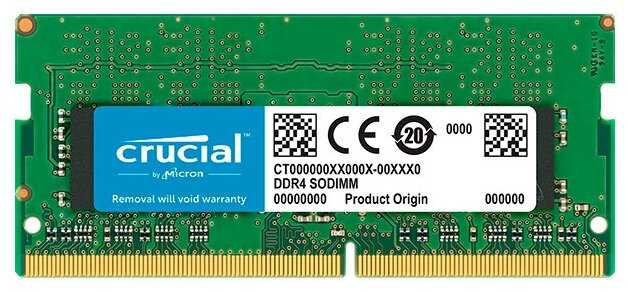
Отзывы о Оперативная память Synology 4 ГБ DDR4 2666 МГц SODIMM CL17 D4NESO-2666-4G
Плюсы по отзывам пользователей - Почему стоит купить Synology 4 ГБ DDR4 2666 МГц SODIMM CL17 D4NESO-2666-4G?:
- Отличная совместимость с NAS Synology:
- Корректно определяется в DS220, четко подходит к DS718 и расширяет возможности DS720.
- Соответствует требованиям официального сайта Synology.
Минусы по отзывам пользователей:
- Значительно завышенная цена:
- Очень дорого по сравнению с аналогами других производителей.
- Цена — основной недостаток, упоминается множеством пользователей.
- Стоимость завышена, не оправдана для многих.
- Наличие дешевых совместимых альтернатив:
- Можно установить аналоги от других производителей гораздо дешевле.
- Неоригинал работает, но может повлиять на гарантию (нужно вынимать перед сервисом).
- Редкие случаи брака:
- В одном случае в DS220: постоянные ошибки контрольных сумм, зависания, полный отказ работы NAS.
- Мучения несколько месяцев до понимания проблемы, пришлось вынуть.
73 отзывов пользователей o Synology 4 ГБ DDR4 2666 МГц SODIMM CL17 D4NESO-2666-4G
Пользовались
Synology 4 ГБ DDR4 2666 МГц SODIMM CL17 D4NES?
Поделитесь своим опытом и помогите другим сделать правильный выбор
Grabbed this for my DS918+ unit to increase my RAM pool from 4GB to 8GB. It is easy to install as long as you follow the directions. It could still be easier though, pulling out all the drives before installing feels a bit like a chore. Synology RAM is way expensive than your regular RAMs, you can still get a third party RAM (only some specific brands and models) and install that one but it would void your warranty. It is a convenience issue.
So, even though I don't like having to pay this amount of money to a 4GB RAM, overall I had a good experience with this product.
This is the expansion RAM recommended by Synology for their NAS DS218+. It is slightly more expensive (but not by much) than RAM products by other manufacturers. However, should something go wrong with the NAS device the warranty could be void using other RAM. Not worth the risk for a couple of $$$ more. Easy to install.
Die Artikelüberschrift und -beschreibung macht einen glauben, dass es sich um Original-Synology RAM handelt. Das ist aber nicht der Fall. Es handelt sich um Drittherstellerware.
Wer also Original-Ware von Synology möchte, sollte diesen Artikel nicht bestellen.
Aus meiner Sicht: Klare Kundentäuschung!
Wer also Original-Ware von Synology möchte, sollte diesen Artikel nicht bestellen.
Aus meiner Sicht: Klare Kundentäuschung!
Hier bin ich auch reingefallen. Habe mir den Speicher geholt um den Arbeitsspeicher meiner Synologybox zu erweiter. Hier wollte ich ein Original Produkt haben. Nach der Beschreibung und nach dem Bild zufolge, bekommt man hier ein Original Produkt von Synology. April, April. Ausgepackt und da kommt ein Speicher von MEMORY SOLUTION D3NS1866L-4G raus. Achtung Kundenverarsche.
This product was purchased for my Synology NAS DS218+. The default unit comes with 2GB memory only. So i added this 4GB memory. Product worked as intended. Easy to install. Quickly delivered (Within 2 days - non-prime member). The only reason i gave 4 stars is due to its overpricing. There are other 3rd party memory (1600MHz) which are 1/3rd of this price.
100% meet expectations
Start operating, right away.
One more time confirmation, u get what u pay for...
Start operating, right away.
One more time confirmation, u get what u pay for...
Synology recomienda esta memoria para sus servidores NAS para asegurar la compatibilidad y confiabilidad.
Installed this in my Synology DS918+, no configuring required, just plug and play.
Great to buffer 4k movies off server
Es una necesidad para el servidor Synology para que sea más versátil.
El search indexer de mi DS218+ lo trababa.
Desde que añadi esta RAM, ya no tengo problemas.
The price was right and the delivery was fantastic. I received what I purchased and the quality is great. Keep it up. Ross
Pour un Synology DS718+
Un seul regret: la compagnie n'a pas prévu plus que 2+4 Go
Mémoire pour ds918+ Très bien
Great memory just expensive!! Works great with my synology NAS!!
Excellent.
I admit, I was very hesitant buying this RAM because it's grossly overpriced. The only reason I did such is because I run a Synology NAS which is both my home/business NAS and this is the only RAM module that is officially supported. I didn't want any excuses from Synology if my NAS tanks, and I didn't want to take any chances because apparently some RAM modules will cause issues. Typically people buy Crucial RAM which seems to work well for this NAS with little to no issues, but I wanted to keep everything official.
I'm running a DS218+ and installation was incredibly simple. I just had to shut down the NAS, pull out my drives to access the expansion slot, push in the module, lock it down, put my drives back in (make sure you put them back in the same drive bays they came out of), boot it back up and the RAM was recognized.
Make sure you need to upgrade the RAM before doing such. If you're using your Synology as basic network storage then you probably don't need to upgrade. In my case I'm using it for network storage, source control, a media server, and more, so I was capping out on my RAM frequently. Post-installation I did notice quite a bit more breathing room which is nice.
People seem to have great success with Crucial RAM so if you're running a personal NAS then I'd definitely go that route. If it's for business then maybe consider going with officially supported RAM but also you'll probably be just fine with something like Crucial. I happen to be hyper-paranoid so I went official. It's about 3X the cost and honestly it's not really worth the added cost, but at least there's a slight peace of mind knowing the RAM I'm using is official, but that peace of mind comes at a ridiculous cost so for most people it's probably not really worth it.
I'm running a DS218+ and installation was incredibly simple. I just had to shut down the NAS, pull out my drives to access the expansion slot, push in the module, lock it down, put my drives back in (make sure you put them back in the same drive bays they came out of), boot it back up and the RAM was recognized.
Make sure you need to upgrade the RAM before doing such. If you're using your Synology as basic network storage then you probably don't need to upgrade. In my case I'm using it for network storage, source control, a media server, and more, so I was capping out on my RAM frequently. Post-installation I did notice quite a bit more breathing room which is nice.
People seem to have great success with Crucial RAM so if you're running a personal NAS then I'd definitely go that route. If it's for business then maybe consider going with officially supported RAM but also you'll probably be just fine with something like Crucial. I happen to be hyper-paranoid so I went official. It's about 3X the cost and honestly it's not really worth the added cost, but at least there's a slight peace of mind knowing the RAM I'm using is official, but that peace of mind comes at a ridiculous cost so for most people it's probably not really worth it.
Almost from the get-go, my Synology DS918+ was flaky, often locking up for no apparent reason. It finally got to the point where the storage pool crashed and no volumes were accessible. I opened up a support ticket and they requested I run several memory tests, each of which took a few hours. Finally, after a few anxious days, a support tech was able to SSH into the NAS and rebuild the array, thus saving all my data. The specific reason for the crash - the RAID superblock on all 4 disks was corrupt, most likely caused by the NAS getting locked and having to hard cycle it many times.
The culprit? Non-Synology RAM. Trying to save a few bucks, I had purchased two Crucial 8GB SODIMM modules for use in the NAS. The memory tests revealed tons of memory-related issues. After replacing the two non-OEM RAM modules with the single one that came with the unit and rerunning the memory test three times, no errors were found.
So, lesson learned. Is this Synology memory expensive? Yes. But, you get what you pay for. My trying to save a few bucks cost me several days of anxiety and several hours running memory tests and sitting in on the SSH session which LUCKILY restored my data.
Also, the use of non-Synology RAM modules is NOT supported. The Synology tech was nice enough to help me out despite that. And, you void the NAS warranty if non-Synology RAM causes damage to the NAS motherboard, RAM slots, etc.
The culprit? Non-Synology RAM. Trying to save a few bucks, I had purchased two Crucial 8GB SODIMM modules for use in the NAS. The memory tests revealed tons of memory-related issues. After replacing the two non-OEM RAM modules with the single one that came with the unit and rerunning the memory test three times, no errors were found.
So, lesson learned. Is this Synology memory expensive? Yes. But, you get what you pay for. My trying to save a few bucks cost me several days of anxiety and several hours running memory tests and sitting in on the SSH session which LUCKILY restored my data.
Also, the use of non-Synology RAM modules is NOT supported. The Synology tech was nice enough to help me out despite that. And, you void the NAS warranty if non-Synology RAM causes damage to the NAS motherboard, RAM slots, etc.
Works fine for my DS918+ NAS drive, however not enough to allow Plex to stream even one movie to a TV. I was hoping for more but clearly I wasn't having a memory issue.
First of all, not the best price for 4GB RAM module, but that's what you get with manufacturer's part. On the flip side, both of the RAM modules are identical in my DS918+ and warranty is not voided. NAS recognized the additional 4GB immediately. Great purchase!
I recently purchased a Synology DS918+ to replace my 5 year old Synology which was starting to show its age. One of the things that really interested me about the DS918+ was the ability to use Docker and Virtual Machines. The DS918+ only comes with 4GB of RAM installed which limits the possibilities with Docker and Virtual Machines.
Initially I purchased a Crucial 16GB (2 x 8GB) DDR3L kit to upgrade the DS918+ (following several guides online) but within a few hours the NAS shutdown and restarted unexpectedly and rebooted itself again a few hours later. Unfortunately 3rd party memory kits are not supported at all by Synology and they only recommend 8GB (2 x 4GB) of their RAM on the DS918+. Random reboots risk losing data so I gave up and put the original RAM back in.
I decided to bite the bullet and buy the additional 4G of Synology D3NS1866L-4G RAM. The RAM is very well presented and not only comes in the regular plastic shell but also a Synology branded box. I installed the module alongside the original in my DS918+ a few days back and it's been running perfectly since (no random shutdowns etc.). Unfortunately you are paying a massive premium for this RAM and the single 4GB stick is nearly as much as a 16GB Crucial kit but it works perfectly and Synology will honour the waranty etc.
Pros:
- Works perfectly in DS918+
- Easy to fit
- Well presented
Cons:
- Really expensive
Initially I purchased a Crucial 16GB (2 x 8GB) DDR3L kit to upgrade the DS918+ (following several guides online) but within a few hours the NAS shutdown and restarted unexpectedly and rebooted itself again a few hours later. Unfortunately 3rd party memory kits are not supported at all by Synology and they only recommend 8GB (2 x 4GB) of their RAM on the DS918+. Random reboots risk losing data so I gave up and put the original RAM back in.
I decided to bite the bullet and buy the additional 4G of Synology D3NS1866L-4G RAM. The RAM is very well presented and not only comes in the regular plastic shell but also a Synology branded box. I installed the module alongside the original in my DS918+ a few days back and it's been running perfectly since (no random shutdowns etc.). Unfortunately you are paying a massive premium for this RAM and the single 4GB stick is nearly as much as a 16GB Crucial kit but it works perfectly and Synology will honour the waranty etc.
Pros:
- Works perfectly in DS918+
- Easy to fit
- Well presented
Cons:
- Really expensive
I recently purchased a Synology DS718+ NAS to replace my older Synology NAS and bought this very expensive 4GB RAM, also from Synology on the assumption the warranty for the NAS would be affected otherwise. All I can say is that either the RAM chip or the socket was constructed out of tolerance as it very difficult to insert one into the other. After several attempts the NAS recognized the additional memory but I am fearful that the module will eventually spring out at a time of its choosing. My advice: don't worry about about the warranty and buy the RAM from Crucial at less than half the price.
Please do not use any OTHER ram for your Synology,
I made that mistake and paid for it!
When they tell you 8GB of ram is the Max,
It’s true!
I put 16 GB of a different manufacturer in and had nothing but trouble,
None of the packages would work correctly
Docker would not run, constant ram leak which would then freeze up the NAS and only a hard reset could sort it.
Took me a month of playing with settings assuming it was a software setting problem before I put the original ram stick back in and everything works like a charm!
I made that mistake and paid for it!
When they tell you 8GB of ram is the Max,
It’s true!
I put 16 GB of a different manufacturer in and had nothing but trouble,
None of the packages would work correctly
Docker would not run, constant ram leak which would then freeze up the NAS and only a hard reset could sort it.
Took me a month of playing with settings assuming it was a software setting problem before I put the original ram stick back in and everything works like a charm!
My DS218+ got a real shot in the arm from going from 2GB to 6GB, the NAS is a good bit more responsive, in fact, I wish I got the extra RAM fitted when I got the NAS in 2018.
There is a downside, this is very expensive for 4GB of RAM, also I cannot see how these are made for each other! The RAM module has to be balanced in the slot and held by friction, as there is no way it clips into the side slots, as I would expect laptop RAM to be fitted. Time will tell if they work together well over the long-term.
Показаны отзывы 1-24 из 73.
График изменения цены Synology 4 ГБ DDR4 2666 МГц SODIMM CL17 D4NESO-2666-4G
Характеристи Synology 4 ГБ DDR4 2666 МГц SODIMM CL17 D4NESO-2666-4G
Информация о характеристиках носит справочный характер.
Перед покупкой уточняйте характеристики и комплектацию товара у продавца