

МФУ лазерное HP LaserJet 3030, ч/б, A4 — 10 отзывов, плюсы и минусы
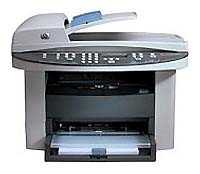
Рейтинг:

 Плохо
Плохо
Плохо
Средняя цена в магазинах 34 945 ₽
Краткие характеристики:
- МФУ/факс
- A4
- печать лазерная ч/б
- 14 стр/мин ч/б
- Post Script
- 32 Мб
- USB
- LPT
- ЖК-панель
10 отзывов пользователей о HP LaserJet 3030, ч/б, A4
Пользовались
HP LaserJet 3030, ч/б, A4?
Поделитесь своим опытом и помогите другим сделать правильный выбор

ТехноНаблюдатель-2EWAJ
02.12.2011
4/10
Оценка пользователя
Ужасно
This is a great MFP for Windows XP, but HP stopped supporting this device after that. After a recent upgrade to Windows 7, I have lost all the functionality besides printing. Scanning won't work and new drivers for Windows 7 have not been made available by HP. I recommend getting a different product.
Квантум-2KKAI
11.01.2010
10/10
Оценка пользователя
Великолепно
I've owned this multifunction machine for five years (Dec 2004 to Jan 2010). I've used all the major functionality -- print, scan, copy and fax. I have few, if any complaints about its performance in any of these areas.I selected it above the other "All-in-One" machines on the market for the following reasons:- I wanted the print quality and low per-page cost of a laser printer (i.e., as opposed to an inkjet).- I wanted the flexibility of scanning/copying bulky things like books -- so I wanted a flat-bed for scanning.- I wanted reliability and believe that HP has a good record in that regard.I purchased this unit for about $449 in Dec 2004.I'm so satisfied with this product that I'd happily use it for another five years except ...I recently got a new PC. After verifying on the Windows 7 compatibility site that the 3030 is fully compatible with the 64-bit version of Windows 7, I chose to get the 64-bit version of Windows 7 installed on the new computer. When I plugged the HP 3030 into the new PC, Windows 7 helpfully downloaded -- automatically -- necessary drivers. It started printing fine immediately -- how delightfully simple!But then when I tried to scan, I realized it didn't work. I tried to download new scanning drivers from the HP website for Windows 7 64-bit. All I found there was a "Universal Print Driver". Apparently, the 3030 is not "Fully Compatible" with 64-bit Windows 7! I called HP and they verified that there was currently no scanning drivers available.So I'm sadly replacing this machine with a new one which is allegedly compatible with 64-bit Windows 7: the HP LaserJet M1522nf MFPI hope that this is helpful.
Спектр-8ZGSB
20.08.2010
8/10
Оценка пользователя
Хорошо
HP makes a nice all around unit in the 3030. I have deployed many of them in a business environment over the past few years, and had very few problems. Too many people expect an all in one to do everything well, that is not their purpose in life; instead they are intended to do many things well. The scanning, fax, copy and print functions of this device all work just fine, none are blazingly fast or knock your socks off quality but they are all more than adequate.
Аргонавт-2BXJH
21.10.2010
8/10
Оценка пользователя
Хорошо
This is my second 3030. I purchased this one used, and was initially upset to find the tip tray missing. However, the seller made it up to me by sending out another try right away. It works as well as my last one.
Астрон-2NSBO
20.06.2010
8/10
Оценка пользователя
Хорошо
I have had this machine about 4 years and it works great for us. We use in our home office and use all functions, print, scan, fax. I have 32 bit and 64 bit computers and they both work great with the 3030. My only complaint would be the high ink price around $65.00 per cartiridge but I just ordered a off brand 3 pack for $30.00 and hope I get the same print quality. I love the scan function and use Adobe to create and save documents in color at 600 dpi. Easy to work with.
Небулоид-6PJVJ
18.12.2007
2/10
Оценка пользователя
Ужасно
Ever since I bought this so called all in one I started having nothing but problems. Lousy software that has patches on top of patches, on top of fixes that do not fix a thing.Buy it if you are looking for a copy machine, but if you are looking for a printer or a scanner then you should be looking somewhere else.Don't make the same mistake I did...you are going to regret it.
Сатурниан-9HYCA
24.10.2006
4/10
Оценка пользователя
Ужасно
I had an HP LaserJet 4MP for about a decade before it finally went. I doubt that I will get that kind of service from this machine. I also had a Xerox b&w WorkCenter for copying that went about a year later. same concerns. i got this primarily to replace the copier. With this HP the toner cartridges go in no time. The scanning is slightly askew, and there is some color distortion. Also, the scanner utility is pretty inept. The print drivers do not function properly, preventing my up-to-date Windows XP from going to sleep mode. HP was once a symbol of dependabilty.
Пандорец-4HOTX
26.05.2006
4/10
Оценка пользователя
Ужасно
In many ways I really like this all in one, it's does great copying, printing, scanning in all ways except that it often prints slightly crooked on the paper, off by a small but noticeable amount. HP tried over the phone to help me resolve this with no success. Since I have other printers, I learned to live with this until the machine died recently. HP sent me a refurbished replacement which after about a year of ownership I was happy to do, they charged $34 for a temporary warranty "uplifting", no problem with that. However, I am sorry to report that this refurbished version has the same page misalignment problem as the last one. Yes, I've checked my power supply, use HP paper and toner, etc. This is just an unfortunate and non-trivial defect for this otherwise fine printer.
Показаны отзывы 1-8 из 10.
Как менялась цена на HP LaserJet 3030, ч/б, A4
Характеристики HP LaserJet 3030, ч/б, A4
| Основные характеристики | |
| Тип печати : | лазерный |
| Цветность печати : | черно-белая |
| Максимальный формат : | A4 |
| Размещение : | настольный |
| Функции сканера/копира : | копирование, отправка изображения по e-mail, сканирование |
| Количество страниц в месяц : | 7000 |
| Область применения : | средний офис |
| Принтер | |
| Время выхода первого отпечатка (ч/б) : | 10 c |
| Технология печати : | лазерная |
| Максимальное разрешение по X для ч/б печати : | 600 |
| Максимальное разрешение по Y для ч/б печати : | 600 |
| Скорость ч/б печати (A4) : | 14 стр./мин |
| Копир | |
| Время выхода первой копии : | 10 c |
| Минимальное значение масштаба : | 25 % |
| Максимальное значение масштаба : | 400 % |
| Шаг масштабирования : | 1 % |
| Максимальное количество копий за цикл : | 99 |
| Максимальное разрешение копира по X (ч/б) : | 600 dpi |
| Максимальное разрешение копира по Y (ч/б) : | 600 dpi |
| Скорость ч/б копирования (A4) : | 14 стр./мин |
| Скорость цветного копирования (A4) : | 14 стр./мин |
| Лотки | |
| Подача бумаги (стандартная) : | 210 шт. |
| Вывод бумаги (стандартный) : | 125 шт. |
| Расходные материалы | |
| Печать на различных носителях : | глянцевая бумага, карточки, конверты, матовая бумага, пленка, этикетки |
| Количество картриджей : | есть |
| Минимальная плотность бумаги : | 60 г/м² |
| Максимальная плотность бумаги : | 163 г/м² |
| Память/Процессор | |
| Процессор : | Motorola Coldfire v 4e |
| Частота процессора : | 240 МГц |
| Объем памяти : | 32 МБ |
| Интерфейсы | |
| Интерфейсы : | LPT, USB |
| Прочее | |
| Совместимость с ОС : | Linux, Mac OS, Windows |
| Функции факса/телефона : | PC Fax, факс |
| Дисплей : | ЖК-панель |
| Ширина : | 497 мм |
| Высота : | 378 мм |
| Глубина : | 399 мм |
| Вес : | 12 кг |
| Потребляемая мощность (при работе) : | 220 Вт |
| Поддержка драйверов и протоколов : | PCL 5e, PCL 6, PostScript, PostScript 2, TWAIN |
| Потребляемая мощность (в режиме ожидания) : | 13 Вт |
| Сканер | |
| Максимальный формат оригинала : | A4 |
| Оттенки серого : | 256 |
| Тип устройства автоподачи : | одностороннее |
| Тип сканера : | планшетный/протяжный |
| Разрешение сканера по Х : | 600 dpi |
| Разрешение сканера по Y : | 600 dpi |
| Разрешение сканера по Х (улучшенное) : | 9600 dpi |
| Разрешение сканера по Y (улучшенное) : | 9600 dpi |
| Максимальный размер сканирования по X : | 216 мм |
| Максимальный размер сканирования по Y : | 381 мм |
| Дополнительная информация : | На панели расположены элементы управления факсом, буквенно-цифровые кнопки. Режим экономии тонера. |
Информация о характеристиках носит справочный характер.
Перед покупкой уточняйте характеристики и комплектацию товара у продавца
Альтернативы с более высокой оценкой





















Wizemart © 2026.
Рекомендательная система по умному выбору товаров по отзывам и рейтингам
