

Оперативная память Crucial 32 ГБ DDR4 3200 МГц DIMM CL22 CT32G4DFD832A — 54 отзывов, плюсы и минусы
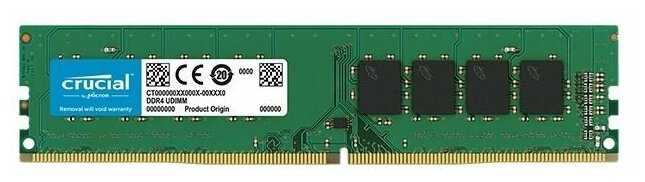


Что пользователи пишут в отзывах: ключевые плюсы и минусы Crucial 32 ГБ DDR4 3200 МГц DIMM CL22 CT32G4DFD832A
*Проценты и ключевые выводы основаны на повторяющихся темах и сценариях, которые чаще всего упоминаются пользователями в отзывах.
👍Почему стоит купить Crucial 32 ГБ DDR4 3200 МГц DIMM CL22 CT32G4DFD832A - Преимущества по отзывам пользователей
- Стабильная работа на номинальной частоте
- Память запускается на 3200 МГц из коробки после активации XMP или минимальных настроек в BIOS.
- Проходит Memtest в несколько проходов без ошибок на профиле 22-22-22-54.
- Работает стабильно в конфигурациях с i5-14600K, i5-11400, i7-7700 и другими.
- Нет синих экранов или сбоев после установки.
- Большой объём одной планкой
- 32 ГБ хватает для игр без фризов, виртуалок на Hyper-V и многозадачности.
- Позволяет апгрейдить ПК постепенно, добавляя планки по одной.
- Обеспечивает запас для большинства задач без необходимости в 64 ГБ сразу.
- Работает в паре с 16 ГБ других фирм без проблем совместимости.
- Высокая совместимость
- Встаёт на материнки Gigabyte Z790, B560, MSI B450, Dell без глюков.
- Автоматически берёт настройки от предыдущей памяти без захода в BIOS.
- Совместима с процессорами Intel от 6-го до 14-го поколения.
- Работает в 4 планках по 32 ГБ на 3400 МГц стабильно.
- Низкий нагрев
- Не сильно греется даже без радиатора при номинальной работе.
- Подходит для корпусов без дополнительного охлаждения.
- Стабильна на 1.2 В без повышения напряжения.
- Надёжность бренда
- Crucial (Micron) хвалят за качество и долговечность, полгода+ без проблем.
- Производство India/Spring 2023, оригинальная упаковка.
- Лучше "честного Китая" по отзывам пользователей.
- Лёгкая установка и настройка
- Определяется шустро, работает как родная.
- Рекомендуют брать парой для dual-channel режима.
- Подходит для офисных ПК и геймерских апгрейдов.
👎О чем стоит задуматься перед покупкой - Недостатки по отзывам пользователей
- Ограниченный разгонный потенциал
- Разброс: одна планка гонится до 3600-3800 МГц на 1.35 В, другая нет даже на 1.35 В.
- Две планки стабильно на 3333 МГц с таймингами 18-20-20-42, выше тайминги растут до 24.
- Не для энтузиастов разгона, базовые тайминги CL22.
- Отсутствие радиатора
- Простой внешний вид без охлаждения, выглядит странно.
- Хотя нагрев низкий, некоторые предпочитают с радиатором.
- Без лишней пластмассы, но не премиум-дизайн.
- Разброс качества планок
- Разный потенциал даже в паре: одна на 3600 МГц на 1.2 В, вторая требует 1.35 В.
- Двухранговые чипы Micron F-die не всегда выжимают максимум.
- Растущая цена
- Хорошая цена была 6500-7700 руб., теперь растёт из-за ухода Micron.
- Не самая дешёвая на рынке сейчас.
- Базовый уровень
- Для тех, кто не гонится, но профессионалам разгона мало.
- На 2400 МГц с старым i7-7700, не топ-производительность.
*Плюсы и минусы, которые пользователи называют чаще всего на основе практического опыта использования.
54 отзывов пользователей о Crucial 32 ГБ DDR4 3200 МГц DIMM CL22 CT32G4DFD832A
Пользовались
Crucial 32 ГБ DDR4 3200 МГц DIMM CL22 CT32G4D?
Поделитесь своим опытом и помогите другим сделать правильный выбор

Скромный эксперт
27.09.2020
Оценка пользователя
Великолепно
HDD is like plain empty space where you keep filling data in FIFO manner.(First In First Out).
SSD on the other hand is like a "mini-computer" in itself. It is not just an empty space to fill. There is hundreds of operations that happens when writing and reading the data. There is a dedicated micro-computer/processor inside an SSD. It has it's own cache, it's own programming etc. So, it is like having a small computer within your computer that allocates space, manages read/write operations. You even have firmware upgrades to your SSD.
That is why just "Price/GB = Value" formula won't work on SSD.
Now, every company has their way of programming their product. There are various types of NAND modes in SSD like SLC, MLC, TLC, eMLC, QLC.. where SLC is most expensive but very durable and suitable for enterprise/business. QLC being cheapest but less durable.
I have both Samsung 860EVO and Crucial MX500. Below is my analysis:
When you compare it Samsung 860EVO, refer the images that I've attached. From the first test,(less memory written for less number of times] it seems Samsung is clear winner.. but hold on...
If you see the next set of images, where more memory is written more number of times, you'll see there is a significant drop in Samsung's performance. This is what I mentioned about internal programming of SSD. Where as you'll see Crucial MX500's speed is almost same in both cases. (Consistency).
Ofcourse, I've also attached HDD performance, clearly it'll show why you should upgrade to SSD from HDD.
So, my conclusion, --> Samsung SSD are suited for smaller amount memory which are written less frequently.
Crucial MX500 --> Suited for steady, long term, non spiking performance.
Even you can go for ADATA SSDs they are reliable but the cheaper ones will be little slower because of QLC type.
FINAL VERDICT:- For a difference of 1000+ Rupees, if you are a home user with normal gaming and storage stuffs, go for Crucial MX500 SSD. It is actually of high quality and serves the purpose very well.
I have been using both Samsung and Crucial and I didn't notice any practical difference when copying, reading, writing, gaming etc on both. They are identical in performance for human perception. Crucial is actually better in some aspects.
What to be aware of?
Package comes with a small square shaped extra metal. It was of no use to me.
The firmware on my SSD was already updated and latest.
You can download Crucial SSD software for authentication, future firmware upgrade etc.
You buy 500GB but only get 465GB usable. Well, this is the case with all memory devices and the 7% loss actually helps for random file operations.
For first time buyers, I hope this was helpful. :-)
Скромный эксперт
27.09.2020
Оценка пользователя
Ужасно
Скромный эксперт
27.09.2020
Оценка пользователя
Хорошо
1. It has more reliability than Samsung 860 evo from data given by companies, though both have 5 years warranty.
2.It is a bit cheaper than Samsung 860 evo.
3. Crucial(Micron) is a reliable company
4. In real world you don't see any difference between MX500 and Samsung 860 evo.
Note:
Micron has no support in India yet!
Always leave around some space empty (here 50GB) in any SSD for it to work properly.
Right now(2018) only Samsung, Micron makes good SSD.
Скромный эксперт
27.09.2020
Оценка пользователя
Великолепно
Installed the SSD, restored from time machine backup and VOILA. It takes just 13 seconds to get to the lockscreen now. This is madness.
This is magic. Highly recommended.
Скромный эксперт
27.09.2020
Оценка пользователя
Великолепно
Anyway, coming back to the topic. This SSD vastly improved my boot times, i don't see the blackscreen anymore which used to show for 5-7 seconds when windows is loading using an HDD. My speeds are not that great because i'm limited by SATA 2 interface on my cheap H61 board.
The SSD is really lightweight and sometimes would feel like there's nothing inside. Same was the case with my previous SSD which i return due to it having some fault causing my motherboard to malfunction. 40TBW is more than enough for normal users, i won't install any games because i want my SSD to long laster so i only have my OS and essential programs on it.
On first attempt, i tried to clone it but it failed in macrium reflect with error 0 so then i tried AOEMI backupper which did successfully cloned it but for some reason it wasn't booting of my SSD due to it not having C: drive letter so would had to unplug HDD and there were many other complications with it as well so finally ended up doing a clean install and it's working great.
But due to the hassle of cloning, resizing / moving, convert dynamic disk to basic one etc. costed me around 40GB of writes. So be aware of that unlike me if you are gonna upgrade to an SSD.
Скромный эксперт
27.09.2020
Оценка пользователя
Великолепно
Скромный эксперт
27.09.2020
Оценка пользователя
Великолепно
I got nicer product thanks..... :)
Скромный эксперт
27.09.2020
Оценка пользователя
Ужасно
Как менялась цена на Crucial 32 ГБ DDR4 3200 МГц DIMM CL22 CT32G4DFD832A
Характеристики Crucial 32 ГБ DDR4 3200 МГц DIMM CL22 CT32G4DFD832A
Информация о характеристиках носит справочный характер.
Перед покупкой уточняйте характеристики и комплектацию товара у продавца
Альтернативы с более высокой оценкой







Wizemart © 2026.
Рекомендательная система по умному выбору товаров по отзывам и рейтингам
